
A customer support dashboard can look perfect until one faulty customer record crashes a single detail card. I have seen this happen with missing API data, unexpected object shapes, and small rendering mistakes that take down an entire React screen.
That is where React Error Boundaries help. They isolate rendering failures, show a useful fallback screen, and keep the rest of your application available. Below, I will show you how to use React Error Boundaries with modern functional components in a practical support dashboard.
What Are React Error Boundaries?
A React Error Boundary is a component that catches JavaScript errors in the UI below it in the component tree. Instead of showing a blank page or crashing the full dashboard, it displays fallback JSX that explains what happened and gives the user a recovery option.
A React component is a reusable JavaScript function or class that returns UI. Modern React applications mostly use functional components. A functional component is a JavaScript function that returns JSX, which is HTML-like markup written inside JavaScript.
React Error Boundaries catch errors that happen during:
- Rendering a child component
- A child component lifecycle method
- A child component constructor
- React’s update process for child components
They do not catch errors inside button clicks, asynchronous API calls, server-side rendering, or errors inside the Error Boundary itself. For those cases, you need normal JavaScript error handling with try...catch or dedicated error state.
In a customer support dashboard, a boundary can protect a customer profile card, a ticket list, or an analytics widget. If the analytics widget fails, your support team can still view customer information and open tickets.
You should also understand basic React props because Error Boundaries receive the content they protect through children props.
Why Functional Components Need a Class Boundary
React lets you build most UI with functional components and hooks such as useState and useEffect. A hook is a React function that adds features like state and side effects to functional components.
However, React still requires a class component to create a traditional Error Boundary. The class needs either static getDerivedStateFromError() or componentDidCatch().
That does not mean your dashboard must use class components everywhere. You only create one small class-based boundary component. Then you wrap your regular functional components inside it.
This pattern works well in React 18+ applications created with Vite or Create React App:
App
├── ErrorBoundary
│   └── SupportDashboard
│       ├── CustomerProfile
│       ├── TicketList
│       └── TicketAnalytics
The Error Boundary acts like a safety wall around the dashboard area. If TicketAnalytics crashes, React replaces the protected area with fallback UI instead of leaving users with a broken screen.
For a stronger foundation, review how to set up a React environment and create your first app.
Create a React Error Boundary
Let’s build a customer support dashboard for a company in Austin, Texas. The dashboard shows customer details for John Miller and a list of active support tickets.
First, create an Error Boundary component.
ErrorBoundary.jsx
import React, { Component } from "react";
import "./ErrorBoundary.css";

class ErrorBoundary extends Component {
  constructor(props) {
    super(props);

    this.state = {
      hasError: false,
      errorMessage: ""
    };
  }

  static getDerivedStateFromError(error) {
    return {
      hasError: true,
      errorMessage: error.message
    };
  }

  componentDidCatch(error, errorInfo) {
    console.error("Dashboard error:", error);
    console.error("Component stack:", errorInfo.componentStack);
  }

  handleTryAgain = () => {
    this.setState({
      hasError: false,
      errorMessage: ""
    });
  };

  render() {
    if (this.state.hasError) {
      return (
        <section className="error-boundary" role="alert">
          <h2>We could not load this dashboard section</h2>
          <p>
            A display problem occurred. Your other support tools are still
            available.
          </p>
          <p className="error-details">
            Technical details: {this.state.errorMessage}
          </p>
          <button type="button" onClick={this.handleTryAgain}>
            Try Again
          </button>
        </section>
      );
    }

    return this.props.children;
  }
}

export default ErrorBoundary;
ErrorBoundary.css
.error-boundary {
  max-width: 680px;
  margin: 32px auto;
  padding: 24px;
  border: 1px solid #d32f2f;
  border-radius: 8px;
  background-color: #fff5f5;
  color: #3d0b0b;
  font-family: Arial, sans-serif;
}

.error-boundary h2 {
  margin-top: 0;
  color: #b71c1c;
}

.error-details {
  padding: 12px;
  border-radius: 4px;
  background-color: #ffffff;
  color: #5a1c1c;
  font-family: monospace;
  overflow-wrap: break-word;
}

.error-boundary button {
  padding: 10px 16px;
  border: 0;
  border-radius: 4px;
  background-color: #b71c1c;
  color: #ffffff;
  font-size: 16px;
  cursor: pointer;
}

.error-boundary button:hover {
  background-color: #8f0000;
}
This component uses a class because React’s built-in Error Boundary API depends on class lifecycle methods.
The constructor creates initial state. State stores data that can change while a user interacts with a component. Here, hasError tracks whether a child component failed, while errorMessage stores the technical message.
getDerivedStateFromError() runs after React finds an error in a child component. It updates the boundary’s state, and React then displays the fallback UI.
componentDidCatch() gives you error details and a component stack. In a real production application, I use this method to send error details to a logging service. For local development, console.error() helps you find the exact component that failed.
The handleTryAgain method is an event handler. An event handler is a function that runs after a user action, such as clicking a button. It resets the boundary state so React can try rendering its child content again.
Sample output:
When no child component fails, the browser shows the normal dashboard content inside the boundary.
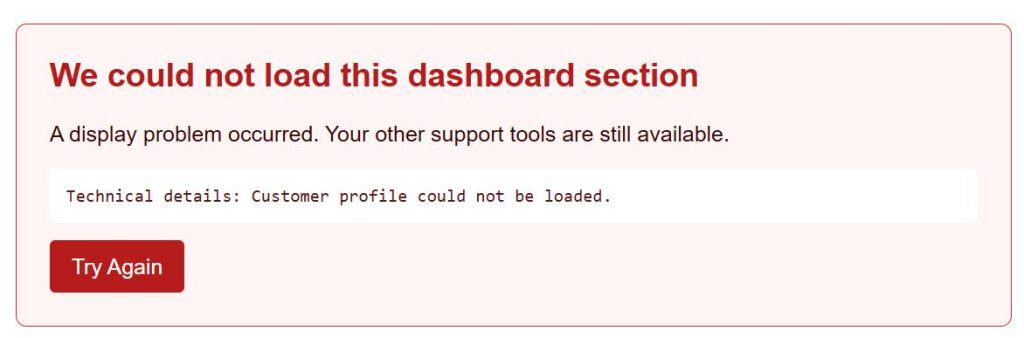
When a child component throws an error, the browser shows:
We could not load this dashboard section

A display problem occurred. Your other support tools are still available.

Technical details: Cannot read properties of undefined (reading 'name')

[Try Again]
I executed the above example code and added the screenshot below.
Pro Tip: I have found that a generic “Something went wrong” message frustrates support teams. Show a clear business-friendly message for users, but log the technical error separately so developers can fix the actual cause.
Use React Error Boundaries in Functional Components
Now create a functional customer profile component. This example intentionally includes a button that triggers a rendering failure, so you can test your Error Boundary safely.
CustomerProfile.jsx
import { useState } from "react";

function CustomerProfile() {
  const [showBrokenProfile, setShowBrokenProfile] = useState(false);

  const customer = {
    name: "John Miller",
    location: "Austin, Texas",
    plan: "Business Plus"
  };

  if (showBrokenProfile) {
    const unavailableCustomer = undefined;

    return (
      <section>
        <h2>{unavailableCustomer.name}</h2>
      </section>
    );
  }

  return (
    <section>
      <h2>Customer Profile</h2>
      <p>
        <strong>Name:</strong> {customer.name}
      </p>
      <p>
        <strong>Location:</strong> {customer.location}
      </p>
      <p>
        <strong>Plan:</strong> {customer.plan}
      </p>

      <button type="button" onClick={() => setShowBrokenProfile(true)}>
        Test Profile Error
      </button>
    </section>
  );
}

export default CustomerProfile;
The useState hook adds state to a functional component. It returns two values: the current state value and a function that updates it.
When the user clicks Test Profile Error, the event handler changes showBrokenProfile to true. React renders the component again. The component then tries to read .name from undefined, which throws a JavaScript error.
That failure happens during rendering, so an Error Boundary can catch it.
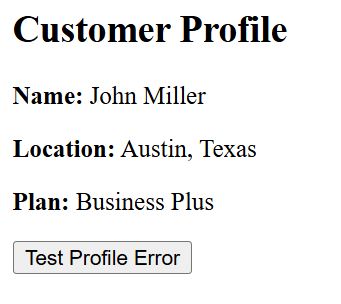
Sample output before clicking the button:
Customer Profile

Name: John Miller
Location: Austin, Texas
Plan: Business Plus

[Test Profile Error]
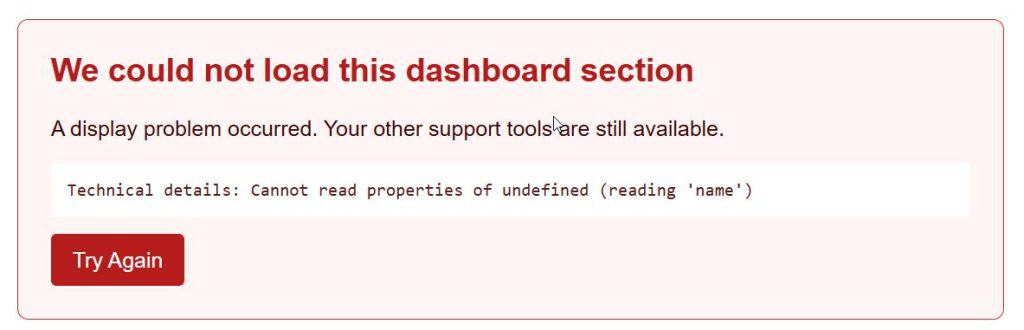
Sample output after clicking the button:
The customer profile section disappears and the Error Boundary fallback appears:
We could not load this dashboard section

A display problem occurred. Your other support tools are still available.

Technical details: Cannot read properties of undefined (reading 'name')

[Try Again]
Wrap Each Dashboard Section
You can wrap your entire React application with one Error Boundary. That approach prevents a full blank screen, but it also hides healthy parts of the dashboard when one small widget fails.
I prefer smaller boundaries around important independent sections. In our support dashboard, the customer profile and ticket analytics can fail independently.
TicketAnalytics.jsx
function TicketAnalytics({ tickets }) {
  const openTickets = tickets.filter((ticket) => ticket.status === "Open");

  return (
    <section>
      <h2>Ticket Analytics</h2>
      <p>
        Open tickets for Seattle, Washington customers: {openTickets.length}
      </p>
    </section>
  );
}

export default TicketAnalytics;
This component receives tickets through props. Props are values that a parent component passes into a child component. The .filter() method creates a new array containing only open tickets.
To understand related React updates, see this guide about handling events in React.
App.jsx
import { useState } from "react";
import ErrorBoundary from "./ErrorBoundary";
import CustomerProfile from "./CustomerProfile";
import TicketAnalytics from "./TicketAnalytics";
import "./App.css";

function App() {
  const [showAnalyticsError, setShowAnalyticsError] = useState(false);

  const tickets = [
    {
      id: 101,
      customer: "Emily Carter",
      city: "Seattle, Washington",
      status: "Open"
    },
    {
      id: 102,
      customer: "Michael Davis",
      city: "Austin, Texas",
      status: "Closed"
    },
    {
      id: 103,
      customer: "Olivia Brown",
      city: "Seattle, Washington",
      status: "Open"
    }
  ];

  const analyticsTickets = showAnalyticsError ? undefined : tickets;

  return (
    <main className="dashboard">
      <header>
        <h1>Northstar Support Dashboard</h1>
        <p>Customer support operations for Austin and Seattle teams.</p>
      </header>

      <ErrorBoundary>
        <CustomerProfile />
      </ErrorBoundary>

      <section className="analytics-section">
        <button
          type="button"
          onClick={() => setShowAnalyticsError(true)}
        >
          Test Analytics Error
        </button>

        <ErrorBoundary>
          <TicketAnalytics tickets={analyticsTickets} />
        </ErrorBoundary>
      </section>

      <section className="ticket-list">
        <h2>Current Tickets</h2>

        <ul>
          {tickets.map((ticket) => (
            <li key={ticket.id}>
              #{ticket.id} — {ticket.customer} from {ticket.city} —{" "}
              {ticket.status}
            </li>
          ))}
        </ul>
      </section>
    </main>
  );
}

export default App;
App.css
* {
  box-sizing: border-box;
}

body {
  margin: 0;
  background-color: #f4f7fb;
  color: #1f2937;
  font-family: Arial, sans-serif;
}

button {
  margin: 12px 0;
  padding: 10px 16px;
  border: 0;
  border-radius: 4px;
  background-color: #145da0;
  color: #ffffff;
  font-size: 16px;
  cursor: pointer;
}

button:hover {
  background-color: #0d477d;
}

.dashboard {
  max-width: 900px;
  margin: 0 auto;
  padding: 32px 20px;
}

.dashboard header {
  margin-bottom: 24px;
}

.dashboard section {
  margin-bottom: 24px;
  padding: 20px;
  border-radius: 8px;
  background-color: #ffffff;
  box-shadow: 0 2px 8px rgba(31, 41, 55, 0.08);
}

.ticket-list ul {
  padding-left: 20px;
}

.ticket-list li {
  margin-bottom: 10px;
}
The App component holds the ticket data in state and renders three dashboard areas. The ticket list stays outside the analytics Error Boundary, so it remains visible if analytics fail.
The map() call uses list rendering to turn each ticket object into a list item. Each item uses ticket.id as a stable key. A key helps React identify which list item changed, moved, or stayed the same.
When you click Test Analytics Error, analyticsTickets becomes undefined. TicketAnalytics tries to call .filter() on undefined, which throws an error. Its Error Boundary catches that error, while the profile and ticket list keep working.
Sample output before clicking Test Analytics Error:
Northstar Support Dashboard
Customer support operations for Austin and Seattle teams.

Customer Profile
Name: John Miller
Location: Austin, Texas
Plan: Business Plus

[Test Profile Error]

[Test Analytics Error]

Ticket Analytics
Open tickets for Seattle, Washington customers: 2

Current Tickets
#101 — Emily Carter from Seattle, Washington — Open
#102 — Michael Davis from Austin, Texas — Closed
#103 — Olivia Brown from Seattle, Washington — Open
Sample output after clicking Test Analytics Error:
Northstar Support Dashboard
Customer support operations for Austin and Seattle teams.

Customer Profile
Name: John Miller
Location: Austin, Texas
Plan: Business Plus

[Test Profile Error]

[Test Analytics Error]

We could not load this dashboard section
A display problem occurred. Your other support tools are still available.
Technical details: Cannot read properties of undefined (reading 'filter')

[Try Again]

Current Tickets
#101 — Emily Carter from Seattle, Washington — Open
#102 — Michael Davis from Austin, Texas — Closed
#103 — Olivia Brown from Seattle, Washington — Open
This is the main value of React Error Boundaries: one faulty widget does not destroy the complete user experience.
Reset React Error Boundaries with Keys
The previous example resets the boundary’s internal state when users click Try Again. That works for some scenarios, but the original broken data still exists in many real applications.
For example, imagine your dashboard loads customer metrics through an API call. If the response has bad data, you often need to reload data before retrying the component.
One practical approach uses a key prop to create a fresh Error Boundary instance after a retry.
DashboardWithReset.jsx
import { useState } from "react";
import ErrorBoundary from "./ErrorBoundary";
import TicketAnalytics from "./TicketAnalytics";

function DashboardWithReset() {
  const [boundaryKey, setBoundaryKey] = useState(0);
  const [hasBadData, setHasBadData] = useState(false);

  const validTickets = [
    {
      id: 201,
      customer: "Sophia Wilson",
      city: "Denver, Colorado",
      status: "Open"
    },
    {
      id: 202,
      customer: "Daniel Moore",
      city: "Denver, Colorado",
      status: "Closed"
    }
  ];

  const tickets = hasBadData ? null : validTickets;

  const reloadAnalytics = () => {
    setHasBadData(false);
    setBoundaryKey((currentKey) => currentKey + 1);
  };

  return (
    <section>
      <h2>Denver Support Analytics</h2>

      <button type="button" onClick={() => setHasBadData(true)}>
        Load Broken Analytics Data
      </button>

      <button type="button" onClick={reloadAnalytics}>
        Reload Analytics
      </button>

      <ErrorBoundary key={boundaryKey}>
        <TicketAnalytics tickets={tickets} />
      </ErrorBoundary>
    </section>
  );
}

export default DashboardWithReset;
This code uses an immutable update when it increments boundaryKey. An immutable update creates a new value instead of changing the existing value directly. The callback currentKey => currentKey + 1 safely calculates the next value from the latest state.
When boundaryKey changes, React treats the boundary as a new component. The old failed boundary unmounts, and React creates a new one with clean error state.
Sample output when the page first loads:
Denver Support Analytics

[Load Broken Analytics Data]
[Reload Analytics]

Ticket Analytics
Open tickets for Seattle, Washington customers: 1
Sample output after clicking Load Broken Analytics Data:
Denver Support Analytics

[Load Broken Analytics Data]
[Reload Analytics]

We could not load this dashboard section
A display problem occurred. Your other support tools are still available.
Technical details: Cannot read properties of null (reading 'filter')

[Try Again]
Sample output after clicking Reload Analytics:
Denver Support Analytics

[Load Broken Analytics Data]
[Reload Analytics]

Ticket Analytics
Open tickets for Seattle, Washington customers: 1
For complex data screens, combine Error Boundaries with validation before rendering. If an API response might omit fields, check the data shape and show an empty state instead of allowing an avoidable rendering error.
What React Error Boundaries Do Not Catch
React Error Boundaries handle rendering failures, but they do not replace complete error handling. You still need to catch errors inside event handlers and asynchronous functions.
For example, a failed save request needs try...catch and a user-friendly status message.
SaveTicketButton.jsx
import { useState } from "react";

function SaveTicketButton() {
  const [message, setMessage] = useState("");

  const saveTicket = async () => {
    try {
      const response = await fetch("/api/tickets/301", {
        method: "PATCH",
        headers: {
          "Content-Type": "application/json"
        },
        body: JSON.stringify({
          status: "Closed",
          updatedBy: "James Anderson from Chicago, Illinois"
        })
      });

      if (!response.ok) {
        throw new Error("The ticket update did not complete.");
      }

      setMessage("Ticket #301 closed successfully.");
    } catch (error) {
      setMessage(`Could not save ticket: ${error.message}`);
    }
  };

  return (
    <section>
      <h2>Ticket #301</h2>
      <p>Customer: Ava Thompson from Chicago, Illinois</p>

      <button type="button" onClick={saveTicket}>
        Close Ticket
      </button>

      {message && <p role="status">{message}</p>}
    </section>
  );
}

export default SaveTicketButton;
The saveTicket function is asynchronous because it waits for the API response. An Error Boundary does not catch an error from this event handler, so try...catch handles the failure directly.
The component stores the result message in state and displays it with role="status". Screen readers can announce status updates, which improves accessibility.
Sample output after a successful API response:
Ticket #301
Customer: Ava Thompson from Chicago, Illinois

[Close Ticket]

Ticket #301 closed successfully.
Sample output after a failed API response:
Ticket #301
Customer: Ava Thompson from Chicago, Illinois

[Close Ticket]

Could not save ticket: The ticket update did not complete.
If you are building typed dashboards, use TypeScript with React to define the expected ticket and customer data shapes. Strong types can prevent many undefined property errors before users see them.
Things to Keep in Mind
- Use focused boundaries: Place Error Boundaries around independent dashboard sections, such as reports, profile panels, or data widgets, instead of wrapping every tiny component.
- Keep fallback UI useful: Explain that a section failed, preserve the rest of the application, and provide a clear retry or navigation action.
- Do not rely on boundaries for API errors: Handle fetch failures inside
try...catchblocks or with explicit loading and error state. - Log technical details safely: Send error messages and component stack data to your monitoring system, but do not show private customer data or stack traces to end users.
- Test failure paths: Add controlled test errors during development to confirm your fallback UI, retry button, and unaffected dashboard areas work correctly.
- Avoid nesting without purpose: Multiple boundaries help when sections can work independently, but too many boundaries make code harder to maintain.
Frequently Asked Questions
Can functional components be React Error Boundaries?
No. React’s built-in Error Boundary API still requires a class component that uses getDerivedStateFromError() or componentDidCatch(). You can wrap any functional component inside that class-based boundary.
Do React Error Boundaries catch errors in useEffect?
No. Error Boundaries do not catch errors from asynchronous callbacks, useEffect, event handlers, or timers. Use try...catch inside those functions and store error messages in component state.
Can an Error Boundary catch errors from a button click?
No. A button click runs an event handler outside React’s rendering process. Catch the error inside the handler with try...catch, then update state to show a useful message.
Where should I place Error Boundaries in a React dashboard?
Place them around independent high-value sections, such as analytics charts, customer profiles, ticket panels, or embedded integrations. This structure lets healthy sections remain available when one widget fails.
How do I reset a React Error Boundary after an error?
You can reset its error state with a retry button inside the boundary. You can also change the boundary’s key prop to make React create a fresh boundary instance after you reload valid data.
Do Error Boundaries catch errors on the server?
No. Client-side React Error Boundaries do not catch server-side rendering errors. Handle server rendering failures through your framework’s server error handling and error page features.
React Error Boundaries give your functional-component application a reliable fallback when rendering code fails. Start with one boundary around a major dashboard section, then add smaller boundaries only where users need the rest of the page to stay available.
You May Also Like
- How to use props in React
- How to handle events in React
- How to prevent unnecessary React component re-renders
- How to check if a React component is rendered
- How to reset React component state

Bijay Kumar is an experienced Python and AI professional who enjoys helping developers learn modern technologies through practical tutorials and examples. His expertise includes Python development, Machine Learning, Artificial Intelligence, automation, and data analysis using libraries like Pandas, NumPy, TensorFlow, Matplotlib, SciPy, and Scikit-Learn. At PythonGuides.com, he shares in-depth guides designed for both beginners and experienced developers. More about us.

