
When I build small Python automation scripts, I often need to move data between two very different worlds. One side uses readable text, such as a customer name or a JSON response. The other side expects raw binary data, such as a file, an API request body, or a network message.
That is where the Python bytes() function becomes useful. It lets you create a bytes object, which stores data as numbers from 0 to 255 instead of normal text characters.
In this guide, I will show you how the Python bytes() function works, when to use it, and how to avoid the mistakes I see most often in real scripts.
What Is the Python bytes() Function?
The Python bytes() function creates a bytes object. A bytes object is an immutable sequence of byte values. Each byte is an integer from 0 through 255.
In simple terms, a Python string stores human-readable text, while bytes store machine-readable binary data.
For example, a reporting script may receive the employee name "Emma Johnson" as text. Before sending that value through a socket connection or writing it to a binary file, the script may need bytes instead.
Here is the basic syntax:
bytes(source, encoding, errors)
The parameters depend on what you pass to the function:
sourcecan be a string, integer, list, tuple, range, or another bytes-like value.encodingtells Python how to convert a string into bytes.errorscontrols what happens when Python finds an unsupported character.
Python includes bytes() as a built-in function, so you do not need to install or import anything.
If you are still getting comfortable with Python functions, start with this guide on how to define a function in Python. It will make built-in functions like bytes() easier to understand.
Why Use the Python bytes() Function?
You will usually use the Python bytes() function when code needs to handle binary information rather than regular text.
Here are a few situations where I use bytes in actual automation work:
- Reading or writing images, PDFs, ZIP files, and other binary files.
- Sending data to a web service or API.
- Working with network sockets.
- Encrypting, hashing, compressing, or encoding information.
- Processing data from hardware devices, barcode scanners, or IoT sensors.
- Building a file-processing script that needs exact byte-level control.
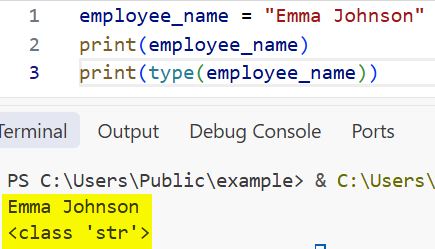
A string looks like this:
employee_name = "Emma Johnson"
print(employee_name)
print(type(employee_name))
Output:
Emma Johnson
<class 'str'>
I executed the above example code and added the screenshot below.
A bytes object looks like this:
employee_name = b"Emma Johnson"
print(employee_name)
print(type(employee_name))
Output:
b'Emma Johnson'
<class 'bytes'>
The b before the quotes tells Python that the value is bytes, not a normal string.
You can learn more about text conversion in this guide on how to convert a string to bytes in Python.
Python bytes() Function Syntax
The most common syntax for a text value is:
bytes(text, encoding)
For example:
customer_name = "Michael Carter"

customer_bytes = bytes(customer_name, "utf-8")

print(customer_bytes)
print(type(customer_bytes))
Output:
b'Michael Carter'
<class 'bytes'>
I executed the above example code and added the screenshot below.
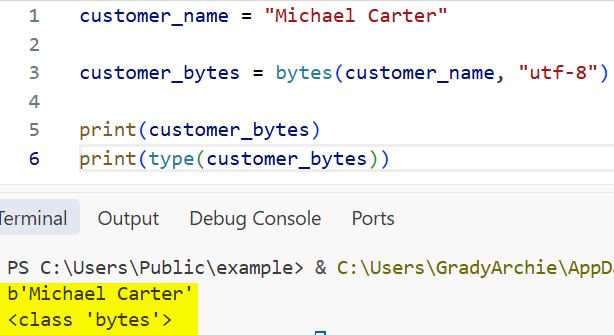
This code converts "Michael Carter" into UTF-8 bytes.
UTF-8 is a character encoding. An encoding is a rule that tells Python how to turn characters into byte values. UTF-8 is the best default choice for modern Python applications because it supports standard English text, accented characters, symbols, and many other writing systems.
Create Bytes From a String
Creating bytes from a string is the most common use of the Python bytes() function.
Suppose you are building a script that prepares customer data before sending it to an internal API. The API expects UTF-8 encoded data.
customer_message = "Hello, Sarah Miller!"

message_bytes = bytes(customer_message, "utf-8")

print(message_bytes)
Output:
b'Hello, Sarah Miller!'
Python converts every character in the string into its corresponding UTF-8 byte value.
You can also inspect the individual byte values:
customer_message = "Hello"

message_bytes = bytes(customer_message, "utf-8")

print(list(message_bytes))
Output:
[72, 101, 108, 108, 111]
I executed the above example code and added the screenshot below.
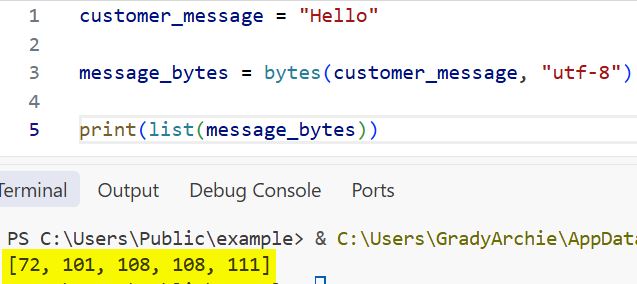
The capital letter H becomes 72, e becomes 101, and so on. This output is useful when you debug an API integration, a file import, or a binary data issue.
Pro Tip: I have found that UTF-8 solves most text-to-bytes conversion needs. I use a different encoding only when a legacy system clearly requires one.
Handle Special Characters With UTF-8
UTF-8 also handles characters that plain ASCII cannot represent.
city_name = "São Paulo"

city_bytes = bytes(city_name, "utf-8")

print(city_bytes)
print(list(city_bytes))
Output:
b'S\xc3\xa3o Paulo'
[83, 195, 163, 111, 32, 80, 97, 117, 108, 111]
The character ã uses more than one byte in UTF-8. That is normal. Python preserves the original text as long as you decode the bytes later with the same encoding.
For a practical follow-up, see how to convert bytes to strings in Python.
Create Empty Bytes With bytes()
You can call the Python bytes() function with no arguments to create an empty bytes object.
empty_data = bytes()

print(empty_data)
print(len(empty_data))
Output:
b''
0
This is useful when you want a safe starting value in a binary-processing script.
For example, imagine a script that reads several small binary report files and combines their contents.
combined_data = bytes()

print("Before reading files:", combined_data)

combined_data += b"Report A\n"
combined_data += b"Report B\n"

print("After adding report data:", combined_data)
Output:
Before reading files: b''
After adding report data: b'Report A\nReport B\n'
I executed the above example code and added the screenshot below.
This works for small examples. For large files, avoid adding bytes repeatedly because each + operation creates a new object. I will cover a better option later.
Create Zero-Filled Bytes From an Integer
When you pass an integer to bytes(), Python creates that many zero-filled bytes.
buffer = bytes(8)

print(buffer)
print(list(buffer))
Output:
b'\x00\x00\x00\x00\x00\x00\x00\x00'
[0, 0, 0, 0, 0, 0, 0, 0]
The value \x00 represents a byte with the value zero. This pattern is common when you need a fixed-size buffer. A buffer is temporary memory that holds data while your script reads, transforms, or sends it.
For example, a device integration may require a 16-byte message area before you fill specific positions with values.
packet = bytes(16)

print("Packet:", packet)
print("Packet length:", len(packet))
Output:
Packet: b'\x00\x00\x00\x00\x00\x00\x00\x00\x00\x00\x00\x00\x00\x00\x00\x00'
Packet length: 16
Remember that bytes objects are immutable. Immutable means you cannot change their contents after creation.
The following code raises an error:
packet = bytes(4)

packet[0] = 65
Output:
TypeError: 'bytes' object does not support item assignment
Use bytearray when you need to change individual byte values later.
Create Bytes From a List of Integers
You can pass a list of integers to the Python bytes() function. Every integer must fall between 0 and 255.
This approach is useful when a hardware device, file format, or network protocol specifies exact byte values.
status_packet = bytes([72, 101, 108, 108, 111])

print(status_packet)
print(status_packet.decode("utf-8"))
Output:
b'Hello'
Hello
The list [72, 101, 108, 108, 111] represents the word Hello.
Here is a more realistic example. Suppose a warehouse scanner sends a small status packet where the first value represents the device ID and the remaining values store status codes.
device_packet = bytes([12, 1, 0, 255])

print("Raw packet:", device_packet)
print("Byte values:", list(device_packet))
print("Device ID:", device_packet[0])
print("Status code:", device_packet[1])
print("Error flag:", device_packet[2])
print("Maximum marker:", device_packet[3])
Output:
Raw packet: b'\x0c\x01\x00\xff'
Byte values: [12, 1, 0, 255]
Device ID: 12
Status code: 1
Error flag: 0
Maximum marker: 255
Each index gives you one byte value. This is why bytes work well for structured binary data. If Python raises a ValueError, check that every number stays within the allowed range.
invalid_packet = bytes([10, 300])
Output:
ValueError: bytes must be in range(0, 256)
Create Bytes From a Range or Tuple
The Python bytes() function also accepts other iterable values, such as a range or tuple. An iterable is any object Python can loop through one item at a time.
Create Bytes From a Range
number_bytes = bytes(range(65, 71))

print(number_bytes)
print(number_bytes.decode("utf-8"))
Output:
b'ABCDEF'
ABCDEF
The range starts at 65 and stops before 71. Those values match the uppercase letters A through F in UTF-8 and ASCII.
Create Bytes From a Tuple
letter_codes = (80, 121, 116, 104, 111, 110)

python_bytes = bytes(letter_codes)

print(python_bytes)
print(python_bytes.decode("utf-8"))
Output:
b'Python'
Python
This style works when a function returns numeric codes in a tuple.
If you need more practice working with collections, read this guide on how to create a tuple in Python or how to initialize a list in Python.
Use bytes() With Different Encodings
The encoding argument matters whenever you convert a string. UTF-8 is usually the right choice, but you may encounter ASCII or Latin-1 in older systems.
message = "Daniel Green"

utf8_bytes = bytes(message, "utf-8")
ascii_bytes = bytes(message, "ascii")

print("UTF-8:", utf8_bytes)
print("ASCII:", ascii_bytes)
Output:
UTF-8: b'Daniel Green'
ASCII: b'Daniel Green'
Both encodings work because the text contains only standard English characters.
Now look at a name with an accented character:
customer_name = "José Martinez"

utf8_bytes = bytes(customer_name, "utf-8")

print("UTF-8:", utf8_bytes)

ascii_bytes = bytes(customer_name, "ascii")
print("ASCII:", ascii_bytes)
Output:
UTF-8: b'Jos\xc3\xa9 Martinez'
UnicodeEncodeError: 'ascii' codec can't encode character '\xe9' in position 3: ordinal not in range(128)
ASCII supports only a limited character set. It cannot encode é.
Handle Encoding Errors
You can use the errors argument to decide how Python handles unsupported characters.
customer_name = "José Martinez"

safe_bytes = bytes(customer_name, "ascii", errors="replace")

print(safe_bytes)
print(safe_bytes.decode("ascii"))
Output:
b'Jos? Martinez'
Jos? Martinez
The "replace" option replaces unsupported characters with ?.
You can also ignore unsupported characters:
customer_name = "José Martinez"

safe_bytes = bytes(customer_name, "ascii", errors="ignore")

print(safe_bytes)
print(safe_bytes.decode("ascii"))
Output:
b'Jos Martinez'
Jos Martinez
Use "replace" or "ignore" carefully. Both options change the original data, which may create incorrect names, addresses, or product details.
Python bytes() Function for File Handling
The Python bytes() function becomes especially useful when your automation script writes or reads binary files.
A binary file stores raw bytes rather than readable text. Images, PDFs, Excel workbooks, ZIP archives, and audio files are common binary files.
Here is a complete example that creates a binary file containing a short report message.
report_text = "Daily sales report for Austin office"
report_bytes = bytes(report_text, "utf-8")

with open("daily_report.bin", "wb") as file:
    file.write(report_bytes)

print("Binary report file created successfully.")
Output:
Binary report file created successfully.
The "wb" mode means write binary. It tells Python to write bytes into the file.
Now read the same file:
with open("daily_report.bin", "rb") as file:
    file_data = file.read()

print(file_data)
print(file_data.decode("utf-8"))
Output:
b'Daily sales report for Austin office'
Daily sales report for Austin office
The "rb" mode means read binary. The file.read() call returns bytes, so you need .decode("utf-8") to make it readable text again.
For more file-related examples, explore how to open a file in Python and how to write bytes to a file in Python.
Pro Tip: In my file automation projects, I always use
with open(...)for binary files. It closes the file automatically, even if the script hits an error.
bytes() vs bytearray in Python
Both bytes and bytearray store byte values. The main difference is whether you can modify the data.
| Feature | bytes | bytearray |
|---|---|---|
| Can store byte values from 0 to 255 | Yes | Yes |
| Can change values after creation | No | Yes |
| Best for | Fixed binary data | Data that needs updates |
| Example | b"Hello" | bytearray(b"Hello") |
Here is a practical comparison:
report_status = bytes([79, 75])

print(report_status)
Output:
b'OK'
You cannot change the first value in report_status.
report_status = bytes([79, 75])

report_status[0] = 78
Output:
TypeError: 'bytes' object does not support item assignment
Now use bytearray:
report_status = bytearray([79, 75])

report_status[0] = 78

print(report_status)
print(report_status.decode("utf-8"))
Output:
bytearray(b'NK')
NK
Use bytes when your data should remain unchanged. Use bytearray when you need to build or edit a binary message efficiently.
Build a Small API Payload With bytes()
A common real-world use case involves converting JSON text into bytes before sending it through a network request.
For this example, imagine a customer support tool that prepares a JSON payload for an internal service.
import json

customer_data = {
    "customer_name": "Olivia Brown",
    "city": "Seattle",
    "ticket_status": "Open"
}

json_text = json.dumps(customer_data)

payload_bytes = bytes(json_text, "utf-8")

print("JSON text:")
print(json_text)

print("\nPayload bytes:")
print(payload_bytes)
Output:
JSON text:
{"customer_name": "Olivia Brown", "city": "Seattle", "ticket_status": "Open"}

Payload bytes:
b'{"customer_name": "Olivia Brown", "city": "Seattle", "ticket_status": "Open"}'
The json module converts the Python dictionary into JSON text. Then bytes() converts that text into UTF-8 bytes.
Many modern Python libraries handle this conversion for you. Still, you should understand it because direct socket work, cryptography tools, file uploads, and lower-level APIs often require bytes explicitly.
For more JSON examples, read how to work with JSON data in Python and how to write JSON data to a file in Python.
Convert Bytes Back to Text
The bytes() function converts text into bytes. To convert bytes back into text, use the .decode() method.
welcome_bytes = bytes("Welcome, Robert Davis!", "utf-8")

welcome_text = welcome_bytes.decode("utf-8")

print(welcome_text)
print(type(welcome_text))
Output:
Welcome, Robert Davis!
<class 'str'>
Always use the same encoding for .decode() that you used with bytes().
Here is a common mistake:
name_bytes = bytes("José Martinez", "utf-8")

print(name_bytes.decode("ascii"))
Output:
UnicodeDecodeError: 'ascii' codec can't decode byte 0xc3 in position 3: ordinal not in range(128)
Python encoded the text with UTF-8, but the code tried to decode it with ASCII. The encodings must match.
Things to Keep in Mind
- Use UTF-8 by default: UTF-8 supports standard English text and international characters, so it is the safest encoding for most Python scripts.
- Bytes are immutable: You cannot edit a bytes object after you create it. Use bytearray when you need to change byte values.
- Keep encodings consistent: Encode and decode with the same encoding, especially when you process names, CSV data, API responses, or file contents.
- Stay within the byte range: Lists, tuples, and ranges passed to bytes() must contain integers from 0 through 255.
- Avoid repeated byte concatenation: Repeatedly joining large bytes objects creates extra copies. Use bytearray or collect smaller pieces in a list and join them once.
- Do not hide encoding errors: The
"ignore"and"replace"error options can lose or change data. Use them only when your business rule allows it.
Frequently Asked Questions
What does bytes() do in Python?
The Python bytes() function creates a bytes object. It converts supported values such as strings, lists of integers, tuples, ranges, or integer lengths into binary-style data. Developers use it for files, APIs, network communication, encoding, and low-level data processing.
What is the difference between str and bytes in Python?
A str object stores readable Unicode text, such as "Emma Johnson". A bytes object stores raw byte values, such as b"Emma Johnson". Convert a string to bytes with bytes() or .encode(), then convert it back with .decode().
Can I use bytes() without an encoding?
Yes, but only when you do not pass a string. For example, bytes(5) creates five zero-filled bytes, and bytes([65, 66]) creates b'AB'. When you pass text, Python requires an encoding such as "utf-8".
Why does bytes() give me a UnicodeEncodeError?
This error usually means the selected encoding does not support one or more characters in your text. For example, ASCII cannot encode é, while UTF-8 can. Switch to UTF-8 unless a system you integrate with requires another encoding.
How do I convert bytes back to a string in Python?
Use the .decode() method on the bytes object. For example, b"Hello".decode("utf-8") returns "Hello". Use the same encoding that you used when you created the bytes value.
Should I use bytes or bytearray in Python?
Use bytes for data that should not change, such as a fixed API payload or file content after you build it. Use bytearray when you need to update values, append pieces efficiently, or modify a binary packet. Both types store values from 0 through 255.
The Python bytes() function gives you a clean way to create and manage binary data from text, integer values, and collections. Start with UTF-8 strings and small file examples, then move to byte arrays or network payloads when your script needs more control. I hope you found this guide helpful and can now use bytes confidently in your next Python project.
You May Also Like
- Convert a string to UTF-8 in Python
- Check if a string is bytes in Python
- Read a binary file into a byte array in Python
- Fix the Python can’t concat str to bytes error
- Learn Python built-in functions

Bijay Kumar is an experienced Python and AI professional who enjoys helping developers learn modern technologies through practical tutorials and examples. His expertise includes Python development, Machine Learning, Artificial Intelligence, automation, and data analysis using libraries like Pandas, NumPy, TensorFlow, Matplotlib, SciPy, and Scikit-Learn. At PythonGuides.com, he shares in-depth guides designed for both beginners and experienced developers. More about us.

