
A few years ago, I built a small reporting utility for a sales team in Austin. The team wanted to save simple calculation rules in a configuration file, such as amount * 0.08 for a commission or units * price for a revenue total. Instead of hard-coding every rule, I needed a controlled way to turn those text expressions into executable Python code.
That is where the Python compile() function becomes useful. It converts Python source code stored as a string into a reusable code object before execution. You will see it most often in rule engines, script runners, code editors, dynamic report builders, and advanced automation tools.
In this guide, I will show you how the Python compile() function works, when to use each mode, how it differs from eval() and exec(), and how to avoid the most common security mistakes.
What Is the Python compile() Function?
The Python compile() function is a built-in function that converts source code into a code object.
A code object is Python’s internal representation of code that is ready to run. It does not run by itself. You execute it later with functions such as eval() or exec().
Here is the basic syntax:
compile(source, filename, mode, flags=0, dont_inherit=False, optimize=-1)
The first three arguments are the ones you will use most often:
source: The Python code you want to compile, usually a string.filename: A label Python uses in error messages and tracebacks.mode: The type of code you are compiling.
For most beginner Python projects, you only need this form:
compiled_code = compile(source, filename, mode)
The Python compile() function works in Python 3.8 and later, including current Python 3 releases. You do not need to install a module because it is part of Python’s built-in functions. If you are learning other built-in tools, explore this guide to Python built-in functions.
Why Use the Python compile() Function?
You may wonder why you should use compile() when eval() and exec() already accept strings.
The main reason is reuse. When you compile a string once, Python creates a code object. You can then run that same code object many times without repeatedly parsing the original text.
This helps when an automation script applies one rule to many records. For example, imagine a small commission-reporting script that calculates a bonus for several sales representatives.
Without compile(), Python processes the expression every time:
sales = [12500, 18750, 9200]

for amount in sales:
    commission = eval("amount * 0.08")
    print(commission)
Output:
1000.0
1500.0
736.0
You can see the output in the screenshot below.
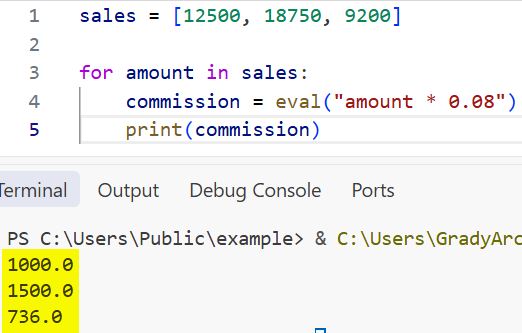
This works, but Python must interpret the text "amount * 0.08" during every loop cycle.
Now compile the expression once:
sales = [12500, 18750, 9200]

commission_rule = compile(
    "amount * 0.08",
    "commission_rule.py",
    "eval"
)

for amount in sales:
    commission = eval(commission_rule)
    print(commission)
Output:
1000.0
1500.0
736.0
You can see the output in the screenshot below.
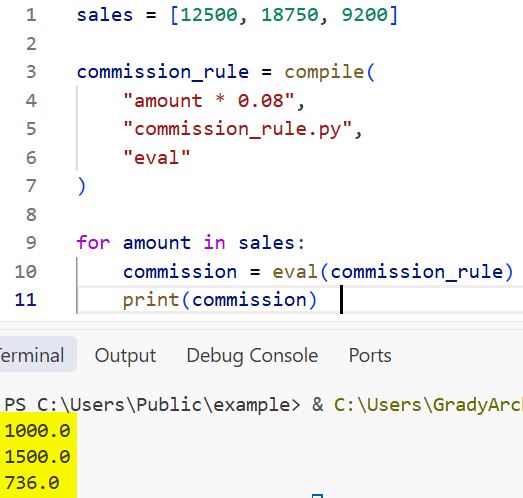
The result is the same, but the script now separates two jobs:
- Convert the rule text into a code object.
- Run that code object for each sales amount.
I have found this pattern helpful when building configurable reporting scripts. The business rule stays readable in a configuration file, while Python handles the repeated calculation efficiently.
Pro Tip: I compile a reusable expression outside a large loop. Compiling inside the loop removes most of the performance benefit.
Python compile() Function Syntax
Let’s break down the common parameters in more detail.
compiled_code = compile(
    source="total * tax_rate",
    filename="tax_calculator.py",
    mode="eval"
)
The result stored in compiled_code is a code object.
Source Parameter
The source parameter holds valid Python code. It can be:
- A string containing Python code.
- A bytes object containing Python code.
- An abstract syntax tree, often called an AST, in advanced tools.
Most developers use a string.
source_code = "customer_name.upper()"
compiled_code = compile(source_code, "customer_format.py", "eval")

customer_name = "emily parker"
result = eval(compiled_code)

print(result)
Output:
EMILY PARKER
You can see the output in the screenshot below.
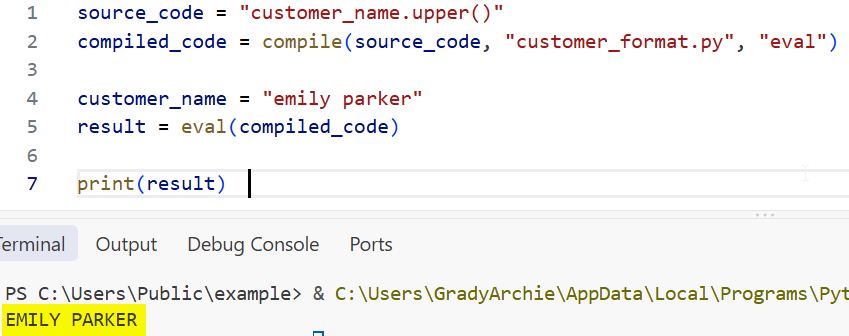
This script compiles the text expression first. Then eval() runs the compiled expression and returns the final value.
For basic string work before compiling code, you may also find it useful to learn how to convert a string to lowercase in Python and check whether a string is empty in Python.
Filename Parameter
The filename parameter does not need to point to a real file. It gives Python a meaningful name to show when an error happens.
formula = "monthly_sales *"

compile(formula, "sales_formula.txt", "eval")
Output:
Traceback (most recent call last):
  File "sales_formula.txt", line 1
    monthly_sales *
SyntaxError: invalid syntax
Using "sales_formula.txt" makes the traceback easier to understand than a vague label such as "<string>".
For scripts that load code from real files, use a meaningful file path. This becomes especially useful when you need to get the path of the current file in Python or manage several local script files.
Mode Parameter
The mode parameter is the most important part of the Python compile() function. Python supports three common modes:
| Mode | Use it for | Run it with |
|---|---|---|
"eval" | One expression that returns a value | eval() |
"exec" | One or more Python statements | exec() |
"single" | One interactive Python statement | exec() |
Let’s look at each mode with working code.
Python compile() Function With eval Mode
Use "eval" when your source contains one expression. An expression calculates or produces a value.
Examples of expressions include:
"12 + 8"
"price * quantity"
"customer_name.upper()"
"max(monthly_sales)"
An assignment such as total = 100 is not an expression. You cannot compile it with "eval" mode.
Here is a complete example that calculates a total for a Chicago office supply order.
order_data = {
    "item": "Office Chair",
    "unit_price": 245,
    "quantity": 4,
    "discount": 0.10
}

formula = """
unit_price * quantity * (1 - discount)
"""

compiled_formula = compile(
    formula,
    "order_total_formula.py",
    "eval"
)

order_total = eval(compiled_formula, {}, order_data)

print(f"Item: {order_data['item']}")
print(f"Order total: ${order_total:.2f}")
Output:
Item: Office Chair
Order total: $882.00
The third argument passed to eval() is a local namespace. A namespace is a dictionary-like collection of variable names and values. Here, order_data gives the compiled formula access to unit_price, quantity, and discount.
This approach suits small, trusted calculation formulas in a reporting automation script. If you work with numeric values, this article on the round() function in Python can help you format results cleanly.
eval Mode With Validation
Before compiling a user-entered expression, validate that it is not blank and catch syntax errors.
formula = "hourly_rate * hours_worked"

if formula.strip():
    try:
        compiled_formula = compile(
            formula,
            "payroll_formula.py",
            "eval"
        )

        values = {
            "hourly_rate": 32.50,
            "hours_worked": 38
        }

        weekly_pay = eval(compiled_formula, {}, values)
        print(f"Weekly pay: ${weekly_pay:.2f}")

    except SyntaxError as error:
        print(f"Formula error: {error}")
else:
    print("Please enter a formula.")
Output:
Weekly pay: $1235.00
The try and except blocks provide exception handling. An exception is an error that happens while Python runs code. In this case, SyntaxError catches an invalid formula before the rest of the automation script fails.
Python compile() Function With exec Mode
Use "exec" when your source has one or more Python statements.
A statement tells Python to do something. Common statements include:
total = price * quantity
print(total)
if total > 1000:
    print("Large order")
Here is a complete inventory alert example for a warehouse in Denver.
inventory_script = """
reorder_level = 25

if current_stock <= reorder_level:
    alert_message = f"Reorder {product_name}: only {current_stock} units left."
else:
    alert_message = f"{product_name} stock level is healthy."
"""

compiled_script = compile(
    inventory_script,
    "inventory_alert.py",
    "exec"
)

inventory_data = {
    "product_name": "Wireless Keyboard",
    "current_stock": 18
}

exec(compiled_script, {}, inventory_data)

print(inventory_data["alert_message"])
Output:
Reorder Wireless Keyboard: only 18 units left.
The compiled script sets reorder_level and alert_message. Because we pass inventory_data as the local namespace, the script can read product_name and current_stock, then write the new alert_message value back into the same dictionary.
This pattern works well in internal automation tools where a developer controls the source code. For example, you may compile a rule once and run it against inventory records loaded from a spreadsheet or database.
Pro Tip: In my automation projects, I use
"exec"only when I need assignments, conditions, loops, or several statements. For a simple calculation that returns one value,"eval"stays easier to review and test.
exec Mode With Multiple Statements
The next example creates a monthly sales summary. It uses a list, a loop, calculations, and formatted output.
sales_summary_script = """
total_sales = sum(sales_amounts)
average_sales = total_sales / len(sales_amounts)

for amount in sales_amounts:
    if amount >= 10000:
        high_value_sales += 1

report = (
    f"Sales representative: {representative}\\n"
    f"Total sales: ${total_sales:,.2f}\\n"
    f"Average sale: ${average_sales:,.2f}\\n"
    f"High-value sales: {high_value_sales}"
)
"""

compiled_report = compile(
    sales_summary_script,
    "monthly_sales_report.py",
    "exec"
)

report_data = {
    "representative": "Michael Johnson",
    "sales_amounts": [8200, 13500, 10400, 7600],
    "high_value_sales": 0
}

exec(compiled_report, {}, report_data)

print(report_data["report"])
Output:
Sales representative: Michael Johnson
Total sales: $39,700.00
Average sale: $9,925.00
High-value sales: 2
The code uses sum() and len() to calculate totals and averages. It then loops through each sales figure and counts the values at or above $10,000.
If you want to strengthen the building blocks behind this example, read about how to iterate through a list backward in Python and sum all values in a Python dictionary.
Python compile() Function With single Mode
Use "single" mode for one interactive statement. It is mainly useful in Python shells, REPL tools, teaching apps, and code consoles.
A REPL is an interactive Python environment that reads code, evaluates it, prints results, and repeats.
interactive_code = compile(
    "print('Welcome, Sarah!')",
    "interactive_console.py",
    "single"
)

exec(interactive_code)
Output:
Welcome, Sarah!
In normal automation scripts, I rarely use "single" mode. "eval" and "exec" cover nearly every practical need.
Python compile() Function and Syntax Errors
One useful reason to call compile() directly is early syntax validation.
For example, imagine you maintain a configurable sales dashboard. A manager enters a formula into a settings file, and your script should check it before saving or using it.
formulas = [
    "sales_amount * 0.07",
    "sales_amount *",
    "(sales_amount + bonus) / 2"
]

for formula in formulas:
    try:
        compile(formula, "sales_rules.txt", "eval")
        print(f"Valid formula: {formula}")

    except SyntaxError as error:
        print(f"Invalid formula: {formula}")
        print(f"Reason: {error.msg}")
Output:
Valid formula: sales_amount * 0.07
Invalid formula: sales_amount *
Reason: invalid syntax
Valid formula: (sales_amount + bonus) / 2
The script never runs the formula. It only checks whether Python can compile it. That makes compile() useful as a validation step in an internal rule editor.
You should still remember that valid Python syntax does not automatically mean safe code. A formula might compile successfully but still perform an unwanted action when executed.
Python compile() Function vs eval() vs exec()
These three tools often appear together, but they do different jobs.
| Tool | Main job | Accepts a code object | Returns a value |
|---|---|---|---|
| compile() | Converts source text into a code object | Not applicable | Returns a code object |
| eval() | Evaluates one expression | Yes | Yes |
| exec() | Runs Python statements | Yes | No direct return value |
Here is a small example that shows the relationship:
expression = "base_price + shipping_cost"

compiled_expression = compile(
    expression,
    "checkout_total.py",
    "eval"
)

checkout_data = {
    "base_price": 79.99,
    "shipping_cost": 12.50
}

total = eval(compiled_expression, {}, checkout_data)

print(f"Checkout total: ${total:.2f}")
Output:
Checkout total: $92.49
The workflow is simple:
- Write or load Python source code as text.
- Call
compile()to validate and prepare that source. - Call
eval()for a value-producing expression. - Call
exec()for statements, assignments, loops, or conditions.
For a related example of calling behavior dynamically, see how to call a function by string name in Python.
Can You Make compile() Safer?
The short answer is: do not compile and execute untrusted Python code.
A dangerous pattern looks like this:
user_formula = input("Enter any Python code: ")

compiled_code = compile(user_formula, "user_input.py", "exec")
exec(compiled_code)
A user could enter code that reads files, changes data, imports modules, or runs operating-system commands. Removing a few built-ins does not turn eval() or exec() into a secure sandbox.
For a reporting script, a safer choice is to accept only a small set of known formulas. You can also use an allowlist for formula names.
allowed_formulas = {
    "standard_commission": "sales_amount * 0.06",
    "premium_commission": "sales_amount * 0.09",
    "quarterly_bonus": "(sales_amount * 0.05) + 500"
}

selected_formula = "premium_commission"

formula = allowed_formulas[selected_formula]

compiled_formula = compile(
    formula,
    "approved_commission_rules.py",
    "eval"
)

sales_data = {
    "sales_amount": 18000
}

commission = eval(compiled_formula, {}, sales_data)

print(f"Formula: {selected_formula}")
print(f"Commission: ${commission:.2f}")
Output:
Formula: premium_commission
Commission: $1620.00
This code never executes arbitrary text from a user. It selects from formulas that you defined and reviewed first.
Pro Tip: I treat dynamic Python code like an administrator-level feature. If a non-developer needs configurable rules, I prefer fixed options, a structured JSON format, or a custom parser instead of raw Python expressions.
Things to Keep in Mind
- Use trusted source only: Never compile and execute raw text from users, web forms, API requests, or unverified files. Python code can access far more than you expect.
- Match the mode correctly: Use
"eval"for one expression and"exec"for statements. An assignment such astotal = 50raises an error in"eval"mode. - Choose meaningful filenames: Use labels such as
"commission_rule.py"or"inventory_rules.txt"so syntax errors and tracebacks are easier to locate. - Compile outside loops: Compile a reusable rule one time before processing a large list of records. Recompiling inside every loop cycle adds unnecessary work.
- Catch syntax errors early: Wrap
compile()intryandexcept SyntaxErrorwhen a configuration file or admin form provides the source text. - Keep namespaces narrow: Pass only the variables your expression needs through a local dictionary. This improves clarity and limits accidental dependencies.
Frequently Asked Questions
What does compile() do in Python?
The Python compile() function converts source code into a code object. It does not execute the code by itself. You run the returned code object later with eval() or exec().
What is the difference between compile() and eval() in Python?
compile() prepares source code and returns a code object. eval() runs one expression and returns its result. You can use eval() directly with a string, but compiling first helps when you want to validate or reuse the expression.
Can I use compile() without eval() or exec()?
Yes. You can use compile() only to check whether a code string has valid syntax. This is useful when validating internal formulas or Python snippets before you save them.
Which compile() mode should I use in Python?
Use "eval" for one expression, such as price * quantity. Use "exec" for statements, assignments, loops, and conditions. Use "single" mainly for interactive console-style programs.
Is the Python compile() function safe?
compile() itself only creates a code object, but code becomes risky when you execute it with eval() or exec(). Never run untrusted Python source. Use approved formulas, strict validation, or a non-Python rule format for user-controlled input.
Does compile() make Python code faster?
It can improve performance when you run the same dynamically created source many times. Compile the source once, then reuse the code object in a loop. For ordinary Python files, Python already handles compilation internally.
The Python compile() function gives you a clean way to validate and prepare dynamic Python source code for later execution. Start with trusted, simple "eval" expressions, then move to "exec" only when your automation needs multiple statements. I hope this practical guide helps you use dynamic code with more confidence and control.
You May Also Like
- Learn how to define a function in Python
- Use lambda functions in Python
- Understand the Python return statement
- Learn Python exception handling for multiple errors
- Call a function within another function in Python

Bijay Kumar is an experienced Python and AI professional who enjoys helping developers learn modern technologies through practical tutorials and examples. His expertise includes Python development, Machine Learning, Artificial Intelligence, automation, and data analysis using libraries like Pandas, NumPy, TensorFlow, Matplotlib, SciPy, and Scikit-Learn. At PythonGuides.com, he shares in-depth guides designed for both beginners and experienced developers. More about us.

