
Deleting spaces takes one method call. To remove spaces from a string in Python, use s.replace(" ", ""), which returns a new string with every regular space deleted. If tabs, newlines or other whitespace must go too, use "".join(s.split()) instead:
"AB 123 456".replace(" ", "")   # 'AB123456'
"".join(" a\tb\nc ".split())     # 'abc'
The sample data is US-style SKUs, phone numbers and addresses, and the screenshots show real output from Python 3.12.5 and pandas 3.0.6.
Remove all spaces from a string with replace()
replace(old, new) swaps every match, so replacing a space with an empty string deletes all of them. Strings are immutable, so you’ll need to assign the result back:
sku = "AB 123 456"
phone = "(212) 555 0187"
messy = "New\tYork  NY"

print(repr(sku.replace(" ", "")))
print(repr(phone.replace(" ", "")))
print(repr(messy.replace(" ", "")))      # the tab survives
print(repr(sku.replace(" ", "", 1)))     # only the first space
Output:
'AB123456'
'(212)5550187'
'New\tYorkNY'
'AB123 456'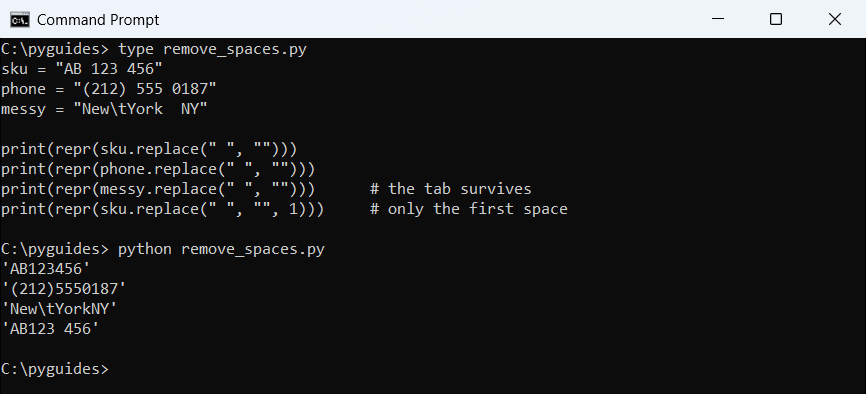
replace() only matches the exact character you give it.The optional third argument limits how many spaces get replaced. To swap spaces for another character rather than delete them, see replacing whitespace with an underscore in Python.
Remove all whitespace with split() and join()
Called with no argument, split() breaks on any run of whitespace: spaces, tabs, newlines and even the no-break space you get when copying text from a web page. Joining the pieces back with "" drops all of it:
text = " 1600 Amphitheatre\tPkwy\nMountain View,\u00a0CA "

print(repr(text.replace(" ", "")))       # tab, newline and no-break space stay
print(repr("".join(text.split())))       # every kind of whitespace is gone
print(repr(" ".join(text.split())))      # or keep one space between words
Output:
'1600Amphitheatre\tPkwy\nMountainView,\xa0CA'
'1600AmphitheatrePkwyMountainView,CA'
'1600 Amphitheatre Pkwy Mountain View, CA'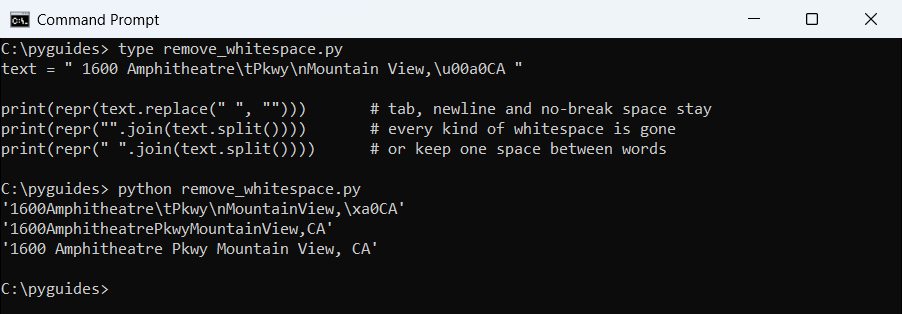
replace() leaves the tab, newline and no-break space behind; "".join(text.split()) removes them all.Join with " " instead and you get clean single spacing. That’s the main idea behind replacing multiple spaces with a single space in Python, and splitting a string by whitespace explains the split rules.
Remove leading and trailing spaces with strip()
Often you only want the padding at the ends gone. strip() trims both sides, while lstrip() and rstrip() trim one side:
city = "   Austin, TX   "

print(repr(city.strip()))
print(repr(city.lstrip()))
print(repr(city.rstrip()))
print(repr("  Dallas  Fort Worth ".strip()))   # inner spaces are untouched
Output:
'Austin, TX'
'Austin, TX   '
'   Austin, TX'
'Dallas  Fort Worth'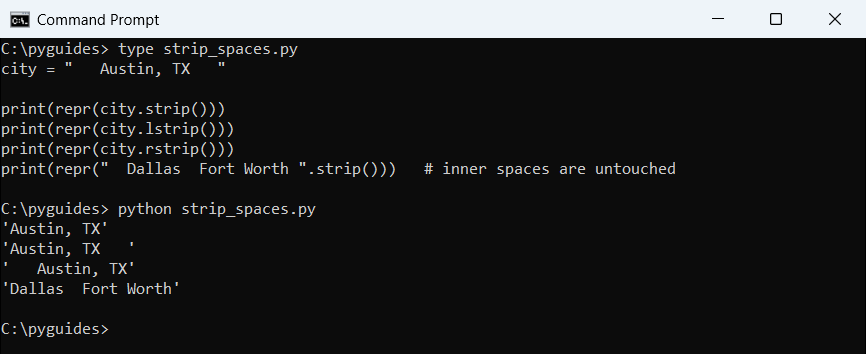
I use strip() on nearly every value read from user input or a CSV file. For more on the three methods, see trimming strings in Python, and the Python strip() function shows how to trim other characters.
How do I remove spaces from a string with regex?
re.sub() is handy when the rule is more specific than “all spaces”. The \s class matches any whitespace, while a plain space in the pattern matches spaces only:
import re

code = "  TX - 750 01\t"
print(repr(re.sub(r"\s+", "", code)))       # all whitespace
print(repr(re.sub(r" +", "", code)))        # regular spaces only
print(repr(re.sub(r"\s+", " ", code).strip()))   # collapse to single spaces
Output:
'TX-75001'
'TX-75001\t'
'TX - 750 01'
For a plain space, replace() is simpler, so I use regex only when I need a pattern. The basics are in my guide to regular expressions in Python.
Remove spaces from a pandas column
For a DataFrame, the .str accessor runs the same string methods on every row. Here I trim customer names and strip the thousands-separator spaces out of prices before converting them to numbers:
import pandas as pd

df = pd.DataFrame({
    "customer": ["  Emily Carter ", "James  Lee", " Olivia Brown"],
    "price": ["1 299.99", " 89.50", "2 450.00 "],
})

df["customer"] = df["customer"].str.strip()
df["price"] = df["price"].str.replace(" ", "", regex=False).astype(float)

print(df.to_string(index=False))
print(f"Total: ${df['price'].sum():,.2f}")
Output:
    customer   price
Emily Carter 1299.99
  James  Lee   89.50
Olivia Brown 2450.00
Total: $3,839.49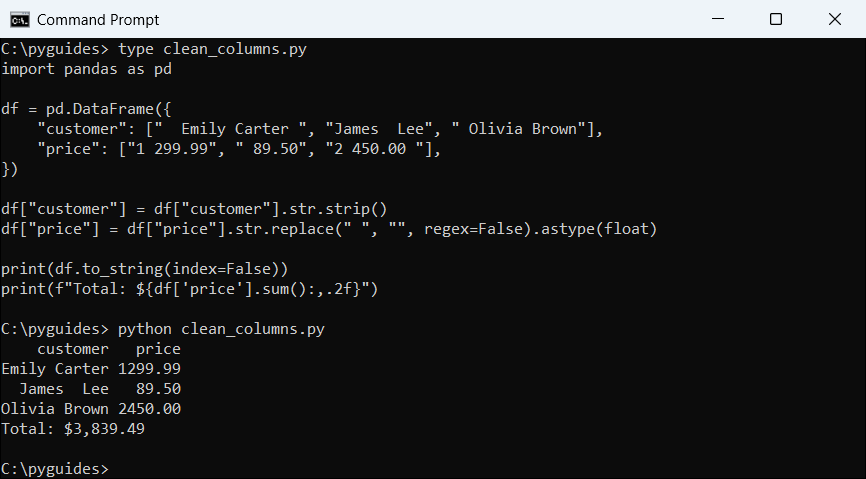
Set regex=False to match a plain space. If the column also has line breaks, removing newlines from a string covers that case.
Methods to remove spaces compared
| Method | Removes | Inner spaces | Example |
|---|---|---|---|
s.replace(" ", "") | Regular spaces | Yes | 'a b' → 'ab' |
"".join(s.split()) | All whitespace | Yes | 'a\tb' → 'ab' |
s.strip() | Whitespace at the ends | No | ' a b ' → 'a b' |
re.sub(r"\s+", "", s) | All whitespace | Yes | Pattern-based rules |
Need more string cleanup? Try these next:
- Remove special characters from a string in Python
- Pad strings with spaces in Python
- Split a string by space in Python
- Remove spaces from a string in TypeScript
Frequently asked questions
How do I remove all spaces from a string in Python?
Use s.replace(" ", ""). For tabs and newlines as well, use "".join(s.split()).
How do I remove only the spaces at the start and end?
Use s.strip(). lstrip() trims the left side and rstrip() the right.
Why does replace() leave some spaces in my string?
They’re probably tabs, newlines or no-break spaces. "".join(s.split()) removes all of them.
Does replace() change the original string?
No. Strings are immutable, so it returns a new string. Assign it back, for example s = s.replace(" ", "").
How do I turn several spaces into one?
Use " ".join(s.split()) or re.sub(r" +", " ", s).
Where is str.replace documented?
See str.replace() in the Python docs.

Bijay Kumar is a 13-time Microsoft MVP with more than 18 years in software development, and the founder of Python Guides and TSinfo Technologies. He started out building .NET and SharePoint solutions at HP, TCS and KPIT before moving into Python, machine learning and AI, and he also builds web apps with TypeScript and React. He writes the tutorials here himself, and every example is run before publishing so you see the real output. More about Bijay · Microsoft MVP profile · LinkedIn