
During my ten years of developing Python applications, I have realized that iterating through lists is the bread and butter of coding.
Whether I am processing financial data or managing user records, knowing the most efficient way to loop through a list saves me a lot of time.
In this tutorial, I will show you the different methods I use to iterate through lists in Python, along with practical examples you can use right away.
The Standard For Loop
The most common way I iterate through a list is by using a simple for loop. It is readable and works perfectly for most scenarios.
When I started working with US Census data, I often used this method to print out state names or population figures.
# List of major US tech hubs
cities = ["San Francisco", "Seattle", "Austin", "New York", "Denver"]

# Iterating through the list
for city in cities:
    print(f"Processing data for: {city}")
In this example, the loop goes through each city in the list and prints it. It is easy and very easy for others to read.
1. Use the range() Function in Python
Sometimes, I need to know the index of the item I am currently working with. In these cases, I use the range() and len() functions together.
I find this particularly helpful when I need to modify the list in place or compare adjacent elements, like analyzing weekly gas prices in California.
# Average gas prices in a US city over 5 weeks
gas_prices = [4.50, 4.65, 4.40, 4.80, 4.75]

# Using range to iterate with an index
for i in range(len(gas_prices)):
    print(f"Week {i + 1} Price: ${gas_prices[i]}")
I executed the above example code and added the screenshot below.
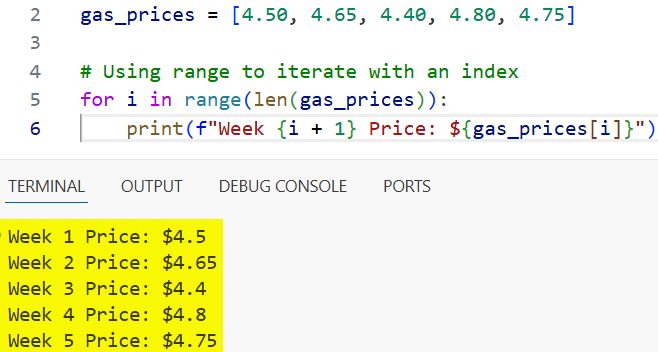
While this works well, I usually prefer other methods if I only need the index, as this can sometimes feel a bit “un-Pythonic.”
2. The Enumerate Method (My Personal Favorite) in Python
If I need both the index and the value, enumerate() is my go-to tool. It is much cleaner than using range(len()).
I often use this when generating reports for US-based clients where I need to rank items or create numbered lists.
# Top 5 National Parks in the USA
parks = ["Yellowstone", "Yosemite", "Zion", "Grand Canyon", "Acadia"]

# Using enumerate for index and value
for rank, park in enumerate(parks, start=1):
    print(f"Rank {rank}: {park} National Park")
I executed the above example code and added the screenshot below.
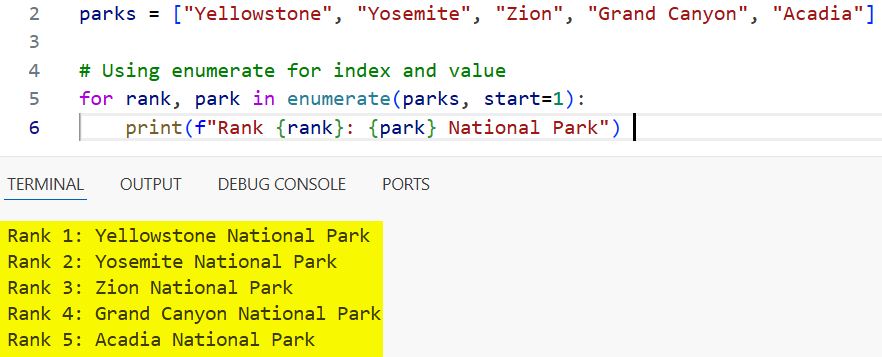
The start=1 argument is a neat trick I use to make the ranking look natural to a human reader rather than starting at zero.
3. Python List Comprehension for Concise Code
When I want to create a new list based on an existing one, I almost always use list comprehension. It makes the code much shorter and often faster.
I recently used this to filter a list of US temperatures from Fahrenheit to Celsius for an international weather project.
# Temperatures in Fahrenheit from various US cities
temps_f = [72, 85, 68, 95, 50]

# Converting to Celsius using list comprehension
temps_c = [(f - 32) * 5/9 for f in temps_f]

print("Temperatures in Celsius:")
print(temps_c)
I executed the above example code and added the screenshot below.
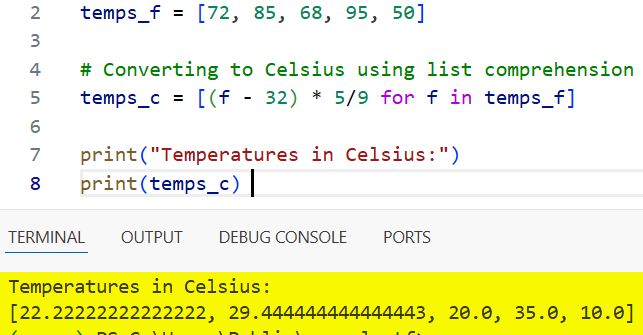
I love how this keeps the logic on a single line, though I make sure not to overcomplicate it so the code stays readable.
Use the While Loop in Python
While I don’t use while loops for list iteration as often as for loops, they are essential when the number of iterations isn’t fixed.
I find this useful when I’m “popping” items off a list, such as processing a queue of support tickets for a US software company.
# List of pending support tickets
tickets = ["Ticket_101", "Ticket_102", "Ticket_103"]

# Processing tickets until the list is empty
while tickets:
    current_ticket = tickets.pop(0)
    print(f"Addressing {current_ticket}...")

print("All tickets resolved.")
I executed the above example code and added the screenshot below.
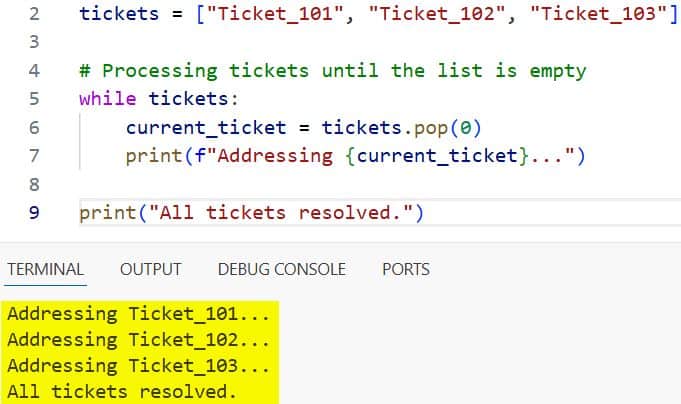
Using while with pop() ensures that I keep working until the work is actually finished.
Iterate with the Map Function
The map() function is another tool I keep in my belt, especially when I need to apply a specific function to every item in a list.
This is very effective when I am cleaning up data, like formatting US phone numbers that come in as strings of digits.
# Raw phone digits
raw_numbers = ["5551234567", "8005550199", "2125550111"]

def format_phone(digits):
    return f"({digits[:3]}) {digits[3:6]}-{digits[6:]}"

# Applying the format function to the list
formatted_numbers = list(map(format_phone, raw_numbers))

for phone in formatted_numbers:
    print(phone)
I executed the above example code and added the screenshot below.
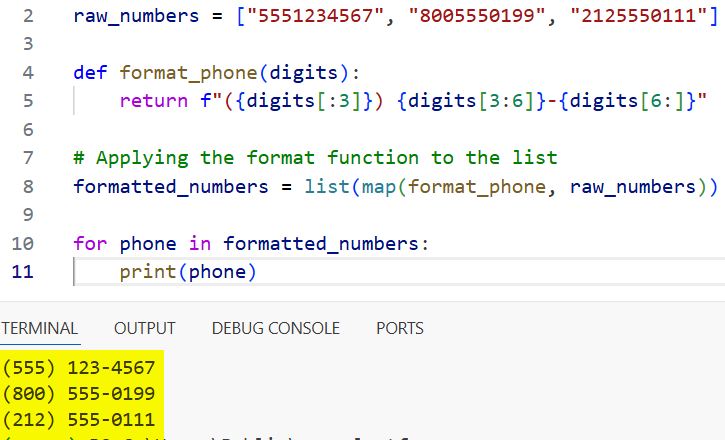
This method is highly efficient, though for simple transformations, I still find list comprehension more intuitive.
Zip for Iterating Multiple Lists Simultaneously
When I have two related lists, like a list of US states and their corresponding capitals, I use the zip() function to loop through them at the same time.
This prevents the need for messy indexing and keeps the data paired correctly.
states = ["New York", "Texas", "California"]
capitals = ["Albany", "Austin", "Sacramento"]

# Iterating through both lists at once
for state, capital in zip(states, capitals):
    print(f"The capital of {state} is {capital}.")
I’ve used this countless times when merging datasets or creating dictionary-like structures from raw lists.
Use Itertools for Advanced Iteration
In my more complex projects, I sometimes need to loop through a list infinitely or cycle through it repeatedly. For this, I turn to the itertools module.
If I am building a dashboard that cycles through different US market indices (Dow Jones, S&P 500, Nasdaq), itertools.cycle is perfect.
import itertools

indices = ["Dow Jones", "S&P 500", "Nasdaq"]
counter = 0

# Cycling through the list 6 times
for index in itertools.cycle(indices):
    print(f"Monitoring: {index}")
    counter += 1
    if counter == 6:
        break
This is a specialized tool, but when you need it, it’s much cleaner than writing custom logic to reset your loop index.
Filter While Iterating
Sometimes I don’t want to process every item, only those that meet a certain criterion, like selecting US states with a population over a certain threshold.
I usually combine a for loop with an if statement or use the filter() function.
# States and their populations (simplified in millions)
us_data = [
    {"state": "Texas", "pop": 29},
    {"state": "Vermont", "pop": 0.6},
    {"state": "Florida", "pop": 21},
    {"state": "Wyoming", "pop": 0.5}
]

print("Large States:")
for data in us_data:
    if data["pop"] > 10:
        print(f"{data['state']} is a high-population state.")
This logic is fundamental to data analysis and is something I use daily in my development work.
Common Mistakes I’ve Seen
Over the years, I’ve seen many junior developers struggle with modifying a list while iterating over it.
If you remove an item from a list while looping through it, Python might skip the next item because the indices shift.
To avoid this, I always iterate over a copy of the list or use list comprehension to create a new, filtered list. It’s a small detail that saves a lot of debugging time.
In this article, I’ve shared the various ways you can iterate through a list in Python.
Whether you need a simple loop or a more complex zip or enumerate function, these methods will help you write cleaner code.
You may also like to read:
- Check the Length of an Array in Python
- Create a 2D Array in Python
- Initialize a 2D Array in Python
- Print an Array in Python

I am Bijay Kumar, a Microsoft MVP in SharePoint. Apart from SharePoint, I started working on Python, Machine learning, and artificial intelligence for the last 5 years. During this time I got expertise in various Python libraries also like Tkinter, Pandas, NumPy, Turtle, Django, Matplotlib, Tensorflow, Scipy, Scikit-Learn, etc… for various clients in the United States, Canada, the United Kingdom, Australia, New Zealand, etc. Check out my profile.

