
I often find myself working on lightweight Python scripts where I want to avoid the overhead of heavy libraries like NumPy.
Whether you are working on a restricted server or just want to understand the underlying math, calculating a dot product manually is a great exercise.
In my years of developing Python applications, I’ve realized that sometimes the simplest approach, using built-in functions, is actually the most efficient for small datasets.
In this tutorial, I will show you exactly how to calculate the dot product using standard Python techniques that I use in my daily workflows.
What is a Dot Product?
Before we jump into the code, it is important to understand what we are actually calculating.
The dot product is the sum of the products of corresponding entries in two sequences of numbers.
If you have two vectors, A and B, the dot product is calculated by multiplying the first elements, then the second, and so on, and finally adding those results together.
Why Calculate Dot Product Without NumPy?
You might wonder why anyone would skip NumPy, given that it is the industry standard for data science in the United States.
In my experience, importing a 100MB library just to perform a single calculation in a small AWS Lambda function is overkill.
Using native Python reduces the cold-start time of your applications and keeps your deployment packages lean and mean.
Method 1: Use a Simple For Loop and Zip
This is the most “Pythonic” way to start if you are new to the language or if you want your code to be extremely readable.
I prefer this method when I am mentoring junior developers because it clearly shows each step of the mathematical process.
Here is the code I typically use:
# Calculating Dot Product using a For Loop
def dot_product_loop(vector_a, vector_b):
    # Initialize the result to zero
    result = 0

    # Iterate through both vectors simultaneously using zip
    for a, b in zip(vector_a, vector_b):
        result += a * b

    return result

# Example: Analyzing quarterly sales growth in New York vs Los Angeles
ny_sales_growth = [10.5, 12.2, 9.8, 11.1]
la_sales_growth = [0.8, 0.9, 1.1, 1.0]

final_product = dot_product_loop(ny_sales_growth, la_sales_growth)
print(f"The Dot Product is: {final_product}")
I executed the above example code and added the screenshot below.
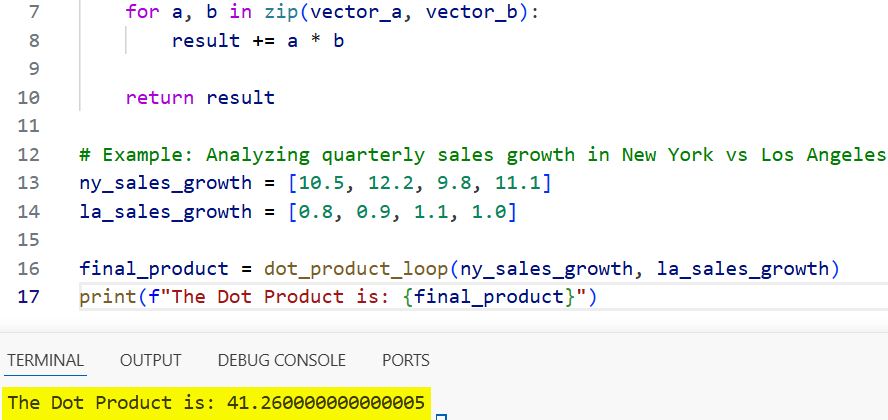
In this example, zip() is the hero. It pairs up the elements of our two lists so we can multiply them one by one.
I used a sales growth example because it reflects the kind of real-world financial data analysis we often do in US-based tech firms.
Method 2: Use List Comprehension and sum()
If you want to keep your code concise, list comprehension is the way to go. I use this method when I want to perform the calculation in a single, readable line.
It is faster than a standard for loop because the sum() function is highly optimized in Python’s C-based backend.
# Using List Comprehension for a one-liner solution
ny_tech_stocks = [150.25, 210.10, 340.50]
portfolio_weights = [0.4, 0.3, 0.3]

# The one-liner dot product calculation
dot_product = sum(stock * weight for stock, weight in zip(ny_tech_stocks, portfolio_weights))

print(f"Calculated Portfolio Value: {dot_product}")
I executed the above example code and added the screenshot below.
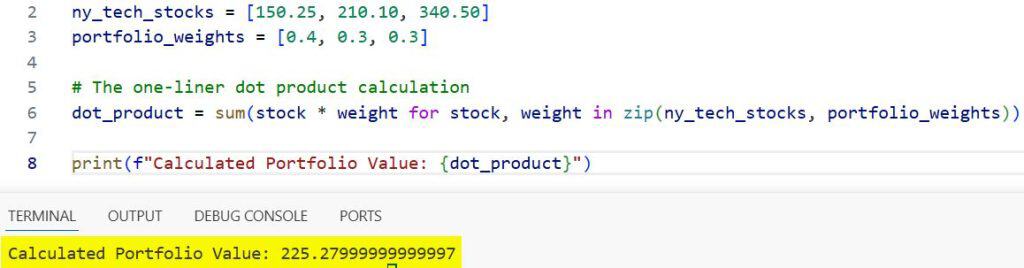
I frequently use this approach when calculating weighted averages for investment portfolios or risk scores in fintech applications.
Method 3: Use the map() and operator.mul Functions
Sometimes, you might want a more functional programming approach.
I’ve found that using map() combined with the operator module can be very efficient for certain types of data pipelines.
It avoids the syntax of a loop entirely and treats the operation as a mapping of a function across two iterables.
import operator

# Functional approach to Dot Product
def dot_product_functional(v1, v2):
    # Multiplying corresponding elements and summing them up
    return sum(map(operator.mul, v1, v2))

# Example: Comparing voter turnout percentages across different US states
state_turnout = [0.65, 0.72, 0.58]
state_population_millions = [19.3, 29.1, 12.8]

result = dot_product_functional(state_turnout, state_population_millions)
print(f"Total Estimated Voters (Millions): {result}")
I executed the above example code and added the screenshot below.
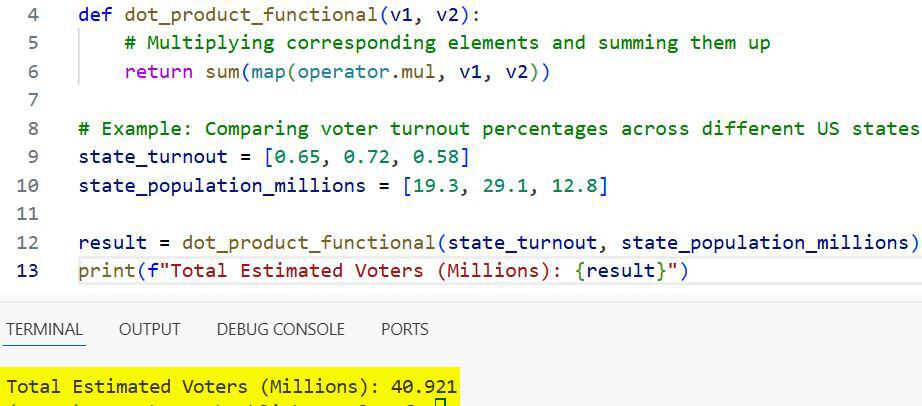
This method is incredibly clean and demonstrates a high level of Python proficiency.
Handle Errors and Edge Cases
One thing I’ve learned the hard way over the last decade is that you should never trust your input data.
If your vectors are not the same length, your dot product will be mathematically undefined or logically incorrect.
I always add a small check at the beginning of my functions to ensure the lists are compatible.
def safe_dot_product(vector_a, vector_b):
    if len(vector_a) != len(vector_b):
        raise ValueError("Vectors must be of the same length for a dot product.")

    return sum(a * b for a, b in zip(vector_a, vector_b))
This prevents silent failures that could lead to massive errors in your data analysis down the line.
Performance Comparison: Native Python vs. NumPy
While we are avoiding NumPy here, it is important to know when you should switch back to it.
For small lists (under 100 elements), native Python is often just as fast because you avoid the overhead of calling a C extension.
However, if you are processing millions of data points, like analyzing the entire US Census dataset, NumPy will be significantly faster.
In my projects, if I am just doing a quick calculation for a UI component, I stick to the sum(zip()) method.
Real-World Application: Simple Linear Regression
In many machine learning interviews in the US, you might be asked to implement a basic algorithm from scratch.
A dot product is the core of a simple linear regression prediction ($y = mx + b$).
Without NumPy, you can still build a working prediction engine for something like home prices in Seattle.
# Predicting Seattle House Prices (Simplified)
# Features: [Square footage, Number of bedrooms, Age of house]
house_features = [2500, 4, 15]
weights = [300, 50000, -2000] # Price per sq ft, per room, per year of age
bias = 100000

# y = (house_features . weights) + bias
predicted_price = sum(f * w for f, w in zip(house_features, weights)) + bias

print(f"The estimated house price is: ${predicted_price:,}")
Using native Python here makes the logic very transparent and easy to debug.
Using native Python for mathematical operations is a great way to keep your code clean and efficient.
If you have any questions or have another way of doing this, feel free to share your thoughts.
I have also written a few other tutorials on Python optimization and data handling, so be sure to check those out as well.
You may read:
- Python Except KeyError
- Catch Multiple Exceptions in Python
- Python File Does Not Exist Exception
- Python Exception within While a loop

Bijay Kumar is an experienced Python and AI professional who enjoys helping developers learn modern technologies through practical tutorials and examples. His expertise includes Python development, Machine Learning, Artificial Intelligence, automation, and data analysis using libraries like Pandas, NumPy, TensorFlow, Matplotlib, SciPy, and Scikit-Learn. At PythonGuides.com, he shares in-depth guides designed for both beginners and experienced developers. More about us.

