
I often merge arrays of objects when building customer dashboards and sales-reporting tools. One API may return basic customer records, while another returns the latest account status, city, or revenue details.
The tricky part is deciding what “merge” means for your data. Sometimes you only need to join two lists. Other times, you must combine matching objects by an ID and let newer values replace older ones.
This guide shows practical ways to merge arrays of objects in TypeScript, including complete code, sample output, and a reusable generic function.
What Does Merge Arrays of Objects Mean?
An array of objects is a list where every item stores related properties. For example, a customer dashboard may store names, locations, and account information in separate arrays.
A simple array merge puts every object from both arrays into one new array. It does not check for matching IDs or remove duplicates.
A keyed merge compares a shared property, such as customerId, and combines records that represent the same customer. This approach is common in API integration, backend data processing, and frontend applications.
For these examples, assume TypeScript 5+ and Node.js 18+. Create a file named merge-customers.ts, then run it with your preferred TypeScript runner or compile it with:
npx tsc merge-customers.ts
node merge-customers.js
Start by defining an interface. An interface describes the required shape of an object, which gives your code better type safety and catches mistakes before runtime. If you need a refresher, see how to create an object from a TypeScript interface.
interface Customer {
  customerId: number;
  name: string;
  city: string;
  state: string;
  status?: "active" | "inactive";
  monthlyRevenue?: number;
}
The question is not whether you can merge arrays. JavaScript gives you several ways to do that. The important question is whether matching customer records should remain separate or become one updated object.
Merge Arrays of Objects in TypeScript with Spread
Use the spread operator when you want to append one array to another without matching or updating records. The spread operator (...) expands array items into a new array.
This works well when two sources contain different customers. For example, a sales tool may receive separate customer lists from Austin and Chicago offices.
interface Customer {
  customerId: number;
  name: string;
  city: string;
  state: string;
}

const austinCustomers: Customer[] = [
  {
    customerId: 101,
    name: "Emma Johnson",
    city: "Austin",
    state: "Texas"
  },
  {
    customerId: 102,
    name: "Liam Carter",
    city: "Austin",
    state: "Texas"
  }
];

const chicagoCustomers: Customer[] = [
  {
    customerId: 201,
    name: "Daniel Miller",
    city: "Chicago",
    state: "Illinois"
  },
  {
    customerId: 202,
    name: "Olivia Davis",
    city: "Chicago",
    state: "Illinois"
  }
];

const allCustomers: Customer[] = [...austinCustomers, ...chicagoCustomers];

console.log(allCustomers);
Sample output:
[
  { customerId: 101, name: 'Emma Johnson', city: 'Austin', state: 'Texas' },
  { customerId: 102, name: 'Liam Carter', city: 'Austin', state: 'Texas' },
  { customerId: 201, name: 'Daniel Miller', city: 'Chicago', state: 'Illinois' },
  { customerId: 202, name: 'Olivia Davis', city: 'Chicago', state: 'Illinois' }
]
You can refer to the screenshot below to see the output.
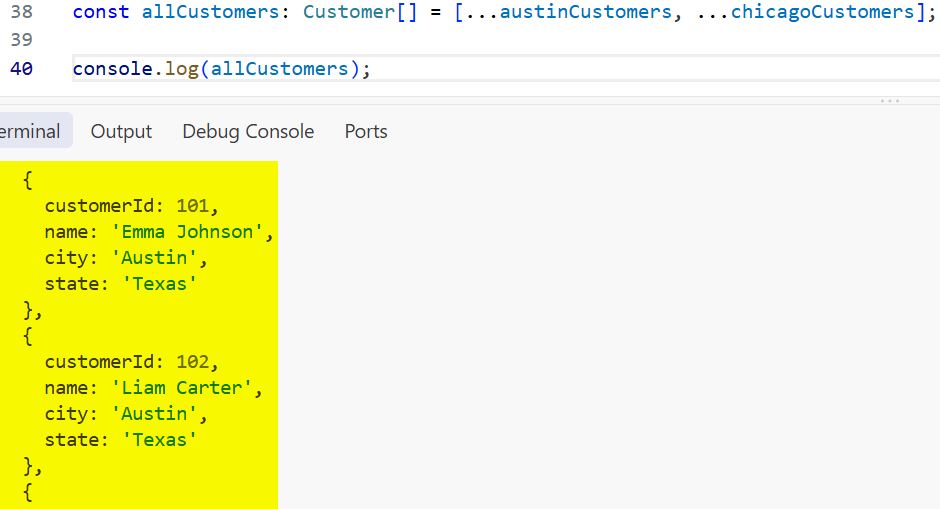
The original arrays stay unchanged because the code creates a new array. This behavior helps in frontend development, especially when you manage application state and want predictable updates.
You can also use concat() for the same job. The spread syntax usually reads more clearly when you merge several lists. For more detail, see how to concatenate arrays in TypeScript using concat.
When simple concatenation is not enough
Consider this customer data:
const existingCustomers: Customer[] = [
  {
    customerId: 101,
    name: "Emma Johnson",
    city: "Austin",
    state: "Texas"
  }
];

const updatedCustomers: Customer[] = [
  {
    customerId: 101,
    name: "Emma Johnson",
    city: "Austin",
    state: "Texas"
  }
];

const mergedCustomers = [...existingCustomers, ...updatedCustomers];

console.log(mergedCustomers);
Sample output:
[
  { customerId: 101, name: 'Emma Johnson', city: 'Austin', state: 'Texas' },
  { customerId: 101, name: 'Emma Johnson', city: 'Austin', state: 'Texas' }
]
You can refer to the screenshot below to see the output.
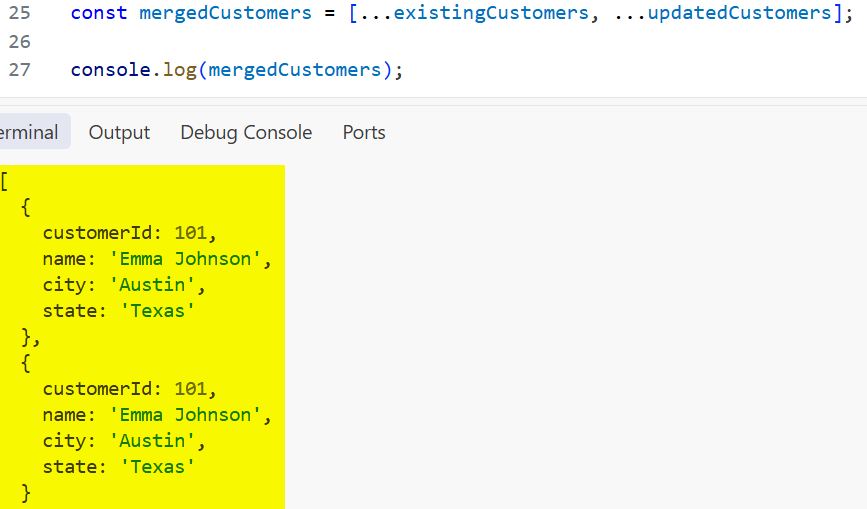
You now have duplicate customer records. If your data comes from overlapping APIs or periodic exports, use a key-based merge instead.
Merge Arrays of Objects in TypeScript by ID
The most useful real-world approach is to merge objects through a unique property such as customerId, email, or sku. A unique key identifies one record and lets your code decide which values win.
In this example, the first array contains customer profile data. The second contains account updates from a billing API. Matching customerId values merge into one object, and the later array overrides properties with newer values.
interface Customer {
  customerId: number;
  name: string;
  city: string;
  state: string;
  status?: "active" | "inactive";
  monthlyRevenue?: number;
}

const customerProfiles: Customer[] = [
  {
    customerId: 101,
    name: "Emma Johnson",
    city: "Austin",
    state: "Texas"
  },
  {
    customerId: 102,
    name: "Liam Carter",
    city: "Denver",
    state: "Colorado"
  }
];

const accountUpdates: Customer[] = [
  {
    customerId: 101,
    name: "Emma Johnson",
    city: "Austin",
    state: "Texas",
    status: "active",
    monthlyRevenue: 4200
  },
  {
    customerId: 103,
    name: "Sophia Martinez",
    city: "Miami",
    state: "Florida",
    status: "active",
    monthlyRevenue: 3150
  }
];

const customerMap = new Map<number, Customer>();

for (const customer of customerProfiles) {
  customerMap.set(customer.customerId, customer);
}

for (const update of accountUpdates) {
  const existingCustomer = customerMap.get(update.customerId);

  customerMap.set(update.customerId, {
    ...existingCustomer,
    ...update
  });
}

const mergedCustomers = Array.from(customerMap.values());

console.log(mergedCustomers);
Sample output:
[
  {
    customerId: 101,
    name: 'Emma Johnson',
    city: 'Austin',
    state: 'Texas',
    status: 'active',
    monthlyRevenue: 4200
  },
  {
    customerId: 102,
    name: 'Liam Carter',
    city: 'Denver',
    state: 'Colorado'
  },
  {
    customerId: 103,
    name: 'Sophia Martinez',
    city: 'Miami',
    state: 'Florida',
    status: 'active',
    monthlyRevenue: 3150
  }
]
A Map stores values by a unique key. Here, the key is customerId, and the value is the full customer object. Looking up an item in a Map is fast, so this pattern handles large API responses better than repeatedly searching an array with find().
The order of these spread operators matters:
{
  ...existingCustomer,
  ...update
}
Properties in update come later, so they replace matching properties from existingCustomer. Reverse the order if your original data should always win.
Pro Tip: I use a
Mapwhenever a client integration can return hundreds or thousands of records. It avoids nested loops and makes the “latest record wins” rule obvious in the code.
Merge Arrays of Objects in TypeScript with reduce()
The reduce() method processes every array item and produces one final value. That final value might be a number, an object, or a Map.
Use reduce() when you want a compact data transformation. It works especially well in a Node.js automation script that collects data from multiple sources before generating a report.
interface Customer {
  customerId: number;
  name: string;
  city: string;
  state: string;
  status?: "active" | "inactive";
  monthlyRevenue?: number;
}

const crmCustomers: Customer[] = [
  {
    customerId: 101,
    name: "Emma Johnson",
    city: "Austin",
    state: "Texas"
  },
  {
    customerId: 102,
    name: "Liam Carter",
    city: "Denver",
    state: "Colorado"
  }
];

const billingCustomers: Customer[] = [
  {
    customerId: 101,
    name: "Emma Johnson",
    city: "Austin",
    state: "Texas",
    status: "active",
    monthlyRevenue: 4200
  },
  {
    customerId: 103,
    name: "Noah Wilson",
    city: "Seattle",
    state: "Washington",
    status: "inactive",
    monthlyRevenue: 0
  }
];

const mergedCustomerMap = [...crmCustomers, ...billingCustomers].reduce(
  (map, customer) => {
    const existingCustomer = map.get(customer.customerId);

    map.set(customer.customerId, {
      ...existingCustomer,
      ...customer
    });

    return map;
  },
  new Map<number, Customer>()
);

const mergedCustomers = [...mergedCustomerMap.values()];

console.log(mergedCustomers);
Sample output:
[
  {
    customerId: 101,
    name: 'Emma Johnson',
    city: 'Austin',
    state: 'Texas',
    status: 'active',
    monthlyRevenue: 4200
  },
  {
    customerId: 102,
    name: 'Liam Carter',
    city: 'Denver',
    state: 'Colorado'
  },
  {
    customerId: 103,
    name: 'Noah Wilson',
    city: 'Seattle',
    state: 'Washington',
    status: 'inactive',
    monthlyRevenue: 0
  }
]
The map parameter is called an accumulator. It collects the latest version of every customer while reduce() moves through the combined array.
This pattern stays concise, but I prefer the earlier for...of example when teaching teams or debugging production data. Clear code matters more than saving a few lines. If reduce() is new to you, review the array reduce method in TypeScript.
Create a Reusable Generic Merge Function
A generic lets one function work with many object shapes while preserving TypeScript types. Instead of writing separate merge logic for customers, products, and employees, you can define one reusable utility.
The function below accepts two arrays and the property name that acts as the unique key. It returns a merged array where records from the second array override matching records from the first.
function mergeByKey<T extends object, K extends keyof T>(
  firstArray: T[],
  secondArray: T[],
  key: K
): T[] {
  const mergedMap = new Map<T[K], T>();

  for (const item of firstArray) {
    mergedMap.set(item[key], item);
  }

  for (const item of secondArray) {
    const existingItem = mergedMap.get(item[key]);

    mergedMap.set(item[key], {
      ...existingItem,
      ...item
    });
  }

  return Array.from(mergedMap.values());
}

interface Customer {
  customerId: number;
  name: string;
  city: string;
  state: string;
  status?: "active" | "inactive";
  monthlyRevenue?: number;
}

const customersFromCrm: Customer[] = [
  {
    customerId: 101,
    name: "Emma Johnson",
    city: "Austin",
    state: "Texas"
  },
  {
    customerId: 102,
    name: "Liam Carter",
    city: "Denver",
    state: "Colorado"
  }
];

const customersFromBilling: Customer[] = [
  {
    customerId: 101,
    name: "Emma Johnson",
    city: "Austin",
    state: "Texas",
    status: "active",
    monthlyRevenue: 4200
  },
  {
    customerId: 104,
    name: "Ava Brown",
    city: "Portland",
    state: "Oregon",
    status: "active",
    monthlyRevenue: 2800
  }
];

const mergedCustomers = mergeByKey(
  customersFromCrm,
  customersFromBilling,
  "customerId"
);

console.log(mergedCustomers);
Sample output:
[
  {
    customerId: 101,
    name: 'Emma Johnson',
    city: 'Austin',
    state: 'Texas',
    status: 'active',
    monthlyRevenue: 4200
  },
  {
    customerId: 102,
    name: 'Liam Carter',
    city: 'Denver',
    state: 'Colorado'
  },
  {
    customerId: 104,
    name: 'Ava Brown',
    city: 'Portland',
    state: 'Oregon',
    status: 'active',
    monthlyRevenue: 2800
  }
]
T extends object means T must be an object type. K extends keyof T ensures that the key you pass, such as "customerId", actually exists on that object. This catches errors at compile time instead of letting an invalid key fail later.
For example, TypeScript rejects this call because accountNumber does not exist on Customer:
mergeByKey(customersFromCrm, customersFromBilling, "accountNumber");
That kind of feedback is one reason developers choose TypeScript over plain JavaScript. You can also learn more about generic object types in TypeScript.
Merge Partial Updates Without Losing Data
API responses often return partial objects. A partial object includes only the fields that changed. For example, a billing service may send a customer ID and updated revenue but omit the customer’s name and location.
Use Partial<T> for this case. Partial<T> is a built-in TypeScript utility type that makes every property in T optional.
interface Customer {
  customerId: number;
  name: string;
  city: string;
  state: string;
  status: "active" | "inactive";
  monthlyRevenue: number;
}

const customers: Customer[] = [
  {
    customerId: 101,
    name: "Emma Johnson",
    city: "Austin",
    state: "Texas",
    status: "active",
    monthlyRevenue: 4200
  },
  {
    customerId: 102,
    name: "Liam Carter",
    city: "Denver",
    state: "Colorado",
    status: "active",
    monthlyRevenue: 3600
  }
];

const revenueUpdates: Array<
  Pick<Customer, "customerId"> & Partial<Customer>
> = [
  {
    customerId: 101,
    monthlyRevenue: 4750
  },
  {
    customerId: 102,
    status: "inactive"
  }
];

const customersById = new Map(
  customers.map((customer) => [customer.customerId, customer])
);

for (const update of revenueUpdates) {
  const existingCustomer = customersById.get(update.customerId);

  if (existingCustomer) {
    customersById.set(update.customerId, {
      ...existingCustomer,
      ...update
    });
  }
}

const updatedCustomers = [...customersById.values()];

console.log(updatedCustomers);
Sample output:
[
  {
    customerId: 101,
    name: 'Emma Johnson',
    city: 'Austin',
    state: 'Texas',
    status: 'active',
    monthlyRevenue: 4750
  },
  {
    customerId: 102,
    name: 'Liam Carter',
    city: 'Denver',
    state: 'Colorado',
    status: 'inactive',
    monthlyRevenue: 3600
  }
]
The Pick<Customer, "customerId"> portion makes customerId required. The Partial<Customer> portion allows other fields to be optional. Together, they ensure every update identifies its target customer before your code merges it.
This pattern works well for PATCH-style API updates, browser dashboards, and background synchronization jobs. If you work with API payloads, it also helps to understand TypeScript REST API calls.
Things to Keep in Mind
- Choose a stable key: Use a permanent ID such as
customerId, not a display name. Names can change, repeat, or arrive with inconsistent spelling. - Define conflict rules: Decide whether the first or second array should win when both objects contain the same property. The order of the spread operator controls this behavior.
- Avoid
any: Define an interface or type for your objects. This prevents missing-property errors and improves editor suggestions. Read more about the TypeScript any type. - Validate API data: TypeScript checks your code during compilation, but it does not validate JSON received at runtime. Check required IDs and property values before merging untrusted API data.
- Use
Mapfor larger lists: Nestedfind()calls become slow as arrays grow. AMapgives you a cleaner and faster lookup strategy. - Keep
strictenabled: Turn on"strict": truein tsconfig.json so TypeScript warns you aboutundefinedvalues and incomplete object shapes.
Frequently Asked Questions
How do I merge two arrays of objects in TypeScript?
Use [...firstArray, ...secondArray] when you only want one combined list. Use a Map keyed by an ID when you need to merge matching objects and remove duplicates.
How do I merge arrays of objects without duplicates in TypeScript?
Store objects in a Map where the key is a unique property, such as customerId. When two objects share a key, set the newer object into the map and return Array.from(map.values()).
Which object wins when two TypeScript objects have the same property?
The object placed later in a spread expression wins. In { ...first, ...second }, values from second replace matching values from first.
Should I use reduce() or Map to merge arrays of objects?
Use a Map as the data structure for key-based merging. You can create and populate that map with a for...of loop for readability or with reduce() when you prefer a functional style.
Does merging arrays modify the original arrays?
No. The spread operator, concat(), and the examples in this guide create new arrays or new objects. Avoid methods such as push() if you must preserve the original array.
Can I merge arrays with different object shapes?
Yes, but define compatible types first. Use optional properties or a combined type when one data source contains fields that the other source does not provide.
Merging arrays of objects in TypeScript becomes straightforward once you separate simple concatenation from key-based record updates. Start with spread syntax for unrelated lists, then use a typed Map whenever matching IDs must combine into one reliable record.
You May Also Like
- Working with arrays of objects in TypeScript
- Remove duplicates from an array of objects in TypeScript
- Find an object in an array by property in TypeScript
- Sort an array of objects by property in TypeScript
- TypeScript type versus interface explained

Bijay Kumar is an experienced Python and AI professional who enjoys helping developers learn modern technologies through practical tutorials and examples. His expertise includes Python development, Machine Learning, Artificial Intelligence, automation, and data analysis using libraries like Pandas, NumPy, TensorFlow, Matplotlib, SciPy, and Scikit-Learn. At PythonGuides.com, he shares in-depth guides designed for both beginners and experienced developers. More about us.

