
Spread syntax is the quickest way to convert a Set to an array in TypeScript: [...mySet]. Array.from(mySet) does the same job. Both return a new, typed array in insertion order, so a Set<string> becomes a string[]:
const list = [...states]; // or Array.from(states)I compiled and ran every example below with TypeScript 7.0.2 and Node.js v22.22.2 in strict mode, and the outputs shown are the real ones.
In this tutorial, I’ll show you how to convert a Set to an array in TypeScript map values on the way out, fix the type error from skipping the conversion, and sort a Set of objects.
Convert a Set to an array with spread and Array.from()
A Set keeps each value once, in insertion order, but has no index or array methods. Here’s a Set of state codes built from a list with repeats:
const states = new Set<string>(["TX", "CA", "NY", "TX", "CA"]);
console.log("set:   ", states, "size", states.size);

const viaSpread: string[] = [...states];
console.log("spread:", viaSpread);

const viaFrom = Array.from(states);
console.log("from:  ", viaFrom);

console.log("same order:", viaSpread.join() === viaFrom.join());
Output:
set:    Set(3) { 'TX', 'CA', 'NY' } size 3
spread: [ 'TX', 'CA', 'NY' ]
from:   [ 'TX', 'CA', 'NY' ]
same order: true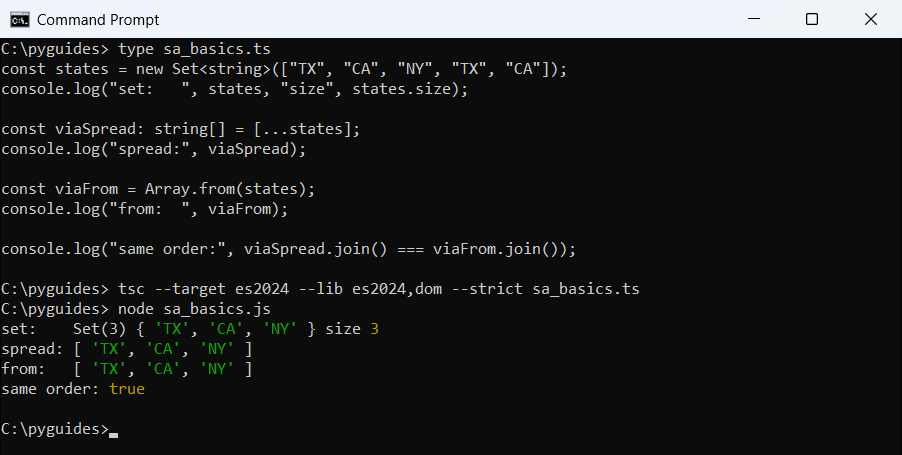
TypeScript infers the element type from the Set, so viaFrom is a string[] without a type annotation. You can check the result with .length; this guide on how to find the length of an array in TypeScript covers it next to size.
Why can’t I assign a Set to a string[] in TypeScript?
A Set isn’t an array, even when it holds strings. If you assign it straight to an array type or try to read zips[0], the compiler stops you:
const zips = new Set<string>(["78701", "10001", "94105"]);

const list: string[] = zips;
console.log(zips[0]);
Output:
sa_error.ts(3,7): error TS2740: Type 'Set<string>' is missing the following properties from type 'string[]': length, pop, push, concat, and 30 more.
sa_error.ts(4,13): error TS7053: Element implicitly has an 'any' type because expression of type '0' can't be used to index type 'Set<string>'.
  Property '0' does not exist on type 'Set<string>'.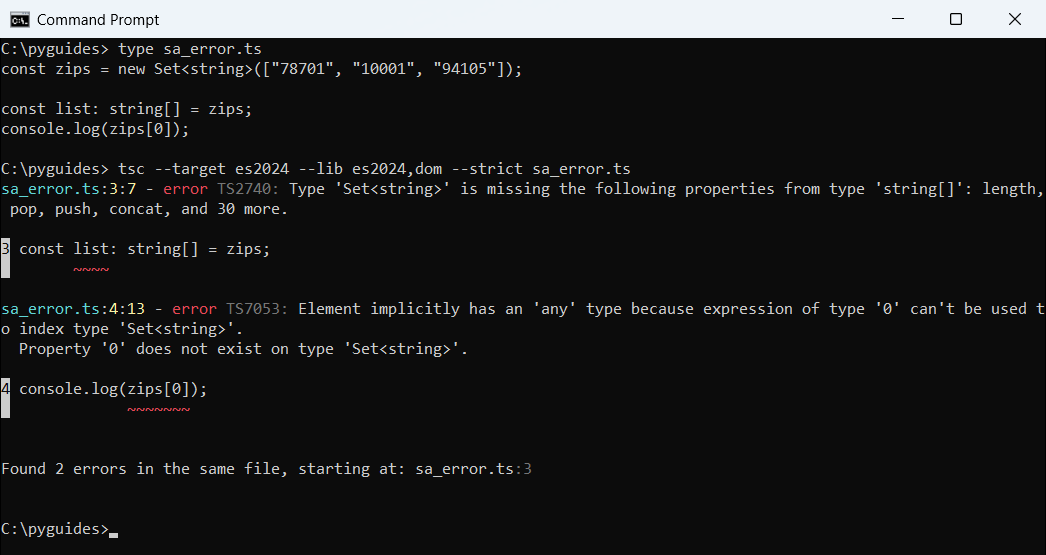
tsc reports that the Set is missing array members such as length and push, and that it can’t be indexed with 0.The fix is always the same: write [...zips] or Array.from(zips), then index the array. I hit this when a refactor changes a return type from an array to a Set.
Map Set values while converting with Array.from()
Array.from() takes an optional map function as its second argument, so you can convert and transform in one pass. With spread, you chain .map() instead:
const prices = new Set<number>([19.99, 5, 129.5, 5]);

const labels = Array.from(prices, (p) => `$${p.toFixed(2)}`);
console.log("from + map:", labels);

const withTax = [...prices].map((p) => +(p * 1.0825).toFixed(2));
console.log("spread.map:", withTax);
Output:
from + map: [ '$19.99', '$5.00', '$129.50' ]
spread.map: [ 21.64, 5.41, 140.18 ]
Here the Set dropped the second 5, so you get three prices. Array.from() formats them as USD, and the spread version adds 8.25% Texas sales tax.
A forEach() loop with push() also works, just with more code. To total the prices, the sum of an array in TypeScript tutorial covers reduce().
Remove duplicates from an array by converting through a Set
Deduplication is the most common reason for this conversion. Wrap the array in new Set(), then spread it back. A generic helper keeps the element type:
const signups: string[] = [
  "ava@example.com",
  "liam@example.com",
  "ava@example.com",
  "noah@example.com",
  "liam@example.com",
];

const unique = [...new Set(signups)];
console.log(unique);
console.log(`kept ${unique.length} of ${signups.length}`);

function toArray<T>(set: ReadonlySet<T>): T[] {
  return Array.from(set);
}
const years = toArray(new Set([2026, 2025, 2026]));
console.log("years:", years);
Output:
[ 'ava@example.com', 'liam@example.com', 'noah@example.com' ]
kept 3 of 5
years: [ 2026, 2025 ]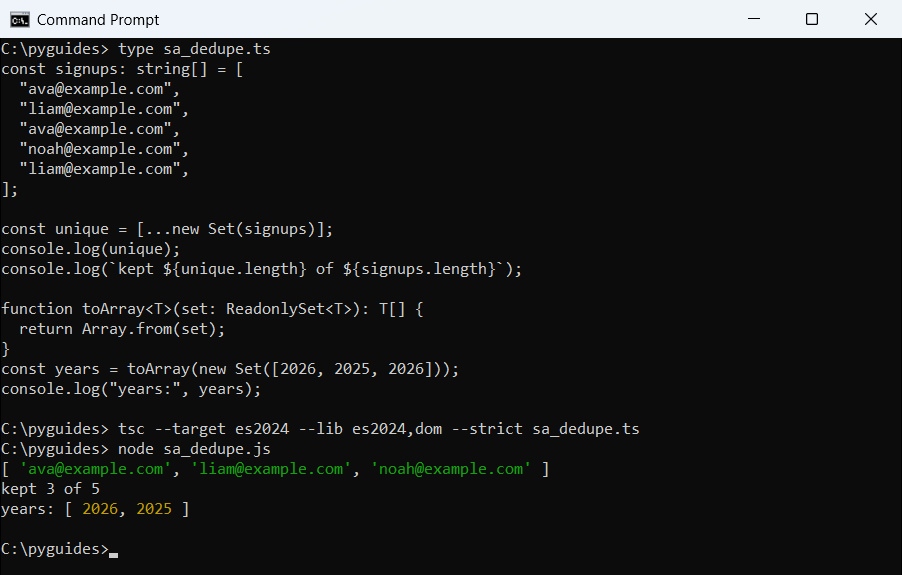
Taking ReadonlySet<T> lets the helper accept read-only Sets too. For more ways to dedupe, including case-insensitive values and counts, see how to get distinct values from an array in TypeScript.
Convert a Set of objects to a sorted array
Sets compare objects by reference, not by content. That matters when you convert open orders to an array and sort them by total:
interface Order {
  id: number;
  city: string;
  total: number;
}

const rush: Order = { id: 5001, city: "Austin", total: 84.5 };
const openOrders = new Set<Order>([
  rush,
  { id: 5002, city: "Denver", total: 129.99 },
  { id: 5003, city: "Austin", total: 42 },
]);
openOrders.add(rush);
openOrders.add({ id: 5003, city: "Austin", total: 42 });
console.log("set size:", openOrders.size);

const sorted = [...openOrders].sort((a, b) => b.total - a.total);
console.log("top order:", sorted[0].id);

const revenue = sorted.reduce((sum, o) => sum + o.total, 0);
console.log(`revenue: $${revenue.toFixed(2)}`);

const byCity = new Map<string, number>();
for (const o of openOrders) byCity.set(o.city, (byCity.get(o.city) ?? 0) + 1);
console.log("cities: ", [...byCity.keys()]);
console.log("entries:", Array.from(byCity.entries()));
Output:
set size: 4
top order: 5002
revenue: $298.49
cities:  [ 'Austin', 'Denver' ]
entries: [ [ 'Austin', 3 ], [ 'Denver', 1 ] ]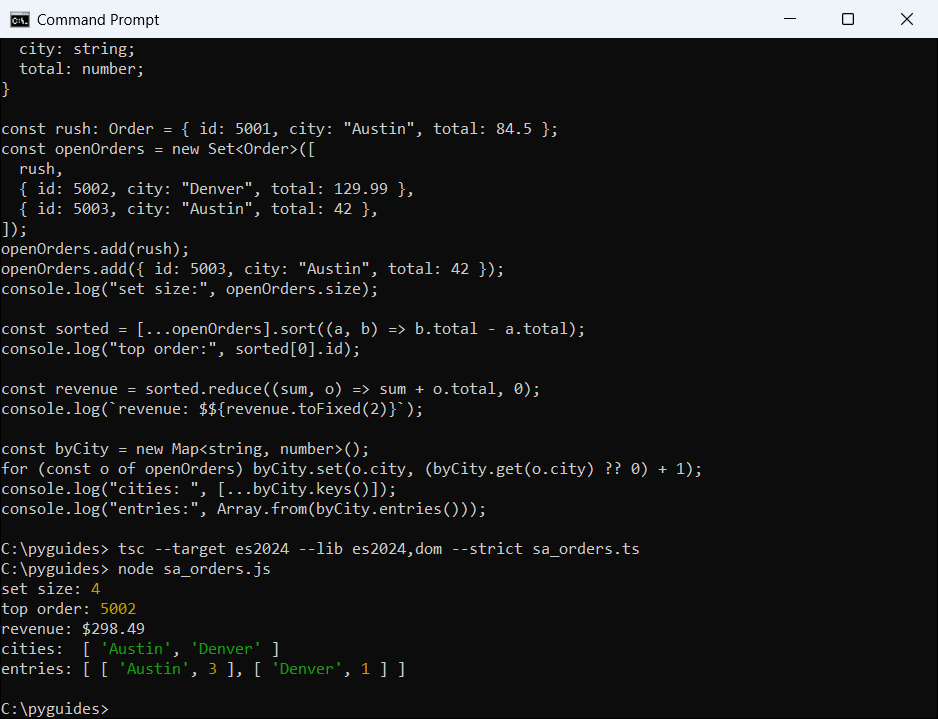
rush object again is ignored, but the copy of order 5003 is kept, so the Set holds four orders worth $298.49.So a Set won’t catch two objects with the same id. To dedupe by a key, follow the steps to remove duplicates from an array of objects in TypeScript.
The same spread and Array.from() calls work on a Map’s keys(), values() and entries(). Going the other way, you can create a Map from an array in TypeScript. For other sort orders, read how to sort an array of objects by property value.
Spread vs Array.from() for Set to array conversion
Both keep insertion order. I pick spread for a plain copy and Array.from() when I transform each value.
Spread also lets you add extra values in the same literal, like [...states, "FL"], and you can merge two Sets with [...a, ...b]. The guide to concatenate arrays in TypeScript using concat() compares spread with concat().
Got another collection to reshape? These four tutorials are good next reads:
- Convert an enum to an array in TypeScript
- Convert JSON to an array in TypeScript
- Get unique values from an array of objects
- Remove an item from an array in TypeScript
Frequently asked questions
How do I convert a Set to an array in TypeScript?
Use [...mySet] or Array.from(mySet). Both return a new typed array, such as string[] for a Set<string>.
Does converting a Set to an array keep the order?
Yes. Sets remember insertion order, and both spread and Array.from() return the values in that order.
Is spread or Array.from() better for a Set?
Spread is shorter for a plain copy. Array.from() is handy when you want to map each value in the same call.
Why does TypeScript say a Set is missing length and push?
You assigned a Set where an array type is expected. Convert it first with [...set] or Array.from(set).
Can I get the first item of a Set without converting it?
Yes, set.values().next().value returns it, but [...set][0] is easier to read for small Sets.
Where is Array.from() documented?
See Array.from() on MDN.

Bijay Kumar is a 13-time Microsoft MVP with more than 18 years in software development, and the founder of Python Guides and TSinfo Technologies. He started out building .NET and SharePoint solutions at HP, TCS and KPIT before moving into Python, machine learning and AI, and he also builds web apps with TypeScript and React. He writes the tutorials here himself, and every example is run before publishing so you see the real output. More about Bijay · Microsoft MVP profile · LinkedIn