
During my years developing complex Python applications, I have often found myself needing to peek under the hood of an object.
Whether I am debugging a Django model or inspecting a data frame, knowing exactly what attributes are available is a lifesaver.
Python provides two built-in functions for this: dir() and vars(). While they might seem similar at first glance, they serve very different purposes in your workflow.
In this tutorial, I will share my firsthand experience on when to use each, using practical examples that go beyond the basic “Hello World” scripts.
Understand the Role of Inspection in Python
When you are working on a large-scale project, such as a US Census data processor, you often deal with objects from external libraries.
Sometimes the documentation isn’t enough, and you need to see the live state of an object or the available methods at runtime.
What is the dir() Function?
The dir() function is your primary tool for discovery. It returns a sorted list of strings containing the names of the attributes of an object.
If you call it without an argument, it returns the names in the current local scope. When you pass an object, it attempts to return a valid list of attributes for that object.
One thing I’ve noticed is that dir() is very thorough. It doesn’t just show you the data; it shows you everything, including inherited methods and “dunder” (double underscore) methods.
Example: Inspect a US City Object with dir()
Let’s say we are building an application to track logistics across major US hubs like Chicago and New York.
class USCity:
    def __init__(self, name, population, state):
        self.name = name
        self.population = population
        self.state = state

    def get_city_summary(self):
        return f"{self.name}, {self.state} has a population of {self.population}."

# Initialize a city object
chicago = USCity("Chicago", 2746388, "Illinois")

# Using dir() to see all attributes and methods
print("--- Using dir() on Chicago Object ---")
print(dir(chicago))
You can refer to the screenshot below to see the output.
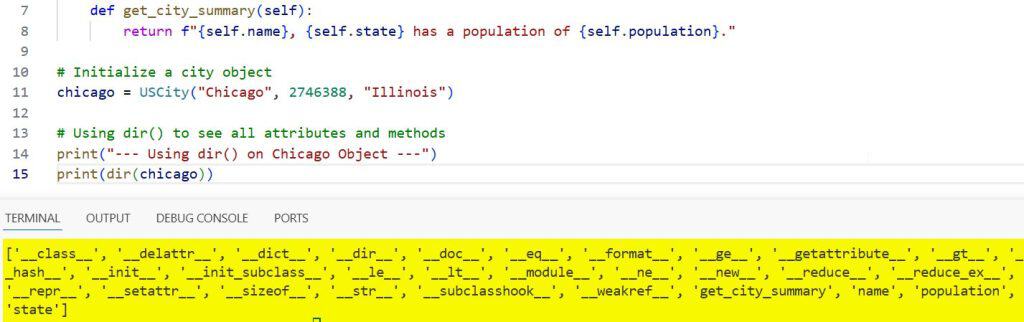
When you run this, you will see a massive list. It includes name, population, and get_city_summary, but also __init__, __str__, and many other inherited Python attributes.
What is the vars() Function?
The vars() function is a bit more specific. It returns the __dict__ attribute of an object.
The __dict__ is a dictionary used to store an object’s (writable) attributes. Unlike dir(), vars() provides you with the actual values associated with the keys.
If you call vars() on an object that doesn’t have a __dict__ attribute (like a simple integer or a class using __slots__), it will raise a TypeError.
Example: Inspect US City Data with vars()
In the same logistics app, if I only care about the specific data assigned to the Chicago instance, vars() is the better choice.
# Using vars() to see the attribute dictionary
print("\n--- Using vars() on Chicago Object ---")
city_data = vars(chicago)
print(city_data)

# Accessing a specific value from the vars dictionary
print(f"The population of the city is: {city_data['population']}")
You can refer to the screenshot below to see the output.
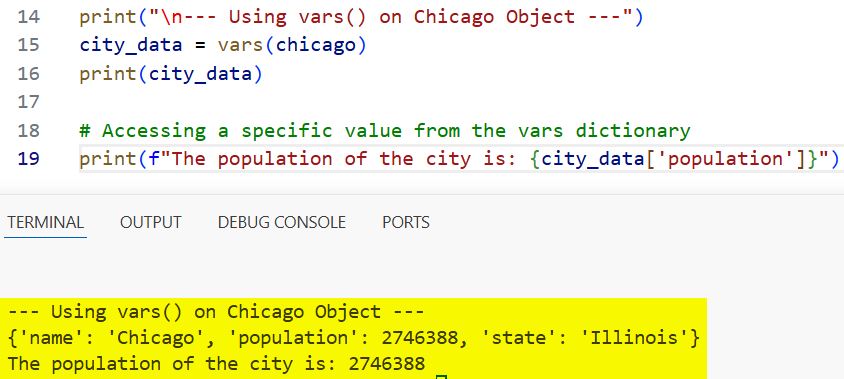
This output is much cleaner. It returns a dictionary: {‘name’: ‘Chicago’, ‘population’: 2746388, ‘state’: ‘Illinois’}.
The Core Differences: My Key Takeaways
After using both functions in production environments, I’ve identified several functional differences that you should keep in mind.
1. Output Format
dir() returns a list of names (strings). It is great for seeing “what can I do with this object?”
vars() returns a dictionary (mapping). It is great for seeing “what is the current state of this object?”
2. The scope of Information
dir() is recursive and inclusive. It looks at the class, its parent classes, and the object itself.
vars() is local to the object instance’s dictionary. It won’t show you methods unless they are assigned as instance attributes.
3. Scope without Arguments
When called without arguments, dir() shows you all the names in your current local namespace (variables, functions, imports).
When called without arguments, vars() acts like locals(), showing you the dictionary of the current local symbol table.
When to Use dir() in Your Workflow
I usually reach for dir() when I am exploring a new library, like pandas or scikit-learn, while working on US economic trends.
If I have a mystery object returned by an API and I want to know if it has a .save() method or a .to_json() method, dir() is the fastest way to check.
When to Use vars() in Your Workflow
I prefer vars() when I am performing tasks like logging or converting an object to a format that can be easily serialized.
For instance, if I need to save our USCity data into a database or send it as a JSON response to a web front-end, vars(chicago) gives me the dictionary I need instantly.
Practical Implementation: Compare dir() and vars()
Let’s look at a more complex example involving a US Federal Agency class to see how these two behave side-by-side.
class FederalAgency:
    category = "Government"

    def __init__(self, agency_name, acronym, headquarters):
        self.agency_name = agency_name
        self.acronym = acronym
        self.headquarters = headquarters

# Create an instance for the NASA agency
nasa = FederalAgency("National Aeronautics and Space Administration", "NASA", "Washington, D.C.")

# 1. Comparison of output types
print(f"Type of dir: {type(dir(nasa))}")
print(f"Type of vars: {type(vars(nasa))}")

# 2. Checking for class-level attributes
print("\nChecking for 'category' attribute:")
print(f"Is 'category' in dir? {'category' in dir(nasa)}")
print(f"Is 'category' in vars? {'category' in vars(nasa)}")
You can refer to the screenshot below to see the output.
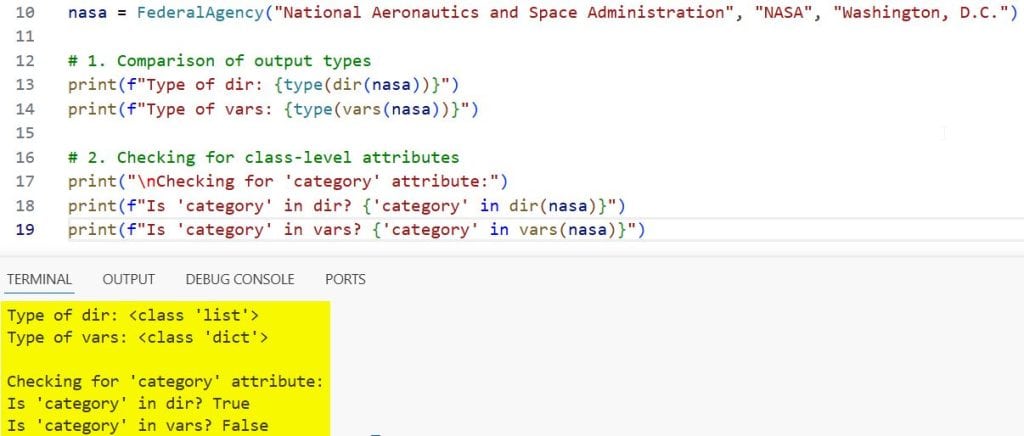
In this case, the category (the class variable) appears in dir(nasa) because dir() looks at the class hierarchy. However, it does not appear in vars(nasa) because it is not part of the instance’s specific dictionary.
Deep Dive: Use vars() for Dynamic Updates
One trick I’ve used in the past is using vars() to dynamically update an object based on a dictionary of US regional settings.
settings_update = {
    "headquarters": "Houston, TX",
    "budget_year": 2026
}

# Update the nasa object attributes using vars()
nasa_vars = vars(nasa)
nasa_vars.update(settings_update)

print(f"\nUpdated NASA Headquarters: {nasa.headquarters}")
print(f"New attribute added via vars: {nasa.budget_year}")
This works because vars() returns a reference to the __dict__ of the object. Modifying the dictionary modifies the object itself.
The Limitations of vars()
It is important to remember that vars() only works on objects that have a __dict__.
Many built-in types, such as lists, dictionaries, and strings, do not have a __dict__. If you try to use vars() on a list of US States, you will hit an error.
us_states = ["California", "Texas", "Florida", "New York"]

try:
    print(vars(us_states))
except TypeError as e:
    print(f"\nError using vars() on a list: {e}")

# However, dir() works perfectly fine
print(f"Number of attributes found by dir() on the list: {len(dir(us_states))}")
Advanced Inspection: Combine dir() with filtering
Sometimes dir() gives you too much information. When I’m looking for specific attributes related to US currency or tax codes in a large object, I filter the dir() list.
class TaxDocument:
    def __init__(self, form_id, taxpayer_name):
        self.form_id = form_id
        self.taxpayer_name = taxpayer_name

    def calculate_tax(self):
        pass

    def submit_to_irs(self):
        pass

w2_form = TaxDocument("W-2", "John Doe")

# Filtering dir() to find only non-dunder methods/attributes
attributes = [attr for attr in dir(w2_form) if not attr.startswith('__')]
print(f"\nFiltered attributes for TaxDocument: {attributes}")
This provides a much more readable list: [‘calculate_tax’, ‘form_id’, ‘submit_to_irs’, ‘taxpayer_name’].
Summary of Differences Table
| Feature | dir(object) | vars(object) |
| Return Type | List of strings | Dictionary |
| Content | Attributes, Methods, Inherited members | Instance-specific attributes |
| Class Variables | Included | Excluded |
| Requirement | Works on almost any object | Object must have __dict__ |
| Primary Use | Exploration and Debugging | Serialization and Data Manipulation |
Why This Matters for Python Developers
Understanding these tools allows you to write more introspective and flexible code.
In my experience, using vars() is cleaner for data-heavy objects where you need to extract values. Using dir() is essential when you are in an interactive shell (like IPython or a Jupyter Notebook) trying to figure out how to interact with a new object.
If you are working on a US-based enterprise application, these inspection tools help you verify that your data structures are being populated correctly from external APIs or databases.
I hope this helps you understand the nuance between these two functions. Both are incredibly powerful when used in the right context.
You may read:
- How to Use Class Decorators in Python
- Dynamic Attribute Management in Python
- How to Use isinstance() and issubclass() Functions
- How type() Works as a Metaclass in Python

Bijay Kumar is an experienced Python and AI professional who enjoys helping developers learn modern technologies through practical tutorials and examples. His expertise includes Python development, Machine Learning, Artificial Intelligence, automation, and data analysis using libraries like Pandas, NumPy, TensorFlow, Matplotlib, SciPy, and Scikit-Learn. At PythonGuides.com, he shares in-depth guides designed for both beginners and experienced developers. More about us.

