
I’ve often seen applications crawl to a halt because of unnecessary rerenders. It is a common frustration when a small change in a parent component triggers a full refresh of every single child, even when their data hasn’t changed.
I remember working on a high-traffic financial dashboard for a New York firm where every tick of the stock price slowed the UI because of this exact issue.
Learning how to control the render cycle is what separates a junior developer from a seasoned pro who can build snappy, high-performance apps.
In this guide, I will show you exactly how I handle these situations using proven techniques like React.memo, useMemo, and useCallback.
The Default Behavior of React Rerendering
By default, when a parent component’s state updates, React will rerender all of its children.
It doesn’t matter if the props passed to the child have changed or not; React plays it safe by refreshing everything.
Let’s look at a scenario involving a “Texas High School Football” scoreboard to see this in action.
Example: The Rerender Problem
import React, { useState } from 'react';

const TeamLogo = ({ teamName }) => {
  console.log(`Rendering Logo for: ${teamName}`);
  return (
    <div style={{ padding: '10px', border: '1px solid #ccc' }}>
      <h3>{teamName} Fans Section</h3>
      <p>Go Team!</p>
    </div>
  );
};

export default function FootballScoreboard() {
  const [homeScore, setHomeScore] = useState(0);
  const [visitorScore, setVisitorScore] = useState(0);

  return (
    <div style={{ textAlign: 'center', marginTop: '50px' }}>
      <h1>Texas Friday Night Lights</h1>
      <div>
        <h2>Home: {homeScore}</h2>
        <button onClick={() => setHomeScore(homeScore + 7)}>Home Touchdown</button>
      </div>
      <div>
        <h2>Visitor: {visitorScore}</h2>
        <button onClick={() => setVisitorScore(visitorScore + 7)}>Visitor Touchdown</button>
      </div>
      <hr />
      <TeamLogo teamName="Austin Coyotes" />
    </div>
  );
}
In this example, every time you click “Home Touchdown,” the TeamLogo component rerenders, even though the teamName prop is a static string.
Method 1: Use React.memo for Functional Components
The most straightforward way I’ve found to stop this is using React.memo.
It is a higher-order component that wraps your functional component and performs a “shallow comparison” of the props.
If the props are the same as the last render, React will skip rendering the component and reuse the last rendered result.
Implementation with USA State Parks Gallery
Imagine we are building a gallery for National Parks in the USA. We don’t want the park cards to refresh when the search filter changes elsewhere.
import React, { useState } from 'react';

// We wrap the component in React.memo
const ParkCard = React.memo(({ name, location }) => {
  console.log(`Rendering card for: ${name}`);
  return (
    <div style={{ margin: '15px', border: '2px solid #2d5a27', borderRadius: '8px' }}>
      <h3>{name}</h3>
      <p>Location: {location}</p>
    </div>
  );
});

export default function ParksExplorer() {
  const [visitorCount, setVisitorCount] = useState(0);

  return (
    <div style={{ padding: '20px' }}>
      <h1>USA National Parks Tracker</h1>
      <p>Live Visitors in Park: {visitorCount}</p>
      <button onClick={() => setVisitorCount(prev => prev + 1)}>Register New Visitor</button>

      <div style={{ display: 'flex', justifyContent: 'center' }}>
        {/* These will NOT rerender when visitorCount changes */}
        <ParkCard name="Yellowstone" location="Wyoming" />
        <ParkCard name="Yosemite" location="California" />
        <ParkCard name="Grand Canyon" location="Arizona" />
      </div>
    </div>
  );
}
You can refer to the screenshot below to see the output.

By wrapping ParkCard in React.memo, I’ve ensured that the DOM only updates when the specific park data changes.
Method 2: Prevent Rerenders When Passing Objects
One trap I see developers fall into frequently is passing objects or arrays as props.
In JavaScript, objects are compared by reference, not by value. If you define an object inside the parent, it gets a new reference on every render.
This causes React.memo to fail because it thinks the prop has changed. To fix this, I use the useMemo hook.
Example: California Real Estate Listings
import React, { useState, useMemo } from 'react';

const ListingDetails = React.memo(({ details }) => {
  console.log("Rendering ListingDetails");
  return (
    <div style={{ backgroundColor: '#f9f9f9', padding: '10px' }}>
      <p>City: {details.city}</p>
      <p>Price Trend: {details.trend}</p>
    </div>
  );
});

export default function RealEstateDashboard() {
  const [toggleTheme, setToggleTheme] = useState(false);

  // useMemo ensures this object maintains the same reference
  const propertyInfo = useMemo(() => {
    return {
      city: "San Francisco",
      trend: "Increasing"
    };
  }, []); // Empty dependency array means it's created once

  return (
    <div style={{
      background: toggleTheme ? '#333' : '#fff',
      color: toggleTheme ? '#fff' : '#000',
      padding: '40px'
    }}>
      <h1>Bay Area Property Insights</h1>
      <button onClick={() => setToggleTheme(!toggleTheme)}>
        Switch to {toggleTheme ? 'Light' : 'Dark'} Mode
      </button>

      <ListingDetails details={propertyInfo} />
    </div>
  );
}
You can refer to the screenshot below to see the output.

Without useMemo, the propertyInfo object would be “new” every time the theme toggles, forcing the ListingDetails to rerender.
Method 3: Handle Function Props with useCallback
Another major culprit for child rerenders is passing functions. Just like objects, functions are redefined on every render.
When I pass an onClick or onDelete handler to a child, I always wrap it in useCallback to maintain referential integrity.
Example: Broadway Show Ticket Counter
import React, { useState, useCallback } from 'react';

const TicketButton = React.memo(({ increment, showName }) => {
  console.log(`Rendering button for ${showName}`);
  return (
    <button onClick={increment} style={{ margin: '10px' }}>
      Buy Ticket for {showName}
    </button>
  );
});

export default function BroadwayBoxOffice() {
  const [totalSales, setTotalSales] = useState(0);
  const [otherState, setOtherState] = useState(false);

  // useCallback keeps the function reference stable
  const handlePurchase = useCallback(() => {
    setTotalSales(prev => prev + 1);
  }, []);

  return (
    <div style={{ textAlign: 'center' }}>
      <h1>NYC Broadway Tickets</h1>
      <h2>Total Sold: {totalSales}</h2>

      <TicketButton showName="The Lion King" increment={handlePurchase} />

      <button onClick={() => setOtherState(!otherState)}>
        Refresh Site Layout
      </button>
    </div>
  );
}
You can refer to the screenshot below to see the output.
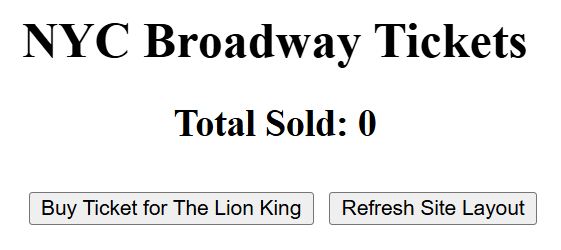
Now, clicking “Refresh Site Layout” won’t cause the TicketButton to rerender because handlePurchase stays the same.
Method 4: Pass Components as Children
This is a “hidden gem” technique I often use when I don’t want to deal with memo.
If a component is passed as a child (using the children prop), React handles it differently. If the parent updates its own state, the children won’t necessarily rerender.
Example: US Census Data Wrapper
import React, { useState } from 'react';

const ExpensiveChart = () => {
  console.log("Expensive Chart Rendered");
  return <div>[Complex Population Chart for USA]</div>;
};

const ContentWrapper = ({ children }) => {
  const [count, setCount] = useState(0);
  return (
    <div style={{ border: '2px dashed blue', padding: '20px' }}>
      <h3>Wrapper State: {count}</h3>
      <button onClick={() => setCount(count + 1)}>Update Wrapper</button>
      {children}
    </div>
  );
};

export default function CensusApp() {
  return (
    <div>
      <h1>2026 US Census Bureau Dashboard</h1>
      <ContentWrapper>
        <ExpensiveChart />
      </ContentWrapper>
    </div>
  );
}
In this structure, updating the state inside ContentWrapper does not trigger a rerender of ExpensiveChart because the chart was created in the CensusApp scope.
Why You Shouldn’t Memoize Everything
In my experience, developers often go overboard and wrap every single component in memo.
Optimization comes with a cost. React has to store the previous props and perform a comparison every time.
If your component is cheap to render (like a simple <span>), the comparison logic might actually be slower than just letting the component rerender.
I typically only reach for these tools when:
- The component is heavy (lots of DOM elements or data processing).
- The component rerenders frequently with the same props.
- The component contains other children who are also heavy.
Summary of Techniques
| Method | Best Used For | Key Hook/Tool |
| React.memo | Functional components with primitive props | React.memo(Component) |
| useMemo | Maintaining object or array references | useMemo(() => ({...}), []) |
| useCallback | Maintaining function references passed as props | useCallback(() => {...}, []) |
| Composition | Moving state down or passing as children | props.children |
Managing rerenders is all about balance.
By using these methods, I’ve been able to scale applications to handle massive amounts of data without losing that smooth, native-feel user experience.
If you are working on a React project, I recommend opening the React DevTools, turning on the “Highlight updates when components render” option, and seeing where your “leaks” are.
It’s often a single useCallback away from a massive performance boost.
I hope you found this tutorial useful! Managing component lifecycles can be tricky at first, but with a bit of practice, it becomes second nature.
You may also like to read:
- How to Create React Components Using CLI
- How to Build a React Stepper Component
- How to Use Jest spyOn with React Components
- React Component Export Syntax

Bijay Kumar is an experienced Python and AI professional who enjoys helping developers learn modern technologies through practical tutorials and examples. His expertise includes Python development, Machine Learning, Artificial Intelligence, automation, and data analysis using libraries like Pandas, NumPy, TensorFlow, Matplotlib, SciPy, and Scikit-Learn. At PythonGuides.com, he shares in-depth guides designed for both beginners and experienced developers. More about us.

