
While building a reporting script, I often need more than the highest number. I also need its position so I can identify the matching product, date, or server.
You can find the index of the maximum value in a Python array with max() and index(). For larger datasets, NumPy argmax() offers a faster and cleaner option.
This guide covers Python lists, loops, NumPy arrays, duplicate maximum values, empty arrays, and multidimensional data.
Find the Index of the Maximum Value in a Python Array
Python developers commonly use the term “array” to refer to several data structures. These include lists, arrays from the array module, and NumPy arrays.
I will use a small server-monitoring example throughout this guide. The array stores CPU usage percentages collected by an automation script.
cpu_usage = [42, 68, 91, 55, 73]
The maximum value is 91, and its index is 2.
Python uses zero-based indexing, which means the first item has index 0. Therefore, the third item appears at index 2.
If you need more background, read this guide to finding the index of an element in a Python array.
Use max() with index()
The simplest approach combines two built-in Python functions:
- max() finds the largest value.
- index() returns the position of a value inside a list.
cpu_usage = [42, 68, 91, 55, 73]

maximum_value = max(cpu_usage)
maximum_index = cpu_usage.index(maximum_value)

print(f"Maximum CPU usage: {maximum_value}%")
print(f"Index: {maximum_index}")
Output:
Maximum CPU usage: 91%
Index: 2
You can see the output in the screenshot below.
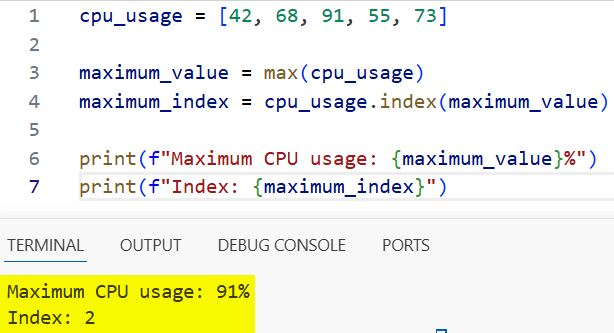
The max() function scans the list and returns 91. The index() method then searches for 91 and returns its position.
You can also write the operation in one line:
cpu_usage = [42, 68, 91, 55, 73]

maximum_index = cpu_usage.index(max(cpu_usage))

print(maximum_index)
This shorter version works well for small scripts. However, storing the maximum value separately often makes production code easier to debug.
You can explore the built-in function further in this guide to finding the maximum value with Python max().
Pro Tip: In my experience, storing both the value and index makes logs much easier to understand. A position without its matching value rarely provides enough context during debugging.
Find the Index of the Maximum Value Using enumerate()
The previous solution scans the list twice. max() performs one scan, while index() performs another search.
That difference rarely matters for small lists. However, I prefer a single-pass solution when processing large log files or continuous sensor data.
Python’s enumerate() function returns each item together with its index.
cpu_usage = [42, 68, 91, 55, 73]

maximum_index, maximum_value = max(
    enumerate(cpu_usage),
    key=lambda item: item[1]
)

print(f"Maximum CPU usage: {maximum_value}%")
print(f"Index: {maximum_index}")
Output:
Maximum CPU usage: 91%
Index: 2
You can see the output in the screenshot below.
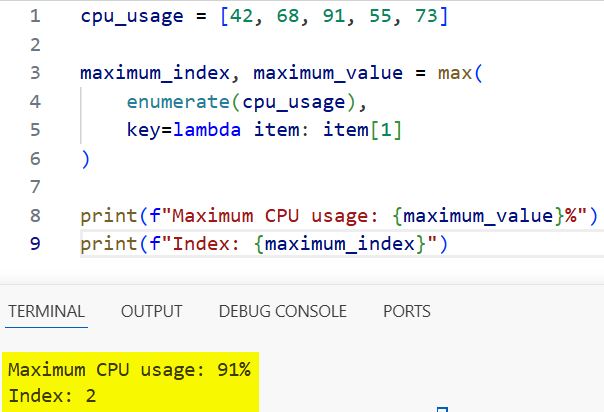
The enumerate(cpu_usage) call produces index-value pairs like these:
(0, 42)
(1, 68)
(2, 91)
(3, 55)
(4, 73)
The key parameter tells max() how to compare those pairs. The lambda function, which is a small unnamed function, selects the value at position 1.
This approach returns both the winning index and its value in one operation. It also works well when the values belong to related records.
For example, the following script identifies the busiest server:
servers = ["server-a", "server-b", "server-c", "server-d"]
cpu_usage = [42, 68, 91, 55]

maximum_index, maximum_value = max(
    enumerate(cpu_usage),
    key=lambda item: item[1]
)

busiest_server = servers[maximum_index]

print(f"{busiest_server} reached {maximum_value}% CPU usage.")
Output:
server-c reached 91% CPU usage.
This pattern connects the maximum number to another list through the shared index. Always confirm that both lists have the same length.
Find Every Index When the Maximum Value Repeats
The index() method returns only the first matching position. That behavior matters when several elements share the maximum value.
cpu_usage = [91, 68, 91, 55, 91]

maximum_value = max(cpu_usage)
maximum_index = cpu_usage.index(maximum_value)

print(maximum_index)
Output:
0
The list contains 91 at indexes 0, 2, and 4. However, index() stops after finding the first match.
Use a list comprehension when you need every matching index. A list comprehension creates a new list using a compact loop and condition.
cpu_usage = [91, 68, 91, 55, 91]

maximum_value = max(cpu_usage)

maximum_indexes = [
    index
    for index, value in enumerate(cpu_usage)
    if value == maximum_value
]

print(f"Maximum value: {maximum_value}")
print(f"Indexes: {maximum_indexes}")
Output:
Maximum value: 91
Indexes: [0, 2, 4]
You can see the output in the screenshot below.
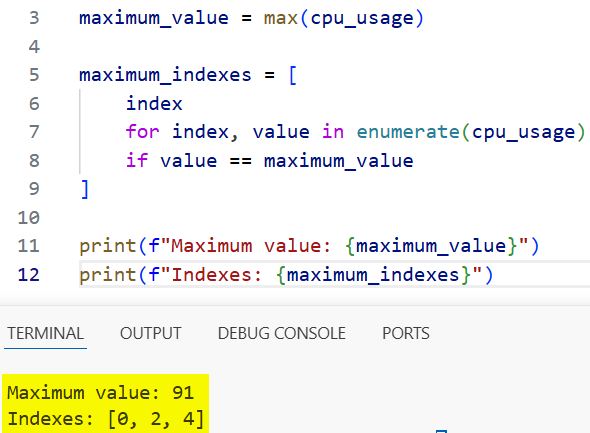
The code checks every value against the maximum. It stores the index whenever the values match.
This approach helps when several servers hit the same usage level. You can learn more about the syntax in this guide to Python list comprehensions.
Find the Index of the Maximum Value in a NumPy Array
NumPy is a Python module for fast numerical operations. A module contains reusable code that you can import into a program.
For large numerical datasets, use NumPy argmax(). The function returns the index of the largest array element.
import numpy as np

cpu_usage = np.array([42, 68, 91, 55, 73])

maximum_index = np.argmax(cpu_usage)
maximum_value = cpu_usage[maximum_index]

print(f"Maximum CPU usage: {maximum_value}%")
print(f"Index: {maximum_index}")
Output:
Maximum CPU usage: 91%
Index: 2
The np.argmax() function searches the array and returns the first maximum index. NumPy performs this work efficiently on large numerical arrays.
If you are new to this data structure, start with this practical introduction to Python NumPy arrays.
You can also convert NumPy’s index type to a regular Python integer:
maximum_index = int(np.argmax(cpu_usage))
This conversion helps when exporting the result to JSON or passing it into systems that expect standard Python types.
Find all maximum indexes with NumPy
Like list.index(), np.argmax() returns the first maximum index. Combine np.max() and np.where() to retrieve every matching position.
import numpy as np

cpu_usage = np.array([91, 68, 91, 55, 91])

maximum_value = np.max(cpu_usage)
maximum_indexes = np.where(cpu_usage == maximum_value)[0]

print(f"Maximum value: {maximum_value}")
print(f"Indexes: {maximum_indexes}")
Output:
Maximum value: 91
Indexes: [0 2 4]
The comparison creates a Boolean array containing True for each maximum value. np.where() returns the indexes where that condition succeeds.
See these guides on NumPy where() and NumPy indexing for related examples.
Find the Maximum Index in a Two-Dimensional Array
A two-dimensional array contains rows and columns. Reporting scripts often use this structure for servers and hourly measurements.
import numpy as np

cpu_usage = np.array([
    [42, 68, 51],
    [73, 91, 64],
    [58, 77, 69]
])

flat_index = np.argmax(cpu_usage)
row_index, column_index = np.unravel_index(
    flat_index,
    cpu_usage.shape
)

print(f"Maximum value: {cpu_usage[row_index, column_index]}")
print(f"Row index: {row_index}")
print(f"Column index: {column_index}")
Output:
Maximum value: 91
Row index: 1
Column index: 1
By default, np.argmax() treats the array like one flat sequence. np.unravel_index() converts that flat position into row and column indexes.
You can also find the maximum index within each row:
row_maximum_indexes = np.argmax(cpu_usage, axis=1)

print(row_maximum_indexes)
Output:
[1 1 1]
The axis tells NumPy which direction to process. Here, axis=1 compares the columns inside each row.
Read this guide to working with two-dimensional NumPy arrays when your data contains rows and columns.
Handle an Empty Array Safely
Calling max() on an empty list raises a ValueError. An exception is an error Python reports while running your program.
cpu_usage = []

if cpu_usage:
    maximum_value = max(cpu_usage)
    maximum_index = cpu_usage.index(maximum_value)
    print(maximum_index)
else:
    print("The CPU usage array is empty.")
The if cpu_usage check treats an empty list as False. This validation prevents the script from crashing.
For reusable code, place the logic inside a function. A function groups instructions under a name so you can call them repeatedly.
def find_maximum_index(values):
    if not values:
        return None

    return max(enumerate(values), key=lambda item: item[1])[0]


cpu_usage = [42, 68, 91, 55, 73]
result = find_maximum_index(cpu_usage)

print(result)
Output:
2
Returning None clearly tells the calling code that no valid index exists. This design works well in automation scripts where empty API responses may occur.
Things to Keep in Mind
- Check for empty arrays: Both
max()andnp.argmax()raise errors when they receive no values. - Expect zero-based indexes: Python starts counting positions at zero, not one.
- Handle duplicate maximums:
index()andnp.argmax()return only the first matching index. - Avoid sorting the array: Sorting changes the order and does extra work. Use
max(),enumerate(), orargmax()instead. - Choose the right structure: Use lists for ordinary scripts and NumPy arrays for large numerical datasets.
- Validate related lists: Confirm that names, dates, and measurement lists have matching lengths before sharing indexes.
Frequently Asked Questions
How do I find the index of the maximum number in a Python list?
Use numbers.index(max(numbers)) when the list contains at least one item. This expression returns the first index containing the maximum number.
How do I get all indexes of the maximum value in Python?
Find the maximum first, then use enumerate() inside a list comprehension. Add every index whose value equals the maximum.
What does NumPy argmax return?
np.argmax() returns the index of the first maximum element. For a multidimensional array, it returns a flattened index unless you provide an axis.
Why does index(max(array)) return only one index?
The index() method stops at the first matching value. Use a list comprehension when duplicate maximum values matter.
Can I find the maximum index without using max()?
Yes. You can write a loop that tracks the current maximum and its index. However, max() with enumerate() usually produces shorter and clearer code.
How do I find the row and column of the maximum NumPy value?
Call np.argmax() to get the flat index. Then pass that index and the array shape to np.unravel_index().
You learned how to find the maximum value’s index with index(), enumerate(), and NumPy argmax(). Start with index(max(values)), then choose NumPy or duplicate-aware logic when your data requires it. I hope this practical guide makes your next Python script easier to build.
You May Also Like
- Find the closest value in an array using Python
- Find the largest number in a Python list
- Print the smallest element in a Python array
- Initialize an array in Python
- Sort NumPy array indexes with argsort()

Bijay Kumar is an experienced Python and AI professional who enjoys helping developers learn modern technologies through practical tutorials and examples. His expertise includes Python development, Machine Learning, Artificial Intelligence, automation, and data analysis using libraries like Pandas, NumPy, TensorFlow, Matplotlib, SciPy, and Scikit-Learn. At PythonGuides.com, he shares in-depth guides designed for both beginners and experienced developers. More about us.

