
Python naming conventions for variables come down to one PEP 8 rule: write variable names in lowercase snake_case, like sales_tax or order_total. Constants get UPPER_CASE, and classes get CapWords.
On top of that style rule, Python itself rejects some names outright, such as ones that start with a digit or match a keyword.
In this article, I’ll show you both sets of rules on one list of sample names, the real errors bad names cause, and two quick ways to check your own code. I ran everything on Python 3.12.5.
The sample variable names we’ll check
Here’s the list I’ll use throughout. They’re names you’d plausibly type in a small US store script:
- Good names:
sales_tax,MAX_ORDERS,_cache - Valid but un-Pythonic:
zipCode(camelCase) - Broken:
2026_revenue,class,first-name,total$ - Valid but risky:
list, which hides a built-in
That last group matters most, because Python accepts those names and the bug shows up later. If variables themselves are new to you, start with variables in Python.
What makes a variable name valid in Python?
Python’s hard rules are short: start with a letter or underscore, use only letters, digits and underscores, and skip keywords. Names are case-sensitive, so total and Total differ.
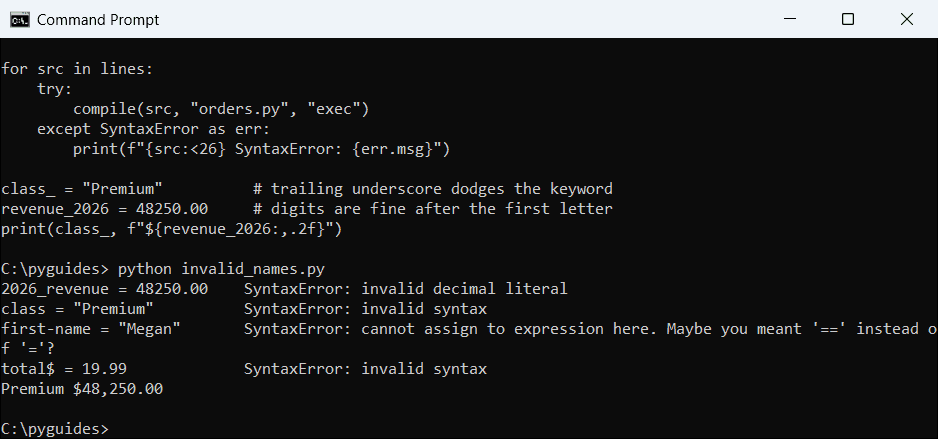
Let me show you what happens when the four broken names hit the interpreter:
lines = ['2026_revenue = 48250.00',
         'class = "Premium"',
         'first-name = "Megan"',
         'total$ = 19.99']

for src in lines:
    try:
        compile(src, "orders.py", "exec")
    except SyntaxError as err:
        print(f"{src:<26} SyntaxError: {err.msg}")

class_ = "Premium"          # trailing underscore dodges the keyword
revenue_2026 = 48250.00     # digits are fine after the first letter
print(class_, f"${revenue_2026:,.2f}")
Output:
2026_revenue = 48250.00    SyntaxError: invalid decimal literal
class = "Premium"          SyntaxError: invalid syntax
first-name = "Megan"       SyntaxError: cannot assign to expression here. Maybe you meant '==' instead of '='?
total$ = 19.99             SyntaxError: invalid syntax
Premium $48,250.00
All four fail with a SyntaxError, while class_ and revenue_2026 work fine.
How does this code work?
2026_revenue looks like a number to the parser, hence “invalid decimal literal”. first-name reads as first minus name, and you can’t assign to a subtraction.
compile() parses each line without running it. So here’s the catch: no message says “bad variable name”, so check the name first.
PEP 8 naming conventions for variables, constants and classes
Valid isn’t the same as Pythonic. zipCode runs, but PEP 8 asks for zip_code. Here’s the style for each kind of name, with the matching sample name:
| Kind of name | PEP 8 style | Example |
|---|---|---|
| Variable | lowercase_with_underscores | sales_tax |
| Constant (module level) | UPPER_CASE_WITH_UNDERSCORES | MAX_ORDERS |
| Class | CapWords | OrderItem |
| Internal use | one leading underscore | _cache |
| Clashes with a keyword | one trailing underscore | class_ |
| Name-mangled attribute | two leading underscores | self.__pin |
PEP 8 also says never to use l, O or I as single-letter names; they look like 1 and 0 in some fonts. Constants get their own guide in constants in Python.
One leading underscore is only a hint, while two inside a class trigger name mangling: self.__pin is stored as _Account__pin. That avoids subclass clashes; it isn’t security. See private variables in Python.
Pro Tip: Function, module and package names follow similar rules. I cover those in Python naming conventions, so this page sticks to variables.
Why does naming a variable list break your code?
list, sum, id and type aren’t keywords, so Python lets you reuse them, hiding the original function.
Here’s the code:
list = ["Austin", "Denver", "Boise"]     # shadows the built-in list
print(list)

try:
    cities = list(("Tampa", "Reno"))
except TypeError as err:
    print("TypeError:", err)

del list                                  # removes the shadow
print(list(("Tampa", "Reno")))
Output:
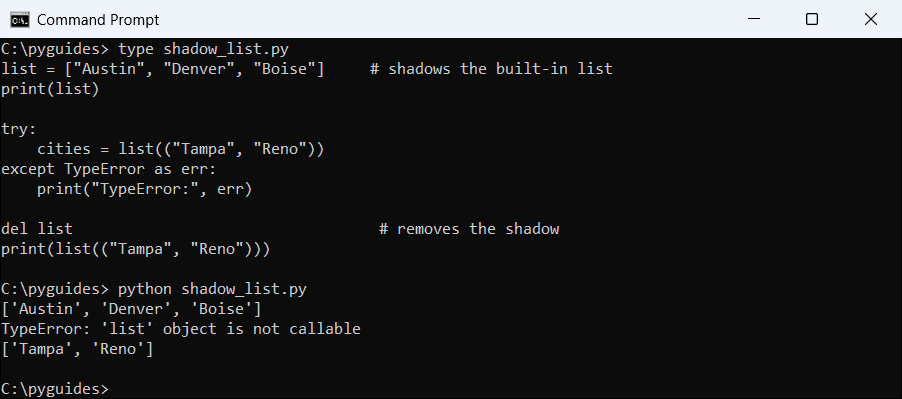
['Austin', 'Denver', 'Boise']
TypeError: 'list' object is not callable
['Tampa', 'Reno']
The second call fails with “‘list’ object is not callable”, and works again after del list.
How does this code work?
The assignment makes list point to your three cities. The next list(...) tries to call that list, which isn’t a function.
The fix is a better name like cities. A total named sum breaks the same way, as shown in the sum() function in Python.
Method 1: Check variable names with isidentifier() and iskeyword()
When names come from data, like CSV headers, check them in code. str.isidentifier() tests the syntax rules and keyword.iskeyword() catches keywords. Here’s the checker on all nine names:
import builtins
import keyword

names = ["sales_tax", "zipCode", "2026_revenue", "class", "first-name",
         "MAX_ORDERS", "_cache", "list", "total$"]

for name in names:
    if keyword.iskeyword(name):
        verdict = "keyword, not allowed"
    elif not name.isidentifier():
        verdict = "invalid identifier"
    elif hasattr(builtins, name):
        verdict = "valid, but shadows a built-in"
    else:
        verdict = "valid"
    print(f"{name:<14} {verdict}")
Output:
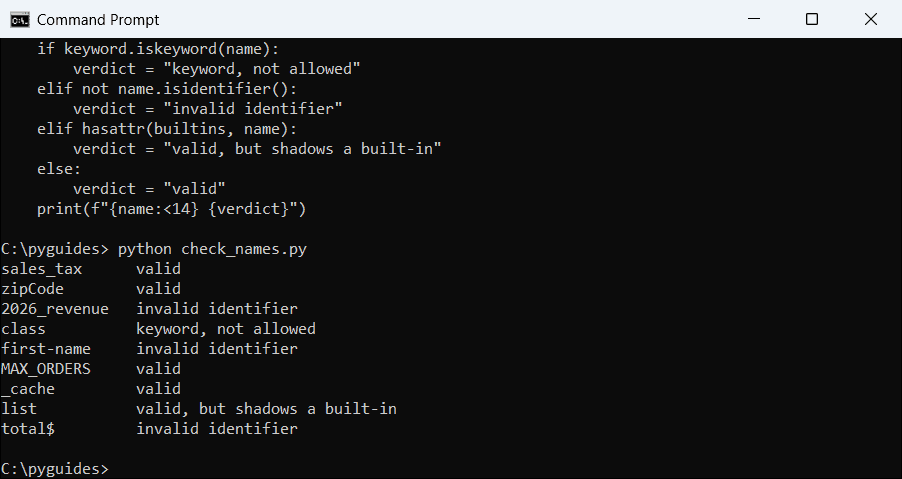
sales_tax      valid
zipCode        valid
2026_revenue   invalid identifier
class          keyword, not allowed
first-name     invalid identifier
MAX_ORDERS     valid
_cache         valid
list           valid, but shadows a built-in
total$         invalid identifier
Three names are invalid, one is a keyword, and list is flagged as shadowing a built-in.
How does this code work?
The keyword test runs first, because "class".isidentifier() is actually True. Then hasattr(builtins, name) spots names like list.
Note that zipCode passes: the checker tests what’s legal, not PEP 8 style. Here’s a related trick for checking the type of a variable.
Method 2: Catch bad variable names with Ruff (Recommended)
For style, let a linter do it. Ruff (pip install ruff) has pep8-naming rules (N), the ambiguous-name rule E741, and built-in shadowing rules (A). Here’s a file full of bad names:
l = [19.99, 4.50]
O = 0


def GetOrderTotal(prices):
    orderTotal = sum(prices)
    return orderTotal


class order_item:
    pass


list = ["Austin", "Denver"]
Output:
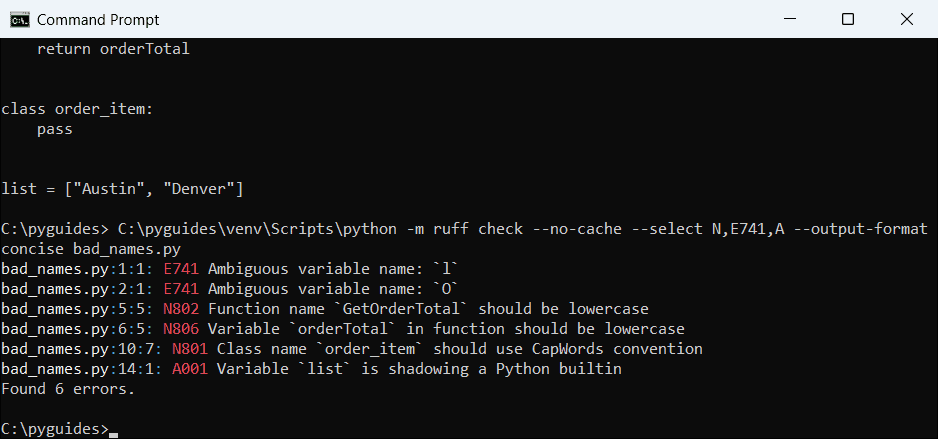
bad_names.py:1:1: E741 Ambiguous variable name: `l`
bad_names.py:2:1: E741 Ambiguous variable name: `O`
bad_names.py:5:5: N802 Function name `GetOrderTotal` should be lowercase
bad_names.py:6:5: N806 Variable `orderTotal` in function should be lowercase
bad_names.py:10:7: N801 Class name `order_item` should use CapWords convention
bad_names.py:14:1: A001 Variable `list` is shadowing a Python builtin
Found 6 errors.
Ruff reports six problems, one per bad name.
How does this code work?
--select N,E741,A turns on just the naming rules, and --output-format concise prints one line per issue. N806 caught orderTotal inside the function.
I run it before every commit. Names also decide where a variable lives, which Python variable scope explains.
Things to Keep in Mind When Naming Python Variables
- A SyntaxError on an assignment usually means a bad name. Start with a letter or underscore and drop hyphens and symbols.
- Built-in names are legal but hide the function. Rename
list,sumoridto something descriptive. - Keywords can’t be names. Add a trailing underscore, like
class_. - PEP 8 is a style guide. If your project already uses another style, stay consistent with it.
Want to keep going with variables? These pick up where this one stops:
- Nested classes in Python
- Access modifiers in Python
- The Python dir() function
- The len() function in Python
Frequently asked questions
What is the naming convention for variables in Python?
PEP 8 says lowercase words joined by underscores (snake_case), like order_total.
Should Python variables use camelCase?
No. camelCase works, but PEP 8 allows mixedCase only where a module already uses it.
Can a Python variable name start with a number?
No. It raises a SyntaxError; use revenue_2026 instead of 2026_revenue.
How do I check if a string is a valid variable name?
Use name.isidentifier() and not keyword.iskeyword(name).
Why shouldn’t I name a variable list or sum?
It hides the built-in function, so later calls fail with “object is not callable”.
Where are Python’s naming conventions documented?
See the Naming Conventions section of PEP 8.

Bijay Kumar is a 13-time Microsoft MVP with more than 18 years in software development, and the founder of Python Guides and TSinfo Technologies. He started out building .NET and SharePoint solutions at HP, TCS and KPIT before moving into Python, machine learning and AI, and he also builds web apps with TypeScript and React. He writes the tutorials here himself, and every example is run before publishing so you see the real output. More about Bijay · Microsoft MVP profile · LinkedIn