
Working with React for over the years has taught me one thing: components are like living organisms.
They are born, they grow, they change, and eventually, they pass away.
I remember my first large-scale project where I ignored these phases. The app was a mess of memory leaks and ghost data.
Once I mastered the lifecycle, everything clicked into place.
In this guide, I will share my firsthand experience with the three main phases of a React component.
What is the React Component Lifecycle?
Every React component goes through a series of stages from the moment it’s initialized to the moment it leaves the UI.
In the industry, we call this the “Component Lifecycle.”
It is divided into three primary phases: Mounting, Updating, and Unmounting.
Phase 1: Mount (The Birth of a Component)
Mounting is the phase where the component is created and inserted into the DOM.
Think of it like a new user signing up for a subscription service in the US, such as a streaming platform.
When that user profile is first built and shown on the screen, that is “Mounting.”
1. The Constructor
The constructor is the very first thing that runs. I use it primarily for two things: initializing the state and binding event handlers.
In modern React, we often skip the constructor for simple state, but for complex logic, it’s still my go-to.
2. The Render Method
This is the only required method in a class component. It handles the actual “drawing” of your UI.
I always keep this function pure, meaning it should never modify the state directly.
3. ComponentDidMount
This is where the magic happens for me. It runs immediately after the component is added to the DOM.
If I need to fetch data from an API, like pulling current stock prices from the NYSE, I do it here.
import React, { Component } from 'react';

class StockTracker extends Component {
  constructor(props) {
    super(props);
    // Initializing state for a US-based stock ticker
    this.state = {
      ticker: 'AAPL',
      price: null,
      loading: true
    };
    console.log("1. Constructor: Initializing Stock Tracker");
  }

  componentDidMount() {
    console.log("3. ComponentDidMount: Fetching live data...");
    // Simulating a fetch to a financial API
    setTimeout(() => {
      this.setState({
        price: 185.25,
        loading: false
      });
    }, 2000);
  }

  render() {
    console.log("2. Render: Drawing the UI");
    const { ticker, price, loading } = this.state;

    return (
      <div style={{ padding: '20px', fontFamily: 'Arial' }}>
        <h1>US Market Watch</h1>
        <p>Stock: <strong>{ticker}</strong></p>
        {loading ? (
          <p>Loading market data...</p>
        ) : (
          <p>Current Price: ${price}</p>
        )}
      </div>
    );
  }
}

export default StockTracker;
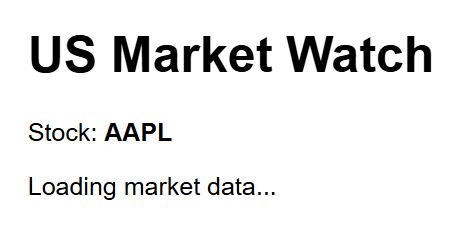
You can see the output in the screenshot below.
Phase 2: Update (The Growth Phase)
A component doesn’t just sit there; it reacts to changes. Whenever the props or state change, the component enters the Updating phase.
Imagine a shipping tracker for a package moving from New York to California. As the location updates, the component re-renders.
1. ShouldComponentUpdate
This is a powerful tool for performance. It allows me to tell React: “Wait, don’t re-render unless this specific piece of data changed.”
In high-traffic apps, I use this to prevent sluggishness by returning false if the update isn’t necessary.
2. ComponentDidUpdate
This method runs right after the update has been flushed to the DOM.
I use this when I need to perform an action based on a change, like updating a database record after a user changes their US zip code.
import React, { Component } from 'react';

class ShippingTracker extends Component {
  constructor(props) {
    super(props);
    this.state = {
      location: 'New York, NY',
      status: 'Processing'
    };
  }

  // Optimization: Only update if the location actually changes
  shouldComponentUpdate(nextProps, nextState) {
    if (this.state.location === nextState.location) {
      return false;
    }
    return true;
  }

  componentDidUpdate(prevProps, prevState) {
    if (prevState.location !== this.state.location) {
      console.log(`Package moved from ${prevState.location} to ${this.state.location}`);
      // Here I would typically trigger a notification or log the transit
    }
  }

  updateLocation = () => {
    this.setState({
      location: 'Chicago, IL',
      status: 'In Transit'
    });
  }

  render() {
    return (
      <div style={{ border: '1px solid #ccc', margin: '10px', padding: '15px' }}>
        <h2>FedEx Shipment Tracker</h2>
        <p>Current Status: {this.state.status}</p>
        <p>Current Hub: {this.state.location}</p>
        <button onClick={this.updateLocation}>Move to Next Hub</button>
      </div>
    );
  }
}

export default ShippingTracker;
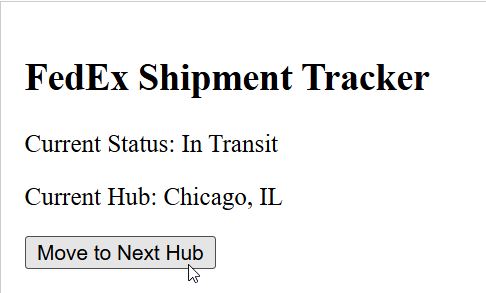
You can see the output in the screenshot below.
Phase 3: Unmount (The Cleanup Phase)
Eventually, a component is no longer needed. When a user navigates away from a page or closes a modal, the component is “Unmounted.”
This is the most critical phase for preventing memory leaks in my experience.
1. ComponentWillUnmount
I use this method to clean up anything I started in componentDidMount. If I set an interval to refresh California weather data every minute, I must clear that interval here.
If I don’t, that timer keeps running in the background, slowing down the entire browser.
import React, { Component } from 'react';

class WeatherInterval extends Component {
  constructor(props) {
    super(props);
    this.state = {
      temp: 72,
      city: 'Los Angeles'
    };
    this.timer = null;
  }

  componentDidMount() {
    // Updating weather every 5 seconds
    this.timer = setInterval(() => {
      const newTemp = Math.floor(Math.random() * (85 - 65 + 1)) + 65;
      this.setState({ temp: newTemp });
      console.log("Weather updated in background");
    }, 5000);
  }

  componentWillUnmount() {
    // CRITICAL: Stop the timer when the component is destroyed
    clearInterval(this.timer);
    console.log("Timer cleared. No memory leaks here!");
  }

  render() {
    return (
      <div style={{ background: '#f0f8ff', padding: '10px' }}>
        <h3>Live Weather: {this.state.city}</h3>
        <p>Temperature: {this.state.temp}°F</p>
      </div>
    );
  }
}

// Parent component to show/hide the weather
class WeatherApp extends Component {
  state = { showWeather: true };

  render() {
    return (
      <div>
        <button onClick={() => this.setState({ showWeather: !this.state.showWeather })}>
          {this.state.showWeather ? "Hide Weather" : "Show Weather"}
        </button>
        {this.state.showWeather && <WeatherInterval />}
      </div>
    );
  }
}

export default WeatherApp;
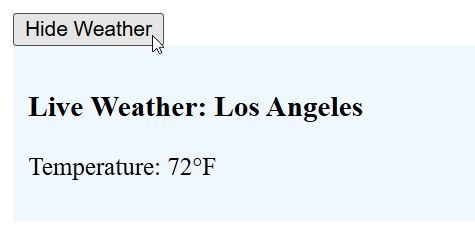
You can see the output in the screenshot below.
Modern React: The useEffect Hook
While class-based lifecycle methods are essential to know, most modern US dev shops have moved to Functional Components.
We use the useEffect hook to handle all three phases in one place.
- Mounting: useEffect(() => { … }, []) (Empty array)
- Updating: useEffect(() => { … }, [dependency]) (Array with values)
- Unmounting: The
returnfunction inside useEffect.
import React, { useState, useEffect } from 'react';

const ModernTaxCalculator = () => {
  const [income, setIncome] = useState(50000);
  const [tax, setTax] = useState(0);

  useEffect(() => {
    // This runs on Mount and whenever 'income' Updates
    const calculatedTax = income * 0.22; // Basic US Federal Tax simulation
    setTax(calculatedTax);

    console.log("Tax updated for new income level.");

    // This return function handles Unmounting
    return () => {
      console.log("Cleaning up calculator resources...");
    };
  }, [income]);

  return (
    <div style={{ padding: '20px', border: '2px solid green' }}>
      <h2>IRS Simple Tax Estimator</h2>
      <label>Annual Income (USD): </label>
      <input
        type="number"
        value={income}
        onChange={(e) => setIncome(e.target.value)}
      />
      <p>Estimated Federal Tax: ${tax.toLocaleString()}</p>
    </div>
  );
};

export default ModernTaxCalculator;
I hope this breakdown makes the React lifecycle feel a bit more manageable.
In my eight years of building UIs, mastering these phases was the single biggest turning point for my code quality.
Whether you are building a simple blog or a complex fintech platform for US users, these principles remain the same.
You may also like to read:
- React PureComponent vs Component
- How to Add ClassName to React Components
- React Drag and Drop Component
- Render React 18 Component to Div

Bijay Kumar is an experienced Python and AI professional who enjoys helping developers learn modern technologies through practical tutorials and examples. His expertise includes Python development, Machine Learning, Artificial Intelligence, automation, and data analysis using libraries like Pandas, NumPy, TensorFlow, Matplotlib, SciPy, and Scikit-Learn. At PythonGuides.com, he shares in-depth guides designed for both beginners and experienced developers. More about us.

