
When I first started building React applications over eight years ago, understanding how to pass content between components was a crucial skill. One of the most powerful features in React is the ability to pass children to components, allowing you to create flexible, reusable UI elements.
If you’re working on a React project in the USA or anywhere else, mastering this will help you build components that fit your app’s needs perfectly.
In this article, I’ll walk you through what passing children means in React, how to use it effectively, and share some practical examples from my own experience.
What Does Passing Children Mean in React?
In React, every component can accept a special prop called children. This prop contains whatever you place between a component’s opening and closing tags when you use it.
For example, if you have a component named <Card>, anything you wrap inside <Card> … </Card> is passed as children to the Card component. This allows you to nest JSX elements inside components without explicitly defining them as props.
Use Children’s Props
From my experience, using the children’s prop has several benefits:
- Reusability: You can create generic components that work with any content.
- Flexibility: Components don’t need to know the exact content they will render.
- Clean Code: Reduces the need for multiple props for nested content.
How to Pass Children to a Component in React: Basic Example
Let me show you a simple example to get started.
import React from "react";

// Card component accepts children prop
const Card = ({ children }) => {
  return (
    <div style={{ border: "1px solid #ccc", padding: "20px", borderRadius: "8px" }}>
      {children}
    </div>
  );
};

const App = () => {
  return (
    <div>
      <h1>Welcome to My Finance Dashboard</h1>
      <Card>
        <h2>Account Balance</h2>
        <p>$5,000</p>
      </Card>
      <Card>
        <h2>Recent Transactions</h2>
        <ul>
          <li>Payment to Utility Company - $120</li>
          <li>Salary Deposit - $3,000</li>
        </ul>
      </Card>
    </div>
  );
};

export default App;
You can refer to the screenshot below to see the output.

Here, the Card component wraps any content passed between its tags via the children prop. This makes it easy to reuse the Card component for different UI sections without changing the component itself.
Access Children in Class Components
If you’re still working with class components, accessing children is just as simple.
import React, { Component } from "react";

class Card extends Component {
  render() {
    return (
      <div style={{ border: "1px solid #ccc", padding: "20px", borderRadius: "8px" }}>
        {this.props.children}
      </div>
    );
  }
}

class App extends Component {
  render() {
    return (
      <div>
        <h1>User Profile</h1>
        <Card>
          <p>Name: John Doe</p>
          <p>Location: New York, USA</p>
        </Card>
      </div>
    );
  }
}

export default App;
You can refer to the screenshot below to see the output.

The children’s prop is available on this.props inside class components, so you can render it the same way.
Use React.Children Utilities for Advanced Handling
Sometimes, you might want to manipulate or validate the children passed to a component. React provides utilities like React.Children.map and React.Children.count to work with children safely.
Here’s an example where I add a wrapper <li> to each child passed into a list component:
import React from "react";

const TransactionList = ({ children }) => {
  return (
    <ul>
      {React.Children.map(children, (child, index) => (
        <li key={index}>{child}</li>
      ))}
    </ul>
  );
};

const App = () => {
  return (
    <div>
      <h1>Recent Transactions</h1>
      <TransactionList>
        <span>Payment to Grocery Store - $80</span>
        <span>Refund from Vendor - $50</span>
        <span>Subscription Payment - $15</span>
      </TransactionList>
    </div>
  );
};

export default App;
You can refer to the screenshot below to see the output.
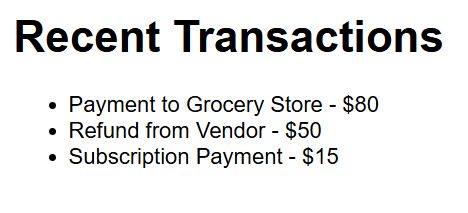
This technique lets you control how children are rendered and is especially useful for components expecting multiple children.
Pass Children Along with Other Props
In real-world apps, you often need to pass children along with other props. For example, a Modal component might accept a title prop and content as children.
import React from "react";

const Modal = ({ title, children, onClose }) => {
  return (
    <div style={{ border: "2px solid black", padding: "20px", width: "300px", backgroundColor: "#fff" }}>
      <h2>{title}</h2>
      <div>{children}</div>
      <button onClick={onClose}>Close</button>
    </div>
  );
};

const App = () => {
  const handleClose = () => alert("Modal closed!");

  return (
    <Modal title="Account Details" onClose={handleClose}>
      <p>Account Number: 123456789</p>
      <p>Account Type: Checking</p>
    </Modal>
  );
};

export default App;
This pattern keeps your components flexible and composable.
Conditional Rendering of Children
Sometimes, you want to conditionally render children based on some logic. Here’s a quick example from a project where I showed a loading spinner if no children are passed:
import React from "react";

const ContentWrapper = ({ children }) => {
  if (!children) {
    return <div>Loading...</div>;
  }
  return <div>{children}</div>;
};

const App = () => {
  const isLoading = false;

  return (
    <ContentWrapper>
      {isLoading ? null : <p>Data loaded successfully!</p>}
    </ContentWrapper>
  );
};

export default App;
This approach helps keep your UI responsive to state changes.
Tips from My Experience When Using Children’s Props
- Always validate children if your component expects a specific type or structure.
- Use React.Children utilities to safely work with children.
- Avoid overusing children to pass large data; prefer props for data, and children for UI elements.
- Remember that children can be a single element, multiple elements, or even text.
Using the children prop effectively has transformed how I build React components. It’s a simple concept but incredibly powerful for creating reusable, clean, and maintainable code.
If you’re looking to deepen your React skills, mastering children props is a must. Experiment with the examples above, and you’ll see how flexible your components can become.
Other React articles you may also like:
- How to Import CSS Files in React Components
- Optimize React Functional Components with React.memo
- How to Fix React Component Not Defined Error
- How to Pass Ref to Child Component in React

Bijay Kumar is an experienced Python and AI professional who enjoys helping developers learn modern technologies through practical tutorials and examples. His expertise includes Python development, Machine Learning, Artificial Intelligence, automation, and data analysis using libraries like Pandas, NumPy, TensorFlow, Matplotlib, SciPy, and Scikit-Learn. At PythonGuides.com, he shares in-depth guides designed for both beginners and experienced developers. More about us.

