
When I first started building data pipelines for financial firms in New York, I realized how often “numbers” aren’t what they seem.
One minute, you are processing a stock price, and the next, a floating-point error turns a clean 100 into 100.00000004.
In Python, distinguishing between a float and a true integer is a task I perform almost daily to ensure data integrity.
I have found that while Python is flexible, being strict about your numeric types prevents massive headaches during data analysis.
In this tutorial, I will show you the exact methods I use to verify integers, ranging from built-in functions to mathematical tricks.
Use the isinstance() Function
The isinstance() function is my go-to tool whenever I need to verify a variable’s type in a production environment.
It is clean, readable, and follows the standard Pythonic way of handling type checking.
I typically use this when I am building functions that require a whole number, such as a count of employees in a Chicago-based tech firm.
Here is the code I use to implement this check:
# Example: Validating a count of office supplies in a Boston warehouse
item_count = 150
price_per_unit = 150.0

# Checking if item_count is an integer
if isinstance(item_count, int):
    print(f"Success: {item_count} is a valid integer count.")
else:
    print(f"Error: {item_count} must be a whole number.")

# Checking if price_per_unit is an integer
if isinstance(price_per_unit, int):
    print(f"Success: {price_per_unit} is an integer.")
else:
    print(f"Note: {price_per_unit} is a float, even if it looks like a whole number.")
You can see the output in the screenshot below.
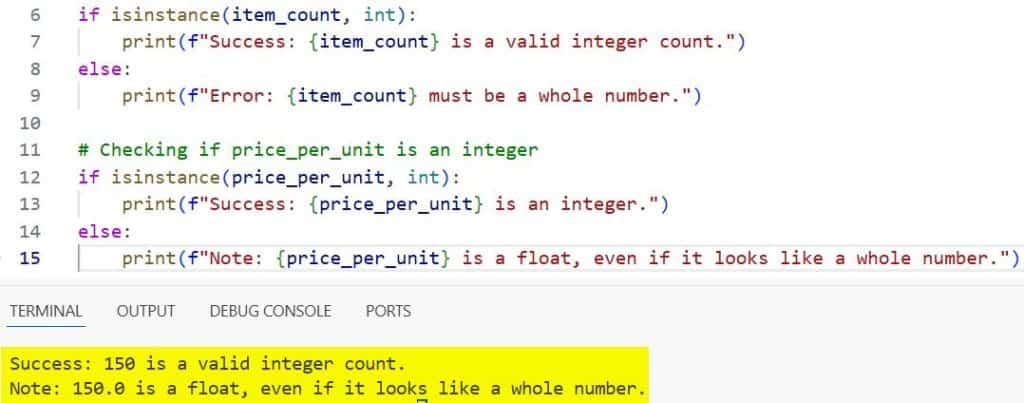
One thing I have learned over the years is that isinstance() also handles Booleans as integers because True is 1 and False is 0 in Python.
If you want to be extremely strict and exclude Booleans, you might need an additional check, though usually, this method is perfect for most US-based business logic.
Use the float.is_integer() Method
There are times when I am dealing with data exported from a SQL database where all numbers come in as floats.
Even if the value is 50.0, technically it is a float, but for my calculations, like counting seats on a flight from JFK to LAX, it represents an integer.
In these cases, the is_integer() method is a lifesaver because it checks if the float has no fractional part.
I find this specifically useful when dealing with currency calculations that should result in whole dollar amounts.
# Example: Checking if a calculated tax value is a whole dollar amount
tax_amount_nyc = 45.0
tax_amount_sf = 45.55

# This method is called on float objects
def check_whole_dollar(val):
    if isinstance(val, float) and val.is_integer():
        print(f"${val} is a whole dollar amount.")
    elif isinstance(val, int):
        print(f"{val} is already a native integer.")
    else:
        print(f"${val} contains cents/fractional parts.")

check_whole_dollar(tax_amount_nyc)
check_whole_dollar(tax_amount_sf)
You can see the output in the screenshot below.
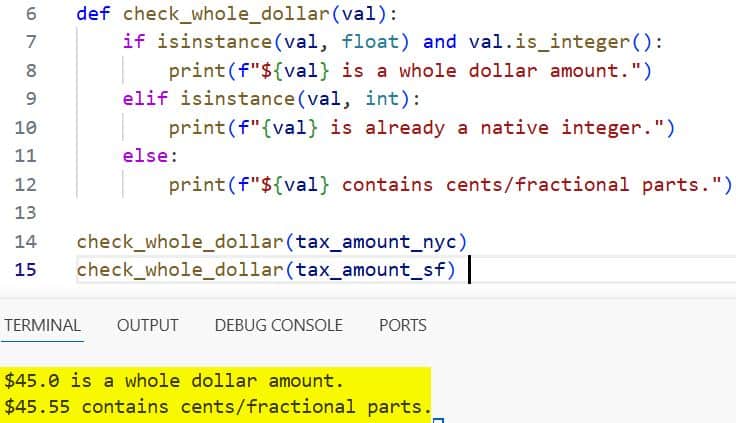
I prefer this method when the “type” matters less than the “value.” It allows your code to be more flexible with incoming data formats.
Use the Modulo Operator (%)
If I am working in a constrained environment or writing a quick script to filter ZIP codes, I often fall back on the modulo operator.
Mathematically, any number divided by 1 with a remainder of 0 can be treated as an integer.
I used this trick frequently back when I was optimizing legacy Python 2 scripts, but it still works perfectly in Python 3.
It is a very “engineer-minded” way to solve the problem without relying on specific class methods.
# Example: Validating a shipment ID for a logistics company in Texas
shipment_id = 98022.0

def is_integral_value(n):
    # If the remainder of n / 1 is 0, it's effectively an integer
    return n % 1 == 0

if is_integral_value(shipment_id):
    print(f"ID {shipment_id} is valid for processing.")
else:
    print(f"ID {shipment_id} is invalid; IDs cannot have decimals.")
You can see the output in the screenshot below.
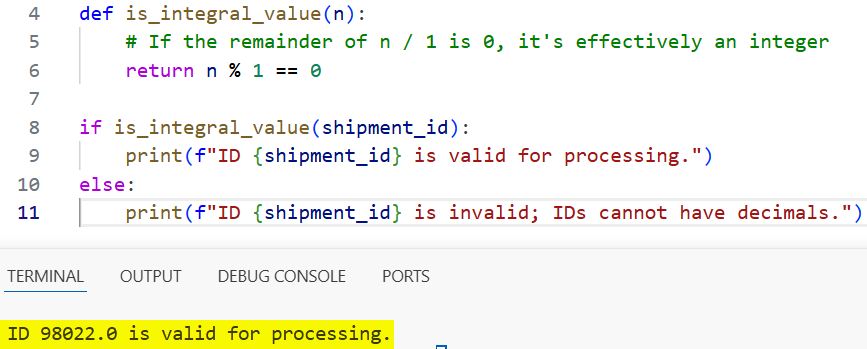
One caveat I should mention is that this method doesn’t care if the type is int or float; it only cares about the mathematical value.
Use the type() Function
While I generally prefer isinstance(), I sometimes use the type() function when I want to perform a strict comparison.
Unlike isinstance(), type() will not return True for subclasses, which can be important if you are using custom numeric classes in a complex framework.
In my experience, this is the “strict mode” of type checking in the Python world.
# Example: Verifying social security digits input (Simplified)
ssn_part = 123

if type(ssn_part) is int:
    print("Input is a strict integer.")
else:
    print("Input type mismatch.")
You can see the output in the screenshot below.
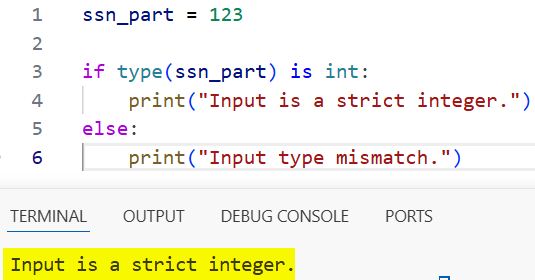
I don’t use this as often, but it is a valuable tool to have in your back pocket for debugging specific type-related bugs in large American enterprise applications.
Handle User Input and Strings
A common scenario I encounter is receiving data as a string, perhaps from a web form where a user enters their age or a quantity.
Before I can check if it is an integer, I have to attempt a conversion.
I’ve seen many junior developers crash their programs because they forgot to handle the ValueError that occurs when a string isn’t numeric.
Here is the robust way I handle this in real-world scenarios:
# Example: Processing a 'Years of Experience' field from a job application form
user_input = "12"

def check_string_input(val):
    try:
        # Try to convert to int
        converted_val = int(val)
        print(f"The input '{val}' is a valid integer: {converted_val}")
    except ValueError:
        print(f"The input '{val}' is NOT an integer.")

check_string_input(user_input)
check_string_input("12.5") # This will fail the int() conversion
If you need to check if a string contains only digits before even trying to convert it, you can use the .isdigit() method.
However, keep in mind that .isdigit() returns False for negative numbers like “-5”, so it isn’t always the best for all US-based data.
Comparing int(n) == n
This is a clever shorthand I’ve used in data cleaning scripts.
If you cast a number to an integer and it remains equal to its original self, then it was an integer (or a float representing an integer) to begin with.
I find this works well when I’m processing large lists of house prices in the California real estate market and need to separate whole numbers quickly.
# Example: Filtering property price data
prices = [450000, 525000.50, 600000.0, 715200]

integer_prices = [p for p in prices if int(p) == p]

print("Properties with whole dollar prices:", integer_prices)
This is readable and performs surprisingly well in list comprehensions.
Why Does Checking for Integers Matter?
In my decade of coding, I have seen silent bugs cause chaos because a float was passed where an integer was expected.
For instance, if you are using a number as an index for a list of US States, Python will throw an error TypeError if that index is 5.0 instead of 5.
Explicitly checking for integers makes your code “fail fast,” which is a principle I swear by for professional development.
It ensures that your logic remains predictable, especially when dealing with financial transactions or loops.
Summary of Methods
To make it easier for you to choose the right tool for the job, here is a quick breakdown of the methods we covered:
- isinstance(x, int): Best for general type checking.
- x.is_integer(): Best when working with floats that should be whole numbers.
- x % 1 == 0: A mathematical approach that works across types.
- int(x) == x: Great for quick comparisons in loops.
- try/except with int(): Essential for handling string inputs from users.
I hope this guide helps you write cleaner, more reliable Python code. Whether you are building a small script or a large-scale application for a US-based firm, these checks are fundamental.
If you found this helpful, you might also want to look into how Python handles floating-point precision, as it often goes hand-in-hand with integer validation.
You may also like to read:
- Understand for i in range Loop in Python
- How to Handle Python Command Line Arguments
- How to Add Python to PATH
- How to Read a File Line by Line in Python

I am Bijay Kumar, a Microsoft MVP in SharePoint. Apart from SharePoint, I started working on Python, Machine learning, and artificial intelligence for the last 5 years. During this time I got expertise in various Python libraries also like Tkinter, Pandas, NumPy, Turtle, Django, Matplotlib, Tensorflow, Scipy, Scikit-Learn, etc… for various clients in the United States, Canada, the United Kingdom, Australia, New Zealand, etc. Check out my profile.

