
I once built a small leave-tracking script for a 10-person U.S. operations team. HR exported employee requests from Excel as a CSV file, but the script needed that data in memory before it could validate dates, count leave days, and create a weekly report. The first job was simple: read the file into an array in Python.
The word array causes some confusion in Python. A standard Python list usually works as the array for text and mixed data. Numeric projects may need a real NumPy array instead. This guide shows the practical choices, complete code, expected output, and the reasons behind each approach.
What Does Reading a File into an Array Mean?
Reading a file into an array means loading file content from disk into a Python data structure. Once the data sits in memory, your program can loop through it, filter it, sort it, validate it, or calculate results.
For most beginner projects, the target structure is a list. A list stores items in order and lets you access each item by its index. Understanding the differences between lists and dictionaries in Python helps when choosing the final structure.
Suppose leave_reasons.txt contains:
Vacation
Medical appointment
Jury duty
Personal day
Python can read those lines into this list:
[
    "Vacation",
    "Medical appointment",
    "Jury duty",
    "Personal day"
]
That structure works well because each file line represents one business value. Your code can now check whether a submitted reason matches an approved leave category.
Python 3.10 or later works for these examples. NumPy requires a separate installation.
Set Up the Example Files
Create a folder named leave_file_project on your local machine. Keep the Python script and sample files together while learning:
leave_file_project/
├── app.py
├── leave_reasons.txt
├── leave_requests.csv
├── leave_requests.json
└── hours.txt
This one-folder structure removes path confusion and keeps the beginner project easy to run.
Add the following content to leave_requests.csv:
employee,start_date,end_date,leave_type,status
Mia Johnson,2026-07-20,2026-07-22,Vacation,Pending
Ethan Davis,2026-07-24,2026-07-24,Jury Duty,Approved
Olivia Brown,2026-08-03,2026-08-04,Personal,Pending
The YYYY-MM-DD dates sort as text and work with Python’s datetime module.
How to Read a File into an Array in Python
The most direct approach uses the built-in open() function and a with statement. Learning how to open a file in Python correctly matters because the with statement closes it automatically, even when an error interrupts your code.
Add this code to app.py:
with open("leave_reasons.txt", "r", encoding="utf-8") as file:
    leave_reasons = file.readlines()

print(leave_reasons)
Output:
['Vacation\n', 'Medical appointment\n', 'Jury duty\n', 'Personal day\n']I executed the above example code and added the screenshot below.
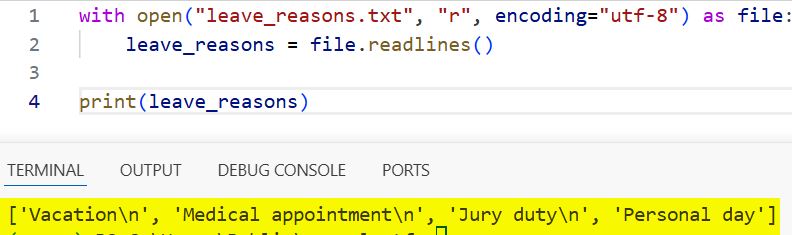
The "r" argument opens the file in read mode. The encoding="utf-8" argument tells Python how to convert stored bytes into readable text. UTF-8 handles common U.S. English text and names with accented characters.
The result contains \n, which represents a newline character. Newlines often cause failed comparisons because "Vacation\n" does not equal "Vacation".
Use a list comprehension to remove surrounding whitespace:
with open("leave_reasons.txt", "r", encoding="utf-8") as file:
    leave_reasons = [line.strip() for line in file]

print(leave_reasons)
print(leave_reasons[0])
Output:
['Vacation', 'Medical appointment', 'Jury duty', 'Personal day']
Vacation
I executed the above example code and added the screenshot below.
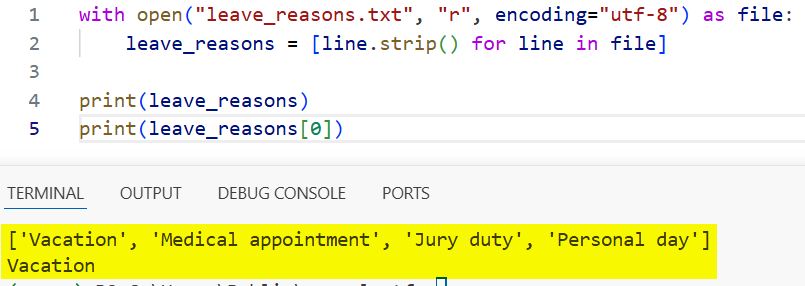
A list comprehension builds a list while looping through another object. Here, the Python strip function removes spaces, tabs, and newline characters from each line.
This pattern safely closes the file and cleans values immediately.
Skip Empty Lines While Reading the File
Real files often contain blank lines. If blank entries have no business meaning, filter them during the same list comprehension:
with open("leave_reasons.txt", "r", encoding="utf-8") as file:
    leave_reasons = [
        line.strip()
        for line in file
        if line.strip()
    ]

print(leave_reasons)
Output:
['Vacation', 'Medical appointment', 'Jury duty', 'Personal day']The condition keeps nonempty strings because Python treats an empty string as false. It prevents blank leave types from entering reports.
Pro Tip: In my experience,
strip()fixes more file-import bugs than developers expect. I clean each line at the boundary, before any validation or comparison runs.
Read the Entire File and Split It into an Array
You can also call read() to load the complete file as one string. Then use splitlines() to create the list:
with open("leave_reasons.txt", "r", encoding="utf-8") as file:
    leave_reasons = file.read().splitlines()

print(leave_reasons)
Output:
['Vacation', 'Medical appointment', 'Jury duty', 'Personal day']I executed the above example code and added the screenshot below.
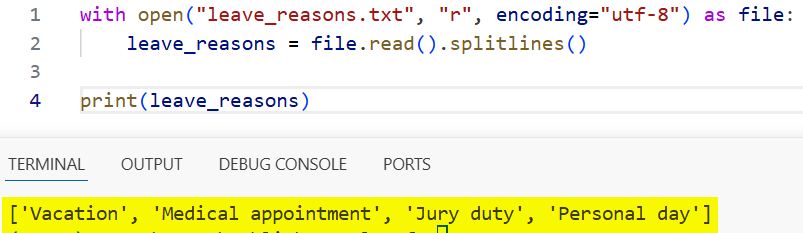
The splitlines() technique removes common Windows, macOS, and Linux line endings. It produces cleaner results than readlines() when newlines have no value.
However, read() loads everything into memory. It suits configuration files and small exports but may exhaust memory with multi-gigabyte files.
For a large file, read the Python file line by line instead:
approved_count = 0

with open("large_leave_export.txt", "r", encoding="utf-8") as file:
    for line in file:
        if "Approved" in line:
            approved_count += 1

print(f"Approved requests: {approved_count}")
Output:
Approved requests: 1842This version intentionally avoids a full array. Streaming saves memory when you only need a count or filtered result.
Read a CSV File into an Array in Python
A CSV file stores comma-separated values. Do not use line.split(",") because valid fields may contain quoted commas, such as "Austin, Texas". Python’s csv module understands these rules, and a streaming approach also helps you read large CSV files in Python.
Create an Array of Rows
Use csv.reader() when you want a list containing one list per row:
import csv

with open("leave_requests.csv", "r", newline="", encoding="utf-8") as file:
    reader = csv.reader(file)
    leave_requests = list(reader)

print(leave_requests[0])
print(leave_requests[1])
Output:
['employee', 'start_date', 'end_date', 'leave_type', 'status']
['Mia Johnson', '2026-07-20', '2026-07-22', 'Vacation', 'Pending']
list(reader) creates a two-dimensional list of rows and columns. leave_requests[1][0] returns Mia Johnson, but numeric positions become fragile when columns change.
The newline="" argument lets the csv module manage Windows line endings.
Create an Array of Dictionaries
For business data, I prefer csv.DictReader(). A dictionary stores values under named keys instead of numeric positions:
import csv

with open("leave_requests.csv", "r", newline="", encoding="utf-8") as file:
    reader = csv.DictReader(file)
    leave_requests = list(reader)

print(leave_requests[0])
print(leave_requests[0]["employee"])
print(leave_requests[0]["status"])
Output:
{'employee': 'Mia Johnson', 'start_date': '2026-07-20', 'end_date': '2026-07-22', 'leave_type': 'Vacation', 'status': 'Pending'}
Mia Johnson
Pending
Named fields improve readability because request["status"] communicates more than request[4]. The first CSV row supplies the keys.
You can filter the array with another list comprehension:
pending_requests = [
    request
    for request in leave_requests
    if request["status"].lower() == "pending"
]

print([request["employee"] for request in pending_requests])
Output:
['Mia Johnson', 'Olivia Brown']Calling lower() handles Pending, PENDING, and pending. I also apply strip() because spreadsheet exports sometimes add invisible spaces.
Convert File Values to the Correct Data Type
Text files produce strings. Your application must convert those strings before performing calculations. Otherwise, Python may join numbers as text instead of adding them.
Suppose hours.txt contains:
8
7.5
4
8
Read the values as floating-point numbers:
with open("hours.txt", "r", encoding="utf-8") as file:
    hours = [float(line.strip()) for line in file if line.strip()]

print(hours)
print(sum(hours))
Output:
[8.0, 7.5, 4.0, 8.0]
27.5
The float type supports decimals. Use int() for whole numbers. Convert during import so later code receives consistent types.
Dates need the same treatment. The datetime module lets you convert a string to a date in Python for calendar calculations:
from datetime import datetime

request = {
    "start_date": "2026-07-20",
    "end_date": "2026-07-22"
}

start_date = datetime.strptime(
    request["start_date"], "%Y-%m-%d"
).date()

end_date = datetime.strptime(
    request["end_date"], "%Y-%m-%d"
).date()

duration = (end_date - start_date).days + 1

print(f"Calendar days requested: {duration}")
Output:
Calendar days requested: 3strptime() parses text according to a format. %Y-%m-%d means year, month, and day. Adding one includes both dates.
This calculation counts weekends and U.S. holidays. Confirm the HR policy before calculating balances.
Read a JSON File into an Array in Python
JSON stores structured strings, numbers, booleans, arrays, and objects. It works well for files created by another application.
Add this content to leave_requests.json:
[
  {
    "employee": "Mia Johnson",
    "leave_type": "Vacation",
    "days": 3,
    "approved": false
  },
  {
    "employee": "Ethan Davis",
    "leave_type": "Jury Duty",
    "days": 1,
    "approved": true
  }
]
Read it with Python’s built-in json module. This module handles JSON data in Python without another package:
import json

with open("leave_requests.json", "r", encoding="utf-8") as file:
    leave_requests = json.load(file)

print(type(leave_requests))
print(leave_requests[0]["employee"])
print(leave_requests[0]["approved"])
Output:
<class 'list'>
Mia Johnson
False
json.load() reads JSON directly from an open file. The top-level JSON array becomes a Python list, each JSON object becomes a dictionary, and false becomes Python’s False.
Avoid using eval() to parse JSON or other file content. eval() can execute malicious Python code. The json module parses the supported data format without treating the file as a program.
Read Numeric File Data into a NumPy Array
A Python list handles basic numbers. A Python NumPy array stores numeric values efficiently and supports vectorization, which applies operations without manual loops.
Install NumPy from your terminal:
python -m pip install numpyThen load hours.txt:
import numpy as np

hours = np.loadtxt("hours.txt", dtype=float)

print(hours)
print(type(hours))
print(hours.mean())
Output:
[8.  7.5 4.  8. ]
<class 'numpy.ndarray'>
6.875
The dtype=float argument requests decimal numbers. mean() calculates the average. NumPy fits data analysis, scientific computing, and large numeric datasets, but it adds an external dependency that simple text-processing scripts do not need.
If the numeric file includes a header or missing values, numpy.loadtxt() may fail. In that situation, NumPy genfromtxt offers options for headers and missing data:
import numpy as np

hours = np.genfromtxt(
    "hours_with_header.csv",
    delimiter=",",
    skip_header=1,
    usecols=1,
    dtype=float
)

print(hours)
Output:
[8. 7.5 4. 8. ]Choose NumPy when later calculations benefit from it. Installing it just to read four lines adds needless complexity.
Handle Missing and Invalid Files
File imports fail for ordinary reasons. A user may rename the export, save it in another folder, or enter an invalid number. Handle expected problems and show a useful message.
from pathlib import Path

file_path = Path("leave_reasons.txt")

try:
    with file_path.open("r", encoding="utf-8") as file:
        leave_reasons = [
            line.strip()
            for line in file
            if line.strip()
        ]

    print(f"Loaded {len(leave_reasons)} leave reasons.")

except FileNotFoundError:
    print(f"File not found: {file_path.resolve()}")

except PermissionError:
    print("Permission denied. Close the file or check folder access.")

except UnicodeDecodeError:
    print("The file is not valid UTF-8 text.")
Successful output:
Loaded 4 leave reasons.Missing-file output:
File not found: C:\leave_file_project\leave_reasons.txtThe pathlib module represents file paths as objects. resolve() shows the full location Python tried to open, while learning how to get the current file path in Python helps with portable project paths.
Catch specific exceptions instead of using a broad except: block. You can also catch multiple exceptions in Python while keeping each recovery message accurate.
Use the Imported Array in a Small Leave App
The following command-line application asks an HR coordinator for a leave type and validates it against the imported array. It runs in a terminal and uses the Python input function instead of a graphical window.
from pathlib import Path


def load_leave_reasons(file_path):
    with Path(file_path).open("r", encoding="utf-8") as file:
        return [
            line.strip()
            for line in file
            if line.strip()
        ]


def normalize(value):
    return value.strip().casefold()


leave_reasons = load_leave_reasons("leave_reasons.txt")

entered_reason = input("Enter leave type: ")

valid_reasons = {
    normalize(reason): reason
    for reason in leave_reasons
}

lookup_key = normalize(entered_reason)

if lookup_key in valid_reasons:
    print(f"Accepted leave type: {valid_reasons[lookup_key]}")
else:
    print("Invalid leave type.")
    print("Choose from:", ", ".join(leave_reasons))
Example run:
Enter leave type: vacation
Accepted leave type: Vacation
Invalid example:
Enter leave type: Remote work
Invalid leave type.
Choose from: Vacation, Medical appointment, Jury duty, Personal day
A function groups reusable code under a name. load_leave_reasons() keeps file handling separate from the user interaction. That separation makes the code easier to test and lets a future Tkinter interface reuse the same loader.
The casefold() method performs a stronger case-insensitive conversion than lower(). It may not matter for the current U.S. English values, but it creates a reliable comparison rule.
For a growing HR leave management tool, I would move completed requests into an SQLite database. SQLite stores structured records in a local database file and supports create, read, update, and delete tasks, often called CRUD operations. The text array should still handle small reference lists, while the database handles requests that change over time.
Things to Keep in Mind
- Choose the right structure: Use a Python list for text or mixed records. Use a NumPy array for substantial numeric work.
- Clean imported values: Remove newline characters and unintended spaces before comparing, sorting, or validating data.
- Avoid hard-coded absolute paths: Use
pathliband a configurable data folder when the script may run on another employee’s computer. - Watch memory usage: Do not load a huge file into an array when your task only needs one-pass processing.
- Validate before trusting: Treat imported files as untrusted input. Check required columns, date formats, numeric ranges, and allowed status values.
- Protect sensitive data: Employee leave files may contain medical or personal information. Limit access and avoid printing private details in logs.
Frequently Asked Questions
How do I read each line of a file into a list in Python?
Open the file with a with statement and use [line.strip() for line in file]. This creates one list item per line and removes newline characters.
What is the difference between read(), readline(), and readlines()?
read() returns the whole file as one string. readline() returns one line per call, while readlines() returns all lines as a list that usually includes newline characters.
How do I read a text file into an array without newlines?
Use file.read().splitlines() or strip each line in a list comprehension. Both approaches remove standard line-ending characters.
How do I read a CSV file into a two-dimensional array?
Use csv.reader() and convert the reader with list(reader). The outer list contains rows, and each inner list contains that row’s column values.
Should I use a Python list or a NumPy array?
Use a list for general file content, strings, dictionaries, and smaller datasets. Use a NumPy array when the file contains consistent numeric data and your program performs many calculations.
How can I read a large file without running out of memory?
Loop over the open file directly and process one line at a time. Store only the filtered or summarized results that your application actually needs.
You learned how to read text, CSV, JSON, and numeric file data into useful Python arrays. For most scripts, start with a cleaned Python list and choose NumPy only for calculation-heavy numeric data. I hope you found this article helpful.
You May Also Like:
- Write an array to a file in Python
- Read a binary file into a byte array in Python
- Read a CSV file with NumPy
- Read a text file with Python Tkinter
- Check whether a file exists in Python

Bijay Kumar is an experienced Python and AI professional who enjoys helping developers learn modern technologies through practical tutorials and examples. His expertise includes Python development, Machine Learning, Artificial Intelligence, automation, and data analysis using libraries like Pandas, NumPy, TensorFlow, Matplotlib, SciPy, and Scikit-Learn. At PythonGuides.com, he shares in-depth guides designed for both beginners and experienced developers. More about us.

