
I’ve been working with Python for many years, and if there is one thing I’ve learned, it’s that you will almost always deal with JSON.
Whether you are pulling data from a retail API or processing financial reports for a New York-based firm, JSON is the standard.
Working with JSON arrays can feel a bit tricky at first, especially when you are trying to grab specific values from a long list of objects.
In this tutorial, I will show you exactly how to navigate these arrays and extract the data you need efficiently.
Understand JSON Arrays in Python
In Python, when we talk about a JSON array, we are essentially dealing with a List of Dictionaries.
If you are pulling data from a US-based weather service or a stock market feed, the data usually arrives as a string that looks like an array.
To work with it, we first need to parse it into a format Python understands.
Method 1: Use the json.loads() Method
When I first started building web scrapers, I realized that the json module is your best friend.
You take a JSON string, load it into a Python object, and then iterate through it just like a regular list.
Here is a practical example. Imagine we have a list of tech companies based in Silicon Valley and their current employee counts.
import json

# Sample JSON array string representing US Tech Companies
json_data = '''
[
    {"company": "Apple", "location": "Cupertino", "employees": 164000},
    {"company": "Microsoft", "location": "Redmond", "employees": 221000},
    {"company": "Google", "location": "Mountain View", "employees": 190000},
    {"company": "Amazon", "location": "Seattle", "employees": 1541000}
]
'''

# Parsing the JSON string into a Python list
companies_list = json.loads(json_data)

print("Extracting Company Names:")

# Using a for loop to get values
for company in companies_list:
    name = company.get("company")
    location = company.get("location")
    print(f"{name} is headquartered in {location}.")
I executed the above example code and added the screenshot below.
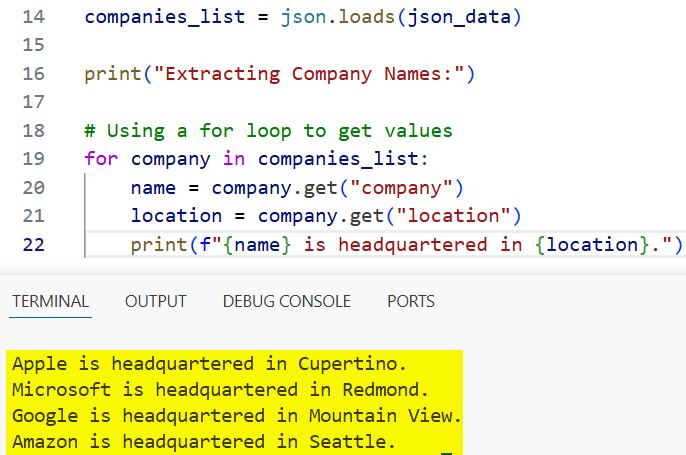
I prefer using the .get() method over square brackets because it prevents the code from crashing if a key is missing.
In a professional production environment, data is often messy, and this small habit has saved me hours of debugging.
Method 2: Extract Values Using List Comprehensions
Whenever I need to extract a single column of data, like just the names of the cities, I use list comprehensions.
It makes the code much cleaner and is generally faster than a standard loop.
Let’s look at how we can quickly get a list of all employee counts from our previous data.
import json

json_data = '''
[
    {"company": "Apple", "employees": 164000},
    {"company": "Microsoft", "employees": 221000},
    {"company": "Google", "employees": 190000}
]
'''

data = json.loads(json_data)

# Extracting only the employee counts into a new list
employee_counts = [item['employees'] for item in data]

print("Employee Counts List:")
print(employee_counts)

# Calculating total employees in these US firms
total_employees = sum(employee_counts)
print(f"Total workforce: {total_employees}")
I executed the above example code and added the screenshot below.
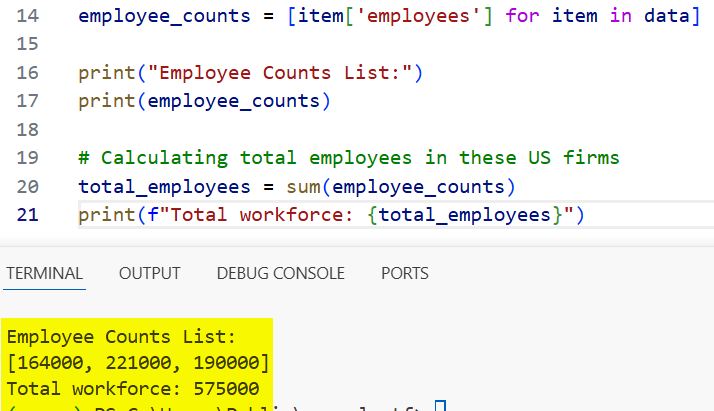
I find this method incredibly useful when I’m preparing data for a dashboard or a quick report for a stakeholder.
It’s a “one-liner” that keeps your script readable and professional.
Method 3: Get Values from Nested JSON Arrays
In the real world, JSON is rarely flat. Usually, you have an array inside another object.
I recently worked on a project involving US Census data where each state had an array of major cities.
To get these values, you have to access the main key first and then loop through the nested array.
import json

# Nested JSON structure
us_data = '''
{
    "country": "United States",
    "regions": [
        {
            "state": "California",
            "cities": ["Los Angeles", "San Francisco", "San Diego"]
        },
        {
            "state": "Texas",
            "cities": ["Houston", "Austin", "Dallas"]
        }
    ]
}
'''

parsed_data = json.loads(us_data)

# Navigating to the nested array
for region in parsed_data['regions']:
    state_name = region['state']
    # Extracting values from the inner array
    major_cities = ", ".join(region['cities'])
    print(f"Major cities in {state_name}: {major_cities}")
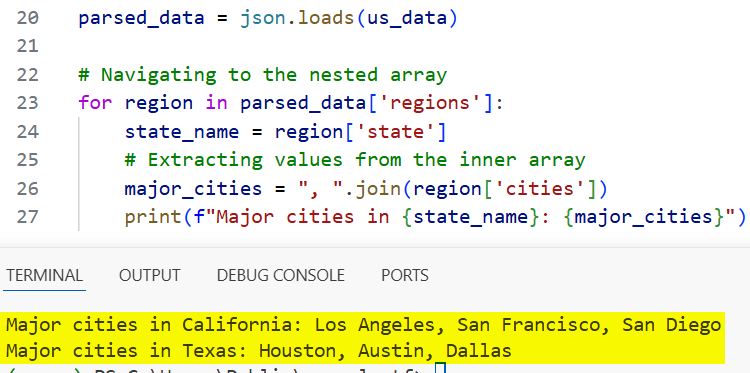
I executed the above example code and added the screenshot below.
Method 4: Handle JSON Arrays from a File
Most of the time, your JSON data isn’t a string in your code; it’s a .json file stored on your server.
Suppose you have a file named us_sales.json with the following content: [{“id”: 1, “amount”: 500}, {“id”: 2, “amount”: 1200}]
import json

# Reading from a local file
try:
    with open('us_sales.json', 'r') as file:
        sales_data = json.load(file)

    # Extracting sales amounts over $1000
    high_value_sales = [sale['amount'] for sale in sales_data if sale['amount'] > 1000]

    print(f"High value transactions found: {high_value_sales}")

except FileNotFoundError:
    print("The JSON file was not found. Please check the file path.")
I always use the with open() statement because it ensures the file is closed properly after reading, even if an error occurs.
Method 5: Use Filter and Lambda Functions
If you are coming from a functional programming background, you might prefer using filter().
I use this when I need to extract values based on a specific condition, like finding all cities with a population over a certain limit.
import json

json_data = '''
[
    {"city": "New York City", "population": 8336000},
    {"city": "Chicago", "population": 2697000},
    {"city": "Phoenix", "population": 1608000}
]
'''

cities = json.loads(json_data)

# Getting cities with population over 2 million
large_cities = list(filter(lambda x: x['population'] > 2000000, cities))

for c in large_cities:
    print(f"Large City: {c['city']}")
Common Mistakes to Avoid
In my experience, two things trip up most developers when extracting JSON values:
- JSON vs. Dictionary: Remember that json_data is a string. You cannot loop through it until you use json.loads().
- KeyErrors: If you try to access item[‘Price’] but the JSON uses item[‘price’] (lowercase), your code will fail. Python is case-sensitive!
Related Points to Consider
- JSON API Requests: Often, you’ll use the requests library. Instead of json.loads(), you can simply use response.json().
- Pandas Integration: If you have a massive JSON array, I recommend loading it into a Pandas DataFrame. It’s much faster for heavy data analysis.
- Data Validation: Consider using pydantic if you need to ensure the values you extract follow a specific schema.
In this tutorial, I showed you several ways to get values from a JSON array in Python.
Depending on your specific needs, whether it’s a simple loop, a quick list comprehension, or handling nested objects, you can choose the method that works best for you.
You may also read:
- Data Encapsulation in Python
- Python @property vs Normal Methods
- How to Use @property Decorator in Python
- How to Use Abstract Base Classes (ABC) in Python

Bijay Kumar is an experienced Python and AI professional who enjoys helping developers learn modern technologies through practical tutorials and examples. His expertise includes Python development, Machine Learning, Artificial Intelligence, automation, and data analysis using libraries like Pandas, NumPy, TensorFlow, Matplotlib, SciPy, and Scikit-Learn. At PythonGuides.com, he shares in-depth guides designed for both beginners and experienced developers. More about us.

