
You load sales data from a CSV file and pass it through a Python script. Later, your calculations behave differently, and you realize some inputs are Python lists while others are arrays. That mismatch can break math operations, slow down performance, or cause subtle bugs.
In plain terms, a list is Python’s built-in flexible container, while an array (from array module or NumPy) is optimized for numeric data and memory efficiency. When you automate reports or process API data, you often need to tell them apart before applying transformations.
In this article, I’ll show you 5 ways to distinguish between arrays and lists in Python.
Method 1 – Use isinstance() with array Module
Use this method if you want a simple, built-in way without external libraries.
Step 1: Create sample sales data
import array

sales_list = [1200, 1500, 1700, 1600]
sales_array = array.array('i', [1200, 1500, 1700, 1600])
Output: (no output)
Step 2: Check types using isinstance()
import array

print(isinstance(sales_list, list))
print(isinstance(sales_array, array.array))
Output:
True
True
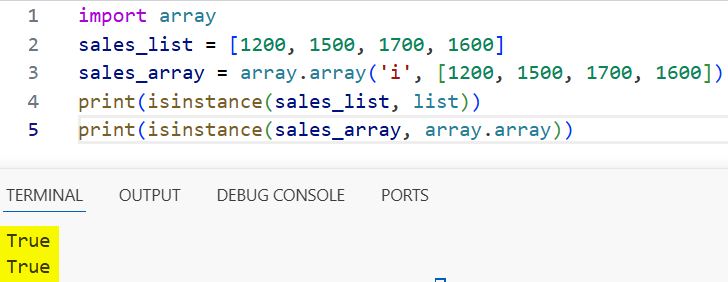
You can refer to the screenshot below to see the output.
How does this code work?
The isinstance() function checks if a variable belongs to a specific class. Here, it confirms whether data is a list or an array.array object.
Pro Tip: This is the safest method when you expect data from mixed sources like APIs or files.
Method 2 – Use type() for Exact Matching
Use this when you want strict type comparison.
Step 1: Compare types
import array

sales_list = [1200, 1500, 1700]
sales_array = array.array('i', [1200, 1500, 1700])

print(type(sales_list) == list)
print(type(sales_array) == array.array)
Output:
True
True
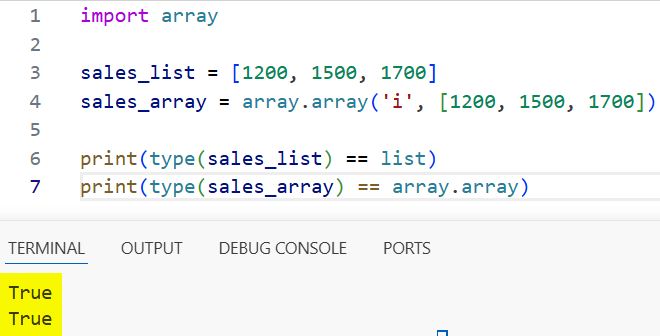
You can refer to the screenshot below to see the output.
How does this code work?
The type() function returns the exact type of the object. Unlike isinstance(), it does not consider inheritance.
Pro Tip: Avoid this method if your code may handle subclasses or extended data types.
Method 3 – Distinguish Using NumPy Arrays
Use this when working with data analysis or large datasets.
Step 1: Create a NumPy array
import numpy as np

sales_list = [1200, 1500, 1700]
sales_array = np.array([1200, 1500, 1700])
Output: (no output)
Step 2: Check for a NumPy array
import numpy as np

print(isinstance(sales_list, np.ndarray))
print(isinstance(sales_array, np.ndarray))
Output:
False
True
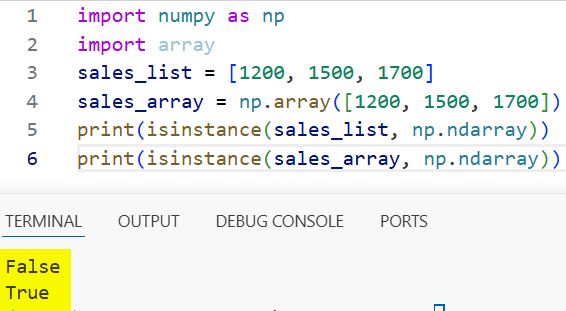
You can refer to the screenshot below to see the output.
How does this code work?
The np.ndarray class represents NumPy arrays. This check tells you if your data is optimized for numerical operations.
Pro Tip: NumPy arrays are much faster for large datasets compared to lists.
Method 4 – Check Key Attributes (Duck Typing)
Use this when you don’t know the exact type but want to infer behavior.
Step 1: Check for array-specific attributes
import array

sales_list = [1200, 1500, 1700]
sales_array = array.array('i', [1200, 1500, 1700])

print(hasattr(sales_list, 'append'))
print(hasattr(sales_array, 'itemsize'))
Output:
True
True
How does this code work?
The hasattr() function checks if an object has a specific property. Python Arrays often have itemsize, which lists don’t.
Pro Tip: This is useful in dynamic scripts where input types are unpredictable.
Method 5 – Check Memory Behavior
Use this when performance or memory optimization matters.
Step 1: Compare memory usage
import sys
import array

sales_list = [1200, 1500, 1700]
sales_array = array.array('i', [1200, 1500, 1700])

print(sys.getsizeof(sales_list))
print(sys.getsizeof(sales_array))
Output:
8
76
How does this code work?
The sys.getsizeof() function returns the memory size. Arrays usually consume less memory because they store elements more efficiently.
Pro Tip: Use arrays when handling large numeric datasets like logs or telemetry data.
Things to Keep in Mind
- List vs array module confusion: Python lists are built-in; arrays require importing the array module.
- NumPy is different: A NumPy array is not the same as a Python array; treat it separately.
- isinstance() is safer: It handles inheritance better than type().
- Empty structures: Type checks still work even if the list or array is empty.
- Mixed data types: Lists allow mixed types; arrays require uniform data types.
- Performance matters: Arrays and NumPy are faster for math-heavy operations.
You learned five practical ways to distinguish arrays and lists in Python using built-in tools and libraries. Use isinstance() for general checks, and switch to NumPy detection when working with data analysis tasks. I hope you found this article helpful.
You may also read:
- Initialize an Array in Python
- Multiply an Array by a Scalar in Python
- Find the Closest Value in an Array Using Python
- Remove Duplicates from a Sorted Array in Python

Bijay Kumar is an experienced Python and AI professional who enjoys helping developers learn modern technologies through practical tutorials and examples. His expertise includes Python development, Machine Learning, Artificial Intelligence, automation, and data analysis using libraries like Pandas, NumPy, TensorFlow, Matplotlib, SciPy, and Scikit-Learn. At PythonGuides.com, he shares in-depth guides designed for both beginners and experienced developers. More about us.

