
Imagine you have a list of monthly sales numbers sitting in a CSV file. You load them into a Python list, and now your manager asks, “What’s the total for the year?” You don’t want to open Excel, copy data, and add it up manually every single time.
That’s where knowing how to find the sum of an array in Python comes in handy. You can use it to total sales, calculate total website visits, add up exam scores, or combine any set of numeric values in a repeatable way inside a Python script.
In this article, I’ll show you 5 ways to find the sum of an array in Python.
Let’s assume this is our sample dataset for the whole article:
- We have a list of monthly sales (in dollars) for a small online store.
- Each item represents one month’s total sales.
monthly_sales = [1200, 1500, 1750, 1600, 1800, 2000, 1950, 2100, 2200, 2300, 2400, 2500]
We’ll use this same monthly_sales list in all methods so you can clearly compare each approach.
Method 1 – Use Python’s Built-in sum() Function
Use this method if you want the simplest and fastest way to get the total of a list or Python array without installing any extra library. It works great for most day-to-day scripts.
Step 1: Define your array (list of numbers)
monthly_sales = [1200, 1500, 1750, 1600, 1800, 2000, 1950, 2100, 2200, 2300, 2400, 2500]
print(monthly_sales)
# Sample output:
# [1200, 1500, 1750, 1600, 1800, 2000, 1950, 2100, 2200, 2300, 2400, 2500]
I executed the above example code and added the screenshot below.

How does this code work?
You create a simple Python list called monthly_sales that stores your sales numbers as integers. When you print it, you see the entire list, which helps you confirm the data looks correct.
Step 2: Use sum() to find the total
monthly_sales = [1200, 1500, 1750, 1600, 1800, 2000, 1950, 2100, 2200, 2300, 2400, 2500]

total_sales = sum(monthly_sales)
print("Total sales for the year:", total_sales)
# Sample output:
# Total sales for the year: 23300
How does this code work?
The built-in sum() function takes an iterable like a list and returns the sum of all its elements. You pass monthly_sales to sum(), store the result in total_sales, and print it with a clear message.
Pro Tip: Use sum() when you work with plain Python lists or tuples and don’t need advanced data analysis. It’s fast, readable, and part of core Python, so there’s nothing extra to install.
Method 2 – Use a for Loop (Manual Summation)
Use this method when you want full control over how the sum is calculated. For example, when you need to skip some values, apply conditions, or log intermediate results.
Step 1: Set up the array and a running total
monthly_sales = [1200, 1500, 1750, 1600, 1800, 2000, 1950, 2100, 2200, 2300, 2400, 2500]

total_sales = 0
print("Initial total:", total_sales)
# Sample output:
# Initial total: 0
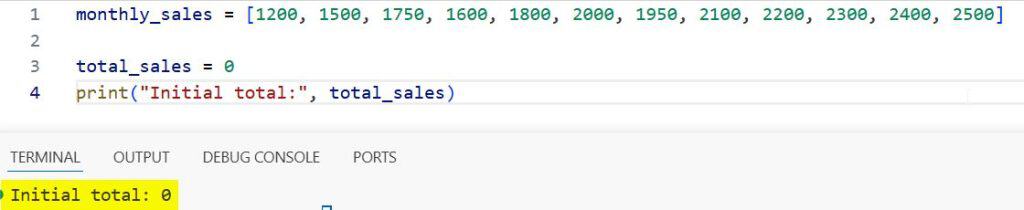
I executed the above example code and added the screenshot below.
How does this code work?
You start with the same monthly_sales list. Then you create a variable total_sales and set it to 0. This variable will hold the running total of all your sales values.
Step 2: Loop through the array and add each value
monthly_sales = [1200, 1500, 1750, 1600, 1800, 2000, 1950, 2100, 2200, 2300, 2400, 2500]

total_sales = 0

for sale in monthly_sales:
    total_sales += sale  # same as total_sales = total_sales + sale

print("Total sales for the year:", total_sales)
# Sample output:
# Total sales for the year: 23300
How does this code work?
The for loop iterates over each value in monthly_sales. On each iteration, it adds the current sale to total_sales. After the loop finishes, total_sales holds the sum of all monthly values.
Pro Tip: The manual for loop is useful when you want to add extra logic, like skipping negative numbers, ignoring missing values, or logging each step for debugging.
Method 3 – Use NumPy Arrays and numpy.sum()
Use this method when you’re working with large datasets, multi-dimensional arrays, or doing scientific and numeric computing. NumPy is a popular library for fast array operations in Python.
Step 1: Install and import numpy, then create a NumPy array
import numpy as np  # NumPy is a popular numerical computing library

monthly_sales = [1200, 1500, 1750, 1600, 1800, 2000, 1950, 2100, 2200, 2300, 2400, 2500]

sales_array = np.array(monthly_sales)
print(sales_array)
# Sample output:
# [1200 1500 1750 1600 1800 2000 1950 2100 2200 2300 2400 2500]
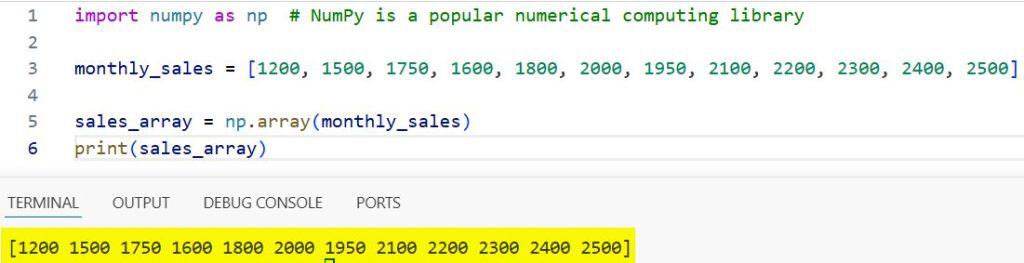
I executed the above example code and added the screenshot below.
How does this code work?
You import numpy as np, which is the common alias. Then you convert the Python list monthly_sales into a NumPy array using np.array(). The sales_array object now supports fast vectorized operations.
Step 2: Use np.sum() to find the total
import numpy as np

monthly_sales = [1200, 1500, 1750, 1600, 1800, 2000, 1950, 2100, 2200, 2300, 2400, 2500]

sales_array = np.array(monthly_sales)

total_sales = np.sum(sales_array)
print("Total sales for the year (NumPy):", total_sales)
# Sample output:
# Total sales for the year (NumPy): 23300
How does this code work?
The np.sum() function takes a NumPy array and returns the sum of its elements. You pass sales_array to np.sum(), and it efficiently computes the total, especially useful when your data size grows.
Step 3 (Optional): Sum along an axis for multi-dimensional arrays
Let’s say you store sales for multiple stores, each row representing a store and each column representing a month.
import numpy as np

# 2D array: rows = stores, columns = months
monthly_sales_stores = np.array([
    [1200, 1500, 1750],   # Store 1, first 3 months
    [1600, 1800, 2000],   # Store 2, first 3 months
    [1950, 2100, 2200]    # Store 3, first 3 months
])

total_all = np.sum(monthly_sales_stores)
total_by_store = np.sum(monthly_sales_stores, axis=1)
total_by_month = np.sum(monthly_sales_stores, axis=0)

print("Total sales (all stores, all months):", total_all)
print("Total sales by store:", total_by_store)
print("Total sales by month:", total_by_month)
# Sample output:
# Total sales (all stores, all months): 14100
# Total sales by store: [4450 5400 5250]
# Total sales by month: [4750 5400 5950]
How does this code work?
- np.sum(monthly_sales_stores) gives the total of all numbers in the 2D array.
- axis=1 sums across columns (per row), so you get totals for each store.
- axis=0 sums across rows (per column), so you get totals for each month across all stores.
- Pro Tip: Use NumPy when performance matters or when you deal with multi-dimensional arrays. Just remember that you need to install NumPy (for example with
pip install numpy) before using it in your project.
Method 4 – Use pandas for DataFrames
Use this method when your data comes from CSV files, databases, or Excel, and you already work with pandas for data analysis. pandas makes it very easy to sum columns and rows.
Step 1: Import pandas and create a DataFrame
import pandas as pd  # pandas is a library for data analysis

monthly_sales = [1200, 1500, 1750, 1600, 1800, 2000, 1950, 2100, 2200, 2300, 2400, 2500]

sales_df = pd.DataFrame({
    "month": range(1, 13),
    "sales": monthly_sales
})

print(sales_df.head())
# Sample output:
#    month  sales
# 0      1   1200
# 1      2   1500
# 2      3   1750
# 3      4   1600
# 4      5   1800
How does this code work?
You import pandas as pd, which is the standard alias. Then you create a DataFrame called sales_df with two columns: month and sales. Each row represents one month’s sales value from your monthly_sales list.
Step 2: Use sum() on the sales column
import pandas as pd

monthly_sales = [1200, 1500, 1750, 1600, 1800, 2000, 1950, 2100, 2200, 2300, 2400, 2500]

sales_df = pd.DataFrame({
    "month": range(1, 13),
    "sales": monthly_sales
})

total_sales = sales_df["sales"].sum()
print("Total sales for the year (pandas):", total_sales)
# Sample output:
# Total sales for the year (pandas): 23300
How does this code work?
The sales_df[“sales”] expression selects the sales column as a Series. When you call .sum() on that Series, pandas adds up all the values in that column and returns the total.
Step 3 (Optional): Sum by group (e.g., by region or category)
Suppose you have sales for two regions and still want to reuse the same monthly values.
import pandas as pd

monthly_sales = [1200, 1500, 1750, 1600, 1800, 2000, 1950, 2100, 2200, 2300, 2400, 2500]
regions = ["North"] * 6 + ["South"] * 6

sales_df = pd.DataFrame({
    "month": range(1, 13),
    "region": regions,
    "sales": monthly_sales
})

total_by_region = sales_df.groupby("region")["sales"].sum()
print(total_by_region)
# Sample output:
# region
# North    9850
# South   13450
# Name: sales, dtype: int64
How does this code work?
You add a region column that marks each month as either North or South. Then you use groupby(“region”)[“sales”].sum() to group rows by region and compute the sum of sales separately for each region.
Pro Tip: Use pandas when your data lives in tables, especially if you load it from CSV or Excel. It’s perfect for reporting, dashboards, and any analysis where you sum by column or by group.
Method 5 – Use a Custom Function for Reuse
Use this method when you want a reusable function that can sum any numeric list or array in your project. This is handy for larger codebases where you want clean, testable functions.
Step 1: Define a reusable function to sum an array
def sum_array(numbers):
    """Return the sum of a list or array of numbers."""
    total = 0
    for value in numbers:
        total += value
    return total

# Test with our monthly_sales dataset
monthly_sales = [1200, 1500, 1750, 1600, 1800, 2000, 1950, 2100, 2200, 2300, 2400, 2500]

total_sales = sum_array(monthly_sales)
print("Total sales for the year (custom function):", total_sales)
# Sample output:
# Total sales for the year (custom function): 23300
How does this code work?
You define a function sum_array() that takes a parameter numbers, which should be a Python list or similar iterable. Inside the function, you set total to 0, loop through each value, add it to total, and finally return total. You then pass monthly_sales to sum_array() and print the result.
Step 2 (Optional): Add basic validation inside the function
def sum_array(numbers):
    """Return the sum of a list or array of numbers with basic checks."""
    if not numbers:
        return 0  # handle empty list

    total = 0
    for value in numbers:
        if not isinstance(value, (int, float)):
            raise ValueError(f"Non-numeric value found: {value}")
        total += value
    return total

monthly_sales = [1200, 1500, 1750, 1600, 1800, 2000, 1950, 2100, 2200, 2300, 2400, 2500]

total_sales = sum_array(monthly_sales)
print("Total sales for the year (custom function with checks):", total_sales)
# Sample output:
# Total sales for the year (custom function with checks): 23300
How does this code work?
The updated sum_array() function first checks if numbers is empty and returns 0 if it is. Inside the loop, it uses isinstance() to ensure each value is either an integer or a float. If not, it raises a ValueError with a helpful message.
Pro Tip: Custom functions are great when you want consistent error handling and logic across your app. You can later swap the internal logic to use sum() or NumPy without changing the rest of your code.
Things to Keep in Mind
- Handling empty lists: If you try to sum an empty list, sum([]) returns 0, but your custom function should also handle this case to avoid errors or None values.
- Non-numeric values: Make sure your array contains only numbers. Strings or None values will cause errors when you use sum(), np.sum(), or manual loops.
- Integer vs float sums: If your array mixes integers and floats (like 1200 and 1200.5), the result will be a float. Plan for this if you display or round totals in reports.
- Python 3 vs Python 2: In modern code, always assume Python 3. If you still maintain old Python 2 code, be careful with integer division and old-style print statements when you adapt examples.
- NumPy and pandas installation: NumPy and pandas are not part of the standard library. Install them with tools like
pip install numpy pandasbefore importing them in your script. - Floating-point precision: When you sum many floating-point numbers (for example, currency values with decimal places), small rounding errors may appear. Consider using Decimal from the decimal module for high-precision financial calculations.
You’ve seen five practical ways to find the sum of an array in Python: using sum(), a for loop, NumPy, pandas, and a reusable custom function. Use the built-in sum() and simple loops for small scripts, reach for NumPy and pandas for larger data analysis tasks, and wrap your logic in a function when you want reusable and testable code. I hope you found this article helpful.
You may also like to read:
- Multiply an Array by a Scalar in Python
- Find the Closest Value in an Array Using Python
- Remove Duplicates from a Sorted Array in Python
- Iterate Through a 2D Array in Python

Bijay Kumar is an experienced Python and AI professional who enjoys helping developers learn modern technologies through practical tutorials and examples. His expertise includes Python development, Machine Learning, Artificial Intelligence, automation, and data analysis using libraries like Pandas, NumPy, TensorFlow, Matplotlib, SciPy, and Scikit-Learn. At PythonGuides.com, he shares in-depth guides designed for both beginners and experienced developers. More about us.

