
Unpacking a tuple in Python means extracting its values and assigning them to individual variables in a single, clean statement. Instead of accessing elements one by one using index notation like data[0], data[1], unpacking lets you do it all at once, making your code shorter, more readable, and more Pythonic.
In one line: a, b, c = (1, 2, 3) unpacks a tuple and assigns each value to a variable by position.
In this tutorial, you’ll learn every way to unpack tuples in Python, from the basics to advanced techniques like starred unpacking, nested unpacking, and unpacking in function calls.
How Does Tuple Unpacking Work?
When you assign a tuple to multiple variables separated by commas, Python automatically maps each value to the corresponding variable by position. The number of variables on the left must match the number of elements in the tuple, unless you use the * operator (covered later).
coordinates = (40.7128, -74.0060)

latitude, longitude = coordinates

print(latitude)   # 40.7128
print(longitude)  # -74.006
Python reads the right-hand side, sees a tuple with two values, and assigns the first to latitude and the second to longitude. No indexing, no loops, clean and instant.
Method 1: Basic Tuple Unpacking
This is the foundation. Assign a tuple to a comma-separated list of variable names.
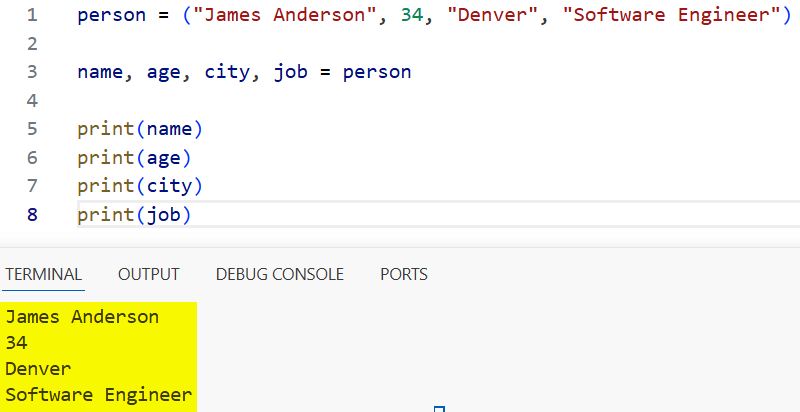
person = ("James Anderson", 34, "Denver", "Software Engineer")

name, age, city, job = person

print(name)  # James Anderson
print(age)   # 34
print(city)  # Denver
print(job)   # Software Engineer
I executed the above example code and added the screenshot below.
The left side must have the same number of variables as there are elements in the tuple. If they don’t match, Python raises a ValueError.
python# ❌ Too few variables
name, age = ("James Anderson", 34, "Denver")
# ValueError: too many values to unpack (expected 2)

# ❌ Too many variables
name, age, city = ("James Anderson", 34)
# ValueError: not enough values to unpack (expected 3, got 2)
Method 2: Starred Unpacking — Capture Multiple Values at Once
The * (star) operator lets you capture multiple elements into a list, giving you flexibility when the tuple length is variable or when you only care about specific positions.
Capture the rest into a list
scores = (98, 87, 76, 65, 54, 43)

first, second, *rest = scores

print(first)   # 98
print(second)  # 87
print(rest)    # [76, 65, 54, 43]
Capture the beginning, keep the last
python*beginning, second_last, last = scores

print(beginning)     # [98, 87, 76, 65]
print(second_last)   # 54
print(last)          # 43
Capture the middle
first, *middle, last = scores

print(first)   # 98
print(middle)  # [87, 76, 65, 54]
print(last)    # 43
I executed the above example code and added the screenshot below.
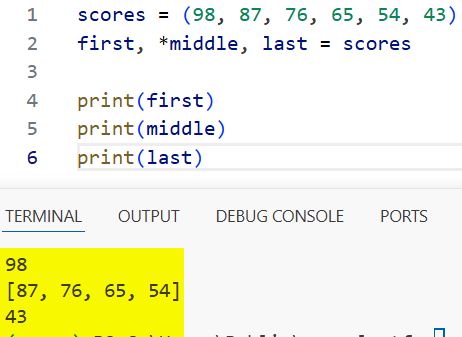
Important: The starred variable always collects into a list, even when unpacking a tuple. And you can only have one starred variable per unpacking statement.
When I use this: When working with data where the first or last elements are the important ones, like a header row followed by data rows, or a log entry where the timestamp comes first and the rest is message content.
Real-World Example: Parse a US Address
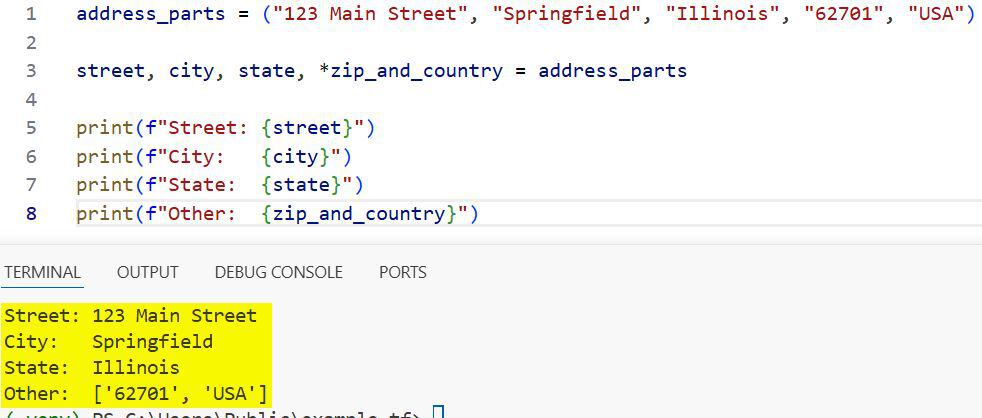
address_parts = ("123 Main Street", "Springfield", "Illinois", "62701", "USA")

street, city, state, *zip_and_country = address_parts

print(f"Street: {street}")
print(f"City:   {city}")
print(f"State:  {state}")
print(f"Other:  {zip_and_country}")
Output:
Street: 123 Main Street
City:   Springfield
State:  Illinois
Other:  ['62701', 'USA']
I executed the above example code and added the screenshot below.
Method 3: Ignore Values with _
Sometimes you only need certain elements from a tuple and want to discard the rest. By convention, Python developers use _ as a throwaway variable name.
employee = ("E-4521", "Sarah Thompson", "Marketing", 68000, "Dallas")

# Only need the name and salary
_, name, _, salary, _ = employee

print(f"{name} earns ${salary:,}")
Output:
Sarah Thompson earns $68,000
You can also combine _ with starred unpacking when you want to ignore multiple middle values:
record = ("HDR", "data1", "data2", "data3", "data4", "FTR")

header, *_, footer = record

print(header)  # HDR
print(footer)  # FTR
Note: _ is a valid variable name in Python; it’s just a strong community convention meaning “I don’t care about this value.” The value is still assigned, just never used.
Method 4: Unpack Tuples in a for Loop
This is one of the most common and useful forms of unpacking. When you have a list of tuples, you can unpack each tuple’s values directly in the for statement.
employees = [
    ("E001", "James Carter", "Engineering", 95000),
    ("E002", "Maria Lopez", "Design", 78000),
    ("E003", "Brian Scott", "Marketing", 65000),
    ("E004", "Jennifer Walsh", "Sales", 71000),
]

for emp_id, name, department, salary in employees:
    print(f"{emp_id} | {name:<18} | {department:<15} | ${salary:,}")
Output:
E001 | James Carter       | Engineering     | $95,000
E002 | Maria Lopez        | Design          | $78,000
E003 | Brian Scott        | Marketing       | $65,000
E004 | Jennifer Walsh     | Sales           | $71,000
This is far cleaner than using row[0], row[1], etc. When someone reads emp_id, name, department, salary, they immediately understand what the loop is doing.
Real-World Example: Process US Sales Data
quarterly_sales = [
    ("Q1 2025", "Northeast", 142000),
    ("Q2 2025", "Northeast", 158000),
    ("Q3 2025", "Northeast", 134000),
    ("Q4 2025", "Northeast", 179000),
]

annual_total = 0

for quarter, region, revenue in quarterly_sales:
    annual_total += revenue
    print(f"{quarter} | {region} | ${revenue:,}")

print(f"\nAnnual Total: ${annual_total:,}")
Output:
Q1 2025 | Northeast | $142,000
Q2 2025 | Northeast | $158,000
Q3 2025 | Northeast | $134,000
Q4 2025 | Northeast | $179,000

Annual Total: $613,000
Method 5: Unpack Nested Tuples
When a tuple contains other tuples as elements, you can unpack the inner tuples directly in the same assignment statement.
Basic Nested Unpacking
point = ((40.7128, -74.0060), "New York")

(lat, lon), city = point

print(f"City: {city}")
print(f"Lat: {lat}, Lon: {lon}")
Output:
City: New York
Lat: 40.7128, Lon: -74.006
Nested Unpacking in a for Loop
city_coordinates = [
    ("New York", (40.7128, -74.0060)),
    ("Los Angeles", (34.0522, -118.2437)),
    ("Chicago", (41.8781, -87.6298)),
    ("Houston", (29.7604, -95.3698)),
]

for city, (lat, lon) in city_coordinates:
    print(f"{city:<15} → Lat: {lat}, Lon: {lon}")
Output:
New York        → Lat: 40.7128, Lon: -74.006
Los Angeles     → Lat: 34.0522, Lon: -118.2437
Chicago         → Lat: 41.8781, Lon: -87.6298
Houston         → Lat: 29.7604, Lon: -95.3698
Method 6: Unpack Tuples Returned from Functions
Python functions can return multiple values as a tuple. Unpacking makes consuming those return values clean and readable.
def get_user_info():
    return ("michael.scott", "michael@dundermifflin.com", "Scranton", "Pennsylvania")

username, email, city, state = get_user_info()

print(f"Username: {username}")
print(f"Email:    {email}")
print(f"Location: {city}, {state}")
Output:
Username: michael.scott
Email:    michael@dundermifflin.com
Location: Scranton, Pennsylvania
I executed the above example code and added the screenshot below.
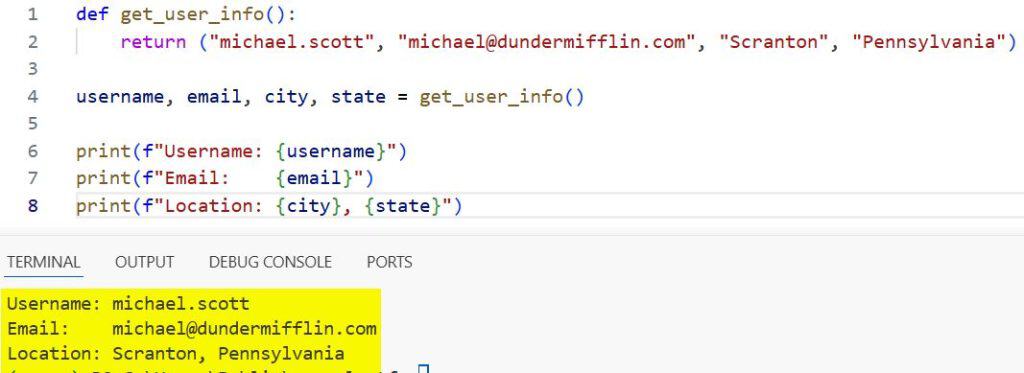
This is a very common Python pattern. Functions like os.path.split(), divmod(), and many data processing functions return tuples you’ll want to unpack immediately.
Real-World Example: Use Python’s Built-in divmod()
total_minutes = 137

hours, minutes = divmod(total_minutes, 60)
print(f"{total_minutes} minutes = {hours} hours and {minutes} minutes")
Output:
text137 minutes = 2 hours and 17 minutes
Real-World Example: Use os.path.split()
import os

file_path = "/home/users/jsmith/documents/report_2025.pdf"

directory, filename = os.path.split(file_path)

print(f"Directory: {directory}")
print(f"File:      {filename}")
Output:
Directory: /home/users/jsmith/documents
File:      report_2025.pdf
Method 7: Variable Swapping with Tuple Unpacking
One of Python’s most elegant tricks, swapping two variables without a temporary variable. This works entirely because of tuple unpacking.
first_place = "Dallas Cowboys"
second_place = "Philadelphia Eagles"

# Swap without a temp variable
first_place, second_place = second_place, first_place

print(f"1st: {first_place}")
print(f"2nd: {second_place}")
Output:
1st: Philadelphia Eagles
2nd: Dallas Cowboys
Under the hood, Python creates a temporary tuple (second_place, first_place) on the right side, then unpacks it back into the variables on the left. It’s safe, clean, and very Pythonic.
Method 8: Unpack in Function Arguments
You can unpack a tuple directly when calling a function using the * operator. This is called argument unpacking or splat unpacking.
def calculate_total(price, tax_rate, discount):
    total = price * (1 + tax_rate) - discount
    return round(total, 2)

order = (49.99, 0.08, 5.00)  # price, tax_rate, discount

result = calculate_total(*order)
print(f"Total: ${result}")
Output:
Total: $48.99
This passes each element of the tuple as a separate positional argument to the function. Extremely useful when you have pre-packaged parameter sets, like configuration tuples or stored argument bundles.
Quick Comparison: All Unpacking Methods
| Method | Syntax | Best For |
|---|---|---|
| Basic unpacking | a, b, c = (1, 2, 3) | Fixed-length tuples with known structure |
| Starred unpacking | first, *rest = data | Variable-length or partially needed tuples |
Ignore with _ | _, name, _ = data | When some fields are irrelevant |
| Loop unpacking | for a, b in list_of_tuples | Iterating structured data like DB rows |
| Nested unpacking | (a, b), c = data | Tuples containing sub-tuples |
| Function return | x, y = my_func() | Functions returning multiple values |
| Variable swap | a, b = b, a | Swapping two values cleanly |
| Argument unpacking | func(*tuple) | Passing tuple elements as function args |
Common Mistakes to Avoid
Let us look at some common mistakes that need to be avoided while working with nested unpacking.
Mistake 1: Mismatched Variable Count
data = (10, 20, 30)

# ❌ Raises ValueError
a, b = data  # too many values to unpack

# ✅ Fix: match variable count or use starred unpacking
a, b, c = data
# or
a, *b = data  # b = [20, 30]
Mistake 2: Use Two Starred Variables
data = (1, 2, 3, 4, 5)

# ❌ SyntaxError — only one starred variable allowed
*a, *b = data
You can only use the * operator once per unpacking statement.
Mistake 3: Forget That * Always Creates a List
values = (10, 20, 30)
first, *rest = values

print(type(rest))  # <class 'list'> — NOT a tuple
If you need rest as a tuple, convert it: rest = tuple(rest).
Mistake 4: Use Index Notation Instead of Unpacking
pythonrecord = ("TX-2025", "Austin", "Texas", 978908)

# ❌ Hard to read — what does index 2 mean?
print(record[0], record[2], record[3])

# ✅ Self-documenting
record_id, city, state, population = record
print(record_id, state, population)
Mistake 5: Mutating a Tuple Through Unpacking
Unpacking does not let you modify the original tuple. The variables you create are independent; changing them does not affect the tuple:
point = (10, 20)
x, y = point

x = 99  # This only changes the variable x, not point[0]
print(point)  # (10, 20) — unchanged
Conclusion
Tuple unpacking is one of those Python features that quietly elevates your code quality. Once you get comfortable with it, index-based access starts to feel clunky and unnecessary. Here’s a summary of all the methods covered:
- Basic unpacking — a, b, c = (1, 2, 3) for fixed-length tuples
- Starred unpacking — first, *rest = data for flexible capture
- Ignore with
_— Skip values you don’t need - Loop unpacking — Unpack tuple rows directly in for loops
- Nested unpacking — Drill into sub-tuples in a single statement
- Function return unpacking — Cleanly receive multiple return values
- Variable swapping — a, b = b, a without a temporary variable
- Argument unpacking — Pass tuple elements as function arguments with *
The golden rule: whenever you find yourself writing data[0], data[1], data[2], stop and ask whether unpacking would make the intent clearer. Nine times out of ten, it will.
You may read:
- Unpack a Tuple in Python
- Use Python Type Hint Tuples for More Robust Code
- Sort a List of Tuples by the Second Element in Python
- Fix the IndexError: tuple index out of range Error in Python

Bijay Kumar is an experienced Python and AI professional who enjoys helping developers learn modern technologies through practical tutorials and examples. His expertise includes Python development, Machine Learning, Artificial Intelligence, automation, and data analysis using libraries like Pandas, NumPy, TensorFlow, Matplotlib, SciPy, and Scikit-Learn. At PythonGuides.com, he shares in-depth guides designed for both beginners and experienced developers. More about us.

