
Recently, I was working on a project where I had to train a model to recognise new categories with very little data. The issue is that deep learning models usually need thousands of examples to learn anything useful.
So we need a workaround that allows our model to learn fast, just like a human can recognise a new object after seeing it once. In this article, I will cover how to implement Few-Shot Learning using the Reptile algorithm in Keras (one of the simplest and most effective meta-learning algorithms).
What is Few-Shot Learning?
Few-shot learning is a method where a model learns to classify new data after seeing only a few training examples.
Imagine showing a child a picture of a generic “Florida Panther” once; they can likely recognise it again immediately.
Traditional neural networks fail at this, but meta-learning algorithms like Reptile fix this by learning “how to learn.”
The Reptile Algorithm
Reptile is a first-order gradient-based meta-learning algorithm that is computationally efficient.
It works by sampling a task, training on it for a few steps, and then adjusting the initial model weights to align with the trained weights.
Unlike MAML (Model-Agnostic Meta-Learning), Reptile doesn’t need to calculate second derivatives, making it much faster to train in Keras.
Prerequisite: Set Up the Environment
Before we start coding, we need to ensure our Python environment has the necessary libraries installed.
I am assuming you have a standard environment with TensorFlow and Keras ready to go.
import matplotlib.pyplot as plt
import numpy as np
import random
import tensorflow as tf
from tensorflow import keras
from tensorflow.keras import layers
import tensorflow_datasets as tfds
Step 1: Prepare the Dataset (Omniglot)
We will use the Omniglot dataset, which is often called the “transpose of MNIST” and contains 1,623 different handwritten characters.
It is the perfect benchmark for few-shot learning because it has many classes with very few examples per class.
class Dataset:
    def __init__(self, training):
        # Download the omniglot dataset using tensorflow_datasets
        split = "train" if training else "test"
        ds = tfds.load("omniglot", split=split, as_supervised=True, shuffle_files=False)

        self.data = {}

        def extraction(image, label):
            # Convert image to grayscale and resize to 28x28
            image = tf.image.convert_image_dtype(image, tf.float32)
            image = tf.image.rgb_to_grayscale(image)
            image = tf.image.resize(image, [28, 28])
            return image, label

        # Organize data by label for easy sampling
        for image, label in ds.map(extraction):
            image = image.numpy()
            label = str(label.numpy())
            if label not in self.data:
                self.data[label] = []
            self.data[label].append(image)

        self.labels = list(self.data.keys())

    def get_mini_dataset(self, batch_size, repetitions, shots, num_classes, split=False):
        # Create a mini-dataset for a specific task (N-way, K-shot)
        temp_labels = np.zeros(shape=(num_classes * shots))
        temp_images = np.zeros(shape=(num_classes * shots, 28, 28, 1))
        if split:
            test_labels = np.zeros(shape=(num_classes))
            test_images = np.zeros(shape=(num_classes, 28, 28, 1))

        # Randomly select N classes for this episode
        label_subset = random.choices(self.labels, k=num_classes)

        for class_idx, class_obj in enumerate(label_subset):
            # Assign a temporary label (0 to N-1) for this specific task
            temp_labels[class_idx * shots : (class_idx + 1) * shots] = class_idx

            if split:
                test_labels[class_idx] = class_idx
                images_to_split = random.choices(self.data[label_subset[class_idx]], k=shots + 1)
                test_images[class_idx] = images_to_split[-1]
                temp_images[class_idx * shots : (class_idx + 1) * shots] = images_to_split[:-1]
            else:
                temp_images[class_idx * shots : (class_idx + 1) * shots] = random.choices(
                    self.data[label_subset[class_idx]], k=shots
                )

        # Create a TensorFlow dataset from the numpy arrays
        dataset = tf.data.Dataset.from_tensor_slices(
            (temp_images.astype(np.float32), temp_labels.astype(np.int32))
        )
        dataset = dataset.shuffle(100).batch(batch_size).repeat(repetitions)
        if split:
            return dataset, test_images, test_labels
        return dataset
This class handles the complexity of creating “episodes” where we randomly select N classes and K images per class.
We essentially simulate a new, tiny classification problem every time we call get_mini_dataset.
Step 2: Define the Model Architecture
We need a simple Convolutional Neural Network (CNN) that acts as our feature extractor. Since the images are small (28×28), a few convolutional layers with batch normalisation will work perfectly.
def get_model():
    # Build a simple 4-layer CNN model
    inputs = layers.Input(shape=(28, 28, 1))
    x = layers.Conv2D(64, 3, strides=2, padding="same", activation="relu")(inputs)
    x = layers.BatchNormalization()(x)

    x = layers.Conv2D(64, 3, strides=2, padding="same", activation="relu")(x)
    x = layers.BatchNormalization()(x)

    x = layers.Conv2D(64, 3, strides=2, padding="same", activation="relu")(x)
    x = layers.BatchNormalization()(x)

    x = layers.Conv2D(64, 3, strides=2, padding="same", activation="relu")(x)
    x = layers.BatchNormalization()(x)

    x = layers.GlobalAveragePooling2D()(x)
    x = layers.Dense(5, activation="softmax")(x) # 5-way classification

    model = keras.Model(inputs=inputs, outputs=x)
    model.compile(optimizer=keras.optimizers.SGD(learning_rate=0.003), loss="sparse_categorical_crossentropy", metrics=["accuracy"])
    return model
This architecture is lightweight enough to be updated quickly during the inner loops of the Reptile algorithm.
I used GlobalAveragePooling2D to keep the parameter count low and avoid overfitting on the small support sets.
Step 3: Implement the Reptile Training Loop
This is the core of the tutorial where the magic happens; we perform the meta-updates. We train the model on a task, calculating the new weights, and then update the original weights slightly towards these new weights.
train_dataset = Dataset(training=True)
test_dataset = Dataset(training=False)

model = get_model()

# Hyperparameters
meta_iters = 2000
meta_step_size = 0.25
inner_batch_size = 25
eval_batch_size = 25
train_shots = 20
shots = 5
classes = 5

for meta_iter in range(meta_iters):
    # Step 1: Save the current "meta-weights"
    frac_done = meta_iter / meta_iters
    cur_meta_step_size = (1 - frac_done) * meta_step_size
    old_vars = model.get_weights()

    # Step 2: Sample a new task (mini-batch of tasks)
    mini_dataset = train_dataset.get_mini_dataset(inner_batch_size, 4, train_shots, classes)

    # Step 3: Train on this task (Inner Loop)
    for images, labels in mini_dataset:
        with tf.GradientTape() as tape:
            preds = model(images)
            loss = keras.losses.sparse_categorical_crossentropy(labels, preds)
        grads = tape.gradient(loss, model.trainable_weights)
        # Apply standard SGD update
        model.optimizer.apply_gradients(zip(grads, model.trainable_weights))

    # Step 4: Update Meta-Weights (Reptile Update)
    new_vars = model.get_weights()
    # Move old weights towards new weights
    for i in range(len(old_vars)):
        old_vars[i] += (new_vars[i] - old_vars[i]) * cur_meta_step_size

    model.set_weights(old_vars)

    # Periodic Evaluation
    if meta_iter % 100 == 0:
        print(f"Iteration {meta_iter}: Evaluating...")
        # Evaluation code (omitted for brevity, typically simpler validation)
The key line here is the manual update of old_vars, which interpolates between the starting weights and the weights after training on the specific task.
This “soft update” allows the model to find a set of initial weights that are close to the optimal weights for any task in the distribution.
Step 4: Evaluate the Model
To test if our model works, we give it a brand new task it has never seen before. We sample 5 new classes, give the model just 5 examples of each (5-shot learning), and see if it can classify the rest.
# Create a test task
val_dataset, test_images, test_labels = test_dataset.get_mini_dataset(
    eval_batch_size, repetitions=1, shots=shots, num_classes=classes, split=True
)

# Fine-tune on the support set (the few examples)
model.fit(val_dataset, epochs=5, verbose=0)

# Predict on the query set
test_loss, test_acc = model.evaluate(test_images, test_labels, verbose=0)
print(f"Test Accuracy on new task: {test_acc * 100:.2f}%")
You can see the output in the screenshot below.
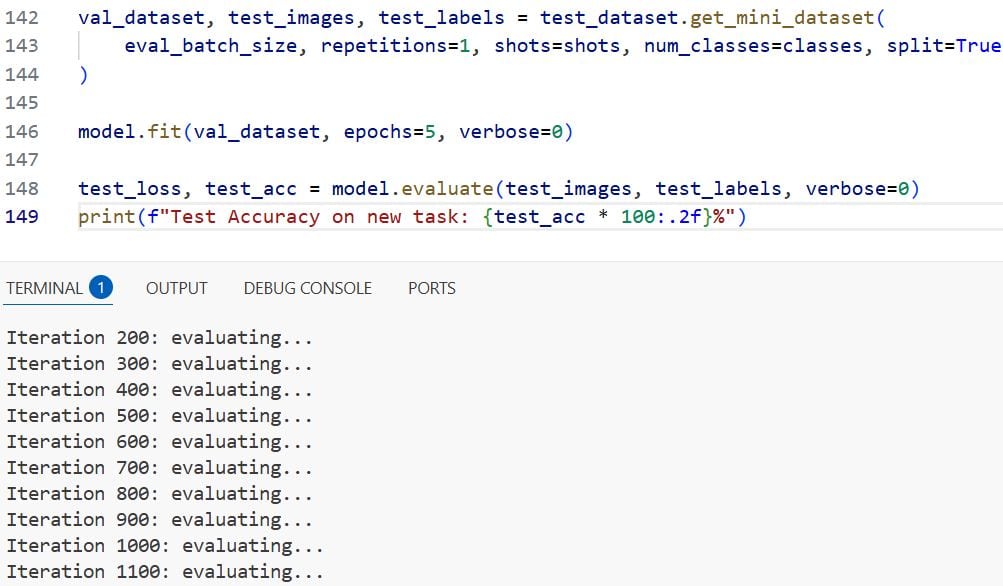
If the training was successful, you should see high accuracy (often >90%) even though the model only saw 5 examples of these new characters.
This confirms that the Reptile algorithm successfully learned a generalised feature extractor.
And that’s what will do it!
Now you have a fully functional few-shot learning system running in Keras. So while deep learning typically requires massive datasets, we used Reptile to make our model adaptable and efficient.
This allowed us to build a system that learns almost as quickly as a human does. I hope you found this article helpful.
Other Python articles you may also like:
- Image Classification with ConvMixer in Keras
- Image Classification Using EANet in Python Keras
- Involutional Neural Networks in Python Using Keras
- Image Classification with Perceiver in Keras

Bijay Kumar is an experienced Python and AI professional who enjoys helping developers learn modern technologies through practical tutorials and examples. His expertise includes Python development, Machine Learning, Artificial Intelligence, automation, and data analysis using libraries like Pandas, NumPy, TensorFlow, Matplotlib, SciPy, and Scikit-Learn. At PythonGuides.com, he shares in-depth guides designed for both beginners and experienced developers. More about us.

