
Managing memory in Python used to feel like a “black box” to me when I first started developing large-scale applications for US-based fintech firms.
I often wondered how my scripts could handle millions of transaction records without crashing the system or slowing down the server.
Understanding how Python stores objects in memory changed the way I write code, making my applications faster and more efficient.
In this tutorial, I’ll share my firsthand experience with Python’s memory management to help you write professional, high-performance code.
The Core Concept: Everything is an Object
One of the first things I realized as a developer is that in Python, everything, from an integer representing a ZIP code to a complex list of California state names, is an object.
Unlike some other languages where variables are containers, Python variables are more like labels or pointers that point to an object in memory.
Understand the PyObject
At the C level (since most of us use CPython), every object is a PyObject structure.
This structure contains two essential pieces of information: the object’s type and a reference count.
How Python Allocates Memory
When I create a variable in Python, the interpreter doesn’t just find a random spot in RAM. It uses a specialized hierarchy to manage space.
Python uses a private heap space where all objects and data structures are located. As a developer, I don’t have direct access to this heap; the Python interpreter manages it for me.
The Python Memory Manager
The Python memory manager handles the allocation of this heap space. It uses different strategies for different types of data to ensure the system doesn’t get bogged down.
For small objects, Python uses “Arenas,” “Pools,” and “Blocks” to minimize the overhead of constantly asking the operating system for more memory.
Method 1: Check Memory Addresses and Sizes
When I’m debugging performance issues in data-heavy applications, I often need to see exactly where an object lives and how much space it takes.
I use the id() function to get the memory address and the sys module to check the object’s size in bytes.
Here is a practical example using a list of US states and their populations:
import sys

# Creating a dictionary of US State populations
state_populations = {
    "California": 39237836,
    "Texas": 29527941,
    "Florida": 21781128,
    "New York": 19835913
}

# Checking the memory address of the object
memory_address = id(state_populations)
print(f"The memory address of the state dictionary is: {memory_address}")

# Checking the size of the object in bytes
object_size = sys.getsizeof(state_populations)
print(f"The size of the dictionary is: {object_size} bytes")

# Variables pointing to the same object
population_ref = state_populations
print(f"Reference address: {id(population_ref)}")
print(f"Are they the same object? {population_ref is state_populations}")
I executed the above example code and added the screenshot below.
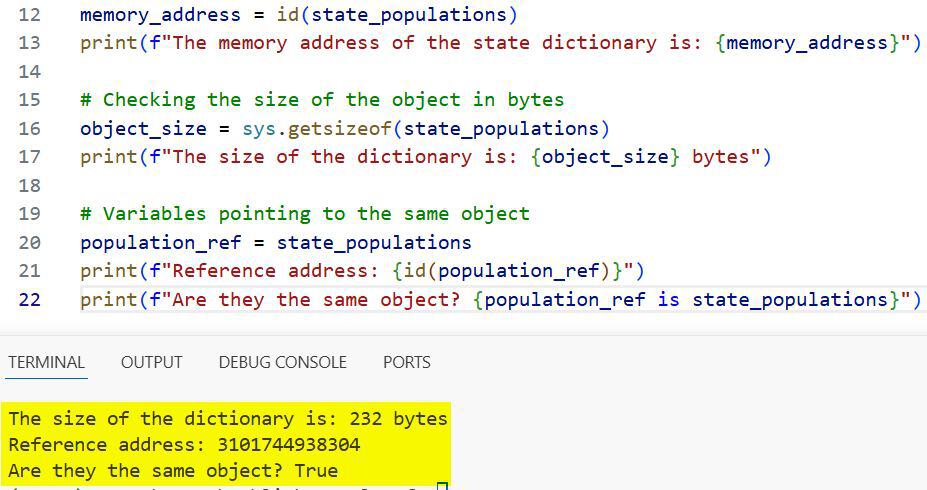
In this code, you’ll notice that population_ref doesn’t create a new copy of the data. It simply points to the same memory address as state_populations.
Method 2: Understand Reference Counting
In my experience, reference counting is the most critical part of Python’s memory management to understand.
Every time I assign an object to a new variable or pass it to a function, its reference count increases. When the reference count hits zero, Python automatically deallocates the memory.
I use the sys.getrefcount() function to keep track of how many labels are pointing to a specific object.
import sys

# A list of major US tech hubs
tech_hubs = ["San Francisco", "Austin", "Seattle", "New York City"]

# Initial reference count
# Note: getrefcount() returns 1 higher than expected because the function itself holds a reference
print(f"Initial count: {sys.getrefcount(tech_hubs)}")

# Creating a new reference
west_coast_hub = tech_hubs
print(f"Count after new reference: {sys.getrefcount(tech_hubs)}")

# Removing a reference
del west_coast_hub
print(f"Count after deleting one reference: {sys.getrefcount(tech_hubs)}")
I executed the above example code and added the screenshot below.
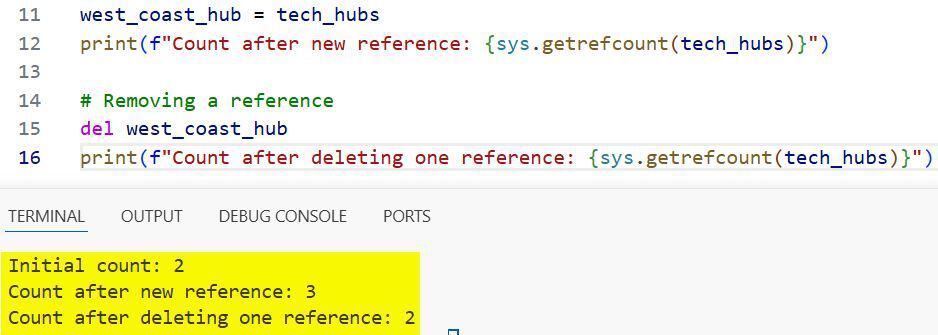
I’ve found that being mindful of these counts helps prevent memory leaks in long-running processes.
The Role of the Garbage Collector (GC)
Reference counting is great, but it has a flaw: it can’t handle circular references.
Suppose I have a “Manager” object pointing to an “Employee” object, and that employee also points back to the manager. Their counts will never reach zero.
This is where the Python Garbage Collector comes in. It runs in the background to find these “islands” of objects and clear them out.
Generations in Garbage Collection
Python’s GC divides objects into three generations based on how long they have survived in memory.
New objects start in Generation 0. If they survive a collection cycle, they move to Generation 1 and eventually to Generation 2.
I’ve noticed that Python clears Generation 0 much more frequently than the older generations, which makes the whole process very efficient.
Memory Management for Different Data Types
Different objects are stored differently depending on whether they are mutable or immutable.
Immutable Objects (Integers and Strings)
For small integers (usually between -5 and 256), Python uses “interning.” It pre-allocates these numbers in memory to save time.
If I create the number 100 multiple times in my script, Python usually points all those variables to the same memory location.
Mutable Objects (Lists and Dictionaries)
Lists and dictionaries are stored as pointers to other objects. When I add a new city to a list, Python might need to over-allocate memory to make room for future growth.
This is why a list of 1,000 items doesn’t just take 1,000 times the memory of one item; there is always a bit of “buffer” space involved.
Practical Memory Optimization Tips
When I build applications for high-traffic environments, I follow a few rules to keep memory usage low:
- Use Generators: Instead of loading a massive CSV of US Census data into a list, I use generators to process one row at a time.
- Slots for Classes: If I have millions of instances of a class, I use __slots__ to prevent the creation of a __dict__ for each instance.
- Explicit Deletion: If I’m done with a large dataset (like a 2GB log file), I use
deland sometimes call gc.collect() manually.
import gc

# Manually triggering a garbage collection
collected = gc.collect()
print(f"Garbage collector: cleared {collected} unreachable objects.")
Summary of Python Memory Structure
To visualize how this all fits together, think of memory as a giant warehouse.
The Stack memory is where your function calls and local variables live. It’s fast and managed automatically as functions open and close.
The Heap memory is the large storage area where the actual objects (the data) are kept.
The Python Memory Manager acts as the warehouse foreman, deciding where to put new shipments and when to throw out the trash.
I hope this walkthrough helps you understand how Python handles the heavy lifting behind the scenes.
By knowing how memory allocation and reference counting work, you can write much more efficient code and troubleshoot performance bottlenecks more effectively.
You may read:
- Dynamic Attribute Management in Python
- How to Use isinstance() and issubclass() Functions
- How to Use Python __dict__ Attribute
- Difference Between dir() and vars() in Python

Bijay Kumar is an experienced Python and AI professional who enjoys helping developers learn modern technologies through practical tutorials and examples. His expertise includes Python development, Machine Learning, Artificial Intelligence, automation, and data analysis using libraries like Pandas, NumPy, TensorFlow, Matplotlib, SciPy, and Scikit-Learn. At PythonGuides.com, he shares in-depth guides designed for both beginners and experienced developers. More about us.

