
I have run into many situations where I needed to duplicate data without affecting the original.
It sounds simple enough to just use the assignment operator, but that is often where the trouble starts for many developers.
I remember working on a logistics dashboard for a shipping company in New York, and we had a major bug because we weren’t truly “copying” our data structures.
In this tutorial, I will show you exactly how to handle shallow and deep copies in Python so you can avoid those same headaches.
The Problem with Simple Assignment
When I first started, I thought that using the equals sign (=) created a brand-new version of my object.
It took me a while to realize that in Python, this just creates a new reference to the same memory address.
If you change the “copy,” the original changes too, which can be a nightmare when managing sensitive data like US Census records or financial transactions.
# A list of tech hubs in the USA
original_hubs = ["San Francisco", "Austin", "Seattle"]
new_hubs = original_hubs

new_hubs.append("Boston")

print(f"Original: {original_hubs}")
print(f"New: {new_hubs}")
Understand Shallow Copy in Python
A shallow copy creates a new object, but it fills that object with references to the items found in the original.
I find shallow copies useful when I have a flat list, meaning a list that doesn’t contain other lists or complex objects inside it.
If you are dealing with a simple list of employee names at a firm in Chicago, a shallow copy is often all you need.
Use the copy() Method
The most common way I perform a shallow copy is by using the copy module that comes built-in with Python.
It is straightforward and makes the intent of your code very clear to anyone else reading it.
import copy

# Weekly sales targets for a retail chain
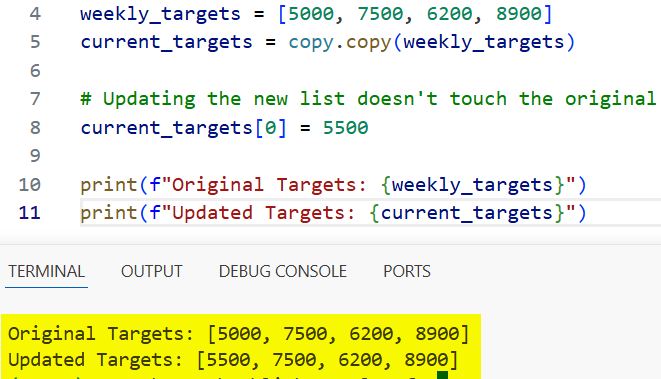
weekly_targets = [5000, 7500, 6200, 8900]
current_targets = copy.copy(weekly_targets)

# Updating the new list doesn't touch the original
current_targets[0] = 5500

print(f"Original Targets: {weekly_targets}")
print(f"Updated Targets: {current_targets}")
You can refer to the screenshot below to see the output.
Use List Slicing
Another trick I use frequently for a quick shallow copy is the slicing syntax [:].
It is a bit more “Pythonic” and saves you from importing a module if you are only working with basic lists.
# List of Ivy League universities
universities = ["Harvard", "Yale", "Princeton"]
shorthand_copy = universities[:]

shorthand_copy.append("Columbia")

print(f"Original List: {universities}")
print(f"Shorthand Copy: {shorthand_copy}")
The Risk of Shallow Copies with Nested Objects
The real danger occurs when you have “nested” objects, like a list inside another list.
I once managed a project for a real estate firm in Miami where we stored property details as nested lists.
When we used a shallow copy, changing a specific room price in the “copy” ended up changing the original database entry too.
How to Use Deep Copy in Python
When I need a completely independent clone of a complex object, I always reach for a deep copy.
A deep copy wanders through the entire object structure and creates new copies of every single nested item it finds.
This ensures that the original and the copy are 100% disconnected in the computer’s memory.
Implement copy.deepcopy()
In my experience, deepcopy is the safest bet when working with Object-Oriented Programming (OOP) and complex class instances.
Here is an example using a structured dataset for a US-based car dealership.
import copy

# Nested data: Dealership inventory [Model, [Colors Available]]
inventory = [
    ["Ford F-150", ["Red", "Silver"]],
    ["Tesla Model 3", ["White", "Blue"]]
]

# Performing a deep copy
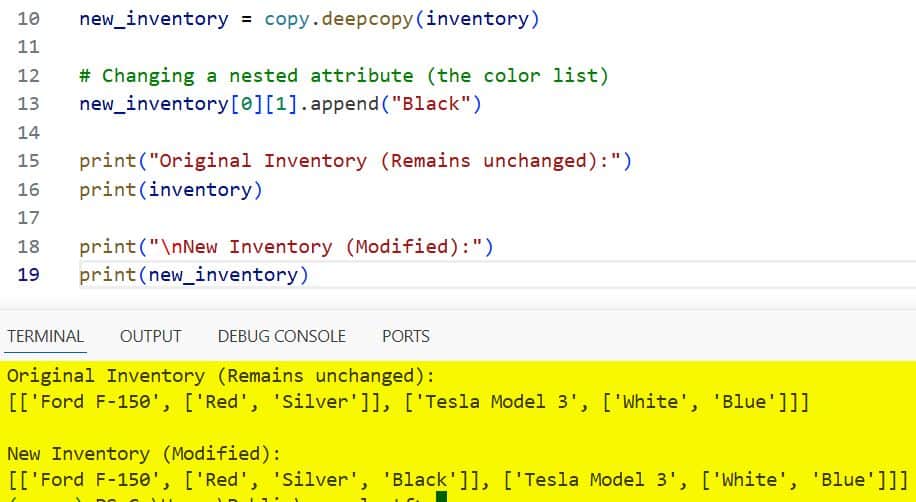
new_inventory = copy.deepcopy(inventory)

# Changing a nested attribute (the color list)
new_inventory[0][1].append("Black")

print("Original Inventory (Remains unchanged):")
print(inventory)

print("\nNew Inventory (Modified):")
print(new_inventory)
You can refer to the screenshot below to see the output.
Shallow Copy vs. Deep Copy in Python Classes
In OOP, we often deal with class instances rather than just simple lists.
I’ve found that understanding how copying affects custom objects is vital for building robust software.
If you have a Company object that contains Department objects, a shallow copy will still share the same department instances between the two companies.
Real-World OOP Example
Let’s look at a scenario involving a US Federal Agency’s regional offices.
import copy

class RegionalOffice:
    def __init__(self, city, staff_count):
        self.city = city
        self.staff_count = staff_count

class Agency:
    def __init__(self, name, office):
        self.name = name
        self.office = office

# Create a specific office in Denver
denver_office = RegionalOffice("Denver", 150)
agency_v1 = Agency("Department of Energy", denver_office)

# Shallow Copying the Agency
agency_v2 = copy.copy(agency_v1)

# Deep Copying the Agency
agency_v3 = copy.deepcopy(agency_v1)

# If we change the staff count in the original office...
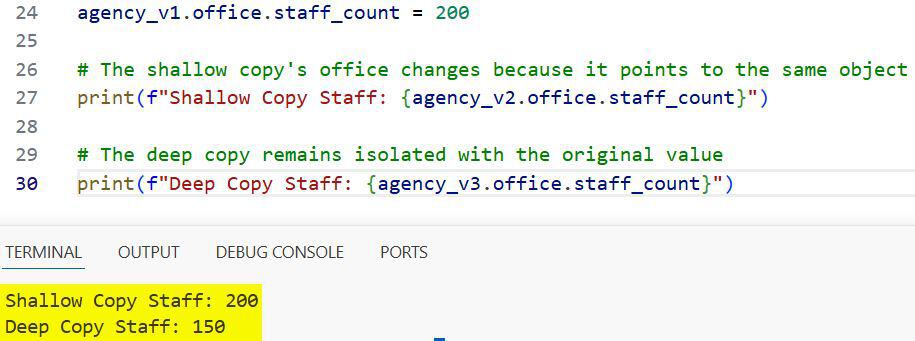
agency_v1.office.staff_count = 200

# The shallow copy's office changes because it points to the same object
print(f"Shallow Copy Staff: {agency_v2.office.staff_count}")

# The deep copy remains isolated with the original value
print(f"Deep Copy Staff: {agency_v3.office.staff_count}")
You can refer to the screenshot below to see the output.
Performance Considerations
One thing I always tell my trainees is that deep copies are significantly slower than shallow copies.
Because a deep copy has to recursively copy every sub-object, it consumes more CPU and memory.
In a high-frequency trading app based on Wall Street, you would want to use shallow copies or immutable types whenever possible to keep the speed up.
I only use deepcopy when the data integrity is more important than the microseconds saved during the execution.
Key Differences at a Glance
Throughout my career, I’ve used this simple mental checklist to decide which method to use:
- Assignment (
=): Use when you want a second name for the same object. - Shallow Copy: Use for “flat” collections or when you want nested objects to stay shared.
- Deep Copy: Use when you want a “true” clone where nothing is shared.
When to Use Each Method
If you are working with a simple list of US states, a shallow copy is perfectly fine.
However, if you are building a simulation of the US Power Grid where objects are deeply linked, you must use deep copy.
I’ve seen many junior developers struggle with “ghost” data changes because they picked the wrong copying strategy.
Always test your copies by changing a value and printing both the original and the clone to be sure.
I hope this guide helps clear up the confusion between shallow and deep copies in Python.
In my experience, once you understand how Python handles memory references, these concepts become second nature.
It is one of those fundamental skills that will save you hours of debugging down the road.
You may also read:
- How to Use Python __dict__ Attribute
- Difference Between dir() and vars() in Python
- Python Memory Management
- Method Resolution Order (MRO) in Python

Bijay Kumar is an experienced Python and AI professional who enjoys helping developers learn modern technologies through practical tutorials and examples. His expertise includes Python development, Machine Learning, Artificial Intelligence, automation, and data analysis using libraries like Pandas, NumPy, TensorFlow, Matplotlib, SciPy, and Scikit-Learn. At PythonGuides.com, he shares in-depth guides designed for both beginners and experienced developers. More about us.

