
If you have been working with React for a while, you know that building a news feed is a rite of passage. It is one of those components that seems simple until you start handling real-time data.
In my years of developing front-end applications, I have built dozens of these feeds. Whether it is for a corporate dashboard or a social media clone, the logic remains a core skill.
In this tutorial, I will show you exactly how to build a robust news feed component from scratch. We will move past basic examples and look at how to handle real data efficiently.
Why You Need a Custom News Feed Component
A news feed is more than just a list of items. It requires handling asynchronous data, managing loading states, and ensuring a clean UI.
I prefer building custom components rather than using heavy libraries. It gives you full control over the performance and the look and feel of the application.
Method 1: Build a Functional News Feed Using Hooks
This is my go-to method for most modern React applications. Using useState and useEffect allows us to manage the lifecycle of our news data cleanly.
In this example, we will simulate a feed that pulls the latest financial headlines from Wall Street. This makes the data feel much more realistic than a standard “Test 1” placeholder.
import React, { useState, useEffect } from 'react';

const NewsFeed = () => {
  const [articles, setArticles] = useState([]);
  const [loading, setLoading] = useState(true);

  // Simulating an API call to a US News Service
  useEffect(() => {
    const fetchNews = async () => {
      setLoading(true);
      try {
        // In a real app, replace this with your Fetch or Axios call
        const mockData = [
          {
            id: 1,
            title: "Federal Reserve Maintains Interest Rates",
            category: "Economy",
            location: "Washington, D.C.",
            timestamp: "2 mins ago"
          },
          {
            id: 2,
            title: "Tech Giants Announce New Silicon Valley Hubs",
            category: "Technology",
            location: "Palo Alto, CA",
            timestamp: "15 mins ago"
          },
          {
            id: 3,
            title: "New York Stock Exchange Hits Record High",
            category: "Finance",
            location: "New York, NY",
            timestamp: "1 hour ago"
          }
        ];

        setTimeout(() => {
          setArticles(mockData);
          setLoading(false);
        }, 1000);
      } catch (error) {
        console.error("Error fetching news:", error);
        setLoading(false);
      }
    };

    fetchNews();
  }, []);

  if (loading) {
    return <div className="loading">Loading Latest US Headlines...</div>;
  }

  return (
    <div style={{ padding: '20px', maxWidth: '600px', margin: '0 auto' }}>
      <h2 style={{ borderBottom: '2px solid #333' }}>Today's Top Stories</h2>
      {articles.map((article) => (
        <div key={article.id} style={{
          marginBottom: '15px',
          padding: '15px',
          borderRadius: '8px',
          backgroundColor: '#f9f9f9',
          boxShadow: '0 2px 4px rgba(0,0,0,0.1)'
        }}>
          <span style={{ color: '#007bff', fontWeight: 'bold' }}>{article.category}</span>
          <h3 style={{ margin: '5px 0' }}>{article.title}</h3>
          <p style={{ fontSize: '0.9rem', color: '#666' }}>
            {article.location} • {article.timestamp}
          </p>
        </div>
      ))}
    </div>
  );
};

export default NewsFeed;
You can see the output in the screenshot below.
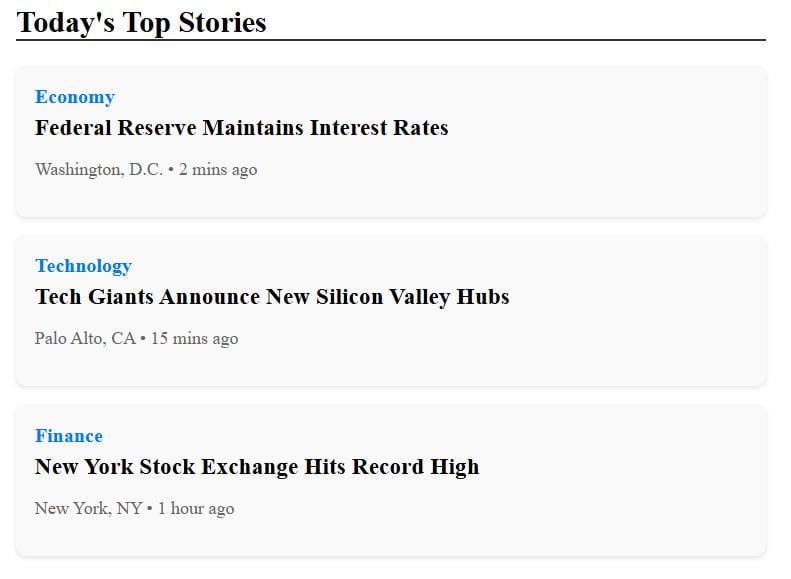
When I write these components, I always ensure the useEffect has a proper cleanup function if I am using WebSockets or intervals. This prevents memory leaks.
Method 2: Add Interactivity and “Like” Functionality
A news feed isn’t very useful if the user can’t interact with it. I often get asked how to manage individual item states within a large list.
The best way is to treat the data as an array of objects where each object has its own state properties. This keeps the UI synced with the data source.
import React, { useState } from 'react';

const InteractiveFeed = () => {
  const [posts, setPosts] = useState([
    { id: 1, author: "Chicago Tribune", content: "New public park opening in the Loop this weekend.", likes: 120, liked: false },
    { id: 2, author: "LA Times", content: "Traffic updates for I-405: Expect delays due to construction.", likes: 85, liked: false },
    { id: 3, author: "Miami Herald", content: "Heatwave warning issued for South Florida region.", likes: 210, liked: false }
  ]);

  const handleLike = (id) => {
    setPosts(posts.map(post => {
      if (post.id === id) {
        return {
          ...post,
          likes: post.liked ? post.likes - 1 : post.likes + 1,
          liked: !post.liked
        };
      }
      return post;
    }));
  };

  return (
    <div style={{ fontFamily: 'Arial, sans-serif', maxWidth: '500px', margin: 'auto' }}>
      <h3>Regional News Updates</h3>
      {posts.map(post => (
        <div key={post.id} style={{ border: '1px solid #ddd', padding: '10px', marginBottom: '10px' }}>
          <strong>{post.author}</strong>
          <p>{post.content}</p>
          <button
            onClick={() => handleLike(post.id)}
            style={{ backgroundColor: post.liked ? '#e0245e' : '#fff', color: post.liked ? '#fff' : '#000' }}
          >
            {post.liked ? '❤️ Liked' : '🤍 Like'} ({post.likes})
          </button>
        </div>
      ))}
    </div>
  );
};

export default InteractiveFeed;
You can see the output in the screenshot below.
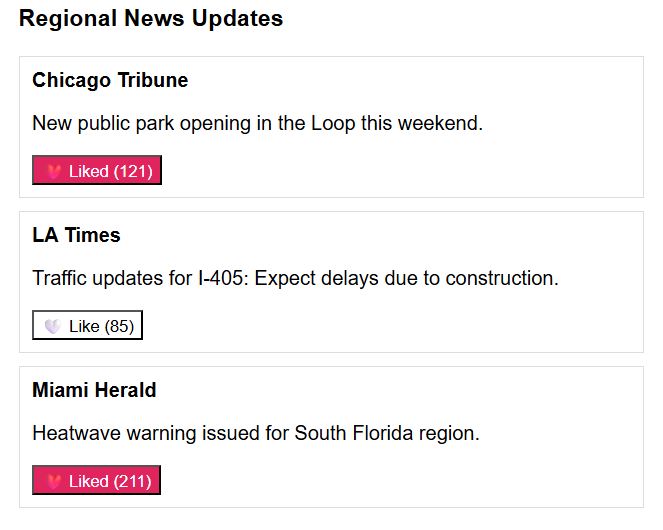
I found that updating the state by mapping through the existing array is the most “React-way” to do it. It ensures immutability, which is key for performance.
Handle Empty States and Errors
In a production environment, you will inevitably run into issues where the news API is down or there are no stories to display.
I always include a “fallback” UI. It is much better to show a “No news available in your area” message than a blank white screen.
Performance Optimization with React.memo
If your news feed grows to hundreds of items, you might notice a slight lag when updating a single item. This is because React re-renders the whole list by default.
I use React.memo to wrap the individual news card component. This tells React only to re-render the card that actually changed.
Design for Mobile Users
Most news is consumed on mobile devices while people are commuting or on a break. A news feed must be responsive.
Using CSS Flexbox or Grid is essential here. I prefer keeping the layout simple: a single column that stacks perfectly on an iPhone or an Android device.
Integrate Real-Time Updates
If you are building a feed for something like the “Election Night” or “Super Bowl” scores, you need real-time capabilities.
I typically use setInterval for basic polling or Socket.io for true real-time updates. This ensures the user sees the latest info without refreshing.
Key Takeaways for Building News Feeds
- Always manage your loading and error states to improve UX.
- Keep your components small and modular; separate the Card from the List.
- Use realistic data in your development phase to catch layout breaks early.
- Optimize for mobile-first viewing.
Building a React news feed is a great way to practice state management and API integration. It covers almost everything a front-end developer does daily.
I hope this guide helps you build a better, faster news feed for your next project.
You may read:
- How to Use Jest spyOn with React Components
- React Component Export Syntax
- How to Prevent Child Component Rerenders in React
- How to Use Export Default Class in React

Bijay Kumar is an experienced Python and AI professional who enjoys helping developers learn modern technologies through practical tutorials and examples. His expertise includes Python development, Machine Learning, Artificial Intelligence, automation, and data analysis using libraries like Pandas, NumPy, TensorFlow, Matplotlib, SciPy, and Scikit-Learn. At PythonGuides.com, he shares in-depth guides designed for both beginners and experienced developers. More about us.

