
Testing how functions are called within your React components is one of the most common tasks I face as a developer.
In my eight years of building React applications, I’ve learned that verifying interactions is just as important as verifying the final UI output.
Whether you are capturing a user’s newsletter signup or triggering a tax calculation for a US payroll app, you need to ensure your functions fire correctly.
In this tutorial, I will show you exactly how to test function calls using React Testing Library (RTL) and Mock functions.
Test a Function Passed as a Prop (Callback Testing)
The most frequent scenario I encounter is testing a component that receives a function as a prop, such as an onClick handler.
Imagine we are building a simple “Submit Tax Return” button for a financial application used in the United States.
When the user clicks the button, we want to make sure the onSubmit function passed from the parent component is triggered exactly once.
Example: US Tax Filing Button
Here is the code for our TaxFiling component:
import React from 'react';

const TaxFiling = ({ onSubmit }) => {
  return (
    <div className="container">
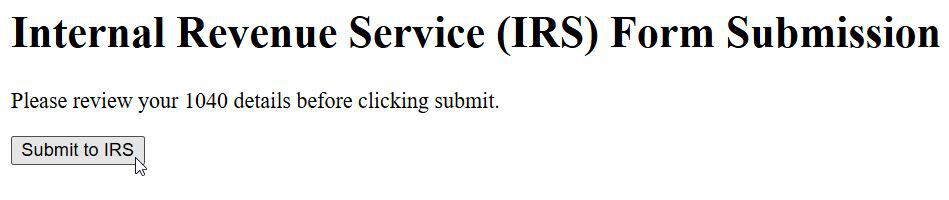
      <h1>Internal Revenue Service (IRS) Form Submission</h1>
      <p>Please review your 1040 details before clicking submit.</p>
      <button
        onClick={onSubmit}
        className="btn-submit"
      >
        Submit to IRS
      </button>
    </div>
  );
};

export default TaxFiling;
You can see the output in the screenshot below.
Now, let’s write the test. We will use vi.fn() (if using Vitest) or jest.fn() to create a “spy” function.
import { render, screen, fireEvent } from '@testing-library/react';
import { describe, it, expect, vi } from 'vitest';
import TaxFiling from './TaxFiling';

describe('TaxFiling Component', () => {
  it('should call the onSubmit function when the button is clicked', () => {
    // Create a mock function
    const mockSubmit = vi.fn();

    // Render the component with the mock function as a prop
    render(<TaxFiling onSubmit={mockSubmit} />);

    // Find the button by its text
    const submitButton = screen.getByRole('button', { name: /submit to irs/i });

    // Simulate a click event
    fireEvent.click(submitButton);

    // Assert that the function was called
    expect(mockSubmit).toHaveBeenCalledTimes(1);
  });
});
I prefer using toHaveBeenCalledTimes(1) because it ensures the function isn’t accidentally triggered multiple times by a faulty re-render.
Test Function Calls with Arguments
In real-world US enterprise apps, functions rarely run without data. You often need to pass specific IDs or values.
Suppose we have a component where a user selects their US State to calculate local sales tax.
We need to verify that when “New York” is selected, our function is called with the correct state code.
Example: State Tax Selector
import React from 'react';

const StateSelector = ({ onStateChange }) => {
  const handleChange = (event) => {
    onStateChange(event.target.value);
  };

  return (
    <div>
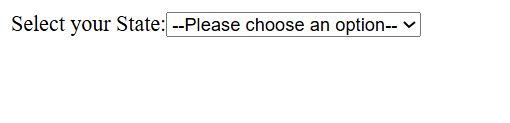
      <label htmlFor="state-select">Select your State:</label>
      <select id="state-select" onChange={handleChange}>
        <option value="">--Please choose an option--</option>
        <option value="NY">New York</option>
        <option value="CA">California</option>
        <option value="TX">Texas</option>
      </select>
    </div>
  );
};

export default StateSelector;
You can see the output in the screenshot below.
Here is how I would test that the function receives the right argument:
import { render, screen, fireEvent } from '@testing-library/react';
import { describe, it, expect, vi } from 'vitest';
import StateSelector from './StateSelector';

describe('StateSelector Component', () => {
  it('should call onStateChange with "NY" when New York is selected', () => {
    const mockStateChange = vi.fn();

    render(<StateSelector onStateChange={mockStateChange} />);

    const selectDropdown = screen.getByLabelText(/select your state/i);

    // Simulate selecting New York
    fireEvent.change(selectDropdown, { target: { value: 'NY' } });

    // Verify the function was called with the specific argument
    expect(mockStateChange).toHaveBeenCalledWith('NY');
  });
});
Using toHaveBeenCalledWith is the gold standard for testing data flow between components.
Test Functions Triggered by API Calls (Mocking Modules)
Sometimes, the function isn’t a prop. It might be a function imported from a utility file or an API service.
In a New York-based shipping app, we might have a utility that calculates the shipping cost based on the destination ZIP code.
We need to mock the entire module to see if the internal function was called during the component lifecycle.
Example: Ship Calculator
First, our utility file (shippingService.js):
export const calculateShipping = (zipCode) => {
  // Logic to calculate shipping for US Zip codes
  return zipCode.startsWith('1') ? 5.00 : 10.00;
};
Our Component:
import React, { useState } from 'react';
import { calculateShipping } from './shippingService';

const ShippingForm = () => {
  const [zip, setZip] = useState('');
  const [cost, setCost] = useState(null);

  const handleCalculate = () => {
    const result = calculateShipping(zip);
    setCost(result);
  };

  return (
    <div>
      <h3>USPS Shipping Estimator</h3>
      <input
        placeholder="Enter ZIP Code"
        value={zip}
        onChange={(e) => setZip(e.target.value)}
      />
      <button onClick={handleCalculate}>Calculate</button>
      {cost !== null && <p>Cost: ${cost}</p>}
    </div>
  );
};

export default ShippingForm;
The Test Strategy:
import { render, screen, fireEvent } from '@testing-library/react';
import { describe, it, expect, vi } from 'vitest';
import ShippingForm from './ShippingForm';
import * as shippingService from './shippingService';

// Mock the entire module
vi.mock('./shippingService', () => ({
  calculateShipping: vi.fn(() => 5.00),
}));

describe('ShippingForm Component', () => {
  it('calls calculateShipping utility when button is clicked', () => {
    render(<ShippingForm />);

    const input = screen.getByPlaceholderText(/enter zip code/i);
    const button = screen.getByRole('button', { name: /calculate/i });

    fireEvent.change(input, { target: { value: '10001' } });
    fireEvent.click(button);

    // Verify the imported function was called
    expect(shippingService.calculateShipping).toHaveBeenCalledWith('10001');
  });
});
This approach is vital when you don’t want to run actual logic (like hitting a real database) during your unit tests.
Test Asynchronous Function Calls
Many modern React apps use async/await. Testing these requires a bit more patience from the testing library.
Consider a “Login” component where we verify credentials against a server. The function call won’t happen instantly; we need to wait for the promise to resolve.
Example: User Login
import React from 'react';

const LoginForm = ({ onLogin }) => {
  const handleSubmit = async (e) => {
    e.preventDefault();
    // Simulate network delay
    await new Promise((resolve) => setTimeout(resolve, 500));
    onLogin('user-session-token');
  };

  return (
    <form onSubmit={handleSubmit}>
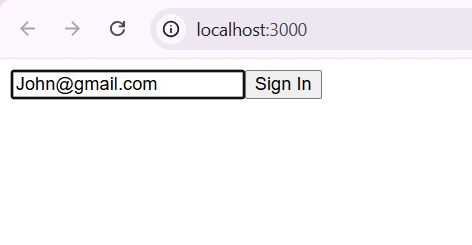
      <input type="email" placeholder="Email Address" required />
      <button type="submit">Sign In</button>
    </form>
  );
};

export default LoginForm;
You can see the output in the screenshot below.
The Test using waitFor:
import { render, screen, fireEvent, waitFor } from '@testing-library/react';
import { describe, it, expect, vi } from 'vitest';
import LoginForm from './LoginForm';

describe('LoginForm', () => {
  it('calls onLogin after an asynchronous delay', async () => {
    const mockLogin = vi.fn();
    render(<LoginForm onLogin={mockLogin} />);

    fireEvent.click(screen.getByRole('button', { name: /sign in/i }));

    // Use waitFor to handle the async nature
    await waitFor(() => {
      expect(mockLogin).toHaveBeenCalledWith('user-session-token');
    });
  });
});
In my experience, waitFor is much more reliable than manual timeouts when dealing with async calls.
Best Practices for Testing Function Calls
Over the years, I’ve developed a few rules of thumb that help keep my tests clean.
First, always mock as little as possible. If a function is pure and doesn’t have side effects, you might not need to mock it.
Second, focus on user behavior. Instead of trying to call the component’s internal methods directly, trigger them via user events like clicks or typing.
Third, ensure your mocks are cleared between tests. Use vi.clearAllMocks() or jest.clearAllMocks() in a beforeEach block.
This prevents the “call count” from one test leaking into the next one, which can cause very frustrating bugs.
Finally, name your test descriptions clearly so that when a function call fails, you know exactly which business logic broke.
In this article, I showed you several ways to test function calls in React components.
Testing function calls helps you ensure that your components interact correctly with other parts of your application.
You may also like to read:
- How to Use Export Default Class in React
- How to Build Dynamic News Feed Component in React
- React Mosaic Component
- How to Force Update a React Functional Component

Bijay Kumar is an experienced Python and AI professional who enjoys helping developers learn modern technologies through practical tutorials and examples. His expertise includes Python development, Machine Learning, Artificial Intelligence, automation, and data analysis using libraries like Pandas, NumPy, TensorFlow, Matplotlib, SciPy, and Scikit-Learn. At PythonGuides.com, he shares in-depth guides designed for both beginners and experienced developers. More about us.

