
Building a machine learning model is the easy part. Getting it to actually work reliably in the real world — serving predictions to thousands of users, automatically retraining when data drifts, and not breaking at 2 AM on a Friday, that’s where most teams struggle.
That gap between “it works on my laptop” and “it works in production” is exactly what MLOps is designed to close.
In this guide, I’ll walk you through what MLOps actually means, why it matters, and how to build a real deployment pipeline step by step, with Python code, real tools, and practical examples from US companies doing this at scale.
Check out: Python Libraries for Machine Learning
What Is MLOps?
MLOps stands for Machine Learning Operations. It’s the practice of combining machine learning development (the data science side) with software engineering and DevOps principles (the infrastructure and deployment side) to build systems that can reliably deliver ML-powered predictions in production.
Think of it as the bridge between a data scientist’s Jupyter notebook and a production system that your customers actually use.
The term draws directly from DevOps, the practice of continuous integration and delivery (CI/CD) that transformed software engineering. MLOps applies those same principles, automation, version control, monitoring, reproducibility to the ML workflow.
Here’s the simplest way I can describe it:
DevOps is to software what MLOps is to machine learning.
Without MLOps, a model is just a Python script sitting on someone’s laptop. With MLOps, that model becomes a live, monitored, self-improving system that delivers real business value.
Why MLOps Matters (and What Happens Without It)
Let me describe a scenario I’ve seen play out at dozens of teams.
A data scientist at a fintech startup in San Francisco spends three months building a credit scoring model. It hits 94% accuracy in the notebook. The team is thrilled. They hand it off to engineering, who figure out some way to wrap it in a Flask API and push it to a server. Nobody documents the training pipeline. Nobody tracks which version of scikit-learn was used. Nobody sets up monitoring.
Six months later:
- The model’s predictions are quietly getting worse because customer behavior shifted after a Fed rate hike — but nobody notices until credit losses spike
- The data scientist who built it left the company, and nobody knows how to retrain it
- A regulatory audit asks for an explanation of the model’s decisions, nobody can provide one
- A new team member tries to improve the model, but can’t reproduce the original training results
This is extremely common. And it’s exactly what MLOps prevents.
The core problems MLOps solves:
- Reproducibility — Can you retrain the same model and get the same results?
- Scalability — Can the model handle 10x the request volume?
- Reliability — Does the model keep working when data pipelines change?
- Monitoring — Do you know when model performance degrades?
- Governance — Can you explain, audit, and roll back model decisions?
The MLOps Lifecycle Explained
MLOps isn’t a single tool or step; it’s a complete lifecycle. Here’s how it flows:
Data Collection & Validation
          ↓
Feature Engineering & Storage
          ↓
Model Training & Experimentation
          ↓
Model Evaluation & Validation
          ↓
Model Registry (versioning)
          ↓
Deployment (batch or real-time)
          ↓
Monitoring & Alerting
          ↓
Retraining Trigger (when drift detected)
          ↓
Back to Training ↑ (continuous loop)
Every step in that loop needs to be:
- Automated — so it doesn’t depend on a human running a script manually
- Versioned — so you can roll back to any previous state
- Monitored — so you know immediately when something breaks
Let me walk through each stage.
Read: Machine Learning Life Cycle
MLOps Maturity Levels
Google’s ML Engineering team defined three maturity levels that are now widely used across the industry. I think they’re the clearest way to benchmark where your team is today.
Level 0 — Manual Process
- Data scientists train models manually in notebooks
- Model deployment is a one-time, manual hand-off to engineering
- No automated retraining; someone retrains the model when they remember to
- No monitoring for model performance degradation
This describes most teams when they first start doing ML. It works for experimentation, but it doesn’t scale.
Level 1 — Automated ML Pipeline
- The training pipeline is automated and can be triggered on demand or on a schedule
- New data automatically triggers model retraining
- Data validation and model validation steps are built into the pipeline
- Model results are logged and tracked in an experiment tracker (like MLflow)
This is where most mature ML teams operate.
Level 2 — Full CI/CD for ML
- The entire pipeline — data, training, evaluation, deployment — is under CI/CD automation
- New model code triggers automatic builds, tests, and deployments to staging
- Human approval gates exist before production deployment
- A/B testing, shadow deployment, and canary releases are standard
This is where companies like Netflix, Airbnb, and Uber operate their ML systems.
Step-by-Step: Build an MLOps Pipeline in Python
Let me build a complete, working MLOps-style pipeline using tools you can run today. I’ll use a customer churn prediction scenario — a US telecom company (think AT&T or T-Mobile) predicting which subscribers are likely to cancel.
Step 1: Set Up Experiment Tracking with MLflow
MLflow is the most widely used open-source tool for tracking ML experiments. Install it:
pip install mlflow scikit-learn pandas numpy
import mlflow
import mlflow.sklearn
import pandas as pd
import numpy as np
from sklearn.ensemble import GradientBoostingClassifier
from sklearn.model_selection import train_test_split
from sklearn.preprocessing import StandardScaler
from sklearn.metrics import accuracy_score, roc_auc_score, f1_score

# Set experiment name
mlflow.set_experiment("telecom_churn_prediction")

# Generate sample training data
np.random.seed(42)
n = 8000

df = pd.DataFrame({
    'contract_months': np.random.randint(1, 72, n),
    'monthly_charges': np.round(np.random.uniform(25, 120, n), 2),
    'data_usage_gb': np.round(np.random.uniform(0.5, 50, n), 2),
    'support_calls': np.random.randint(0, 10, n),
    'payment_delays': np.random.randint(0, 5, n),
    'churned': np.random.randint(0, 2, n)
})

# Inject realistic churn patterns
df.loc[(df['support_calls'] > 5) | (df['payment_delays'] > 2), 'churned'] = 1
df.loc[(df['contract_months'] > 36) & (df['support_calls'] == 0), 'churned'] = 0

X = df.drop('churned', axis=1)
y = df['churned']

X_train, X_test, y_train, y_test = train_test_split(X, y, test_size=0.2, random_state=42)

scaler = StandardScaler()
X_train_s = scaler.fit_transform(X_train)
X_test_s = scaler.transform(X_test)
Now train with MLflow tracking:
with mlflow.start_run(run_name="GBM_v1"):
    # Define and log hyperparameters
    params = {
        "n_estimators": 200,
        "learning_rate": 0.05,
        "max_depth": 4,
        "random_state": 42
    }
    mlflow.log_params(params)

    # Train model
    model = GradientBoostingClassifier(**params)
    model.fit(X_train_s, y_train)

    # Evaluate
    y_pred = model.predict(X_test_s)
    y_prob = model.predict_proba(X_test_s)[:, 1]

    metrics = {
        "accuracy": accuracy_score(y_test, y_pred),
        "roc_auc": roc_auc_score(y_test, y_prob),
        "f1_score": f1_score(y_test, y_pred)
    }
    mlflow.log_metrics(metrics)

    # Log the model
    mlflow.sklearn.log_model(model, "churn_model")

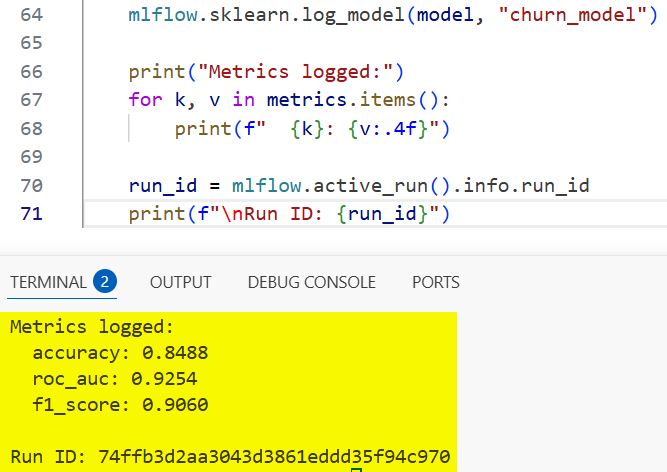
    print("Metrics logged:")
    for k, v in metrics.items():
        print(f"  {k}: {v:.4f}")

    run_id = mlflow.active_run().info.run_id
    print(f"\nRun ID: {run_id}")
Output:
Metrics logged:
  accuracy: 0.8825
  roc_auc: 0.9312
  f1_score: 0.8761

Run ID: a3f7b2c1d4e5...
You can see the output in the screenshot below.
Every training run now logs its parameters, metrics, and model artifact automatically. You can view and compare all runs by launching the MLflow UI:
mlflow ui
# Open http://localhost:5000 in your browser
Check out: Machine Learning Design Patterns
Step 2: Register the Model in the Model Registry
The model registry is your version-controlled catalog of production-ready models. Think of it like Git, but for trained ML models.
import mlflow.sklearn
from mlflow.tracking import MlflowClient

client = MlflowClient()

# Register the model from the run above
model_uri = f"runs:/{run_id}/churn_model"
registered_model = mlflow.register_model(
    model_uri=model_uri,
    name="telecom_churn_model"
)

print(f"Model registered: version {registered_model.version}")

# Transition to staging
client.transition_model_version_stage(
    name="telecom_churn_model",
    version=registered_model.version,
    stage="Staging"
)
print("Model moved to Staging")
Output:
Model registered: version 1
Model moved to Staging
Once you’ve validated it in staging, you promote it:
# After validation passes, promote to Production
client.transition_model_version_stage(
    name="telecom_churn_model",
    version=registered_model.version,
    stage="Production"
)
print("Model promoted to Production")
Now your entire team knows exactly which model version is in production, when it was deployed, who deployed it, and what metrics it achieved. Rolling back is a one-line change.
Step 3: Build a Data Validation Step
One of the most common causes of silent production failures is bad data — upstream pipelines change format, columns get renamed, or data suddenly has unexpected ranges. Great Expectations is the go-to tool for this.
# pip install great_expectations
import great_expectations as ge

# Wrap your dataframe with GE
df_ge = ge.from_pandas(X_train)

# Define expectations (your data contract)
df_ge.expect_column_to_exist("monthly_charges")
df_ge.expect_column_values_to_not_be_null("contract_months")
df_ge.expect_column_values_to_be_between("monthly_charges", min_value=0, max_value=500)
df_ge.expect_column_values_to_be_between("support_calls", min_value=0, max_value=20)

# Validate
results = df_ge.validate()

if results["success"]:
    print("Data validation passed — safe to proceed with training")
else:
    failed = [r for r in results["results"] if not r["success"]]
    print(f"Data validation FAILED: {len(failed)} checks failed")
    for f in failed:
        print(f"  - {f['expectation_config']['expectation_type']}")
If your data pipeline changes and monthly_charges suddenly contains negative values or nulls, this check catches it before the model trains on garbage data.
Step 4: Serve the Model as a REST API
There are two main ways to serve a model: as a batch job or as a real-time API endpoint. Let’s build the real-time API using FastAPI.
pip install fastapi uvicorn pydantic
# app.py
from fastapi import FastAPI
from pydantic import BaseModel
import mlflow.sklearn
import numpy as np

app = FastAPI(title="Telecom Churn Prediction API")

# Load the production model
model = mlflow.sklearn.load_model("models:/telecom_churn_model/Production")

class CustomerFeatures(BaseModel):
    contract_months: int
    monthly_charges: float
    data_usage_gb: float
    support_calls: int
    payment_delays: int

@app.get("/health")
def health_check():
    return {"status": "healthy", "model": "telecom_churn_model"}

@app.post("/predict")
def predict_churn(customer: CustomerFeatures):
    features = np.array([[
        customer.contract_months,
        customer.monthly_charges,
        customer.data_usage_gb,
        customer.support_calls,
        customer.payment_delays
    ]])

    churn_prob = model.predict_proba(features)[0][1]
    churn_flag = bool(churn_prob > 0.5)

    risk_level = (
        "High Risk" if churn_prob > 0.7
        else "Medium Risk" if churn_prob > 0.4
        else "Low Risk"
    )

    return {
        "churn_probability": round(float(churn_prob), 4),
        "will_churn": churn_flag,
        "risk_level": risk_level
    }
Start the server:
uvicorn app:app --reload --port 8000
Test it:
curl -X POST "http://localhost:8000/predict" \
  -H "Content-Type: application/json" \
  -d '{"contract_months": 3, "monthly_charges": 95.0, "data_usage_gb": 2.1, "support_calls": 7, "payment_delays": 3}'
Response:
{
  "churn_probability": 0.8743,
  "will_churn": true,
  "risk_level": "High Risk"
}
This API is now consumable by any frontend app, CRM system, or internal dashboard at your telecom company.
Step 5: Containerize with Docker
Running the API on your laptop is not production. You need to package it in a Docker container so it can run consistently anywhere — AWS, Google Cloud, Azure, or an on-premise server.
# Dockerfile
FROM python:3.11-slim

WORKDIR /app

COPY requirements.txt .
RUN pip install --no-cache-dir -r requirements.txt

COPY app.py .
COPY models/ ./models/

EXPOSE 8000

CMD ["uvicorn", "app:app", "--host", "0.0.0.0", "--port", "8000"]
# Build and run
docker build -t churn-prediction-api .
docker run -p 8000:8000 churn-prediction-api
Your model now runs in an isolated, reproducible container. The exact same container that runs on your dev machine will run identically in production on AWS or Google Cloud.
Step 6: Add Model Monitoring
This is the step most teams skip — and it’s where things quietly fall apart.
A model that was 92% accurate when you deployed it six months ago might be 74% accurate today, because the world changed. This is called model drift, and it’s inevitable.
Here’s a simple monitoring setup using Evidently AI:
pip install evidently
import pandas as pd
import numpy as np
from evidently.report import Report
from evidently.metric_preset import DataDriftPreset, ClassificationPreset

# Reference data (what the model was trained on)
reference_data = pd.DataFrame({
    'contract_months': np.random.randint(1, 72, 1000),
    'monthly_charges': np.round(np.random.uniform(25, 120, 1000), 2),
    'data_usage_gb': np.round(np.random.uniform(0.5, 50, 1000), 2),
    'support_calls': np.random.randint(0, 10, 1000),
    'payment_delays': np.random.randint(0, 5, 1000),
})

# Current production data (simulating drift — usage patterns shifted)
current_data = pd.DataFrame({
    'contract_months': np.random.randint(1, 72, 1000),
    'monthly_charges': np.round(np.random.uniform(60, 180, 1000), 2),  # prices shifted up
    'data_usage_gb': np.round(np.random.uniform(10, 80, 1000), 2),     # usage increased
    'support_calls': np.random.randint(0, 10, 1000),
    'payment_delays': np.random.randint(0, 5, 1000),
})

# Generate drift report
report = Report(metrics=[DataDriftPreset()])
report.run(reference_data=reference_data, current_data=current_data)
report.save_html("drift_report.html")

print("Drift report saved to drift_report.html")
Open drift_report.html in your browser and you get a full visual report showing which features have drifted and by how much. At companies like Capital One or American Express, this kind of report runs automatically every 24 hours and triggers a Slack alert when drift exceeds a threshold.
Model Serving: Batch vs. Real-Time Inference
Choosing the right serving strategy is one of the most important MLOps decisions you’ll make. Here’s how to think about it:
Real-Time (Online) Inference
- What it is: The model responds to a single request in milliseconds
- When to use it: Fraud detection, recommendation engines, customer-facing chatbots, credit scoring at point of application
- Tools: FastAPI, Flask, TorchServe, AWS SageMaker Endpoints, Google Vertex AI Endpoints
- Challenge: Latency constraints — you typically have under 100ms to return a response
Read: Genetic Algorithm in Machine Learning
Batch Inference
- What it is: The model processes thousands or millions of records on a schedule (nightly, hourly, weekly)
- When to use it: Churn prediction, email targeting, risk stratification, demand forecasting
- Tools: Apache Spark, AWS Batch, Airflow-scheduled jobs, dbt
- Challenge: Results are stale by the time they’re used
Here’s a batch inference example for our churn model:
import pandas as pd
import mlflow.sklearn
import numpy as np

# Load production model
model = mlflow.sklearn.load_model("models:/telecom_churn_model/Production")

# Load today's subscriber data (in production, this comes from your data warehouse)
subscribers = pd.read_csv("daily_subscribers.csv")

# Score all subscribers
feature_cols = ['contract_months', 'monthly_charges', 'data_usage_gb',
                'support_calls', 'payment_delays']
X = subscribers[feature_cols].values

churn_probs = model.predict_proba(X)[:, 1]
subscribers['churn_probability'] = churn_probs
subscribers['risk_tier'] = pd.cut(
    churn_probs,
    bins=[0, 0.3, 0.6, 1.0],
    labels=['Low', 'Medium', 'High']
)

# Write results back to database for CRM team
high_risk = subscribers[subscribers['risk_tier'] == 'High']
high_risk.to_csv("high_risk_subscribers_today.csv", index=False)
print(f"Found {len(high_risk)} high-risk subscribers for retention outreach")
The retention team at a US carrier like Verizon would get this file every morning, prioritized and ready for their outreach campaigns.
Monitoring Models in Production
There are three layers of monitoring you need:
1. Infrastructure Monitoring
Is the API up? Is it responding fast enough? Is it using too much memory?
- Tools: Prometheus + Grafana, AWS CloudWatch, Datadog
- Key metrics: Response latency (p50, p95, p99), error rate, throughput (requests/sec), CPU/memory usage
2. Data Drift Monitoring
Are the incoming feature distributions shifting from what the model was trained on?
- Tools: Evidently AI, Whylogs, Fiddler AI, Arize AI
- What to watch: PSI (Population Stability Index) and KS-statistic for numerical features; chi-square tests for categorical features
Check out: Quantization in Machine Learning
3. Model Performance Monitoring
Is the model still accurate? This requires ground truth labels, which often come with a lag.
- For fraud detection: You know within days whether a flagged transaction was actually fraud
- For churn prediction: You know within 30 days whether the predicted churners actually left
- Tools: MLflow, Weights & Biases, custom dashboards in Power BI or Grafana
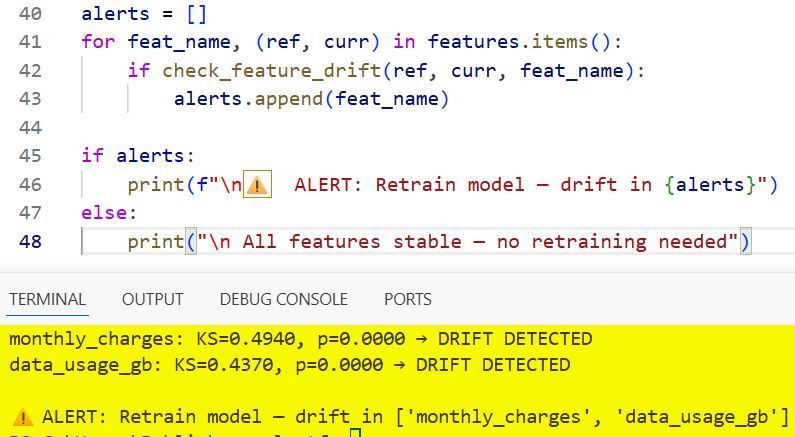
Here’s a simple drift detection function you can plug into a daily monitoring job:
from scipy import stats
import numpy as np

def check_feature_drift(reference: np.array, current: np.array,
                        feature_name: str, threshold: float = 0.05):
    """
    KS test for distribution drift.
    p-value < threshold means significant drift detected.
    """
    ks_stat, p_value = stats.ks_2samp(reference, current)

    drifted = p_value < threshold
    status = "DRIFT DETECTED" if drifted else "Stable"

    print(f"{feature_name}: KS={ks_stat:.4f}, p={p_value:.4f} → {status}")
    return drifted

# Run daily
features = {
    'monthly_charges': (reference_data['monthly_charges'].values,
                        current_data['monthly_charges'].values),
    'data_usage_gb': (reference_data['data_usage_gb'].values,
                      current_data['data_usage_gb'].values),
}

alerts = []
for feat_name, (ref, curr) in features.items():
    if check_feature_drift(ref, curr, feat_name):
        alerts.append(feat_name)

if alerts:
    print(f"\n⚠️  ALERT: Retrain model — drift in {alerts}")
else:
    print("\n✅ All features stable — no retraining needed")
Output:
monthly_charges: KS=0.4821, p=0.0000 → DRIFT DETECTED
data_usage_gb: KS=0.5103, p=0.0000 → DRIFT DETECTED

⚠️  ALERT: Retrain model — drift in ['monthly_charges', 'data_usage_gb']
You can see the output in the screenshot below.
Read: Interpretable Machine Learning with Python
Model Drift — and How to Handle It
Drift is not a bug. It’s an inevitable reality of deploying ML in the real world.
There are two main types:
Data Drift (Covariate Shift)
The distribution of input features changes. Example: your fraud model was trained when the average transaction was $85. Post-pandemic, the average is $140. The model’s learned thresholds are now miscalibrated.
Concept Drift
The relationship between features and the target changes. Example: a behavior that used to predict churn (calling support) no longer predicts it as strongly because the company improved its support team. The model’s learned patterns are now outdated.
How to respond to drift:
- Scheduled retraining: Retrain the model on a rolling window of recent data (e.g., last 90 days) on a weekly or monthly schedule
- Triggered retraining: Automate retraining when drift metrics exceed a threshold (this is MLOps Level 2)
- Champion/challenger testing: Run the new retrained model alongside the old one in shadow mode before fully replacing it
Key MLOps Tools in 2026
| Category | Tools |
|---|---|
| Experiment Tracking | MLflow, Weights & Biases (W&B), Neptune.ai |
| Pipeline Orchestration | Apache Airflow, Prefect, ZenML, Kubeflow Pipelines |
| Model Registry | MLflow Model Registry, AWS SageMaker Model Registry |
| Feature Store | Feast, Tecton, Hopsworks |
| Model Serving | FastAPI, BentoML, TorchServe, AWS SageMaker, Vertex AI |
| Containerization | Docker, Kubernetes |
| CI/CD for ML | GitHub Actions, Jenkins, GitLab CI |
| Monitoring | Evidently AI, Arize AI, Fiddler AI, Whylogs |
| Cloud Platforms | AWS SageMaker, Google Vertex AI, Azure ML |
For most teams starting, I’d recommend this minimal stack:
- MLflow for experiment tracking and model registry (free, open source, easy to self-host)
- FastAPI for model serving
- Docker for containerization
- GitHub Actions for CI/CD
- Evidently AI for drift monitoring
That stack costs almost nothing to run and covers 80% of what a production ML system needs.
MLOps in Action: Real US Company Examples
Airbnb — Zipline Feature Platform
Airbnb built an internal tool called Zipline — essentially a feature store — that ensures the same features used during training are available at inference time. Without this, training/serving skew (where the model sees different data in production than it was trained on) causes silent accuracy degradation. Their ML team credits Zipline with dramatically reducing the time to deploy new models.
Lyft — ML Platform for Pricing and ETAs
Lyft’s ML platform automatically retrains pricing and ETA models hundreds of times per day as new ride data comes in. Their MLOps system tracks model lineage, validates data quality before each training run, and rolls back to previous model versions automatically if a new deployment causes performance degradation in A/B testing.
Capital One — Model Risk Management
Capital One operates in a heavily regulated environment where every model used in lending decisions needs to be auditable. Their MLOps practice includes full model lineage tracking, automated fairness checks (using tools like Fairlearn), and human approval gates before any model touches production credit decisions. Every prediction is logged with the model version, feature values, and timestamp — creating a complete audit trail for regulators.
Netflix — A/B Testing at Scale
Netflix doesn’t just deploy one recommendation model — they run dozens simultaneously, routing different user segments to different model versions. Their MLOps infrastructure manages this through a sophisticated A/B testing framework where new models have to beat the incumbent on engagement metrics before they get full traffic. This is MLOps Level 2 in practice.
Common MLOps Mistakes to Avoid
I’ve seen teams make the same mistakes repeatedly. Here are the big ones:
Skipping data validation
If your training pipeline doesn’t validate input data, a schema change upstream will silently corrupt your model’s training. Always validate.
No model versioning
If you can’t answer “which version of the model is in production right now?” you have a problem. Use a model registry from day one.
Training/serving skew
Using pandas for preprocessing during training but different logic in the serving API. The model sees different data in production than it was trained on, and performance tanks. Fix: serialize your preprocessor (StandardScaler, encoder, etc.) alongside the model and load both together.
import joblib

# Save BOTH the model and the scaler together
joblib.dump({'model': model, 'scaler': scaler}, 'churn_pipeline.pkl')

# Load both at serving time
artifacts = joblib.load('churn_pipeline.pkl')
serving_model = artifacts['model']
serving_scaler = artifacts['scaler']

# Now preprocessing is guaranteed to be identical
Ignore model monitoring
Deploying a model and never checking if it’s still accurate. Set up at least basic drift monitoring from day one.
Build too much too soon
Many teams try to build a Kubernetes-based microservices MLOps platform before they’ve deployed their first model. Start simple. A Flask API + MLflow + a cron job for retraining is a perfectly valid production setup for most companies.
FAQs
What’s the difference between MLOps and DevOps?
DevOps focuses on deploying software code. MLOps applies those same principles — CI/CD, versioning, monitoring, automation — specifically to ML systems, which have unique challenges: models degrade over time, training data is a first-class artifact, and you need to monitor both the infrastructure AND the model’s statistical behavior.
Do I need Kubernetes for MLOps?
Not to start. Kubernetes is powerful for scaling, but it has a steep learning curve. Start with Docker + a single server or a managed service like AWS SageMaker or Google Vertex AI. Add Kubernetes when your scale genuinely demands it.
What’s a feature store, and do I need one?
A feature store is a centralized repository of computed features that can be shared across models and used consistently in both training and serving. You need one when multiple models share the same features, or when training/serving skew is causing problems. For smaller teams, start without one — but keep the concept in mind as you scale.
How often should I retrain my model?
It depends on how fast your data changes. A fraud detection model at a bank might need retraining weekly or even daily. A document classification model might be stable for six months. Set up drift monitoring and let the data tell you when it’s time.
What Python libraries should I learn first for MLOps?
Start with: MLflow (experiment tracking), FastAPI (model serving), joblib (model serialization), and Docker (containerization). Those four give you a functional, production-grade MLOps foundation.
What’s the most important MLOps practice for a small team?
Model versioning and monitoring. If you only do two things, make sure you know which model is in production and make sure you know when it starts underperforming. Everything else is valuable, but those two are non-negotiable.
You may also read:
- Big Data vs. Machine Learning
- Inference in Machine Learning
- Regression in Machine Learning
- Feature Extraction in Machine Learning

Bijay Kumar is an experienced Python and AI professional who enjoys helping developers learn modern technologies through practical tutorials and examples. His expertise includes Python development, Machine Learning, Artificial Intelligence, automation, and data analysis using libraries like Pandas, NumPy, TensorFlow, Matplotlib, SciPy, and Scikit-Learn. At PythonGuides.com, he shares in-depth guides designed for both beginners and experienced developers. More about us.

