
When I process sales records from an API or scan dashboard data for a failed order, I often need to stop as soon as I find a match. A forEach() loop looks neat for running code on every item, but it creates a frustrating problem when you need to exit early.
You cannot use break inside forEach() in TypeScript. The practical fix is to choose a loop or array method that supports early termination instead.
In this guide, I will show you why forEach() behaves this way and which TypeScript-safe alternatives work best in real projects.
Why You Cannot Break Out of a forEach Loop in TypeScript
The forEach() method runs a callback function once for each item in an array. The callback is a separate function scope, so a break statement cannot exit the outer array iteration.
Here is a typed sales dashboard example:
interface SalesRecord {
  id: number;
  customer: string;
  status: "pending" | "paid" | "failed";
  amount: number;
}

const sales: SalesRecord[] = [
  { id: 101, customer: "Asha", status: "paid", amount: 1200 },
  { id: 102, customer: "Ravi", status: "paid", amount: 850 },
  { id: 103, customer: "Meera", status: "failed", amount: 450 },
  { id: 104, customer: "Kabir", status: "pending", amount: 600 }
];

sales.forEach((sale: SalesRecord): void => {
  if (sale.status === "failed") {
    break;
  }

  console.log(sale.customer);
});
TypeScript reports an error because break can only appear inside a loop or switch statement. Here, the break sits inside the callback function passed to forEach().
TypeScript catches this during compile-time type checking, but it does not change JavaScript runtime behavior. The same restriction exists in JavaScript because forEach() has no built-in way to stop early.
You can use return inside the callback, but it only exits the current callback call. It does not stop the remaining iterations.
sales.forEach((sale: SalesRecord): void => {
  if (sale.status === "failed") {
    return;
  }

  console.log(sale.customer);
});
You can refer to the screenshot below to see the output.
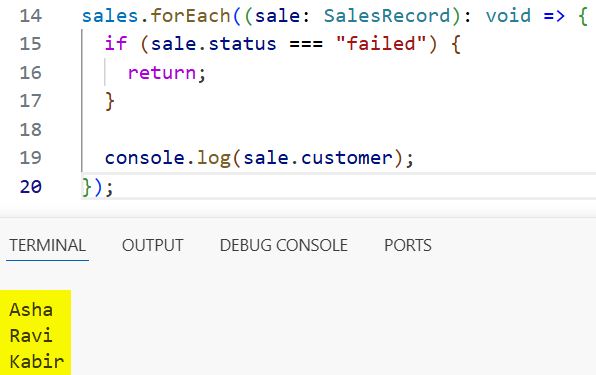
This code skips the failed record, but it still processes Kabir’s pending record afterward. Use this pattern only when you want to skip one item, not stop the complete loop. For more loop fundamentals, see this guide on TypeScript loops to execute code multiple times.
Break Out of a forEach Loop in TypeScript with for…of
The most direct solution is to replace forEach() with a for...of loop. It supports break, continue, and return, making it ideal when your logic needs clear control over iteration.
function findFirstFailedSale(records: readonly SalesRecord[]): SalesRecord | undefined {
  for (const sale of records) {
    if (sale.status === "failed") {
      return sale;
    }
  }

  return undefined;
}

const failedSale = findFirstFailedSale(sales);

console.log(failedSale?.customer); // Meera
This function accepts a readonly array, which means the function can inspect the sales records but cannot add, remove, or reorder them. That is useful when the same API data feeds multiple parts of a frontend dashboard.
The function returns the first failed sale immediately. It does not inspect later records, so it avoids unnecessary work and makes the intent obvious.
If you only need to stop processing without returning a value, use break:
let processedCount: number = 0;

for (const sale of sales) {
  if (sale.status === "failed") {
    console.log(`Stopped at failed sale: ${sale.id}`);
    break;
  }

  processedCount++;
}

console.log(processedCount); // 2
This loop stops as soon as it reaches record 103. The break exits the for...of loop completely.
Use for...of when you need to:
- Stop after finding a matching item
- Skip selected items with
continue - Run asynchronous code with
await - Update a variable outside the loop
- Keep complex business logic readable
For a closer look at this pattern, read how to use for…of loops in TypeScript.
Pro Tip: I use
for...ofwhenever a loop may need an early exit later. Starting withforEach()often creates unnecessary refactoring once validation rules or API checks become more complex.
Use some() to Stop When a Match Is Found
Use some() when you want to test whether at least one array item matches a condition. It stops automatically after the first callback that returns true.
This makes some() a clean option when you only need a yes-or-no result.
const hasFailedSale: boolean = sales.some((sale: SalesRecord): boolean => {
  return sale.status === "failed";
});

console.log(hasFailedSale); // true
You can refer to the screenshot below to see the output.
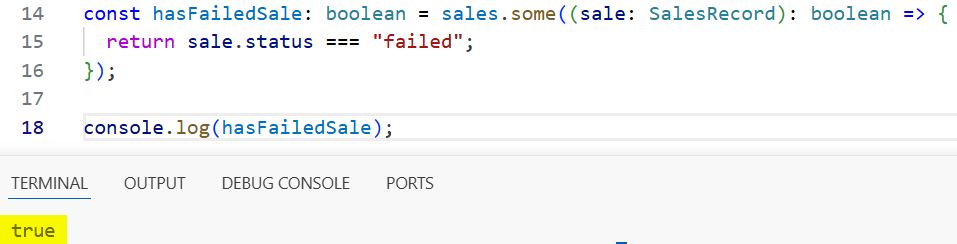
The callback returns true for Meera’s failed sale. At that point, some() stops checking the array and returns true.
You can also capture the matching record while stopping early:
let firstFailedSale: SalesRecord | undefined;

sales.some((sale: SalesRecord): boolean => {
  if (sale.status !== "failed") {
    return false;
  }

  firstFailedSale = sale;
  return true;
});

console.log(firstFailedSale);
This works, but I prefer find() when I need the matching object. some() communicates that the main goal is a Boolean check.
Use some() for validation rules such as checking whether an imported CSV contains invalid records or determining whether a task list includes an overdue item.
Use every() to Stop When Validation Fails
The every() method checks whether all items meet a condition. It stops as soon as one callback returns false.
For example, imagine that a Node.js reporting script must confirm every sale has a positive amount before uploading the data.
const allAmountsAreValid: boolean = sales.every(
  (sale: SalesRecord): boolean => sale.amount > 0
);

console.log(allAmountsAreValid); // true
Now add an invalid record:
const importedSales: SalesRecord[] = [
  ...sales,
  { id: 105, customer: "Unknown", status: "pending", amount: 0 }
];

const canProcessReport: boolean = importedSales.every(
  (sale: SalesRecord): boolean => sale.amount > 0
);

console.log(canProcessReport); // false
You can refer to the screenshot below to see the output.
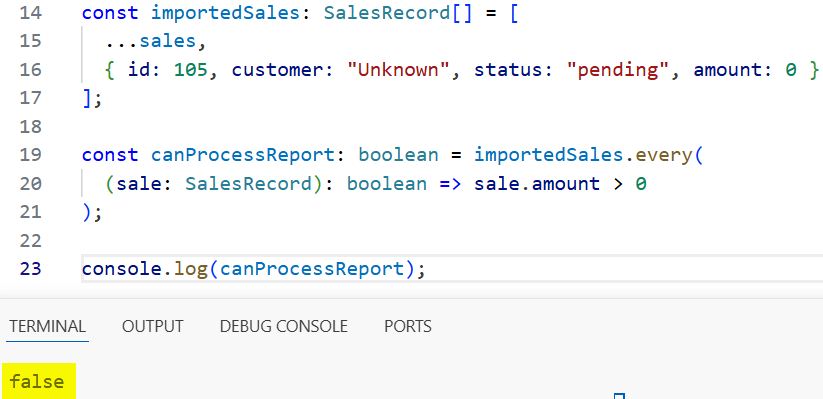
As soon as every() reaches record 105, it stops and returns false. This is useful for data validation because you do not need to inspect every item after a failure.
some() and every() do not mutate the source array. They are immutable operations, so they work well with frontend state and API response data.
Use find() When You Need the Matching Object
The find() method returns the first item that matches a condition, then stops searching. In many TypeScript applications, this is the best replacement for forEach() plus a manual variable.
const failedRecord: SalesRecord | undefined = sales.find(
  (sale: SalesRecord): boolean => sale.status === "failed"
);

if (failedRecord) {
  console.log(`Failed order: ${failedRecord.id}`);
}
The return type is SalesRecord | undefined. That union type forces you to handle the possibility that no failed record exists.
Avoid this unsafe code:
const failedRecord = sales.find((sale) => sale.status === "failed");

console.log(failedRecord.customer);
TypeScript correctly warns that failedRecord may be undefined. Check the value before reading its properties.
if (failedRecord !== undefined) {
  console.log(failedRecord.customer);
}
Use find() when you need one matching object, such as a customer by ID, an inventory item by SKU, or the first failed API response. You can also learn more about finding an object in a TypeScript array.
When a Traditional for Loop Works Better
A classic for loop also supports break. It gives you direct access to the index, which helps when your code needs the item position.
let failedIndex: number = -1;

for (let index = 0; index < sales.length; index++) {
  if (sales[index].status === "failed") {
    failedIndex = index;
    break;
  }
}

console.log(failedIndex); // 2
This approach works well when you need to update an item by index or inspect nearby records. However, use for...of when you only need the item itself. It reads more naturally and reduces index-related mistakes.
If you need both the item and its position, see how to get the index in a TypeScript forEach loop.
Do Not Use Exceptions to Exit forEach
Some developers throw an error inside forEach() and catch it outside the loop. While this can technically stop the iteration, it makes normal control flow look like an application failure.
try {
  sales.forEach((sale: SalesRecord): void => {
    if (sale.status === "failed") {
      throw new Error("Stop processing");
    }
  });
} catch (error) {
  console.log("Loop stopped");
}
Do not use this pattern for ordinary matching or validation. Exceptions belong to unexpected failures, such as a missing database connection or invalid API response.
Use for...of, find(), some(), or every() instead. Reserve exception handling for actual errors, not loop control.
Things to Keep in Mind
- forEach cannot break:
break,continue, and returning a value from the callback cannot stop aforEach()loop. - Return only skips one callback: A
returninsideforEach()skips the current item but allows later iterations to continue. - Choose the right array method: Use
find()for an item,some()for any match, andevery()for all-valid checks. - Protect readonly data: A readonly array prevents accidental mutations, while search methods and
for...ofcan still read its values. - Handle undefined results:
find()can returnundefined, so check the result before accessing object properties. - Avoid exception-based exits: Throwing errors to stop normal iteration makes debugging and error handling harder.
Frequently Asked Questions
Can I use break inside forEach in TypeScript?
No. You cannot use break inside a forEach() callback because the callback is a function, not the loop body itself. Use for...of when you need break.
Does return break a forEach loop in TypeScript?
No. return exits only the current callback execution. The forEach() method continues with the next array item.
What is the best alternative to forEach for early exit?
Use for...of when you need flexible loop control. Use find(), some(), or every() when their return values exactly match your goal.
Does find() stop after the first match?
Yes. find() stops as soon as it finds the first item that satisfies the condition. It returns that item or undefined if no item matches.
Can I use await inside a forEach loop?
You can mark the callback as async, but forEach() does not wait for its promises. Use for...of with await when each asynchronous operation must finish before the next iteration begins.
Is for…of slower than forEach in TypeScript?
In most frontend and Node.js script scenarios, readability and correct early exit matter more than tiny performance differences. A for...of loop can also do less work when it stops early.
You cannot break directly from a forEach() loop in TypeScript, but for...of, find(), some(), and every() give you reliable early-exit options. Start with for...of for clear control flow, then use an array method when it expresses your intent more precisely. I hope you found this article helpful.
You May Also Like
- Break out of loops in TypeScript
- Use break statements in TypeScript for loops
- Filter arrays in TypeScript
- TypeScript for loops with arrays
- TypeScript best practices

Bijay Kumar is an experienced Python and AI professional who enjoys helping developers learn modern technologies through practical tutorials and examples. His expertise includes Python development, Machine Learning, Artificial Intelligence, automation, and data analysis using libraries like Pandas, NumPy, TensorFlow, Matplotlib, SciPy, and Scikit-Learn. At PythonGuides.com, he shares in-depth guides designed for both beginners and experienced developers. More about us.

