
Meta Description: Learn how to use the TypeScript forEach loop with index to process typed arrays safely, build clear UI output, and avoid common looping mistakes in apps.
When I build a sales dashboard, I often receive an array of records from an API and need to display a row number beside each sale. The sale object matters, but its position in the array matters too. That is where the TypeScript forEach() loop with an index becomes useful.
The forEach() method lets you run code for every array item. Its second callback parameter gives you the current index, so you can create numbered lists, update specific rows, build labels, or apply position-based rules.
This guide shows how to use the TypeScript forEach loop with index, type the data safely, and choose a better loop when forEach() is not the right fit.
TypeScript forEach Loop With Index Syntax
The basic forEach() syntax looks like this:
array.forEach((item, index) => {
  // Run code for each item
});
The first parameter is the current array value. The second parameter is the current index, which starts at 0.
Here is a simple example with sales regions:
const regions: string[] = ["North", "South", "West"];

regions.forEach((region, index) => {
  console.log(`${index}: ${region}`);
});
Output:
0: North
1: South
2: West
You can see the output in the screenshot below.
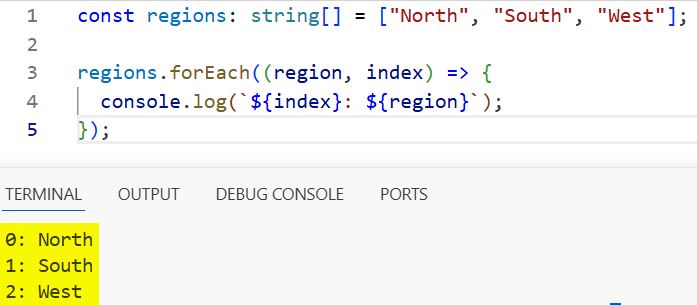
The string[] part is a type annotation. It tells TypeScript that regions must contain strings only. If you accidentally add a number or object, TypeScript can flag the mistake before you run the code.
forEach() exists in JavaScript, and TypeScript does not change how it works at runtime. TypeScript adds compile-time checking around the values you use inside the callback.
If you need a refresher on basic array callbacks, see this guide on using the TypeScript forEach method on arrays.
TypeScript forEach Loop With Index in a Dashboard
Let’s use a realistic sales dashboard example. Imagine that your API has already returned a typed list of sales records.
interface SalesRecord {
  id: string;
  representative: string;
  region: string;
  amount: number;
}

const salesRecords: SalesRecord[] = [
  {
    id: "S-101",
    representative: "Asha",
    region: "North",
    amount: 12500
  },
  {
    id: "S-102",
    representative: "Ravi",
    region: "South",
    amount: 9800
  },
  {
    id: "S-103",
    representative: "Meera",
    region: "West",
    amount: 14300
  }
];
The interface defines the expected shape of each record. This prevents common frontend bugs, such as trying to read sale.customerName when the actual property is representative.
Now use forEach() and its index parameter to create a numbered console report:
salesRecords.forEach((sale: SalesRecord, index: number) => {
  const rowNumber = index + 1;

  console.log(
    `${rowNumber}. ${sale.representative} - ${sale.region} - ₹${sale.amount}`
  );
});
Output:
1. Asha - North - ₹12500
2. Ravi - South - ₹9800
3. Meera - West - ₹14300
You can see the output in the screenshot below.
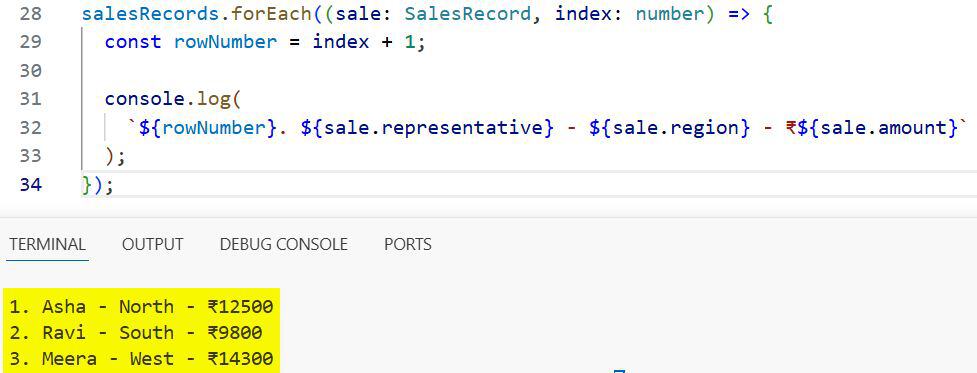
I use index + 1 because array indexes start at zero, while people expect dashboard rows and report numbers to start at one.
You can often omit the explicit types on sale and index. TypeScript infers them from SalesRecord[].
salesRecords.forEach((sale, index) => {
  console.log(`${index + 1}. ${sale.representative}`);
});
This version stays type-safe because TypeScript knows that sale is a SalesRecord and index is a number.
Build Numbered UI Data
A common use case in frontend development is preparing data for a table, list, or card component. Instead of changing the original API response, create a new array with the display details you need.
interface SalesRow {
  position: number;
  label: string;
  amount: number;
}

const dashboardRows: SalesRow[] = [];

salesRecords.forEach((sale, index) => {
  dashboardRows.push({
    position: index + 1,
    label: `${sale.representative} (${sale.region})`,
    amount: sale.amount
  });
});

console.log(dashboardRows);
This code creates a separate dashboardRows array. Each item includes a user-friendly position number and a display label.
The original salesRecords array remains unchanged. That matters when the same API data feeds a table, chart, export function, and summary card. Keeping the source data stable makes debugging easier.
For this exact transformation, map() is often more expressive because it creates a new array directly:
const dashboardRows = salesRecords.map((sale, index): SalesRow => {
  return {
    position: index + 1,
    label: `${sale.representative} (${sale.region})`,
    amount: sale.amount
  };
});
Use forEach() when your main goal is a side effect, such as logging, updating a display element, or filling an existing collection. Use map() when you want a new transformed array.
Pro Tip: I’ve found that using
forEach()to build a new array can hide intent in larger projects. When I need a transformed result, I usually choosemap()so the next developer immediately knows what the code returns.
Access the Third Callback Parameter
The forEach() callback can receive three parameters:
array.forEach((item, index, array) => {
  // item: current value
  // index: current position
  // array: original array
});
The third parameter is the original array. You will not need it often, but it can help when comparing the current record with the total list.
salesRecords.forEach((sale, index, records) => {
  const isLastRecord = index === records.length - 1;

  if (isLastRecord) {
    console.log(`Final record: ${sale.id}`);
  }
});
This code checks whether the current index equals the last valid array position. Since array length is 3, the last index is 2.
I prefer records.length - 1 over hardcoding a number. Your code then keeps working when the API returns more or fewer records.
If you need more practical patterns for array loops, explore TypeScript for loops with arrays.
Update an Array Item by Index
You can use the index to access the current item through the original array.
salesRecords.forEach((sale, index, records) => {
  if (sale.amount < 10000) {
    records[index] = {
      ...sale,
      region: `${sale.region} - Review`
    };
  }
});
The spread operator creates a new object with the existing sale properties and replaces only region. This avoids changing the existing object property directly.
However, this still changes the original array because it assigns a new object to records[index]. That may be acceptable in a small Node.js script, but it can cause stale state issues in React or other UI frameworks.
A safer immutable approach creates a new array:
const reviewedSales = salesRecords.map((sale) => {
  if (sale.amount < 10000) {
    return {
      ...sale,
      region: `${sale.region} - Review`
    };
  }

  return sale;
});
Here, salesRecords stays intact and reviewedSales contains the updated records. Learn more about protecting input data with readonly arrays in TypeScript.
Use Readonly Arrays Safely
A readonly array prevents you from changing the array structure. You can read and loop through it, but you cannot call mutating methods such as push(), pop(), or splice().
const salesRecords: readonly SalesRecord[] = [
  {
    id: "S-101",
    representative: "Asha",
    region: "North",
    amount: 12500
  },
  {
    id: "S-102",
    representative: "Ravi",
    region: "South",
    amount: 9800
  }
];

salesRecords.forEach((sale, index) => {
  console.log(`Row ${index + 1}: ${sale.representative}`);
});
This works because forEach() reads the array. The following code fails TypeScript checking:
salesRecords.push({
  id: "S-103",
  representative: "Meera",
  region: "West",
  amount: 14300
});
Use readonly input when a function should inspect records but must not replace, add, or remove entries.
function printSalesReport(records: readonly SalesRecord[]): void {
  records.forEach((sale, index) => {
    console.log(`${index + 1}. ${sale.representative}: ₹${sale.amount}`);
  });
}
The void return type tells TypeScript that this function performs an action but does not return a value.
When Not to Use forEach
forEach() is useful, but it has limits. Choose another loop or array method when your requirement differs.
When you need to return data
forEach() always returns undefined. Use map() to create a transformed array.
const salesLabels = salesRecords.map(
  (sale, index) => `${index + 1}. ${sale.representative}`
);
When you need to stop early
You cannot use break or continue directly inside a forEach() callback. Use a regular for loop or for...of loop if you must stop after finding a match.
for (let index = 0; index < salesRecords.length; index++) {
  const sale = salesRecords[index];

  if (sale.amount > 14000) {
    console.log(`High-value sale found at index ${index}`);
    break;
  }
}
This is one of the most important differences between forEach() and a traditional loop. See how to break out of a TypeScript forEach loop when you need early exit behavior.
When you need async operations in sequence
Avoid assuming that await inside forEach() waits for each callback.
salesRecords.forEach(async (sale, index) => {
  await saveSale(sale);
  console.log(`Saved record ${index + 1}`);
});
The outer forEach() does not wait for these promises. If order matters, use for...of instead.
for (const [index, sale] of salesRecords.entries()) {
  await saveSale(sale);
  console.log(`Saved record ${index + 1}`);
}
The entries() method returns both the index and item. This pattern works well in a Node.js script that uploads records one at a time.
Things to Keep in Mind
- Indexes start at zero: Add
1only when you need human-friendly row numbers or ranks. - forEach returns nothing: Use
map(),filter(), orreduce()when you need a result array or calculated value. - Avoid accidental mutation: Updating
array[index]changes the original array, which can create difficult state bugs. - Use clear types: Define an interface for object arrays so TypeScript catches missing and misspelled properties during compilation.
- Do not expect early exit:
break,continue, andreturndo not stop the surroundingforEach()loop. - Treat async code carefully:
forEach()does not await asynchronous callbacks, so usefor...ofwhen processing order matters.
Frequently Asked Questions
How do I get the index in a TypeScript forEach loop?
Add index as the second callback parameter. TypeScript infers it as a number when you call forEach() on an array.
tsitems.forEach((item, index) => {
console.log(index, item);
});
Does TypeScript forEach index start at 0 or 1?
It starts at 0, just like JavaScript array indexes. Use index + 1 when showing numbered rows to users.
Can I change an array item inside forEach?
Yes, you can assign a new value through the array reference and index. However, prefer an immutable map() operation when shared application data should remain unchanged.
Can I use break in TypeScript forEach?
No. forEach() does not support break or continue because its callback is a function. Use a for loop, for...of, find(), or some() when you need to stop early.
Is forEach type-safe in TypeScript?
Yes, when your array has a known type such as SalesRecord[]. TypeScript checks the item type in the callback during compilation, but it does not validate unknown API data at runtime.
Should I use forEach or map with an index?
Use forEach() for actions such as logging, sending events, or updating existing output. Use map() when you need a new array, such as a list of numbered dashboard rows.
The TypeScript forEach() loop with index gives you a simple way to process typed array items while tracking each item’s position. Start with forEach() for clear per-item actions, then switch to map() or for...of when you need transformed data, early exit, or reliable async control.
You May Also Like
- How to iterate over arrays in TypeScript
- How to use for-of loops in TypeScript
- How to filter arrays in TypeScript
- How to sort arrays in TypeScript
- How to use the array reduce method in TypeScript

Bijay Kumar is an experienced Python and AI professional who enjoys helping developers learn modern technologies through practical tutorials and examples. His expertise includes Python development, Machine Learning, Artificial Intelligence, automation, and data analysis using libraries like Pandas, NumPy, TensorFlow, Matplotlib, SciPy, and Scikit-Learn. At PythonGuides.com, he shares in-depth guides designed for both beginners and experienced developers. More about us.

