
ax.set_xticks() decides where the ticks sit on a Matplotlib x-axis. You pass positions in data coordinates, and optionally the labels to go with them:
ax.set_xticks([0, 2, 4, 6, 8, 10])
ax.set_xticks([1, 2, 3, 4], labels=["Q1", "Q2", "Q3", "Q4"])
Positions first. That’s the detail behind most of the trouble people have with it, because setting labels without positions is a different and less reliable thing.
Figures and output below are from Matplotlib 3.11.2 on Python 3.12.5.
Setting tick positions with set_xticks
Matplotlib picks ticks for you until you say otherwise. Pass a list and you’ll get exactly those:
import matplotlib
matplotlib.use("Agg")
import matplotlib.pyplot as plt
import numpy as np

x = np.linspace(0, 10, 100)
fig, ax = plt.subplots(figsize=(6, 3))
ax.plot(x, np.sin(x))

print("default ticks:", ax.get_xticks())

ax.set_xticks([0, 2, 4, 6, 8, 10])          # positions, in data coordinates
print("after set_xticks:", ax.get_xticks())

plt.close(fig)
Output:
default ticks: [-2.  0.  2.  4.  6.  8. 10. 12.]
after set_xticks: [ 0  2  4  6  8 10]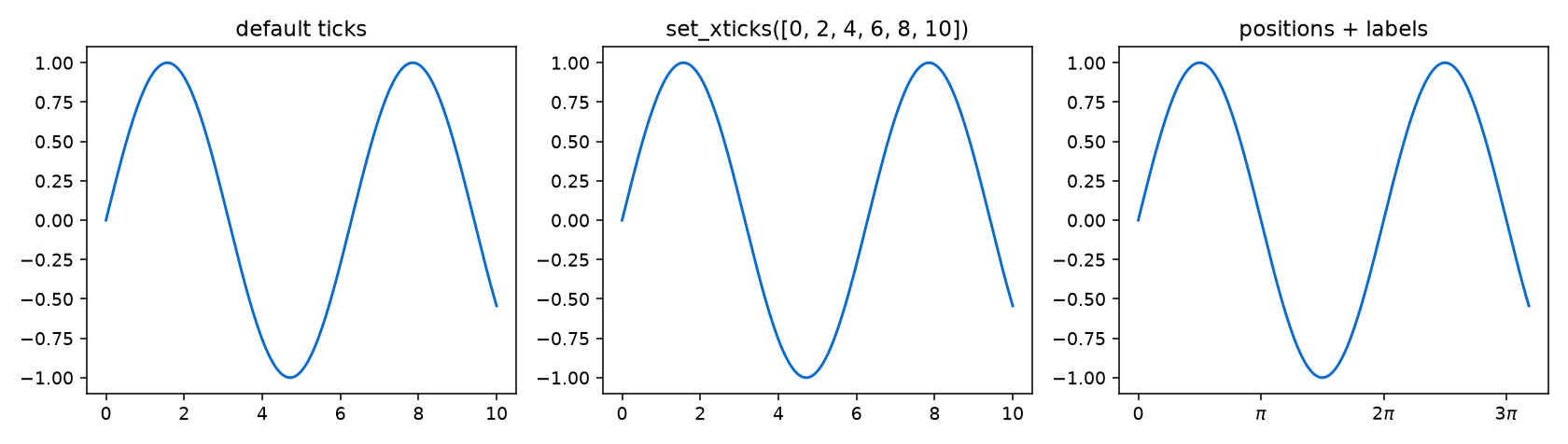

The values are in data coordinates, not pixels or index numbers. On a plot running 0 to 10, a tick at 2 lands where your data says 2.
set_xticks with positions and labels in one call
Since Matplotlib 3.5, set_xticks takes the labels alongside the positions, which is now the recommended way:
import matplotlib
matplotlib.use("Agg")
import matplotlib.pyplot as plt

quarters = [1, 2, 3, 4]
revenue = [180, 210, 195, 260]

fig, ax = plt.subplots(figsize=(6, 3))
ax.bar(quarters, revenue)

# positions and labels in one call, which is the modern way
ax.set_xticks(quarters, labels=["Q1", "Q2", "Q3", "Q4"])

fig.canvas.draw()
print("positions:", ax.get_xticks())
print("labels   :", [t.get_text() for t in ax.get_xticklabels()])
plt.close(fig)
Output:
positions: [1 2 3 4]
labels   : ['Q1', 'Q2', 'Q3', 'Q4']
Doing both together keeps them in step. It also sidesteps the warning you’ll get from calling set_xticklabels on its own, because the positions are fixed in the same breath.
That warning, and the alignment options that go with rotated labels, are covered in the rotation guide.
What is the difference between set_xticks and plt.xticks?
Three names, three jobs, and mixing them up is the usual reason ticks end up wrong:
import matplotlib
matplotlib.use("Agg")
import matplotlib.pyplot as plt
import numpy as np

x = np.arange(6)

# set_xticks -> where the ticks go
fig, ax = plt.subplots()
ax.plot(x, x ** 2)
ax.set_xticks([0, 2, 4])
print("set_xticks       ->", ax.get_xticks())
plt.close(fig)

# plt.xticks with no arguments READS them back
fig, ax = plt.subplots()
ax.plot(x, x ** 2)
locs, labels = plt.xticks()
print("plt.xticks() read->", locs)
plt.close(fig)

# plt.xticks with arguments does both jobs on the current axes
fig, ax = plt.subplots()
ax.plot(x, x ** 2)
plt.xticks([0, 2, 4], ["low", "mid", "high"])
fig.canvas.draw()
print("plt.xticks set   ->", [t.get_text() for t in ax.get_xticklabels()])
plt.close(fig)
Output:
set_xticks       -> [0 2 4]
plt.xticks() read-> [-1.  0.  1.  2.  3.  4.  5.  6.]
plt.xticks set   -> ['low', 'mid', 'high']
plt.xticks() with no arguments reads; with arguments it sets.| Call | What it does |
|---|---|
ax.set_xticks(pos) | Sets the positions on a specific axes |
ax.set_xticks(pos, labels=...) | Sets positions and labels together |
ax.set_xticklabels(labels) | Sets only the text, and warns unless positions are fixed |
plt.xticks() | Reads back the current positions and labels |
plt.xticks(pos, labels) | Sets both, on whichever axes is current |
Use the ax. methods in anything with more than one axes. plt.xticks acts on the current axes only, the same trap that catches set_xticklabels users on subplots.
Spacing set_xticks without listing every position
Typing out positions stops being practical once the axis is long or the limits change. Two better options:
import matplotlib
matplotlib.use("Agg")
import matplotlib.pyplot as plt
import numpy as np
from matplotlib.ticker import MultipleLocator, MaxNLocator

x = np.linspace(0, 47, 200)

# every 5 units, computed rather than typed out
fig, ax = plt.subplots()
ax.plot(x, x)
ax.set_xticks(np.arange(0, 51, 5))
print("np.arange   :", ax.get_xticks())
plt.close(fig)

# a locator keeps working when the limits change
fig, ax = plt.subplots()
ax.plot(x, x)
ax.xaxis.set_major_locator(MultipleLocator(10))
fig.canvas.draw()
print("MultipleLocator(10):", ax.get_xticks())
plt.close(fig)

# or just ask for "about this many"
fig, ax = plt.subplots()
ax.plot(x, x)
ax.xaxis.set_major_locator(MaxNLocator(nbins=4))
fig.canvas.draw()
print("MaxNLocator(4)     :", ax.get_xticks())
plt.close(fig)
Output:
np.arange   : [ 0  5 10 15 20 25 30 35 40 45 50]
MultipleLocator(10): [-10.   0.  10.  20.  30.  40.  50.]
MaxNLocator(4)     : [-15.   0.  15.  30.  45.  60.]
np.arange fixes the list; the locators recompute when limits change.MultipleLocator(10) puts a tick every ten units whatever the range. MaxNLocator(nbins=4) asks for roughly that many and picks round numbers itself.
Reach for a locator when your data is dynamic, and for an explicit list when the positions carry meaning, such as quarters or categories. I’d default to the locator in anything that redraws.
Minor ticks and clearing the axis with set_xticks
The same method handles minor ticks through one argument:
import matplotlib
matplotlib.use("Agg")
import matplotlib.pyplot as plt
import numpy as np

fig, ax = plt.subplots(figsize=(6, 3))
ax.plot(np.linspace(0, 10, 100), np.linspace(0, 10, 100))

ax.set_xticks([0, 5, 10])                          # major
ax.set_xticks(np.arange(0, 10.5, 1), minor=True)   # minor, same method

print("major:", ax.get_xticks())
print("minor:", ax.get_xticks(minor=True))
plt.close(fig)
Output:
major: [ 0  5 10]
minor: [1. 2. 3. 4. 6. 7. 8. 9.]
There’s a trap worth knowing here, and an empty list that clears the axis completely:
import matplotlib
matplotlib.use("Agg")
import matplotlib.pyplot as plt
import numpy as np

fig, ax = plt.subplots()
ax.plot(np.arange(10), np.arange(10))
print("xlim after plotting  :", tuple(round(v, 2) for v in ax.get_xlim()))

# a stray position does NOT get ignored: the axis stretches to reach it
ax.set_xticks([0, 5, 9, 500])
print("xlim after set_xticks:", tuple(round(v, 2) for v in ax.get_xlim()))

ax.set_xlim(0, 9)                     # put the view back if you only wanted the ticks
print("after set_xlim       :", tuple(round(v, 2) for v in ax.get_xlim()))

ax.set_xticks([])                     # and this clears ticks and labels entirely
print("after set_xticks([]) :", ax.get_xticks(), "->", len(ax.get_xticks()), "ticks")
plt.close(fig)
Output:
xlim after plotting  : (np.float64(-0.45), np.float64(9.45))
xlim after set_xticks: (np.float64(-0.45), np.float64(500.0))
after set_xlim       : (np.float64(0.0), np.float64(9.0))
after set_xticks([]) : [] -> 0 ticks
A tick position outside your data doesn’t get ignored. The axis stretches to reach it, so one stray number turns a 0-to-9 plot into a 0-to-500 one.
Call set_xlim() after set_xticks() when you want the ticks but not the rescale. It’s the quickest explanation for a chart that suddenly looks empty.
set_xticks([]) is the other half: it removes the marks and labels in one go, which suits image plots and sparklines. To clear both axes at once, see removing tick labels and ticks.
More Matplotlib tick and axis guides:
- Matplotlib set_xticklabels
- Rotate tick labels 45 and 90 degrees
- Remove tick labels and ticks
- Matplotlib tick_params
- Log scale minor ticks with LogLocator
Frequently asked questions
What does ax.set_xticks() do?
It sets the positions of the x-axis ticks, in data coordinates, and can take the labels at the same time. The signature is in the set_xticks reference.
What is the difference between set_xticks and set_xticklabels?
set_xticks chooses where the ticks go; set_xticklabels only changes the text. Setting labels without fixing positions triggers a warning.
How do I set tick positions and labels together?
ax.set_xticks(positions, labels=[...]), available from Matplotlib 3.5. It keeps the two in step and avoids the warning.
What is the difference between set_xticks and plt.xticks?
plt.xticks() with no arguments reads the current ticks; with arguments it sets them on the current axes. ax.set_xticks always targets one specific axes.
How do I set a tick every N units?
Either ax.set_xticks(np.arange(start, stop, N)), or ax.xaxis.set_major_locator(MultipleLocator(N)) so it survives a change of limits.
How do I add minor ticks?
Pass minor=True: ax.set_xticks(positions, minor=True). Major and minor ticks are stored separately.
How do I remove the x ticks completely?
ax.set_xticks([]). That removes the tick marks and their labels in one call.

Bijay Kumar is a 13-time Microsoft MVP with more than 18 years in software development, and the founder of Python Guides and TSinfo Technologies. He started out building .NET and SharePoint solutions at HP, TCS and KPIT before