
I have spent countless hours comparing datasets to find discrepancies. Whether I am looking at US Census data or year-over-year retail sales, knowing how to spot differences is a vital skill.
Over time, I have found that there isn’t just one way to compare DataFrames in Pandas. The method you choose usually depends on whether you want a quick “True or False” answer or a detailed report of every change.
In this tutorial, I will share the exact techniques I use in my daily workflow to compare DataFrames efficiently.
Identify Identical DataFrames with the Equals Method
When I first started, I used to try comparing DataFrames using the standard == operator.
I quickly realized that this often leads to errors because it tries to compare every single element and returns a mask.
If I just need to know if two datasets are the same, I always use the equals() method.
This method is great because it handles NaNs (null values) correctly, whereas standard comparison operators often fail when they encounter missing data.
I often use this when I am migrating data from a SQL Server in New York to a cloud instance and need to verify the integrity.
import pandas as pd

# Let's create two DataFrames representing Q1 Sales in California
sales_v1 = pd.DataFrame({
    'Store_ID': [101, 102, 103],
    'Revenue': [55000, 62000, 48000],
    'City': ['Los Angeles', 'San Francisco', 'San Diego']
})

sales_v2 = pd.DataFrame({
    'Store_ID': [101, 102, 103],
    'Revenue': [55000, 62000, 48000],
    'City': ['Los Angeles', 'San Francisco', 'San Diego']
})

# Checking if they are identical
is_identical = sales_v1.equals(sales_v2)

print(f"Are the DataFrames identical? {is_identical}")
I executed the above example code and added the screenshot below.
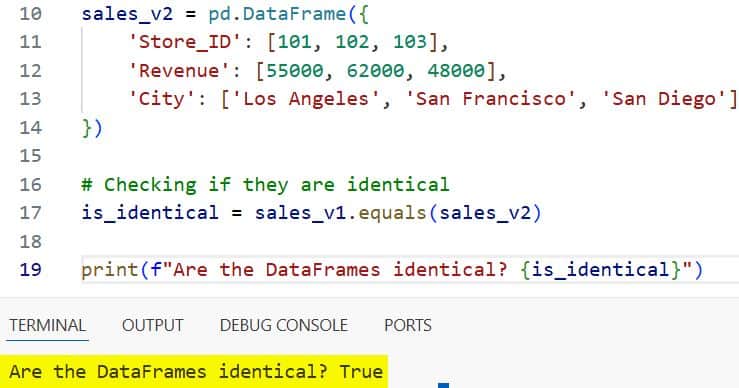
In this case, the output will be True. I find this method most useful in automated scripts where a simple Boolean check triggers the next step of the pipeline.
Use the Compare Method for Detailed Differences
In 2020, Pandas introduced the compare() method, and it completely changed how I handle data audits.
I use this when I have two versions of a dataset, like a US employee roster before and after a monthly update, and I need to see exactly what changed.
The compare() method aligns the two DataFrames and shows you the “self” (original) and “other” (new) values side-by-side.
It is important to remember that this method only works if the DataFrames have the same shape and the same index/column labels.
import pandas as pd

# Employee data for a tech firm in Seattle
df_june = pd.DataFrame({
    'Employee_ID': [1, 2, 3, 4],
    'Salary': [105000, 98000, 120000, 110000],
    'Department': ['Eng', 'HR', 'Eng', 'Mkt']
}).set_index('Employee_ID')

df_july = pd.DataFrame({
    'Employee_ID': [1, 2, 3, 4],
    'Salary': [105000, 102000, 120000, 110000],
    'Department': ['Eng', 'Ops', 'Eng', 'Mkt']
}).set_index('Employee_ID')

# Comparing the two months
differences = df_june.compare(df_july)

print(differences)
I executed the above example code and added the screenshot below.
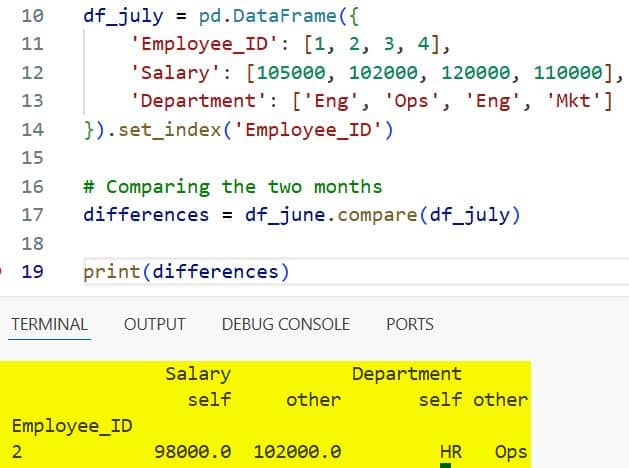
In this example, Employee 2 received a salary bump and changed departments. The output will show the Salary and Department columns with sub-columns for self and other.
I really appreciate how this visualizes the delta without me having to write complex loops.
Find Missing Rows Using a Merge Indicator
Sometimes, comparing two DataFrames isn’t about finding different values in the same row, but finding which rows are missing entirely.
I frequently encounter this when comparing voter registration lists or regional shipping logs in the US.
When I need to see which records exist in the “Current” list but are missing from the “Updated” list, I use an outer merge with the indicator parameter.
import pandas as pd

# Logistics data for distribution centers in Texas
warehouse_stock_am = pd.DataFrame({
    'SKU': ['A100', 'B200', 'C300', 'D400'],
    'Stock': [500, 300, 150, 400]
})

warehouse_stock_pm = pd.DataFrame({
    'SKU': ['A100', 'B200', 'D400', 'E500'],
    'Stock': [450, 300, 380, 100]
})

# Merging to find discrepancies
comparison_merge = warehouse_stock_am.merge(
    warehouse_stock_pm,
    on='SKU',
    how='outer',
    suffixes=('_AM', '_PM'),
    indicator=True
)

# Filtering to see what changed or is missing
only_in_morning = comparison_merge[comparison_merge['_merge'] == 'left_only']
only_in_evening = comparison_merge[comparison_merge['_merge'] == 'right_only']

print("Items sold out (only in morning list):")
print(only_in_morning)

print("\nNew items arrived (only in evening list):")
print(only_in_evening)
I executed the above example code and added the screenshot below.
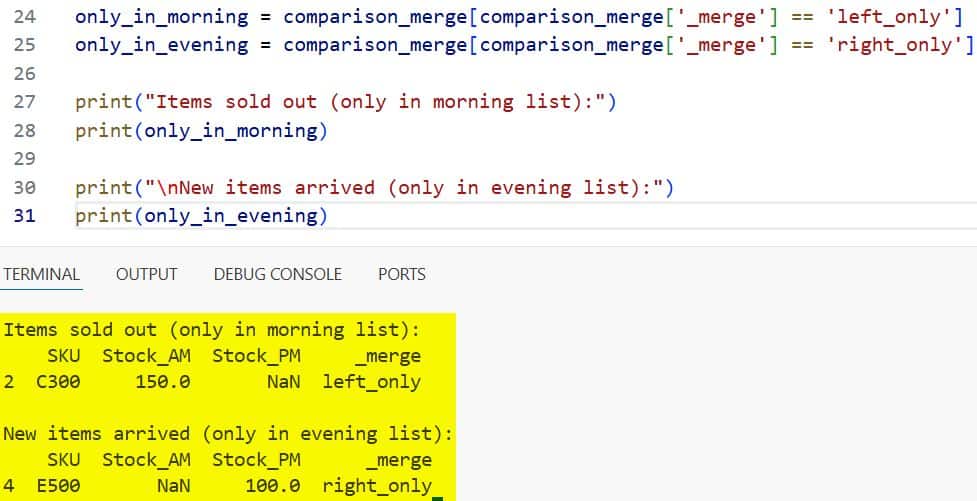
I find that the _merge column is a lifesaver. It tells you exactly if the row was in “both”, “left_only”, or “right_only”.
This is my go-to strategy for reconciling two different database exports.
Identify Changes with Boolean Indexing and Ne
If I am working with very large datasets, like real estate prices across all 50 US states, I sometimes want a faster way to filter for differences.
I use the ne() (not equal) method combined with boolean indexing.
This is much faster than compare() because it doesn’t create a complex multi-index result; it just gives me the rows where a mismatch exists.
import pandas as pd

# Median home prices in selected US cities (Year 2023 vs 2024)
prices_2023 = pd.DataFrame({
    'City': ['Austin', 'Miami', 'Chicago', 'Denver'],
    'Price': [550000, 600000, 320000, 580000]
}).set_index('City')

prices_2024 = pd.DataFrame({
    'City': ['Austin', 'Miami', 'Chicago', 'Denver'],
    'Price': [540000, 625000, 320000, 590000]
}).set_index('City')

# Identifying which cities saw a price change
mask = prices_2023['Price'].ne(prices_2024['Price'])
changed_cities = prices_2024[mask]

print("Cities with updated market prices:")
print(changed_cities)
I executed the above example code and added the screenshot below.
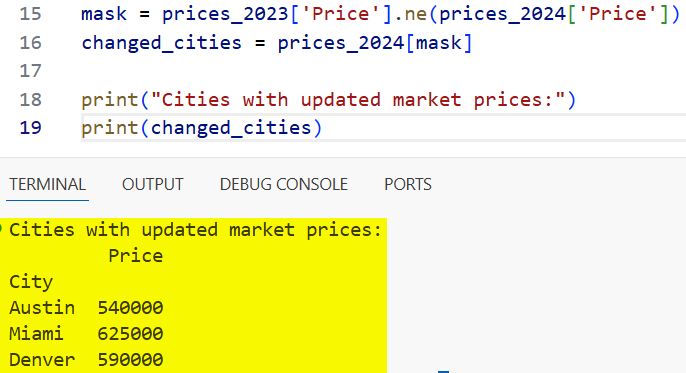
In my experience, using a boolean mask like this is the most “Pythonic” way to handle filtering when performance is a concern.
Unit Testing Comparisons with Assert Frame Equal
If you are a developer writing production code, you shouldn’t just print your results to the console.
I always write unit tests to ensure my data processing functions are working correctly. Pandas provides a specific utility called pd.testing.assert_frame_equal.
Unlike the other methods, this one doesn’t return a DataFrame. It simply does nothing if they match, or raises a detailed AssertionError if they don’t.
import pandas as pd
from pandas.testing import assert_frame_equal

# Expected output from a calculation
expected_data = pd.DataFrame({'State': ['NY', 'TX'], 'Tax': [8.875, 6.25]})
# Actual output from my function
actual_data = pd.DataFrame({'State': ['NY', 'TX'], 'Tax': [8.875, 6.25]})

try:
    assert_frame_equal(expected_data, actual_data)
    print("Test Passed: The DataFrames match perfectly.")
except AssertionError as e:
    print(f"Test Failed: {e}")
I use this in my CI/CD pipelines to make sure that any changes I make to my code don’t accidentally break the data output format.
It is particularly useful because it can check for data types as well as values.
Choose the Right Method for Your Project
I have learned that there is no “best” way, only the “right” way for your specific situation. If you just need a quick check to see if a file has changed, use equals().
If you are performing a data audit and need to show your manager exactly what numbers were updated, compare() is your best friend.
For reconciling two lists that might have different rows, stick with the merge() indicator method.
And finally, if you are building a robust application, always use assert_frame_equal in your testing suite.
I hope this guide helps you navigate your data comparison tasks more effectively. Dealing with data discrepancies is part of the job, but with these tools, it becomes a much more manageable task.
You may also read other tutorials on Pandas:
- Ways to Replace Values in a Pandas Column
- Pandas Sort by Multiple Columns
- Lambda Functions in Pandas DataFrames
- How to Read Excel Files in Pandas

I am Bijay Kumar, a Microsoft MVP in SharePoint. Apart from SharePoint, I started working on Python, Machine learning, and artificial intelligence for the last 5 years. During this time I got expertise in various Python libraries also like Tkinter, Pandas, NumPy, Turtle, Django, Matplotlib, Tensorflow, Scipy, Scikit-Learn, etc… for various clients in the United States, Canada, the United Kingdom, Australia, New Zealand, etc. Check out my profile.

