
When I build small reporting scripts, I often need to repeat a label, separator, or default value several times. For example, a sales report may need a row of dashes before each regional summary, or a test script may need the same sample value repeated for a fixed number of records.
In Python, the term repeat() function can mean two different things. You can repeat strings and lists with the * operator, or you can use itertools.repeat() when you need an iterator that produces the same value repeatedly. You can also use numpy.repeat() for repeating elements inside arrays.
This guide shows the practical differences, full working code, expected output, and when each approach makes sense.
What Is the repeat() Function in Python?
Python does not include a built-in function named repeat() for strings or lists. Instead, the best approach depends on the data type and the result you need.
For most beginner Python scripts, use the multiplication operator:
value * count
For example, this repeats a string:
message = "Welcome "
repeated_message = message * 3

print(repeated_message)
Output:
Welcome Welcome Welcome
You can see the output in the screenshot below.
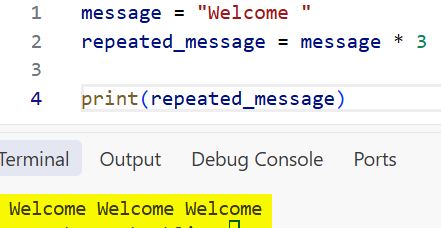
The * operator creates a new string containing the original text three times. This works well when you need a final string immediately, such as a heading separator in a console report.
If you are new to Python functions, see this guide on how to define a function in Python. A function is a reusable block of code that performs a specific task.
How to Use repeat() in Python with Strings
The simplest way to repeat a string in Python is with the * operator. This method is useful in command-line applications, log formatting, text reports, and test data generation.
Repeat a String a Fixed Number of Times
Let’s say Olivia from Austin needs a separator line in a weekly sales report.
separator = "-"
report_title = "Weekly Sales Report"

print(separator * 30)
print(report_title)
print(separator * 30)
Output:
------------------------------
Weekly Sales Report
------------------------------
You can see the output in the screenshot below.
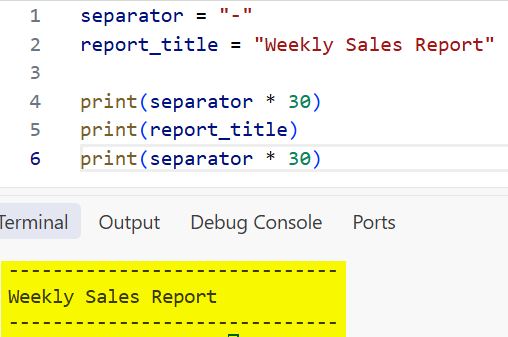
Here, separator * 30 creates a new string containing 30 dashes. Python reads the multiplication operator as “repeat this string 30 times.”
You can use this approach whenever you need predictable text formatting. It keeps a small automation script readable without adding an extra module.
Repeat a Word with a Space
When you repeat a word, Python does not add spaces automatically. You need to include a space inside the string or use join().
alert = "Pending "
print(alert * 4)
Output:
Pending Pending Pending Pending
You can see the output in the screenshot below.
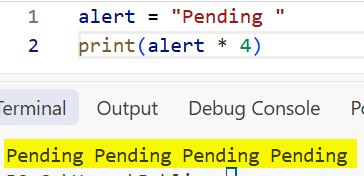
This works, but it leaves an extra space at the end. A cleaner option uses the string join() method.
alert = "Pending"
repeated_alert = " ".join([alert] * 4)

print(repeated_alert)
Output:
Pending Pending Pending Pending
The list [alert] * 4 creates four copies of "Pending". Then " ".join() combines them with one space between each value. If you want to work more confidently with strings, learn how to concatenate strings and integers in Python.
Pro Tip: I use string multiplication for visual separators, but I use
" ".join()for repeated words. It prevents unwanted trailing spaces and makes console output cleaner.
How to Use repeat() in Python with Lists
You can also repeat a Python list, which is an ordered collection of values. This is useful when you need placeholder values for a small local script or mock data for testing.
Repeat List Items
Suppose Ethan in Chicago is testing a customer-feedback script. He needs three copies of the same status list.
status_codes = ["new", "review"]
repeated_status_codes = status_codes * 3

print(repeated_status_codes)
Output:
['new', 'review', 'new', 'review', 'new', 'review']
Python repeats the entire list in order. It does not repeat each item three times before moving to the next item.
If you need to repeat each item instead, use a for loop or a list comprehension. A list comprehension is a short syntax for creating a list from existing data.
status_codes = ["new", "review"]
repeated_each_code = [code for code in status_codes for _ in range(3)]

print(repeated_each_code)
Output:
['new', 'new', 'new', 'review', 'review', 'review']
The first loop reads each code from status_codes. The second loop runs three times, so Python adds each code three times before moving forward.
For more list operations, explore how to create an empty list in Python and find the length of a list in Python.
Avoid Repeating Nested Lists Incorrectly
This is one of the most common mistakes when using list repetition. Consider a small attendance tracker with three daily rows.
attendance = [["Not Marked"]] * 3

attendance[0][0] = "Present"

print(attendance)
Output:
[['Present'], ['Present'], ['Present']]
Many beginners expect only the first row to change. However, all three inner lists point to the same list object in memory. Changing one row changes every repeated reference.
Create a new inner list for each row instead:
attendance = [["Not Marked"] for _ in range(3)]

attendance[0][0] = "Present"

print(attendance)
Output:
[['Present'], ['Not Marked'], ['Not Marked']]
This list comprehension builds three separate lists. Use this approach for nested lists, grids, tables, and mutable values such as dictionaries.
Pro Tip: In my automation projects, I never use
[[]] * countfor a table or matrix. It looks correct at first, but shared references cause hard-to-find data bugs later.
How to Use itertools.repeat() in Python
Use itertools.repeat() when you need an iterator. An iterator returns values one at a time instead of creating every repeated value immediately.
The itertools module comes with Python, so you do not need to install anything. This approach helps when you process large data sets, call a function repeatedly, or supply the same value to another function.
Basic itertools.repeat() Example
from itertools import repeat

project_code = "TX-204"

for code in repeat(project_code, 3):
    print(code)
Output:
TX-204
TX-204
TX-204
The first argument is the value to repeat. The second argument is the number of times to repeat it.
Unlike "TX-204" * 3, repeat() does not combine the values into one string. It produces one value at a time, which works naturally inside a for loop.
You can read more about looping patterns in this guide on iterating through a list backward in Python.
Create an Infinite Repeating Iterator
If you do not provide a count, itertools.repeat() continues forever. This is useful when another tool controls how many values it reads.
from itertools import repeat

message_source = repeat("Processing report...")

for _ in range(3):
    print(next(message_source))
Output:
Processing report...
Processing report...
Processing report...
The next() function asks the iterator for its next value. The range(3) loop prevents the script from running forever.
Never loop directly over an unlimited repeat() iterator without a stopping condition:
from itertools import repeat

for message in repeat("Running"):
    print(message)
This code keeps printing "Running" until you stop the program manually.
Use repeat() with map()
A useful real-world pattern combines itertools.repeat() and map(). Suppose a local reporting script needs to add the same tax rate to several invoice totals.
from itertools import repeat

invoice_totals = [120.00, 85.50, 210.00]
tax_rate = 0.08

def calculate_total(amount, rate):
    return round(amount * (1 + rate), 2)

final_totals = list(map(calculate_total, invoice_totals, repeat(tax_rate)))

print(final_totals)
Output:
[129.6, 92.34, 226.8]
The map() function calls calculate_total() for each invoice amount. repeat(tax_rate) supplies 0.08 every time map() calls the function.
This pattern avoids manually creating a second list like [0.08, 0.08, 0.08]. If you want a deeper explanation of this approach, see the guide on the map function in Python.
How to Use numpy.repeat() in Python
Use numpy.repeat() when you work with numerical arrays in data analysis, scientific computing, or machine learning. NumPy is a Python library for fast operations on arrays, which are structured collections of numbers.
Install NumPy if needed:
pip install numpy
Then import it in your script.
Repeat Every Value in a NumPy Array
Imagine Sophia in Seattle is preparing daily unit counts for a small inventory analysis.
import numpy as np

daily_units = np.array([12, 18, 25])
repeated_units = np.repeat(daily_units, 2)

print(repeated_units)
Output:
[12 12 18 18 25 25]
np.repeat() repeats each element before moving to the next one. This differs from multiplying a Python list.
daily_units = [12, 18, 25]

print(daily_units * 2)
Output:
[12, 18, 25, 12, 18, 25]
The Python list repeats the full sequence. NumPy repeats each array element. This difference matters when you prepare data for calculations, charting, or machine learning models.
For related NumPy techniques, see how to create a NumPy array in Python and how to use NumPy repeat in Python.
Repeat Values Different Numbers of Times
You can give np.repeat() a list of repeat counts. Each count applies to the matching element.
import numpy as np

priority_levels = np.array(["high", "medium", "low"])
repeat_counts = [3, 2, 1]

expanded_priorities = np.repeat(priority_levels, repeat_counts)

print(expanded_priorities)
Output:
['high' 'high' 'high' 'medium' 'medium' 'low']
This works well when a data-preparation script needs to expand categories by weight or frequency.
Repeat Rows in a Two-Dimensional Array
A two-dimensional array has rows and columns, like a spreadsheet table. You can control which direction NumPy repeats by using the axis argument.
import numpy as np

sales_data = np.array([
    [101, 250],
    [102, 175]
])

repeated_rows = np.repeat(sales_data, 2, axis=0)

print(repeated_rows)
Output:
[[101 250]
 [101 250]
 [102 175]
 [102 175]]
Here, axis=0 tells NumPy to repeat rows. Use axis=1 when you want to repeat columns.
import numpy as np

sales_data = np.array([
    [101, 250],
    [102, 175]
])

repeated_columns = np.repeat(sales_data, 2, axis=1)

print(repeated_columns)
Output:
[[101 101 250 250]
 [102 102 175 175]]
Python repeat() Methods Compared
The following table helps you choose the right repetition technique for your script.
| Method | Best for | Example result |
|---|---|---|
text * 3 | Repeating a string | "HiHiHi" |
items * 3 | Repeating a full Python list | [1, 2, 1, 2, 1, 2] |
itertools.repeat(value, 3) | Producing the same value lazily in a loop | value, value, value |
np.repeat(array, 3) | Repeating every NumPy array element | [1, 1, 1, 2, 2, 2] |
For a console report, start with string multiplication. For a data-processing loop, choose itertools.repeat(). For numerical arrays, use numpy.repeat().
Things to Keep in Mind
- Use the right tool: Choose
*for basic strings and lists, itertools.repeat() for iterators, and numpy.repeat() for array data. - Watch nested lists: Avoid
[[value]] * countwhen you need independent inner lists because Python shares the same nested object. - Control infinite iterators: Always add a limit when using
itertools.repeat()without a count, such asrange()orislice(). - Expect new values: Repetition creates a new string or outer list, so store the result in a variable when you need to reuse it.
- Check memory for large data: A huge repeated string, list, or NumPy array consumes memory. Prefer itertools.repeat() when you only need values one at a time.
- Do not confuse list multiplication with NumPy repetition:
items * 2repeats a sequence, whilenp.repeat(items, 2)repeats each element.
Frequently Asked Questions
Is there a built-in repeat() function in Python?
Python does not have a general built-in repeat() function for strings and lists. Use the * operator for those types. Import repeat() from itertools when you need an iterator.
How do I repeat a string 10 times in Python?
Use the multiplication operator with the string and the number 10.
print(“Hello ” * 10)
What is the difference between repeat() and the * operator in Python?
The * operator creates the repeated result immediately. itertools.repeat() creates an iterator that returns the same value only when your code requests it. That makes repeat() more memory-friendly for large repeated operations.
How do I repeat each item in a Python list?
Use a list comprehension if you need each individual item repeated before the next item.
numbers = [1, 2, 3]
result = [number for number in numbers for _ in range(2)]
print(result)
Output:
[1, 1, 2, 2, 3, 3]
Does itertools.repeat() create an infinite loop?
It can if you omit the second argument and loop over it without a limit. repeat("Task") produces "Task" forever. Add a count, use range(), or use another stopping condition.
How is numpy.repeat() different from Python list multiplication?
numpy.repeat() repeats each element in an array. Python list multiplication repeats the entire list as a sequence. Choose NumPy when you need element-level repetition for numerical data.
You now know how to use Python repetition with strings, lists, itertools.repeat(), and numpy.repeat(). Start with the simplest option that matches your data, then move to iterators or NumPy arrays when your script needs better control or scale. I hope you found this article helpful.
You May Also Like
- How to use the Python map() function
- How to use lambda functions in Python
- How to use the zip function in Python
- How to convert a list to a NumPy array in Python
- How to create arrays in Python

Bijay Kumar is an experienced Python and AI professional who enjoys helping developers learn modern technologies through practical tutorials and examples. His expertise includes Python development, Machine Learning, Artificial Intelligence, automation, and data analysis using libraries like Pandas, NumPy, TensorFlow, Matplotlib, SciPy, and Scikit-Learn. At PythonGuides.com, he shares in-depth guides designed for both beginners and experienced developers. More about us.

