
In my decade of working with Python, I’ve often encountered developers who get tripped up by the immutability of tuples.
Since you cannot modify a tuple once it is created, many beginners assume sorting them is a complex task.
Actually, sorting a tuple is quite easy once you understand how Python handles data structures behind the scenes.
In this tutorial, I will show you exactly how I handle sorting tuples using several different approaches I’ve used in production environments.
The Problem with Tuples and the sort() Method
When you work with Python lists, you likely use the .sort() method frequently. It is efficient because it sorts the list “in place.”
However, because tuples are immutable, they do not have a .sort() method. If you try to call it, Python will throw an AttributeError.
Whenever I need to organize data stored in a tuple, I look toward functions that return a new object rather than trying to change the original.
Method 1: Use the sorted() Function
The most common way I sort a tuple is by using the built-in sorted() function. This is the “Pythonic” way to do it.
The sorted() function takes any iterable and returns a new list containing all the items in ascending order.
Suppose we are tracking the populations of major US cities. Here is how I would sort that data:
# A tuple of major US cities and their approximate populations
city_populations = (8336000, 3971000, 2697000, 2320000, 1608000)

# Sorting the tuple
# Note: sorted() returns a list, so we convert it back to a tuple
sorted_populations = tuple(sorted(city_populations))

print("Original Tuple:", city_populations)
print("Sorted Tuple (Ascending):", sorted_populations)
You can see the output in the screenshot below.
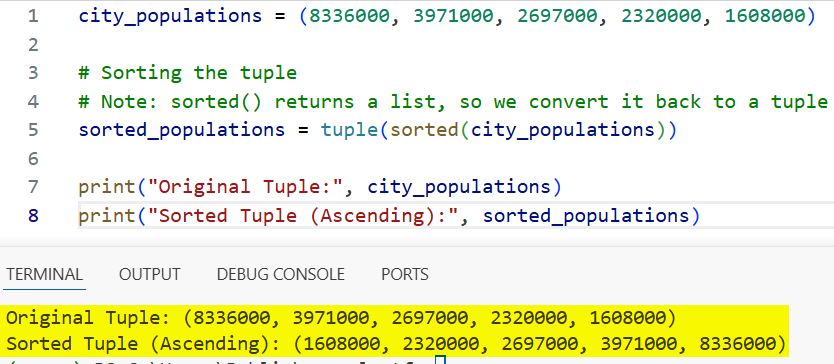
In this example, I wrapped the sorted() function inside a tuple() constructor.
This ensures that the final result remains a tuple, maintaining the data integrity of your original structure.
Method 2: Sort in Descending Order
Often, I find that I need to see the highest values first, such as when I am analyzing high-score data or financial records.
The sorted() function accepts a reverse parameter. Setting this to True flips the order immediately.
Let’s look at a scenario involving US stock prices (represented as a tuple):
# Stock prices for tech companies in USD
tech_stock_prices = (145.30, 274.15, 3105.00, 120.40, 182.10)

# Sorting the tuple in descending order
highest_to_lowest = tuple(sorted(tech_stock_prices, reverse=True))

print("Tech Stocks (Sorted High to Low):", highest_to_lowest)
You can see the output in the screenshot below.
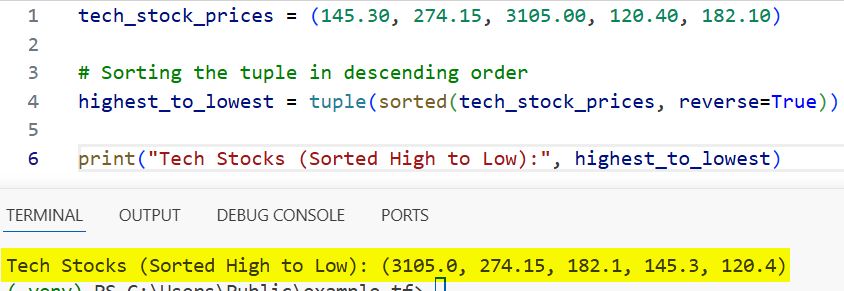
This is much cleaner than sorting and then manually reversing the list later. It keeps the code readable and efficient.
Method 3: Sort a Tuple of Tuples (Nested Tuples)
In real-world applications, your data is rarely a simple list of numbers. Usually, you are dealing with records or objects.
I frequently work with “tuples of tuples,” where each inner tuple represents a row of data, like a database entry.
Imagine we have a dataset of US states, their abbreviations, and their founding years. We want to sort them by the year they joined the Union.
# (State Name, Abbreviation, Year of Statehood)
us_states = (
    ("California", "CA", 1850),
    ("Delaware", "DE", 1787),
    ("Florida", "FL", 1845),
    ("Texas", "TX", 1845),
    ("Hawaii", "HI", 1959)
)

# Sorting by the third element (Index 2: Year)
sorted_states = tuple(sorted(us_states, key=lambda state: state[2]))

for state in sorted_states:
    print(state)
You can see the output in the screenshot below.
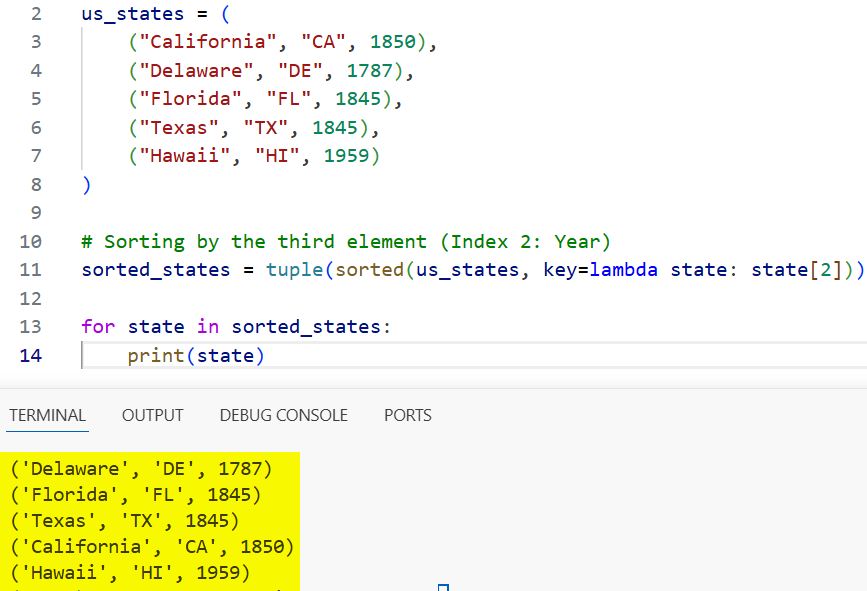
In this code, I used a lambda function as the key. This tells Python: “Don’t just look at the whole tuple; look specifically at index 2 for the sorting logic.”
Method 4: Sort by Multiple Criteria
There are times when a single key isn’t enough. For example, what if two states joined the Union in the same year?
In the previous example, Florida and Texas both joined in 1845. If I want to sort by Year and then alphabetically by State Name, I can do that easily.
I simply modify the lambda function to return a tuple of values:
# Sorting by Year (Index 2), then by Name (Index 0)
complex_sorted_states = tuple(sorted(us_states, key=lambda state: (state[2], state[0])))

print("States sorted by year, then name:")
for state in complex_sorted_states:
    print(state)
You can see the output in the screenshot below.
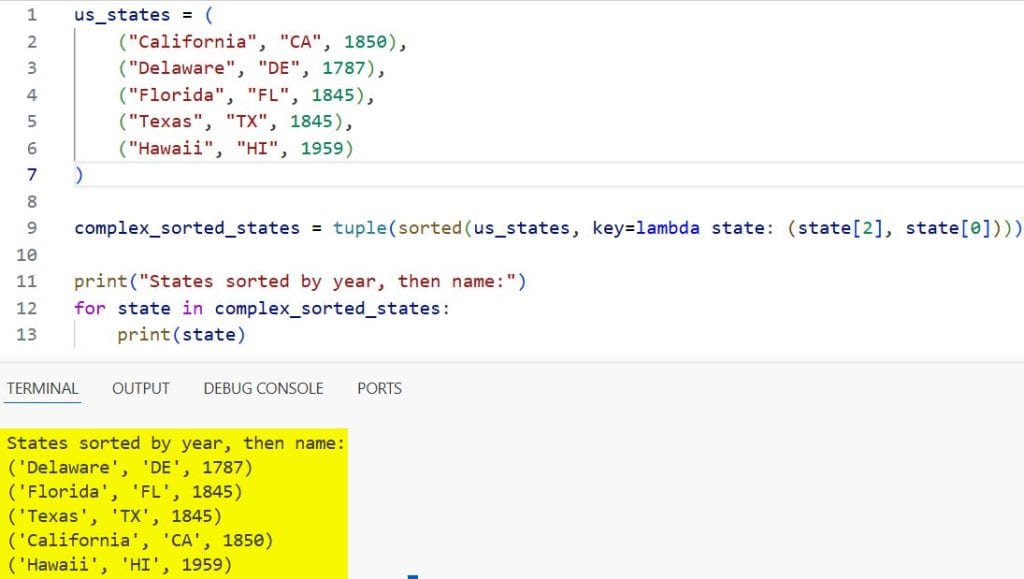
Python will sort by the first item in the lambda’s return tuple. If there is a tie, it moves to the second item. This is incredibly powerful for cleaning up datasets.
Method 5: Use itemgetter for Better Performance
When I’m working with massive datasets (millions of rows), I find that itemgetter from the operator module is slightly faster than lambda.
It does essentially the same thing but is implemented in C, making it more efficient for high-performance applications.
Here is how I would use it to sort a list of US employees by their salaries:
from operator import itemgetter

# (Name, Department, Salary)
employees = (
    ("Alice", "Engineering", 120000),
    ("Bob", "Sales", 95000),
    ("Charlie", "Engineering", 110000),
    ("David", "Marketing", 88000)
)

# Sorting by Salary (Index 2)
sorted_employees = tuple(sorted(employees, key=itemgetter(2)))

print("Employees sorted by Salary:")
for emp in sorted_employees:
    print(emp)
If you need to sort by multiple indexes, you can pass them both into itemgetter(2, 0).
Method 6: Case-Insensitive Sorting
Strings can be tricky. By default, Python sorts uppercase letters before lowercase letters.
In a list of US National Parks, “Arches” would come before “zion,” but if someone accidentally typed “Zion,” the sort order might break.
Whenever I deal with user-generated text, I use the .lower() method in my sorting key.
parks = ("Yellowstone", "Yosemite", "Arches", "zion", "Grand Canyon")

# Basic sort (Case-sensitive)
basic_sort = tuple(sorted(parks))

# Professional sort (Case-insensitive)
pro_sort = tuple(sorted(parks, key=str.lower))

print("Default Sort:", basic_sort)
print("Case-Insensitive Sort:", pro_sort)
Using key=str.lower ensures that the “z” in Zion is treated the same as an uppercase “Z,” placing it at the end of the list where it belongs.
Sort Tuples with the zip() Function
Sometimes you have related data stored in two separate tuples. For instance, a tuple of names and a tuple of their corresponding ZIP codes.
I use the zip() function to pair them up, sort them, and then (if needed) separate them back out.
names = ("John", "Sarah", "Mike")
zip_codes = (90210, 10001, 60601)

# Pair them, sort by ZIP code, and unzip
combined = sorted(zip(zip_codes, names))

# Separate them back into tuples
sorted_zips, sorted_names = zip(*combined)

print("Sorted ZIPs:", sorted_zips)
print("Corresponding Names:", sorted_names)
The asterisk * in zip(*combined) is the “unpacking” operator, which is a neat trick I use to reverse the zipping process.
Summary of Sorting Methods
To make it easier for you to decide which tool to use, here is a quick breakdown of my personal rules of thumb:
- Simple Sort: Use sorted(my_tuple).
- Descending Order: Use sorted(my_tuple, reverse=True).
- Nested Data: Use key=lambda to target specific indexes.
- High Performance: Use operator.itemgetter.
- Text Data: Always use key=str.lower to avoid case sensitivity issues.
I hope this guide helps you manage your data structures more effectively.
Sorting is a fundamental skill in Python, and mastering these various methods will make your code much cleaner and more efficient.
You may read:
- Remove Item from Set in Python
- Check if a Python Set is Empty
- Add Item to Set in Python
- Create an Empty Set in Python

Bijay Kumar is an experienced Python and AI professional who enjoys helping developers learn modern technologies through practical tutorials and examples. His expertise includes Python development, Machine Learning, Artificial Intelligence, automation, and data analysis using libraries like Pandas, NumPy, TensorFlow, Matplotlib, SciPy, and Scikit-Learn. At PythonGuides.com, he shares in-depth guides designed for both beginners and experienced developers. More about us.

