
One of the most common hurdles for developers is understanding how “lifecycle” works when you aren’t using traditional class methods like componentDidMount.
If you are coming from a background of class components, the shift to functional components can feel a bit like learning a new language.
I remember spending hours debugging state updates before I truly grasped how the useEffect hook replaces the old lifecycle paradigm.
In this tutorial, I will walk you through everything you need to know about the React function component lifecycle using practical, real-world examples.
What is the React Function Component Lifecycle?
In React, every component goes through a series of phases: Mounting, Updating, and Unmounting.
In class components, we used explicit methods for these. In function components, we use the useEffect hook to handle these “side effects.”
Think of the lifecycle as the journey of a component from the moment it appears on the screen to the moment it is removed.
1. The Mount Phase (The Birth of a Component)
Mounting is the phase where the component is created and inserted into the DOM. This is where you typically fetch initial data or set up subscriptions.
In my experience, this is the most critical phase for setting the stage for a smooth user experience.
Imagine we are building a simple dashboard for a New York-based financial firm to track the current price of a specific stock.
Example: Fetch Initial Stock Data
Here is the full code to demonstrate the mounting phase using the useEffect hook with an empty dependency array [].
import React, { useState, useEffect } from 'react';

// Simulating a US Stock Price Tracker
const StockTracker = () => {
  const [stockPrice, setStockPrice] = useState(0);
  const [loading, setLoading] = useState(true);

  useEffect(() => {
    // This runs only once after the initial render (Mounting)
    console.log("Component Mounted: Fetching initial Wall Street data...");

    const fetchInitialPrice = async () => {
      // Simulating an API call to a US Stock Exchange
      setTimeout(() => {
        setStockPrice(450.75); // Hypothetical price for a tech giant
        setLoading(false);
      }, 2000);
    };

    fetchInitialPrice();
  }, []); // Empty array ensures this only runs on mount

  return (
    <div style={{ padding: '20px', fontFamily: 'Arial' }}>
      <h1>Wall Street Dashboard</h1>
      {loading ? (
        <p>Loading market data...</p>
      ) : (
        <p>Current Tech Stock Price: <strong>${stockPrice}</strong></p>
      )}
    </div>
  );
};

export default StockTracker;
You can refer to the screenshot below to see the output.

In this snippet, the empty array [] tells React that the effect doesn’t depend on any values from props or state, so it never needs to re-run.
2. The Update Phase (Reacting to Change)
The updating phase occurs whenever a component’s state or props change. This is where the component “re-renders” to reflect the new data.
I often use this phase to trigger calculations or update document titles based on user interactions.
Let’s look at an example involving a Sales Tax Calculator for a retail store in California.
Example: Calculate California Sales Tax on Update
In this case, we want the effect to run every time the “subtotal” value changes.
import React, { useState, useEffect } from 'react';

const CaliforniaTaxCalculator = () => {
  const [subtotal, setSubtotal] = useState(0);
  const [totalWithTax, setTotalWithTax] = useState(0);
  const CA_TAX_RATE = 0.0725; // 7.25% California State Tax

  useEffect(() => {
    // This runs on mount AND whenever 'subtotal' changes
    console.log("Updating Phase: Recalculating tax for the transaction.");

    const calculatedTax = subtotal * CA_TAX_RATE;
    setTotalWithTax(subtotal + calculatedTax);

    // Updating the browser tab title - a common real-world task
    document.title = `Total: $${(subtotal + calculatedTax).toFixed(2)}`;
  }, [subtotal]); // Dependency array includes subtotal

  return (
    <div style={{ padding: '20px', border: '1px solid #ccc', maxWidth: '400px' }}>
      <h2>LA Retail Checkout</h2>
      <label>Enter Subtotal ($): </label>
      <input
        type="number"
        value={subtotal}
        onChange={(e) => setSubtotal(Number(e.target.value))}
      />
      <hr />
      <p>State Tax (7.25%): ${(subtotal * CA_TAX_RATE).toFixed(2)}</p>
      <h3>Grand Total: ${totalWithTax.toFixed(2)}</h3>
    </div>
  );
};

export default CaliforniaTaxCalculator;
You can refer to the screenshot below to see the output.
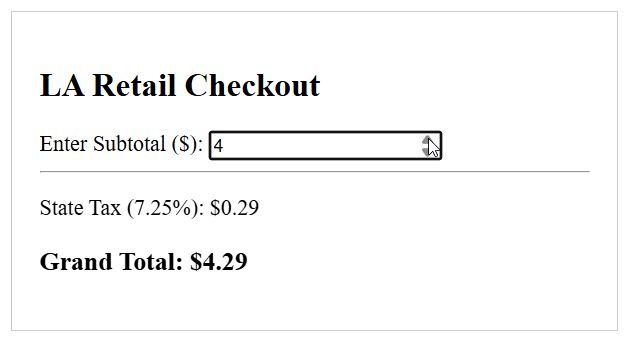
By adding [subtotal] to the dependency array, React knows to skip the effect if the subtotal hasn’t changed, which saves processing power.
3. The Unmount Phase (The Cleanup)
Unmounting is the final phase when a component is removed from the DOM. This is vital for cleaning up resources like timers or event listeners.
If you skip this step, you might run into memory leaks, which I’ve found can drastically slow down large-scale React apps.
Think of a “Live Support” chat widget used by a service in Chicago. When the user closes the chat, we need to disconnect from the server.
Example: Clean Up a Connection
To handle unmounting, we return a function from within the useEffect hook.
import React, { useState, useEffect } from 'react';

const SupportChat = () => {
  useEffect(() => {
    console.log("Mounting: Connecting to Chicago Support Server...");

    const connectionId = setInterval(() => {
      console.log("Ping: Connection active...");
    }, 3000);

    // This is the CLEANUP function (Unmounting)
    return () => {
      console.log("Unmounting: Disconnecting from server and clearing intervals.");
      clearInterval(connectionId);
    };
  }, []);

  return (
    <div style={{ background: '#eef', padding: '15px', marginTop: '10px' }}>
      <h4>Live Support: Connected</h4>
      <p>An agent from our Illinois office will be with you shortly.</p>
    </div>
  );
};

const ChatApp = () => {
  const [showChat, setShowChat] = useState(false);

  return (
    <div style={{ padding: '20px' }}>
      <h2>US Customer Service Portal</h2>
      <button onClick={() => setShowChat(!showChat)}>
        {showChat ? "Close Support Chat" : "Open Support Chat"}
      </button>
      {showChat && <SupportChat />}
    </div>
  );
};

export default ChatApp;
You can refer to the screenshot below to see the output.
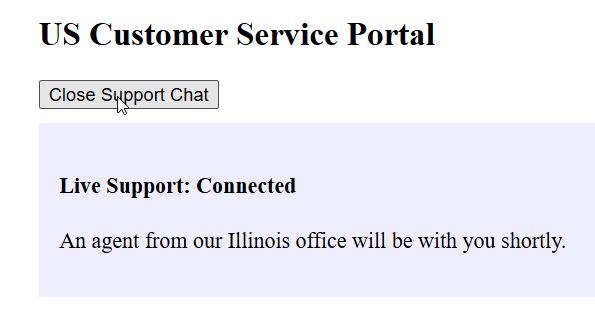
When you click “Close Support Chat,” the component unmounts, and the cleanup function runs, stopping the interval.
Handle Multiple Effects
One mistake I made early on was trying to cram every piece of logic into a single useEffect.
React allows you to use multiple useEffect hooks in a single component. This keeps your code organized by concern.
For instance, you might have one effect for logging page views for US analytics and another for handling a countdown timer for a “Black Friday” sale.
Example: Separate Concerns with Multiple Hooks
import React, { useState, useEffect } from 'react';

const BlackFridaySale = () => {
  const [secondsLeft, setSecondsLeft] = useState(3600); // 1 hour sale
  const [location, setLocation] = useState("USA");

  // Effect 1: Handle the Countdown Timer
  useEffect(() => {
    const timer = setInterval(() => {
      setSecondsLeft((prev) => (prev > 0 ? prev - 1 : 0));
    }, 1000);
    return () => clearInterval(timer);
  }, []);

  // Effect 2: Log Analytics
  useEffect(() => {
    console.log(`User viewing sale from: ${location}`);
    // Logic to send data to a US-based analytics server
  }, [location]);

  return (
    <div style={{ textAlign: 'center', color: 'red' }}>
      <h1>Limited Time Offer!</h1>
      <p>Time remaining: {Math.floor(secondsLeft / 60)} minutes</p>
      <select onChange={(e) => setLocation(e.target.value)}>
        <option value="USA">United States</option>
        <option value="Canada">Canada</option>
      </select>
    </div>
  );
};

export default BlackFridaySale;
Using separate hooks makes the code much easier to read and maintain over time.
Summary of the Dependency Array
The behavior of the lifecycle depends entirely on that second argument in useEffect:
- No Dependency Array: Runs on every single render.
- Empty Array []: Runs once on mount and cleans up on unmount.
- Array with Variables [prop, state]: Runs on mount and whenever any specified variable changes.
In this guide, we have looked at how the React function component lifecycle works using the useEffect hook.
We covered the three main phases, mounting, updating, and unmounting, with examples ranging from Wall Street stock trackers to California tax calculators.
Understanding these patterns is the key to building performant and bug-free React applications.
You may read:
- Best Tailwind React Component Library
- Force a React Child Component to Re-render
- How to Render React Components Online
- Resolve React Data Fetching Issues

Bijay Kumar is an experienced Python and AI professional who enjoys helping developers learn modern technologies through practical tutorials and examples. His expertise includes Python development, Machine Learning, Artificial Intelligence, automation, and data analysis using libraries like Pandas, NumPy, TensorFlow, Matplotlib, SciPy, and Scikit-Learn. At PythonGuides.com, he shares in-depth guides designed for both beginners and experienced developers. More about us.

