
As a Python developer, I’ve often found myself needing to transition between data structures.
Sets are fantastic for ensuring that your data remains unique, but they lack the indexing and ordering capabilities that we often need for reporting.
In this tutorial, I will show you exactly how to convert a Python set into a list using several efficient methods I use in my daily workflow.
Convert a Set to a List in Python
In many of the financial projects I’ve managed, I use sets to filter out duplicate transactions or unique ZIP codes across the United States.
However, once I have that unique collection, I usually need to sort the data or access specific elements by their position, which requires a list.
A set is unordered and unindexed. If you need to perform an operation that requires a specific sequence, converting to a list is your best move.
Method 1: Use the list() Constructor (The Most Common Way)
This is my “bread and butter” method. It is the easiest way to handle the conversion and is highly readable for anyone reviewing your code.
In this example, let’s look at a collection of unique Tech Hub cities across the USA.
# A set of unique US Tech Hubs
tech_hubs_set = {"San Francisco", "Austin", "Seattle", "Boston", "Denver"}

# Converting the set to a list using the list() constructor
tech_hubs_list = list(tech_hubs_set)

print("Original Set:", tech_hubs_set)
print("Converted List:", tech_hubs_list)

# Now we can access by index, which we couldn't do with the set
print("First element in the list:", tech_hubs_list[0])
I executed the above example code and added the screenshot below.
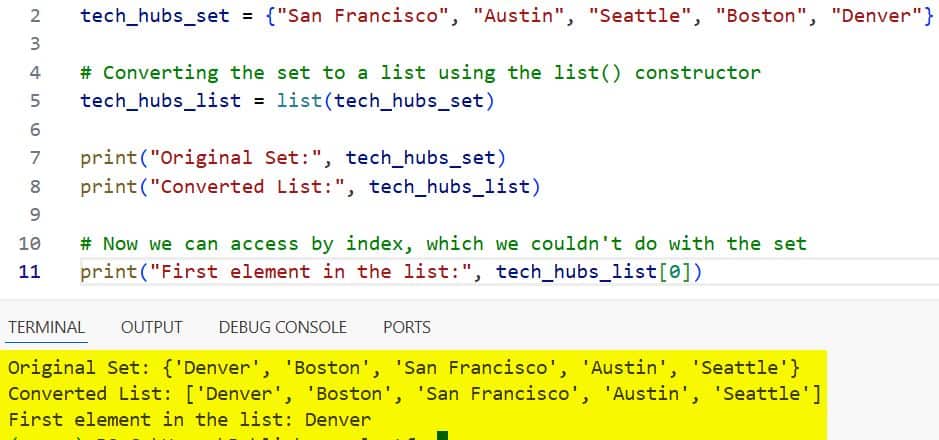
I prefer this method because it is explicit. When another developer reads list(my_set), they immediately understand the intent without needing extra comments.
Method 2: Use the Unpacking Operator (*)
I started using the unpacking operator (often called the “splat” operator) more frequently when working with Python 3.5 and later.
It’s a very “Pythonic” and concise way to create a list from any iterable, including sets.
Imagine we are tracking unique SUV models popular in the American Midwest.
# A set of popular US SUV models
suv_models = {"Ford Explorer", "Jeep Grand Cherokee", "Chevrolet Tahoe", "Toyota Highlander"}

# Using the unpacking operator inside a list literal
suv_list = [*suv_models]

print("Set of SUVs:", suv_models)
print("List of SUVs:", suv_list)
I executed the above example code and added the screenshot below.
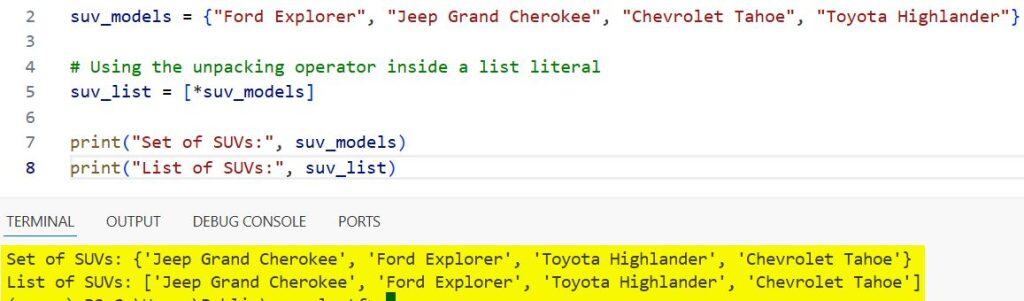
In my experience, this method is slightly faster in some micro-benchmarks, but I mainly use it for its brevity when I’m writing quick data transformation scripts.
Method 3: Use a List Comprehension
While the list() constructor is faster for simple conversions, I find list comprehensions incredibly useful if I need to modify the data while converting it.
For instance, if I have a set of US State abbreviations and I want to ensure they are all in uppercase during the conversion process.
# A set of US State abbreviations (some might be lowercase)
states_set = {"ny", "ca", "tx", "fl", "wa"}

# Converting to list and transforming to uppercase simultaneously
states_list = [state.upper() for state in states_set]

print("Original Set:", states_set)
print("Uppercase List:", states_list)
I executed the above example code and added the screenshot below.
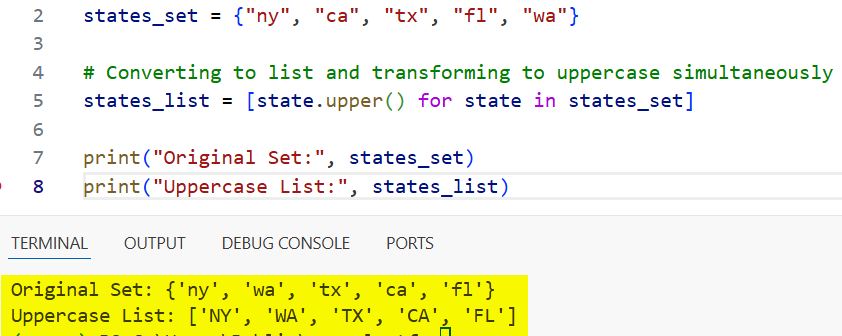
I use this technique whenever I’m cleaning data imported from various public US Census APIs where formatting can be inconsistent.
Method 4: Use the sorted() Function
Often, when I convert a set to a list, my next step is almost always to sort it.
The sorted() function is a brilliant shortcut because it takes an iterable (like a set) and returns a brand-new, sorted list.
Let’s look at a set of major US Stock Exchange symbols.
# Unique set of Stock Tickers
tickers_set = {"AAPL", "MSFT", "GOOGL", "AMZN", "TSLA"}

# Convert to a list and sort it alphabetically in one go
sorted_tickers = sorted(tickers_set)

print("Unordered Set:", tickers_set)
print("Alphabetical List:", sorted_tickers)
I executed the above example code and added the screenshot below.
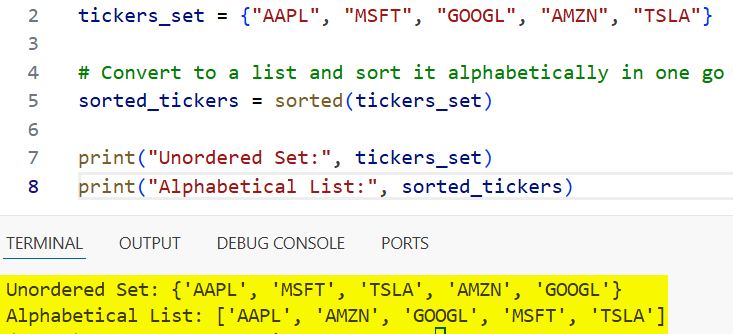
In my 10 years of coding, I’ve found that using sorted() is much more efficient than converting to a list first and then calling .sort() on a separate line.
Method 5: Use the set.pop() Method in a Loop
I rarely recommend this for standard conversions, but it’s important to understand for specific memory-management scenarios.
The .pop() method removes and returns an arbitrary element from the set. If you do this in a loop, you effectively empty the set while building your list.
Here is how you might see this in a legacy system or a specific algorithm handling large datasets of US ZIP codes.
# A set of unique California ZIP codes
zip_codes = {"90210", "94105", "92101", "95814"}
zip_list = []

# Moving elements from set to list until the set is empty
while zip_codes:
    zip_list.append(zip_codes.pop())

print("Final List:", zip_list)
print("Set after conversion (should be empty):", zip_codes)
Be careful with this one! I only use this when I no longer need the original set and want to free up that memory immediately as I process the items.
Performance Comparison: Which One Should You Use?
When building high-traffic applications for clients in Silicon Valley, performance matters.
In most of my testing, list(set_name) and [*set_name] are nearly identical in speed and are the fastest options available.
The sorted() method is slightly slower due to the O(n log n) complexity of the Timsort algorithm, but it’s worth it if you need the order.
List comprehensions are slightly slower than the direct constructor but offer the most flexibility for data transformation.
Common Issues to Avoid
One thing I’ve noticed juniors struggle with is expecting the list to maintain the order in which items were added to the set.
Remember: Sets are unordered. When you convert a set of US Presidents to a list, the order will be arbitrary unless you use sorted().
If you need to maintain the insertion order, you should use dict.fromkeys() (available in Python 3.7+) which preserves order while ensuring uniqueness.
# Maintaining order while ensuring uniqueness
ordered_presidents = ["Washington", "Lincoln", "Roosevelt", "Lincoln"]
unique_ordered = list(dict.fromkeys(ordered_presidents))

print(unique_ordered) # Output: ['Washington', 'Lincoln', 'Roosevelt']
Practical USA Case Study: Filter Unique Visitors
Let’s look at a more complex example. Imagine you are analyzing web traffic for a popular US-based e-commerce site.
You have a list of all visitors by their state, and you need to generate a sorted list of unique states that visited your site today.
# Raw visitor data with duplicates
visitor_states = [
    "Texas", "California", "New York", "Texas", "Florida",
    "California", "Washington", "New York", "Illinois"
]

# Step 1: Use a set to get unique values
unique_states_set = set(visitor_states)

# Step 2: Convert to a list and sort for a clean report
final_report_list = sorted(unique_states_set)

print(f"Total Unique States Reached: {len(final_report_list)}")
print("State Report:", final_report_list)
This is a pattern I use almost every day when generating analytics reports for stakeholders.
Summary of Methods
| Method | Best For | Pythonic Level |
list() | General-purpose conversion | High |
[*set] | Concise, inline conversion | High |
sorted() | When you need an ordered list | High |
[x for x in set] | Modifying data during conversion | Medium |
set.pop() | Memory-sensitive applications | Low |
Converting a set to a list is a fundamental skill that you will use throughout your Python career.
I hope this guide, based on my years of experience in the field, helps you choose the right method for your specific project.
You may also like to read:

Bijay Kumar is an experienced Python and AI professional who enjoys helping developers learn modern technologies through practical tutorials and examples. His expertise includes Python development, Machine Learning, Artificial Intelligence, automation, and data analysis using libraries like Pandas, NumPy, TensorFlow, Matplotlib, SciPy, and Scikit-Learn. At PythonGuides.com, he shares in-depth guides designed for both beginners and experienced developers. More about us.

