
I’ve found that selecting the first row of a dataset is one of the most common tasks you’ll perform.
Whether you are checking headers or validating data entry for a New York real estate project, knowing the right method is essential.
I remember when I first started using Pandas; I used to get confused between labels and positions. It felt like a maze.
After years of trial and error, I’ve streamlined the best ways to grab that initial record quickly and efficiently.
In this tutorial, I will show you five different methods to get the first row of a Pandas DataFrame, using practical examples you can use right away.
Set Up the US Real Estate Dataset
To make these examples meaningful, let’s create a small dataset. This represents property listings in various US cities.
import pandas as pd

# Creating a dataset of US Real Estate listings
data = {
    'City': ['New York', 'Los Angeles', 'Chicago', 'Houston', 'Phoenix'],
    'State': ['NY', 'CA', 'IL', 'TX', 'AZ'],
    'Median_Home_Value': [825000, 950000, 310000, 275000, 420000],
    'Inventory_Count': [450, 620, 1100, 890, 530]
}

df = pd.DataFrame(data)

print("Original DataFrame:")
print(df)
Method 1: Use the .iloc Indexer
The .iloc indexer is my absolute favorite tool. It stands for “integer location” and is used when you know the exact position of the data.
Since Python uses zero-based indexing, the first row is always at index 0. I use this when I want to treat the row as a Series object.
# Getting the first row as a Series using iloc
first_row_series = df.iloc[0]

print("First Row as a Series:")
print(first_row_series)
You can refer to the screenshot below to see the output.
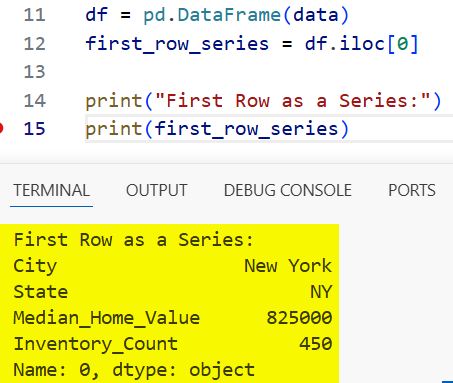
In this case, the output gives you the data for New York. It’s clean, fast, and very readable for other developers.
Method 2: Use the .head() Function
When I just want to peek at the top of a massive dataset, like a list of all ZIP codes in the US, I use .head().
By default, .head() returns the first five rows, but you can pass the number 1 to get just the first one.
# Getting the first row as a DataFrame using head()
first_row_df = df.head(1)

print("First Row as a DataFrame:")
print(first_row_df)
You can refer to the screenshot below to see the output.
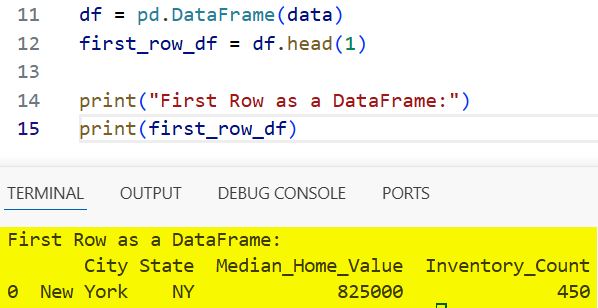
One thing I love about this method is that it returns a DataFrame, not a Series. This preserves the visual table format in your IDE.
Method 3: Use the .loc Indexer
I often use .loc when my DataFrame has specific labels. However, if your index is the default numeric range, .loc[0] works perfectly.
I prefer this method when the index has a specific meaning, such as a Unique Property ID or a Social Security Number prefix.
# Getting the first row using loc
# Note: This works because our index starts at 0
first_row_loc = df.loc[0]

print("First row using loc:")
print(first_row_loc)
You can refer to the screenshot below to see the output.
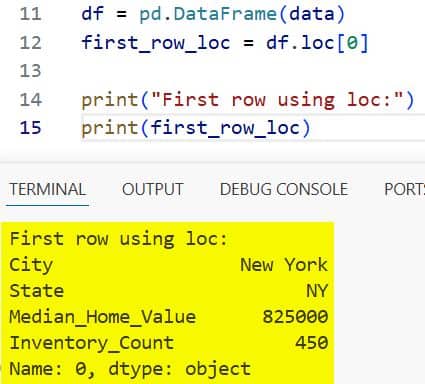
Be careful with this one. If you have sorted your data or sliced it, the label 0 might no longer refer to the very first row in the visual list.
Method 4: Use Iat for Scalar Values
Sometimes, I don’t need the whole row. I just need one specific value from the first row, like the city name.
For this, .iat is the fastest way to access a single value at a specific integer position. It is much faster than .iloc for single cells.
# Getting the city name from the first row
first_city = df.iat[0, 0]

print(f"The first city in the list is: {first_city}")
In my experience, using .iat in large loops can significantly improve the performance of your Python scripts.
Method 5: Get the First Row After Sorting
In real-world US data analysis, the first row often depends on a condition. For instance, what is the city with the highest inventory?
I usually sort the DataFrame first and then use .iloc[0] to grab the new top result.
# Sorting by Inventory_Count to find the highest
df_sorted = df.sort_values(by='Inventory_Count', ascending=False)

# Getting the first row of the sorted data
top_inventory_row = df_sorted.iloc[0]

print("City with the highest inventory:")
print(top_inventory_row)
This is how I find the “Top 1” of any category. It combines data manipulation with selection in a very logical flow.
Common Errors to Avoid
One mistake I see quite often is using df[0]. In Pandas, this usually looks for a column named 0, not the first row.
Always remember to use .iloc or .loc when you are trying to access rows by their index. It saves a lot of debugging time.
Another tip: if your DataFrame might be empty, calling .iloc[0] will raise an IndexError. I always check if the DataFrame is empty first.
if not df.empty:
    print(df.iloc[0])
else:
    print("The DataFrame is empty!")
This simple check has saved my production code from crashing more times than I can count.
Which Method Should You Use?
If you want a single row as a Series, go with .iloc[0]. It is standard and widely understood.
If you want the result to look like a table (a DataFrame), .head(1) is your best friend.
For performance-heavy tasks where you only need one cell, .iat is the winner.
I’ve used all of these in various projects, from analyzing US census data to tracking stock market trends on Wall Street.
I hope this tutorial helps you feel more confident in navigating your data with Pandas.
The more you practice these shortcuts, the more natural your data analysis workflow will become.
You may also like to read:
- How to Drop Rows in Pandas Based on Column Values
- How to Use the Pandas Apply Function to Each Row
- How to Drop Rows with NaN Values in Pandas
- How to Check if a Pandas DataFrame is Empty

Bijay Kumar is an experienced Python and AI professional who enjoys helping developers learn modern technologies through practical tutorials and examples. His expertise includes Python development, Machine Learning, Artificial Intelligence, automation, and data analysis using libraries like Pandas, NumPy, TensorFlow, Matplotlib, SciPy, and Scikit-Learn. At PythonGuides.com, he shares in-depth guides designed for both beginners and experienced developers. More about us.

