
In my decade of working with Python, I’ve found that merging dictionaries is one of those tasks that pops up in almost every project.
Whether I’m combining configuration settings for a cloud server in Virginia or aggregating retail sales data from a New York storefront, I need a clean way to join data.
In this tutorial, I’ll show you exactly how to concatenate dictionaries in Python using the most efficient methods I’ve used in production environments.
1. Merge Dictionaries Using the Merge Operator (|)
If you are using Python 3.9 or later, this is by far my favorite way to handle dictionary concatenation.
It is clean, readable, and behaves exactly how you would expect a “merge” to work without modifying the original data.
I often use this when I want to create a new “master” record from two separate data sources without touching the source dictionaries.
ca_customer = {"name": "James Miller", "state": "CA", "membership": "Gold"}
tx_customer_update = {"state": "TX", "last_purchase_usd": 450.50}

# Using the | operator to create a new dictionary
final_profile = ca_customer | tx_customer_update

print(final_profile)
# Output: {'name': 'James Miller', 'state': 'TX', 'membership': 'Gold', 'last_purchase_usd': 450.50}
I executed the above example code and added the screenshot below.

Notice how the value for “state” in the second dictionary overwritten the first one. This is standard behavior in Python dictionary merging.
2. Use the Dictionary Unpacking Operator (**)
Before Python 3.9 came along, the unpacking operator was the industry standard for merging dictionaries.
I still use this method frequently when I need to maintain backward compatibility with older Python environments.
It essentially “unpacks” the key-value pairs of both dictionaries into a new one.
base_shipping = {"carrier": "FedEx", "origin": "Chicago, IL"}
delivery_details = {"destination": "Seattle, WA", "weight_lbs": 15}

# Merging using unpacking
shipment_manifest = {**base_shipping, **delivery_details}

print(shipment_manifest)
# Output: {'carrier': 'FedEx', 'origin': 'Chicago, IL', 'destination': 'Seattle, WA', 'weight_lbs': 15}
I executed the above example code and added the screenshot below.
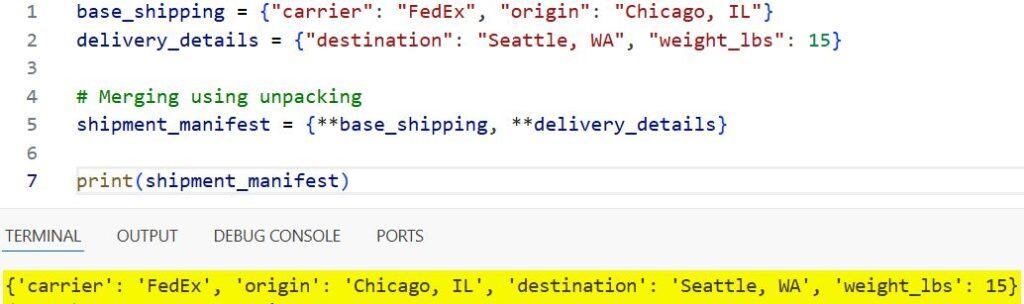
This method is highly efficient and remains a very “Pythonic” way to solve the problem.
3. Concatenate with the update() Method
There are times when I don’t want to create a new dictionary. Instead, I want to update an existing one “in-place.”
The update() method is the best tool for this. It modifies the original dictionary directly, which saves memory if you are dealing with large datasets.
In my experience, this is particularly useful when you are incrementally building a report or a log file.
tax_records = {"Q1": 5000, "Q2": 4800}
new_filings = {"Q3": 5200, "Q4": 6100}

# This modifies 'tax_records' directly
tax_records.update(new_filings)

print(tax_records)
# Output: {'Q1': 5000, 'Q2': 4800, 'Q3': 5200, 'Q4': 6100}
I executed the above example code and added the screenshot below.
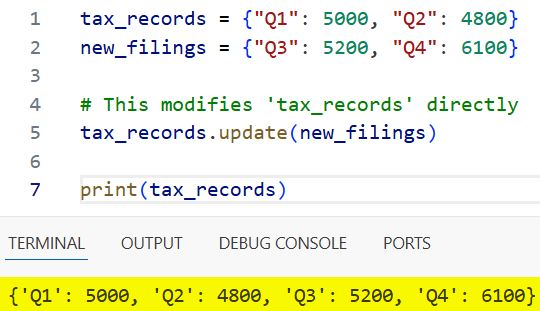
Keep in mind that update() returns None. It acts on the object itself rather than returning a new object.
4. Merge Using the Update Operator (|=)
Just like the merge operator, Python 3.9 introduced the update operator |=.
I use this as a shorthand for the update() method. It’s perfect for when you want to update the original variable but prefer the look of an assignment operator.
employee_data = {"id": 1024, "dept": "Engineering"}
benefits_update = {"health_plan": "PPO", "401k_match": True}

# In-place update using |=
employee_data |= benefits_update

print(employee_data)
# Output: {'id': 1024, 'dept': 'Engineering', 'health_plan': 'PPO', '401k_match': True}
I executed the above example code and added the screenshot below.
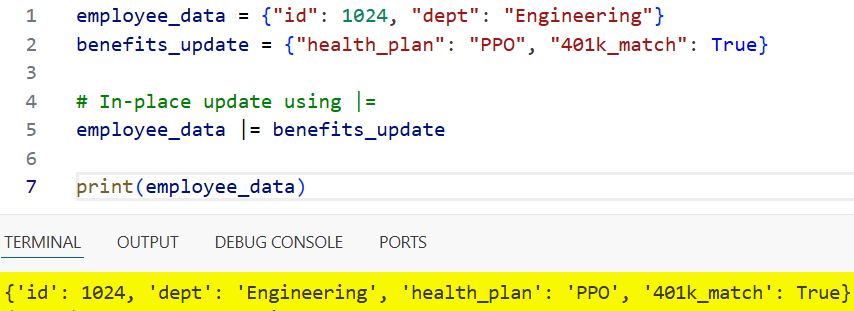
It keeps the code concise, which I find very helpful when reviewing long scripts.
5. Combine Multiple Dictionaries Using ChainMap
Sometimes, I deal with multiple dictionaries, and I don’t necessarily want to merge them into a single object.
In these cases, I use ChainMap from the collections module. It creates a single view of multiple dictionaries.
The advantage here is that it doesn’t copy the data. It just looks through the dictionaries one by one until it finds the key.
from collections import ChainMap

nyc_prices = {"latte": 5.50, "croissant": 4.00}
la_prices = {"latte": 5.25, "avocado_toast": 12.00}
miami_prices = {"smoothie": 8.00}

# Create a combined view
all_prices = ChainMap(nyc_prices, la_prices, miami_prices)

print(all_prices["latte"]) # Returns 5.50 from nyc_prices (first match)
print(all_prices["avocado_toast"]) # Returns 12.00 from la_prices
I find this particularly useful for handling application defaults where user settings should override system settings.
6. Use Dictionary Comprehension for Custom Merging
In some rare cases, I need more control over how dictionaries are merged. For example, if I want to sum the values of matching keys instead of overwriting them.
In these situations, I turn to dictionary comprehension.
precinct_a = {"Candidate_1": 1200, "Candidate_2": 950}
precinct_b = {"Candidate_1": 800, "Candidate_2": 1100}

# Merging and summing the values
combined_votes = {k: precinct_a.get(k, 0) + precinct_b.get(k, 0) for k in set(precinct_a) | set(precinct_b)}

print(combined_votes)
# Output: {'Candidate_1': 2000, 'Candidate_2': 2050}
While more complex, this gives you the flexibility that the built-in operators do not provide.
Which Method Should You Choose?
In my daily work, my choice usually depends on the Python version I am using.
If I am on Python 3.9+, I almost always use the | operator for creating new dictionaries because it is the most readable.
If I am working on an older legacy system or a cloud function that hasn’t been updated, I stick with the ** unpacking method.
For in-place updates, update() is the standard, and it’s what most Python developers will expect to see in your code.
I hope you found this tutorial useful! Merging data structures efficiently is a core skill for any developer, and Python gives us plenty of great ways to do it.
You may read:
- Call Super Constructors with Arguments in Python
- Use Python Class Constructors with Parameters
- Call a Base Class Constructor with Arguments in Python
- Check if an Object is Iterable in Python

Bijay Kumar is an experienced Python and AI professional who enjoys helping developers learn modern technologies through practical tutorials and examples. His expertise includes Python development, Machine Learning, Artificial Intelligence, automation, and data analysis using libraries like Pandas, NumPy, TensorFlow, Matplotlib, SciPy, and Scikit-Learn. At PythonGuides.com, he shares in-depth guides designed for both beginners and experienced developers. More about us.

