
Over the years, I have managed massive datasets of product images for e-commerce platforms.
One of the biggest headaches I faced was dealing with nearly identical images, photos taken from slightly different angles or with different lighting.
In this tutorial, I will show you exactly how I solved this using Python Keras to efficiently identify these near-duplicates.
The Problem with Near-Duplicate Images
When dealing with thousands of images, simple file-name checks or file-size comparisons are insufficient.
A near-duplicate is an image that looks almost exactly like another but might have been resized, cropped, or slightly color-corrected.
Method 1: Feature Extraction using Pre-trained VGG16 in Python Keras
I prefer using the VGG16 model because it is incredibly reliable for extracting “embeddings” or numerical representations of images.
By converting an image into a vector of numbers, we can mathematically calculate how similar one photo is to another.
import numpy as np
from tensorflow.keras.applications.vgg16 import VGG16, preprocess_input
from tensorflow.keras.preprocessing import image
from tensorflow.keras.models import Model

# Load the VGG16 model pre-trained on ImageNet
base_model = VGG16(weights='imagenet')
# We remove the final classification layer to get the feature vector
model = Model(inputs=base_model.input, outputs=base_model.get_layer('fc1').output)

def extract_features(img_path):
    # Loading image and resizing to 224x224 for VGG16
    img = image.load_img(img_path, target_size=(224, 224))
    img_data = image.img_to_array(img)
    img_data = np.expand_dims(img_data, axis=0)
    img_data = preprocess_input(img_data)

    # Extracting the 4096-dimensional feature vector
    feature = model.predict(img_data)
    return feature.flatten()

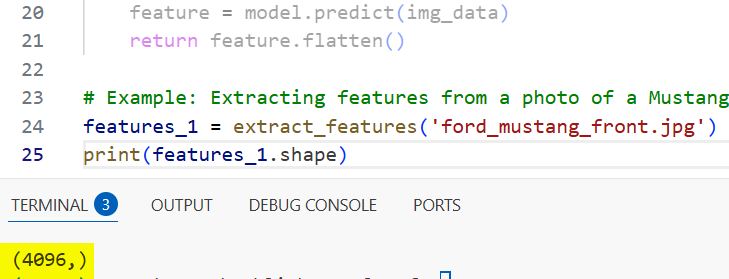
# Example: Extracting features from a photo of a Mustang in a dealership
features_1 = extract_features('ford_mustang_front.jpg')
print(features_1.shape)
I executed the above example code and added the screenshot below.
Method 2: Calculate Cosine Similarity for Python Keras Embeddings
Once I have the feature vectors, I need a way to compare them to see how “close” they are in a multi-dimensional space.
I use Cosine Similarity because it measures the angle between two vectors, making it perfect for identifying images with the same content.
from sklearn.metrics.pairwise import cosine_similarity

def get_similarity(feat1, feat2):
    # Reshaping for sklearn compatibility
    feat1 = feat1.reshape(1, -1)
    feat2 = feat2.reshape(1, -1)

    # Returning a score between 0 and 1
    return cosine_similarity(feat1, feat2)[0][0]

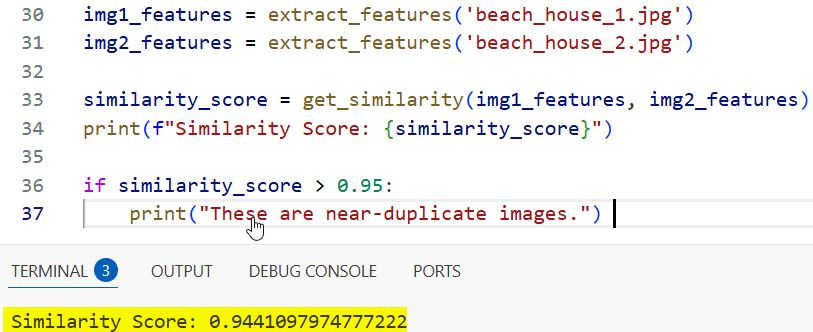
# Comparing a front view and a slightly angled view of a California beach house
img1_features = extract_features('beach_house_1.jpg')
img2_features = extract_features('beach_house_2.jpg')

similarity_score = get_similarity(img1_features, img2_features)
print(f"Similarity Score: {similarity_score}")

if similarity_score > 0.95:
    print("These are near-duplicate images.")
I executed the above example code and added the screenshot below.
Method 3: Build a Bulk Near-Duplicate Detector with Python Keras
In my experience, you usually aren’t just comparing two images, but rather cleaning up a whole directory of photos.
This script loops through a folder, extracts features for every image, and flags duplicates based on a specific threshold.
import os

def find_all_duplicates(image_folder, threshold=0.98):
    image_files = [os.path.join(image_folder, f) for f in os.listdir(image_folder) if f.endswith('.jpg')]
    features_list = []
    duplicates = []

    # Extract features for all images first
    for img_path in image_files:
        features_list.append((img_path, extract_features(img_path)))

    # Compare each image with every other image
    for i in range(len(features_list)):
        for j in range(i + 1, len(features_list)):
            score = get_similarity(features_list[i][1], features_list[j][1])
            if score > threshold:
                duplicates.append((features_list[i][0], features_list[j][0], score))

    return duplicates

# Running this on a local dataset of Grand Canyon tourist photos
found_duplicates = find_all_duplicates('./my_travel_photos/')
for d in found_duplicates:
    print(f"Duplicate found: {d[0]} and {d[1]} with score {d[2]}")
Method 4: Use Global Average Pooling for Faster Python Keras Processing
If you are working with a massive dataset (like 50,000+ images), the previous method might be a bit slow.
I use Global Average Pooling (GAP) layers instead of Fully Connected layers to reduce the vector size, which speeds up comparisons significantly.
from tensorflow.keras.applications import ResNet50
from tensorflow.keras.layers import GlobalAveragePooling2D

# Using ResNet50 for more modern and efficient feature extraction
base_resnet = ResNet50(weights='imagenet', include_top=False)
gap_layer = GlobalAveragePooling2D()(base_resnet.output)
fast_model = Model(inputs=base_resnet.input, outputs=gap_layer)

def extract_features_fast(img_path):
    img = image.load_img(img_path, target_size=(224, 224))
    x = image.img_to_array(img)
    x = np.expand_dims(x, axis=0)
    x = preprocess_input(x)

    # This returns a smaller 2048-length vector
    return fast_model.predict(x).flatten()

# Faster extraction for a batch of images from a Seattle tech conference
fast_feat = extract_features_fast('conference_room.jpg')
print(fast_feat.shape)
I executed the above example code and added the screenshot below.

Method 5: Visualize Results of Python Keras Near-Duplicate Search
When I build these tools for clients, they often want to see the duplicates side-by-side to verify the AI is working.
Using Matplotlib, we can create a simple visualizer that displays the pair of images flagged as duplicates.
import matplotlib.pyplot as plt

def plot_duplicates(img_path1, img_path2, score):
    fig, axes = plt.subplots(1, 2, figsize=(10, 5))

    img1 = image.load_img(img_path1)
    img2 = image.load_img(img_path2)

    axes[0].imshow(img1)
    axes[0].set_title("Original Image")

    axes[1].imshow(img2)
    axes[1].set_title(f"Duplicate (Score: {score:.4f})")

    plt.show()

# Visualize a detected duplicate pair from a real estate listing in Texas
plot_duplicates('house_front.jpg', 'house_front_filtered.jpg', 0.992)
In this tutorial, I showed you how to use Python Keras to build a robust near-duplicate image search system. I covered everything from feature extraction with VGG16 to high-speed processing with ResNet50.
You may also read:
- Ways to Visualize Convolutional Neural Network Filters in Keras
- Keras Model Predictions with Integrated Gradients
- Explore Vision Transformer (ViT) Representations in Keras
- Keras Grad-CAM Class Activation Maps

Bijay Kumar is an experienced Python and AI professional who enjoys helping developers learn modern technologies through practical tutorials and examples. His expertise includes Python development, Machine Learning, Artificial Intelligence, automation, and data analysis using libraries like Pandas, NumPy, TensorFlow, Matplotlib, SciPy, and Scikit-Learn. At PythonGuides.com, he shares in-depth guides designed for both beginners and experienced developers. More about us.

